Network card - Ethernet not plugged in

Ok have updated BIOS Firmware/flash thingy.. So hopefully thats all cleared up but now still got the same old NIC problems Zzzz
 

My Computer My Computer

Computer Manufacturer/Model Number
Custom built
OS
W 7
CPU
Intel Core 17 950
Motherboard
Evga x58 snd Classified
Memory
6gig Corsair 1800mhx
Graphics Card(s)
2x Evga geforce 285's
Sound Card
Creative XFI Titanium Champion series
Monitor(s) Displays
Asus 23 inch hd monitor thingy
Hard Drives
Segate 1.5tb barracuda
Case
Cool master haf 932
Cooling
Random fan
Mushroom, had the same problem (drove me nuts!!!) this is what I did. Uninstall all the Realtek divers from control panel, reboot into your bios & disable the built in network chip (check device manager to make sure it's gone) reboot & enable the NIC in your bios. Windows should install the default MS drivers (don't update the drivers) & all should be good until Realtek get thier sh$@!$%% together & give us drivers that work.

Regards Loose
 

My Computer My Computer

OS
windows 7
Still getting
Performance power management features on processor 1 in group 0 are disabled due to a firmware problem. Check with the computer manufacturer for updated firmware. although i updated the BIOS which i got from my Motherboard website (evga)

Your computer was not assigned an address from the network (by the DHCP Server) for the Network Card with network address 0x001FBC018609. The following error occurred: 0x79. Your computer will continue to try and obtain an address on its own from the network address (DHCP) server.

IRQARB: ACPI BIOS does not contain an IRQ for the device in PCI slot 0, function 0. Please contact your system vendor for technical assistance.

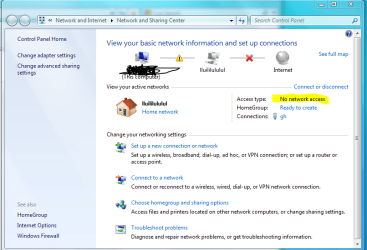
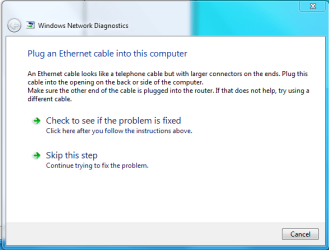
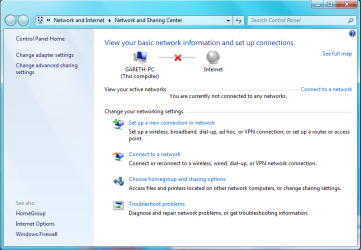
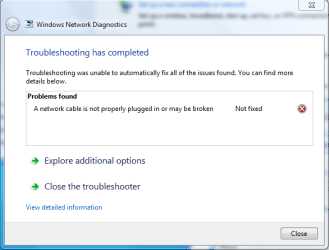
Also took some Screen shots of my Network problem
#1.PNG
#2.PNG
#3.PNG
#4.PNG
#5.PNG
 

My Computer My Computer

Computer Manufacturer/Model Number
Custom built
OS
W 7
CPU
Intel Core 17 950
Motherboard
Evga x58 snd Classified
Memory
6gig Corsair 1800mhx
Graphics Card(s)
2x Evga geforce 285's
Sound Card
Creative XFI Titanium Champion series
Monitor(s) Displays
Asus 23 inch hd monitor thingy
Hard Drives
Segate 1.5tb barracuda
Case
Cool master haf 932
Cooling
Random fan
I am getting BSOD's now when I'm playing Aion it locks up then says "A clock interval on the second processor was not set with the time interval" something along those lines.. and stupid windows 7 wont let me put the dump file in a zip "Access denied" even though i am the administrator stupid security

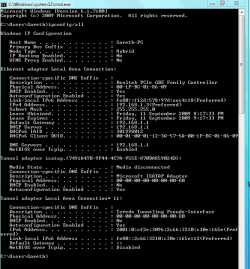
Also here is my Cmd ipconfig/all when the Network is Disabled and Enabled
just loving this windows 7 x64 bit network bug Zzz
#6.PNG
#7.PNG


ok that should help the guru's.

also have a look at this lol
#8.PNG
 

My Computer My Computer

Computer Manufacturer/Model Number
Custom built
OS
W 7
CPU
Intel Core 17 950
Motherboard
Evga x58 snd Classified
Memory
6gig Corsair 1800mhx
Graphics Card(s)
2x Evga geforce 285's
Sound Card
Creative XFI Titanium Champion series
Monitor(s) Displays
Asus 23 inch hd monitor thingy
Hard Drives
Segate 1.5tb barracuda
Case
Cool master haf 932
Cooling
Random fan
I am getting BSOD's now when I'm playing Aion it locks up then says "A clock interval on the second processor was not set with the time interval" something along those lines.. and stupid windows 7 wont let me put the dump file in a zip "Access denied" even though i am the administrator stupid security

Also here is my Cmd ipconfig/all when the Network is Disabled and Enabled
just loving this windows 7 x64 bit network bug Zzz
View attachment 27473
View attachment 27474


ok that should help the guru's.

also have a look at this lol
View attachment 27475
I think you need to reset your CMOS and just clear your mobo out. Sounds like your mobo is messed up. You may want to try another if you can.

~Lordbob
 

My Computer My Computer

Computer Manufacturer/Model Number
Hera
OS
Windows 7 Ultimate x64, Mint 9
CPU
Intel i5-2500k
Motherboard
ASUS P8P67 Pro
Memory
2x 4Gb Corsair VENGEANCE DDR3-1600
Graphics Card(s)
NVidia GeForce N260GTX Twin Frozr
Sound Card
Realtek HD OnBoard Audio
Monitor(s) Displays
ASUS 24" Monitor
Screen Resolution
1920x1080
Hard Drives
G.SKILL Phoenix Series 60GB SATA II MLC Internal Solid State Drive (SSD)
SAMSUNG Spinpoint F3R 1TB 7200 RPM 32MB Cache SATA II
PSU
Cooler Master Real Power Pro 750W
Case
Cooler Master Haf 932
Cooling
Fans
Keyboard
Razer Tarantula
Mouse
Razer Lachesis
Internet Speed
not fast enough
what try a new MOBO? lame.. its brand new only 1 month old but yeah i will try that whole Reset CMOS thing

"just clear your mobo out" ha what? help here commence! haha :D
 

My Computer My Computer

Computer Manufacturer/Model Number
Custom built
OS
W 7
CPU
Intel Core 17 950
Motherboard
Evga x58 snd Classified
Memory
6gig Corsair 1800mhx
Graphics Card(s)
2x Evga geforce 285's
Sound Card
Creative XFI Titanium Champion series
Monitor(s) Displays
Asus 23 inch hd monitor thingy
Hard Drives
Segate 1.5tb barracuda
Case
Cool master haf 932
Cooling
Random fan
Ok well.. Here is THE main example of the problem say for instance my internet is working fine i and i am browsing youtube or something all of a sudden i get the Caution yellow sign thing on my network icon saying no network access but i am still connected to home network(no internet at this point) i start the trouble shooter scan thing and when it gets to the point of saying "reseting the local area network adapter" i get big fat ****ing red X on the network symbol then it pops up with "And ethernet cable is not plugged in or may be broken" sometimes it will "Fix" it self and say i have internet acces but at that point i dont so... W T F

Using NetComm NB5 Plus4 ADSL2 Modem/Router. Reckon that would be the problem? it seems old and the firmware update for it is well.. as old as the modem haha


Hope that made sense trying not to be a pushy ******* here but can i get some quick replies :p this issue is getting out of hand. And only seems to be caused in windows 7 Thanks
 

My Computer My Computer

Computer Manufacturer/Model Number
Custom built
OS
W 7
CPU
Intel Core 17 950
Motherboard
Evga x58 snd Classified
Memory
6gig Corsair 1800mhx
Graphics Card(s)
2x Evga geforce 285's
Sound Card
Creative XFI Titanium Champion series
Monitor(s) Displays
Asus 23 inch hd monitor thingy
Hard Drives
Segate 1.5tb barracuda
Case
Cool master haf 932
Cooling
Random fan
what try a new MOBO? lame.. its brand new only 1 month old but yeah i will try that whole Reset CMOS thing

"just clear your mobo out" ha what? help here commence! haha :D
if it is the MOBO than you can RMA it can get one that works...don't discredit lordbob's idea as all other known fixes that worked have failed for you.
 

My Computer My Computer

Computer Manufacturer/Model Number
Compal JFT02 (Custom Build Laptop)
OS
Windows 7 Home Premium x64 - Mac OS X 10.6.4 x64
CPU
Intel Core 2 Duo T9300 2.5 GHz
Motherboard
JFT02
Memory
4GB Kingston DDR2-800
Graphics Card(s)
NVIDIA Geforce 8600M GT (512MB Model)
Sound Card
Realtek HD Audio
Monitor(s) Displays
WUXGA Standard Laptop Display
Screen Resolution
1680*1050
Hard Drives
Toshiba 320GB 5400RPM Laptop HD
PSU
Standard Laptop Power Supply
Case
Standard Laptop Case
Cooling
Standard Laptop Cooling
Keyboard
Standard Laptop 105 Key-Keyboard
Mouse
Synaptics Touchpad
Internet Speed
Verizion Online DSL 3360/864 kbs (dl/up)
what try a new MOBO? lame.. its brand new only 1 month old but yeah i will try that whole Reset CMOS thing

"just clear your mobo out" ha what? help here commence! haha :D
if it is the MOBO than you can RMA it can get one that works...don't discredit lordbob's idea as all other known fixes that worked have failed for you.
I'm still voting for a messed up mobo.

~Lordbob
 

My Computer My Computer

Computer Manufacturer/Model Number
Hera
OS
Windows 7 Ultimate x64, Mint 9
CPU
Intel i5-2500k
Motherboard
ASUS P8P67 Pro
Memory
2x 4Gb Corsair VENGEANCE DDR3-1600
Graphics Card(s)
NVidia GeForce N260GTX Twin Frozr
Sound Card
Realtek HD OnBoard Audio
Monitor(s) Displays
ASUS 24" Monitor
Screen Resolution
1920x1080
Hard Drives
G.SKILL Phoenix Series 60GB SATA II MLC Internal Solid State Drive (SSD)
SAMSUNG Spinpoint F3R 1TB 7200 RPM 32MB Cache SATA II
PSU
Cooler Master Real Power Pro 750W
Case
Cooler Master Haf 932
Cooling
Fans
Keyboard
Razer Tarantula
Mouse
Razer Lachesis
Internet Speed
not fast enough
what try a new MOBO? lame.. its brand new only 1 month old but yeah i will try that whole Reset CMOS thing

"just clear your mobo out" ha what? help here commence! haha :D
if it is the MOBO than you can RMA it can get one that works...don't discredit lordbob's idea as all other known fixes that worked have failed for you.
I'm still voting for a messed up mobo.

~Lordbob
I have read over the thread...and I am arriving at the same conclusion. Their MIGHT be a chance that it ts Realtek
 

My Computer My Computer

Computer Manufacturer/Model Number
Compal JFT02 (Custom Build Laptop)
OS
Windows 7 Home Premium x64 - Mac OS X 10.6.4 x64
CPU
Intel Core 2 Duo T9300 2.5 GHz
Motherboard
JFT02
Memory
4GB Kingston DDR2-800
Graphics Card(s)
NVIDIA Geforce 8600M GT (512MB Model)
Sound Card
Realtek HD Audio
Monitor(s) Displays
WUXGA Standard Laptop Display
Screen Resolution
1680*1050
Hard Drives
Toshiba 320GB 5400RPM Laptop HD
PSU
Standard Laptop Power Supply
Case
Standard Laptop Case
Cooling
Standard Laptop Cooling
Keyboard
Standard Laptop 105 Key-Keyboard
Mouse
Synaptics Touchpad
Internet Speed
Verizion Online DSL 3360/864 kbs (dl/up)
i'm not discrediting lordsbobs ideas i'm loving his ideas but dunno how it could be a messed up mobo and when u said just clear your mother board out what do you mean by that? Thanks for the information guys :) Although i did what umm what some one said cant remember who "sorry" who ever that was to Uninstall drivers reboot disable Network in BIOS save and exit reboot Enable then reboot and update drivers.. seems to be working so far but i know it aint going to be a 100% fix but hey.. better then before.
 

My Computer My Computer

Computer Manufacturer/Model Number
Custom built
OS
W 7
CPU
Intel Core 17 950
Motherboard
Evga x58 snd Classified
Memory
6gig Corsair 1800mhx
Graphics Card(s)
2x Evga geforce 285's
Sound Card
Creative XFI Titanium Champion series
Monitor(s) Displays
Asus 23 inch hd monitor thingy
Hard Drives
Segate 1.5tb barracuda
Case
Cool master haf 932
Cooling
Random fan
if it is the MOBO than you can RMA it can get one that works...don't discredit lordbob's idea as all other known fixes that worked have failed for you.
I'm still voting for a messed up mobo.

~Lordbob
I have read over the thread...and I am arriving at the same conclusion. Their MIGHT be a chance that it ts Realtek

Hmm realtek aye.. well i wanted to try a new network card but.. no store seems to have PCIe cards in stock only PCI which is taking by my sound card. So i might have to go order in a CHEAP PCIe card any suggestions? nice cheap reliable card

Thanks
 

My Computer My Computer

Computer Manufacturer/Model Number
Custom built
OS
W 7
CPU
Intel Core 17 950
Motherboard
Evga x58 snd Classified
Memory
6gig Corsair 1800mhx
Graphics Card(s)
2x Evga geforce 285's
Sound Card
Creative XFI Titanium Champion series
Monitor(s) Displays
Asus 23 inch hd monitor thingy
Hard Drives
Segate 1.5tb barracuda
Case
Cool master haf 932
Cooling
Random fan
i'm not discrediting lordsbobs ideas i'm loving his ideas but dunno how it could be a messed up mobo and when u said just clear your mother board out what do you mean by that? Thanks for the information guys :) Although i did what umm what some one said cant remember who "sorry" who ever that was to Uninstall drivers reboot disable Network in BIOS save and exit reboot Enable then reboot and update drivers.. seems to be working so far but i know it aint going to be a 100% fix but hey.. better then before.
By clear out, I meant your CMOS. You will need to look up the exact details for your mobo, but you should be able to just pull out the CMOS battery for a while, or swap the jumper for a few minutes.

I would also try getting a USB adapter if you have no free slots. I believe they tend to be cheaper.

~Lordbob
 

My Computer My Computer

Computer Manufacturer/Model Number
Hera
OS
Windows 7 Ultimate x64, Mint 9
CPU
Intel i5-2500k
Motherboard
ASUS P8P67 Pro
Memory
2x 4Gb Corsair VENGEANCE DDR3-1600
Graphics Card(s)
NVidia GeForce N260GTX Twin Frozr
Sound Card
Realtek HD OnBoard Audio
Monitor(s) Displays
ASUS 24" Monitor
Screen Resolution
1920x1080
Hard Drives
G.SKILL Phoenix Series 60GB SATA II MLC Internal Solid State Drive (SSD)
SAMSUNG Spinpoint F3R 1TB 7200 RPM 32MB Cache SATA II
PSU
Cooler Master Real Power Pro 750W
Case
Cooler Master Haf 932
Cooling
Fans
Keyboard
Razer Tarantula
Mouse
Razer Lachesis
Internet Speed
not fast enough
i seem to have fixed my "ethernet cable... blah blah" problem by Manually configurating my IPV4 settings but one problem still happens is my internet keeps d/cing every like 30 seconds to 5 mins and the task bar network symbol doesnt change and says i am still connected. all lights on the router are still on when the d/c happens maybe its not a d/c just my internet Stalling =D
 

My Computer My Computer

Computer Manufacturer/Model Number
Custom built
OS
W 7
CPU
Intel Core 17 950
Motherboard
Evga x58 snd Classified
Memory
6gig Corsair 1800mhx
Graphics Card(s)
2x Evga geforce 285's
Sound Card
Creative XFI Titanium Champion series
Monitor(s) Displays
Asus 23 inch hd monitor thingy
Hard Drives
Segate 1.5tb barracuda
Case
Cool master haf 932
Cooling
Random fan
shroom

has someone sugested disabling IPv6 innetwork and sharing?

K
 

My Computer My Computer

Computer Manufacturer/Model Number
HP Pavillion dv-7 1005 Tx
OS
Win 8 Release candidate 8400
CPU
[email protected]
Memory
4 gigs
Graphics Card(s)
Nvidia 9600M
Sound Card
HD built-in
Monitor(s) Displays
17" Wxga
Screen Resolution
1440x900
Cooling
none
Internet Speed
45Mb down 5Mb up
:) Although i did what umm what some one said cant remember who "sorry" who ever that was to Uninstall drivers reboot disable Network in BIOS save and exit reboot Enable then reboot and update drivers.. seems to be working so far but i know it aint going to be a 100% fix but hey.. better then before.

It was me that suggested that, no it won't be 100% but it will get you though until Realtek give us some decent drivers & I said don't! update your driver though windows update, just let windows install the default original driver, because if you do you'll end up with drivers which are 2 years out of date!!
 

My Computer My Computer

OS
windows 7
Still getting
Performance power management features on processor 1 in group 0 are disabled due to a firmware problem. Check with the computer manufacturer for updated firmware. although i updated the BIOS which i got from my Motherboard website (evga)

Your computer was not assigned an address from the network (by the DHCP Server) for the Network Card with network address 0x001FBC018609. The following error occurred: 0x79. Your computer will continue to try and obtain an address on its own from the network address (DHCP) server.

IRQARB: ACPI BIOS does not contain an IRQ for the device in PCI slot 0, function 0. Please contact your system vendor for technical assistance.

Also took some Screen shots of my Network problem
View attachment 27437
View attachment 27438
View attachment 27439
View attachment 27440
View attachment 27441
Mushroom, from what I saw, u did update your NIC driver, because if you didnt, the driver name should look like this on ur adapter "Realtek RTL8168C(P)/8111C(P) Family PCI-E Gigabit Ethernet NIC (NDIS 6.20)". I would recomend that leave everything at its orginal setting without changing anything. All I did was reinstall, leave the driver as it is, CHange the groupwork name by Start->Control Panel->System->Computer Name->Change-> type something like your name into the Workgroup field. I got 1 d/c be4 i change the group work. And I dont think there is anything to do with the bios or MOBO IMO thats is
 

My Computer My Computer

Computer Manufacturer/Model Number
Laptop Asus X51a
OS
windows 7
CPU
T9400
Motherboard
M51A
Memory
4gb
Graphics Card(s)
intel GMAX4500HD
Yep tried that no luck... also upgraded from RC to retail build thingy

My guess Realtek suck balls or windows 7 sucks balls.. tuff choice

still getting d/ced
 

My Computer My Computer

Computer Manufacturer/Model Number
Custom built
OS
W 7
CPU
Intel Core 17 950
Motherboard
Evga x58 snd Classified
Memory
6gig Corsair 1800mhx
Graphics Card(s)
2x Evga geforce 285's
Sound Card
Creative XFI Titanium Champion series
Monitor(s) Displays
Asus 23 inch hd monitor thingy
Hard Drives
Segate 1.5tb barracuda
Case
Cool master haf 932
Cooling
Random fan
Yep tried that no luck... also upgraded from RC to retail build thingy

My guess Realtek suck balls or windows 7 sucks balls.. tuff choice

still getting d/ced
It would be Realtek in this case.

As I have suggested before, try another adapter if you can.

~Lordbob
 

My Computer My Computer

Computer Manufacturer/Model Number
Hera
OS
Windows 7 Ultimate x64, Mint 9
CPU
Intel i5-2500k
Motherboard
ASUS P8P67 Pro
Memory
2x 4Gb Corsair VENGEANCE DDR3-1600
Graphics Card(s)
NVidia GeForce N260GTX Twin Frozr
Sound Card
Realtek HD OnBoard Audio
Monitor(s) Displays
ASUS 24" Monitor
Screen Resolution
1920x1080
Hard Drives
G.SKILL Phoenix Series 60GB SATA II MLC Internal Solid State Drive (SSD)
SAMSUNG Spinpoint F3R 1TB 7200 RPM 32MB Cache SATA II
PSU
Cooler Master Real Power Pro 750W
Case
Cooler Master Haf 932
Cooling
Fans
Keyboard
Razer Tarantula
Mouse
Razer Lachesis
Internet Speed
not fast enough
Yeah i will order in a PCIe card at my local computer store but i did buy a SWANN USB ethernet adapter thingy.. but windows 7 didnt find it on the system.. and wouldnt allow the driver install so i just returned it. guess i will wait it out untill i get a new Card
 

My Computer My Computer

Computer Manufacturer/Model Number
Custom built
OS
W 7
CPU
Intel Core 17 950
Motherboard
Evga x58 snd Classified
Memory
6gig Corsair 1800mhx
Graphics Card(s)
2x Evga geforce 285's
Sound Card
Creative XFI Titanium Champion series
Monitor(s) Displays
Asus 23 inch hd monitor thingy
Hard Drives
Segate 1.5tb barracuda
Case
Cool master haf 932
Cooling
Random fan
Back
Top