Solved Network Printer Install not working!?

r3plicat3

New member
I have an old Brother HL1440 in one room connected to a windows 7 home premium pc (x86).. It's connected with a USB cord into the computer itself. That computer is on my network and I have my Windows 7 Ultimate x64 system in another room. I am trying to print from my 7 ultimate box through the network to the printer in the other room. I can see the other computer (the one with the printer connected) from my network but I can't log in to it. Every time I click on it, it says Windows cannot access \\Home\HL1440 on HOME-PC. I've had this working before but can't figure this out. They're both on the same network, with the same workgroup. The printer is shared and I have privileges with my admin account on the other system. The drivers are installed so why can't I get this to work?

The computer with the brother printer is new, but I've set everything up just as before. Any ideas?
 

My Computer

Computer Manufacturer/Model Number
Custom
OS
Windows 7 Ultimate x64
CPU
Intel Core i7 920
Motherboard
Intel DX58SO
Memory
6gb DDR3 Patriot Viper w/ XMP support
Graphics Card(s)
Nvidia Maxcore GTX295 (BFG Tech Overclocked)
Sound Card
Creative XFi
Monitor(s) Displays
21" LCD
Hard Drives
Western Digital Blue 500GB
PSU
750 Watt Corsair
Case
Antec 900
Cooling
Stock Cooling for the CPU, 8" fan on top, (3) 5" case fans
Keyboard
Logitech Wave
Mouse
Logitech MX Revolution
Internet Speed
30mbps
Other Info
Water Cooled CPU w/ Corsair H60
What is showing in Devices and Printers on the machine that the printer is connected to? Can you access anything else from computer to computer? Is the print spooler service set to auto on both machines in services?
 

My Computer

Computer type
Laptop
Computer Manufacturer/Model Number
HP 17-ak0xx, dv7 3173nr
OS
Win7 Home Premium x64 W10Pro&Home
CPU
A12 9720p 4+8 TurionII M520
Motherboard
HP 3839
Memory
6GB 8GB
Graphics Card(s)
R7
Monitor(s) Displays
24" sa550
Screen Resolution
1600x900 1920x1080
Mouse
Logitechx2
Internet Speed
120Mb/s down 12up
Hi,

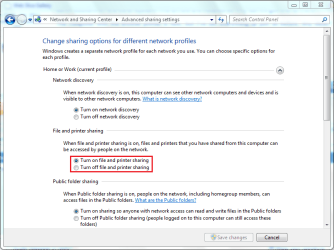
You may want to make sure that 'File and Printer sharing' is on.

Open up the Network and Sharing Center from within Control Panel (Network section) and click 'Change advanced sharing settings'.

Capture.PNG

You'll also find that you will have to install the printer on your ultimate machine using the following tutorial

http://www.sevenforums.com/tutorials/99983-driver-install-add-printer-wizard.html? Using the network printer option

Hope it helps :)


OS
 

My Computer

Computer Manufacturer/Model Number
Compaq Desktop
OS
Windows 7 Ultimate x64
CPU
AMD Sempron Dual Core
Memory
3GB
Graphics Card(s)
NVIDIA GeForce 6150SE nForce 430
Screen Resolution
1024x768
Hard Drives
150GB Sata
Hi,

You may want to make sure that 'File and Printer sharing' is on.

Open up the Network and Sharing Center from within Control Panel (Network section) and click 'Change advanced sharing settings'.

View attachment 139632

You'll also find that you will have to install the printer on your ultimate machine using the following tutorial

http://www.sevenforums.com/tutorials/99983-driver-install-add-printer-wizard.html? Using the network printer option

Hope it helps :)


OS


I'm almost positive everything is set up but I will recheck those options, and if necessary, reinstall the printer. Thank you OS.
 

My Computer

Computer Manufacturer/Model Number
Custom
OS
Windows 7 Ultimate x64
CPU
Intel Core i7 920
Motherboard
Intel DX58SO
Memory
6gb DDR3 Patriot Viper w/ XMP support
Graphics Card(s)
Nvidia Maxcore GTX295 (BFG Tech Overclocked)
Sound Card
Creative XFi
Monitor(s) Displays
21" LCD
Hard Drives
Western Digital Blue 500GB
PSU
750 Watt Corsair
Case
Antec 900
Cooling
Stock Cooling for the CPU, 8" fan on top, (3) 5" case fans
Keyboard
Logitech Wave
Mouse
Logitech MX Revolution
Internet Speed
30mbps
Other Info
Water Cooled CPU w/ Corsair H60
I had every option mentioned set. I ran the troubleshooter again and this is the message:

"Windows can't find a computer or device named "HOME-HP" (which is the name of my other system with the printer connected)
Windows can communicate with the name resolution server but can't find the host name.
 

My Computer

Computer Manufacturer/Model Number
Custom
OS
Windows 7 Ultimate x64
CPU
Intel Core i7 920
Motherboard
Intel DX58SO
Memory
6gb DDR3 Patriot Viper w/ XMP support
Graphics Card(s)
Nvidia Maxcore GTX295 (BFG Tech Overclocked)
Sound Card
Creative XFi
Monitor(s) Displays
21" LCD
Hard Drives
Western Digital Blue 500GB
PSU
750 Watt Corsair
Case
Antec 900
Cooling
Stock Cooling for the CPU, 8" fan on top, (3) 5" case fans
Keyboard
Logitech Wave
Mouse
Logitech MX Revolution
Internet Speed
30mbps
Other Info
Water Cooled CPU w/ Corsair H60
What is showing in Devices and Printers on the machine that the printer is connected to? Can you access anything else from computer to computer? Is the print spooler service set to auto on both machines in services?

I can't access an anything on the other system.
This is really weird because I know I've set it up correctly before. I'm probably missing something extremely obvious.
 

My Computer

Computer Manufacturer/Model Number
Custom
OS
Windows 7 Ultimate x64
CPU
Intel Core i7 920
Motherboard
Intel DX58SO
Memory
6gb DDR3 Patriot Viper w/ XMP support
Graphics Card(s)
Nvidia Maxcore GTX295 (BFG Tech Overclocked)
Sound Card
Creative XFi
Monitor(s) Displays
21" LCD
Hard Drives
Western Digital Blue 500GB
PSU
750 Watt Corsair
Case
Antec 900
Cooling
Stock Cooling for the CPU, 8" fan on top, (3) 5" case fans
Keyboard
Logitech Wave
Mouse
Logitech MX Revolution
Internet Speed
30mbps
Other Info
Water Cooled CPU w/ Corsair H60
What security/firewall software are you running?
 

My Computer

Computer Manufacturer/Model Number
Dell XPS 15 L502x
OS
Windows 7 Ultimate x64 SP1
CPU
Core i7-2670QM
Memory
8GB DDR3 PC3-10600
Graphics Card(s)
Intel HD Graphics 3000 + GeForce GT 540M
Screen Resolution
1920x1080
Hard Drives
1TB 5400RPM Seagate
What security/firewall software are you running?

ESET Smart Security. I've disabled the firewall and tried that, I've also tried setting a rule allowing the gateway... still nothing.
 

My Computer

Computer Manufacturer/Model Number
Custom
OS
Windows 7 Ultimate x64
CPU
Intel Core i7 920
Motherboard
Intel DX58SO
Memory
6gb DDR3 Patriot Viper w/ XMP support
Graphics Card(s)
Nvidia Maxcore GTX295 (BFG Tech Overclocked)
Sound Card
Creative XFi
Monitor(s) Displays
21" LCD
Hard Drives
Western Digital Blue 500GB
PSU
750 Watt Corsair
Case
Antec 900
Cooling
Stock Cooling for the CPU, 8" fan on top, (3) 5" case fans
Keyboard
Logitech Wave
Mouse
Logitech MX Revolution
Internet Speed
30mbps
Other Info
Water Cooled CPU w/ Corsair H60

My Computer

Computer Manufacturer/Model Number
Custom
OS
Windows 7 Ultimate x64
CPU
Intel Core i7 920
Motherboard
Intel DX58SO
Memory
6gb DDR3 Patriot Viper w/ XMP support
Graphics Card(s)
Nvidia Maxcore GTX295 (BFG Tech Overclocked)
Sound Card
Creative XFi
Monitor(s) Displays
21" LCD
Hard Drives
Western Digital Blue 500GB
PSU
750 Watt Corsair
Case
Antec 900
Cooling
Stock Cooling for the CPU, 8" fan on top, (3) 5" case fans
Keyboard
Logitech Wave
Mouse
Logitech MX Revolution
Internet Speed
30mbps
Other Info
Water Cooled CPU w/ Corsair H60
Excellent, that's good to hear :)
 

My Computer

Computer Manufacturer/Model Number
Compaq Desktop
OS
Windows 7 Ultimate x64
CPU
AMD Sempron Dual Core
Memory
3GB
Graphics Card(s)
NVIDIA GeForce 6150SE nForce 430
Screen Resolution
1024x768
Hard Drives
150GB Sata
Back
Top