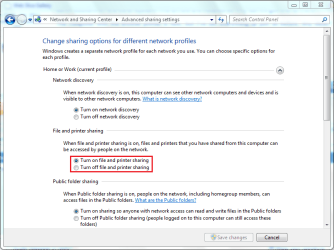
I have an old Brother HL1440 in one room connected to a windows 7 home premium pc (x86).. It's connected with a USB cord into the computer itself. That computer is on my network and I have my Windows 7 Ultimate x64 system in another room. I am trying to print from my 7 ultimate box through the network to the printer in the other room. I can see the other computer (the one with the printer connected) from my network but I can't log in to it. Every time I click on it, it says Windows cannot access \\Home\HL1440 on HOME-PC. I've had this working before but can't figure this out. They're both on the same network, with the same workgroup. The printer is shared and I have privileges with my admin account on the other system. The drivers are installed so why can't I get this to work?
The computer with the brother printer is new, but I've set everything up just as before. Any ideas?
The computer with the brother printer is new, but I've set everything up just as before. Any ideas?
My Computer
At a glance
Windows 7 Ultimate x64Intel Core i7 9206gb DDR3 Patriot Viper w/ XMP supportNvidia Maxcore GTX295 (BFG Tech Overclocked)
- Computer Manufacturer/Model Number
- Custom
- OS
- Windows 7 Ultimate x64
- CPU
- Intel Core i7 920
- Motherboard
- Intel DX58SO
- Memory
- 6gb DDR3 Patriot Viper w/ XMP support
- Graphics Card(s)
- Nvidia Maxcore GTX295 (BFG Tech Overclocked)
- Sound Card
- Creative XFi
- Monitor(s) Displays
- 21" LCD
- Hard Drives
- Western Digital Blue 500GB
- PSU
- 750 Watt Corsair
- Case
- Antec 900
- Cooling
- Stock Cooling for the CPU, 8" fan on top, (3) 5" case fans
- Keyboard
- Logitech Wave
- Mouse
- Logitech MX Revolution
- Internet Speed
- 30mbps
- Other Info
- Water Cooled CPU w/ Corsair H60