
Neverwinter Nights 2 issues

Astvinr

New member
Local time
10:46 PM
Messages
18
Alright, so I've been trying out a few games on W7 now, and they've all worked great (FC2, Assassin's Creed, TF2), but now I've dusted off Neverwinter Nights 2.

First of all the installation was a bit long I think, but I'm not sure if that has anything to do with W7. Then however when I tried to play the game it wouldn't start at all, nothing happened. The nwn2main.exe file was running, but nothing happened. I tried to restart, but that didn't work so I did it manually.

Then once I got back in I was able to start NWN2, and began changing the graphical settings, like widescreen resolution, maximum detail and so on.
By the way I'm trying W7 out on my new computer:
Gigabyte EP45-UD3 motherboard, Intel Core 2 Quad Q9550, Geforce GTX 260 (216 shaders).

So when I added water reflection and water refraction and applied (I was just in the menu, I hadn't started a campaign or anything) it just stopped. The music was still playing, but nothing was happening. I wasn't able to shut it off with the Task Manager, nor could I restart from the windows start menu, so I did so manually again.

Next time around I manage to change all the graphical settings, this time not clicking apply but instead I clicked ok.
Then I try starting a campaign, so I make my character and start it up... but in the process of loading it simply stops. Same as before, I'm not able to shut it off with the Task Manager and I can't restart the computer normally, so once again I do it manually.

Then I manage to get into the game, start the campaign, engage in some dialogue, but then when I get my first quest (open a chest and get some furs) it stops then and there. Same procedure as previously follows...

From here on I try it over and over, hurry through dialogue and manage to get further and further into the game, but I'm only able to play for like... 2-3 minutes at a time before it stops. And it doesn't matter if I'm currently clicking around, or if I'm simply standing still. It still stops after probably the same amount of time every time. I think I'm gonna time it the next couple of times actually... :P

Oh, and about every other time I try to enter the game it stops working then and there as well.

Anyway, here's what I've tried to resolve the issue:

1. Compatability mode XP (SP2) and Vista, neither solve the issue.
2. Disable UAC virtualization for nwn2main.exe. Heck you never know... but it works the same with or without.

I'm gonna try some more stuff and get back to you... first I'm going to set the graphical details lower and see what happens.
 
Last edited:

My Computer

Computer Manufacturer/Model Number
Yours' truly
OS
Windows 7 BETA x64
CPU
Intel Core 2 Quad Q9550 2.83GHz
Motherboard
Gigabyte EP45-UD3
Memory
8 GB Kingston Value RAM (4x2)
Graphics Card(s)
XFX Geforce GTX 260 216 SP
Monitor(s) Displays
Samsung Syncmaster T220
Screen Resolution
1680 x 1050
Hard Drives
WD Caviar Green 1 TB
PSU
Corsair 550W
Case
Antec P182
Keyboard
Logitech UltraX Premium
Mouse
Logitech MX518
Internet Speed
24 Mbit ADSL
Have you tried the latest Nvidia drivers 181.22? and have you updated your DirectX from Microsoft, it's the Vista one you want, November is the latest I think.
 

My Computer

Computer Manufacturer/Model Number
Home Brew
OS
Windows 7 Ultimate Vista Ultimate x64
CPU
Core 2 Duo E8500 3.16Ghz @ 3.8Ghz
Motherboard
eVGA 750i FTW
Memory
2x2Gigs Patriot PC2-6400 LL
Graphics Card(s)
Inno3D GeForce GTX260 216 SP
Monitor(s) Displays
ASUS VW222U 22" 2ms Response time
Screen Resolution
1680x1050
Hard Drives
SATA 150GB
SATA II 250GB
USB IDE 750GB Ext.
PSU
HYTEC 600W & Thermaltake 650W Toughpower Power Exp
Case
Thermaltake Armor LCS (Liquid Cooling System)
Cooling
Liquid Cooling System
Keyboard
Logitech G15 Gaming Keyboard
Mouse
Logitech G9 Gaming Mouse
I've only updated through Windows Update. There was an update for my graphics card there, but you're saying that's not the one I should use?

And no I suppose I haven't updated my DirectX unless that's done through Windows Update.

You have any links perhaps?

edit:
I googled the nvidia driver, and here's what it says:

GeForce Release 181 WHQL
recommended.jpg
181.22 January 22, 2009

Was that the one you were referring to?
 

My Computer

Computer Manufacturer/Model Number
Yours' truly
OS
Windows 7 BETA x64
CPU
Intel Core 2 Quad Q9550 2.83GHz
Motherboard
Gigabyte EP45-UD3
Memory
8 GB Kingston Value RAM (4x2)
Graphics Card(s)
XFX Geforce GTX 260 216 SP
Monitor(s) Displays
Samsung Syncmaster T220
Screen Resolution
1680 x 1050
Hard Drives
WD Caviar Green 1 TB
PSU
Corsair 550W
Case
Antec P182
Keyboard
Logitech UltraX Premium
Mouse
Logitech MX518
Internet Speed
24 Mbit ADSL
Yes I would recommend getting the latest drivers for your hardware and I have a GTX260 216core as well and that's the driver I am running with and all my games are working well.

DirectX Download here :)
 

My Computer

Computer Manufacturer/Model Number
Home Brew
OS
Windows 7 Ultimate Vista Ultimate x64
CPU
Core 2 Duo E8500 3.16Ghz @ 3.8Ghz
Motherboard
eVGA 750i FTW
Memory
2x2Gigs Patriot PC2-6400 LL
Graphics Card(s)
Inno3D GeForce GTX260 216 SP
Monitor(s) Displays
ASUS VW222U 22" 2ms Response time
Screen Resolution
1680x1050
Hard Drives
SATA 150GB
SATA II 250GB
USB IDE 750GB Ext.
PSU
HYTEC 600W & Thermaltake 650W Toughpower Power Exp
Case
Thermaltake Armor LCS (Liquid Cooling System)
Cooling
Liquid Cooling System
Keyboard
Logitech G15 Gaming Keyboard
Mouse
Logitech G9 Gaming Mouse
Spanks a lot! :D

I'll get back to you all with some feedback once I've installed and tried it.
 

My Computer

Computer Manufacturer/Model Number
Yours' truly
OS
Windows 7 BETA x64
CPU
Intel Core 2 Quad Q9550 2.83GHz
Motherboard
Gigabyte EP45-UD3
Memory
8 GB Kingston Value RAM (4x2)
Graphics Card(s)
XFX Geforce GTX 260 216 SP
Monitor(s) Displays
Samsung Syncmaster T220
Screen Resolution
1680 x 1050
Hard Drives
WD Caviar Green 1 TB
PSU
Corsair 550W
Case
Antec P182
Keyboard
Logitech UltraX Premium
Mouse
Logitech MX518
Internet Speed
24 Mbit ADSL
No worries Astvinr and welcome to Seven Forums.
 

My Computer

Computer Manufacturer/Model Number
Home Brew
OS
Windows 7 Ultimate Vista Ultimate x64
CPU
Core 2 Duo E8500 3.16Ghz @ 3.8Ghz
Motherboard
eVGA 750i FTW
Memory
2x2Gigs Patriot PC2-6400 LL
Graphics Card(s)
Inno3D GeForce GTX260 216 SP
Monitor(s) Displays
ASUS VW222U 22" 2ms Response time
Screen Resolution
1680x1050
Hard Drives
SATA 150GB
SATA II 250GB
USB IDE 750GB Ext.
PSU
HYTEC 600W & Thermaltake 650W Toughpower Power Exp
Case
Thermaltake Armor LCS (Liquid Cooling System)
Cooling
Liquid Cooling System
Keyboard
Logitech G15 Gaming Keyboard
Mouse
Logitech G9 Gaming Mouse
I'm afraid that didn't help at all...

Same as always:

1. I start the game, black screen (as it's supposed to be), from there nothing.

2. Reboot manually, start game again and magically it works! After a few minutes however... the screen freezes. Music, voices and other sounds still work though. But nothing else.

I'm going to reinstall NWN2 now. I recall seeing a notice that the DirectX part of the installation of NWN2 didn't work as it couldn't find the path to... something. Perhaps now with updated DirectX, that will work as intended.
 

My Computer

Computer Manufacturer/Model Number
Yours' truly
OS
Windows 7 BETA x64
CPU
Intel Core 2 Quad Q9550 2.83GHz
Motherboard
Gigabyte EP45-UD3
Memory
8 GB Kingston Value RAM (4x2)
Graphics Card(s)
XFX Geforce GTX 260 216 SP
Monitor(s) Displays
Samsung Syncmaster T220
Screen Resolution
1680 x 1050
Hard Drives
WD Caviar Green 1 TB
PSU
Corsair 550W
Case
Antec P182
Keyboard
Logitech UltraX Premium
Mouse
Logitech MX518
Internet Speed
24 Mbit ADSL
It's worth a go, try installing with Vista Compatibility mode to see if that helps.
 

My Computer

Computer Manufacturer/Model Number
Home Brew
OS
Windows 7 Ultimate Vista Ultimate x64
CPU
Core 2 Duo E8500 3.16Ghz @ 3.8Ghz
Motherboard
eVGA 750i FTW
Memory
2x2Gigs Patriot PC2-6400 LL
Graphics Card(s)
Inno3D GeForce GTX260 216 SP
Monitor(s) Displays
ASUS VW222U 22" 2ms Response time
Screen Resolution
1680x1050
Hard Drives
SATA 150GB
SATA II 250GB
USB IDE 750GB Ext.
PSU
HYTEC 600W & Thermaltake 650W Toughpower Power Exp
Case
Thermaltake Armor LCS (Liquid Cooling System)
Cooling
Liquid Cooling System
Keyboard
Logitech G15 Gaming Keyboard
Mouse
Logitech G9 Gaming Mouse
You mean enable Vista Compatability on the setupfile on the install DVD?

Anyway, the same DirectX error appeared when I installed it now. It says:


I'll reinstall again, this time with Vista Compatability mode.
 

My Computer

Computer Manufacturer/Model Number
Yours' truly
OS
Windows 7 BETA x64
CPU
Intel Core 2 Quad Q9550 2.83GHz
Motherboard
Gigabyte EP45-UD3
Memory
8 GB Kingston Value RAM (4x2)
Graphics Card(s)
XFX Geforce GTX 260 216 SP
Monitor(s) Displays
Samsung Syncmaster T220
Screen Resolution
1680 x 1050
Hard Drives
WD Caviar Green 1 TB
PSU
Corsair 550W
Case
Antec P182
Keyboard
Logitech UltraX Premium
Mouse
Logitech MX518
Internet Speed
24 Mbit ADSL
I turned on compatability mode for XP SP2 on all exe files on the DVD, but I still got the same error.

That's too bad because a guy over at the nwn2-forum said that worked for him.
Oh well... back to see what more there is to do...
 

My Computer

Computer Manufacturer/Model Number
Yours' truly
OS
Windows 7 BETA x64
CPU
Intel Core 2 Quad Q9550 2.83GHz
Motherboard
Gigabyte EP45-UD3
Memory
8 GB Kingston Value RAM (4x2)
Graphics Card(s)
XFX Geforce GTX 260 216 SP
Monitor(s) Displays
Samsung Syncmaster T220
Screen Resolution
1680 x 1050
Hard Drives
WD Caviar Green 1 TB
PSU
Corsair 550W
Case
Antec P182
Keyboard
Logitech UltraX Premium
Mouse
Logitech MX518
Internet Speed
24 Mbit ADSL
Dammit... I'm starting to go crazy here... :p
I've even resorted to cracking the game! It's a legit copy, but hey I'll try just about anything right now.
So anyway, using cracked exe-files didn't help. It was rather funny though because it did work like usual, with the exception of one NPC doing all these crazy gestures and suddenly flying up and down in the air before he approached my character.

Anyway... I also tried making a virtual copy of disc, but that wouldn't work when I mounted it with PowerISO at least. And that's the only virtual drive program that's worked for me so far.

I've tried running as administrator both with and without compatibility mode (both XP and Vista), and with and without disabling visual themes.
It just won't work!

The only way it does work that I have heard of is if you install the original game, then you install the Storm of Zehir expansion. If you don't patch the game it will allegedly work. The problem is... I don't have Storm of Zehir.

If anyone knows any other way I could get it running, I'd appreciate it.
I've seen some stuff about deleting registry files, perhaps that could help?

Obviously W7 is still in beta so I didn't expect it to go smooth. But for the most part it's worked much better than I thought.
 

My Computer

Computer Manufacturer/Model Number
Yours' truly
OS
Windows 7 BETA x64
CPU
Intel Core 2 Quad Q9550 2.83GHz
Motherboard
Gigabyte EP45-UD3
Memory
8 GB Kingston Value RAM (4x2)
Graphics Card(s)
XFX Geforce GTX 260 216 SP
Monitor(s) Displays
Samsung Syncmaster T220
Screen Resolution
1680 x 1050
Hard Drives
WD Caviar Green 1 TB
PSU
Corsair 550W
Case
Antec P182
Keyboard
Logitech UltraX Premium
Mouse
Logitech MX518
Internet Speed
24 Mbit ADSL
Okay so I got a hold on both expansions, and tried first by installing the original game, then see if that would run. As usual, it ran for a few minutes before freezing.
Then I installed MotB, tried playing it, but with the same results.
Then I installed SoZ, but that didn't resolve the issue either.
So finally I updated with the live updating program, but still the game would freeze after only a few minutes played.

I've heard one person say that he had these problems, but he got it working after reinstalling W7 and then updating the iKernel the first thing he did.
Anyone who knows why you'd want to do that? And how would you do that?
He then installed the original NWN 2 and MotB only, without updating. But since I've tried that myself with no success, the only thing left to do for me is to reinstall W7, and perhaps update this iKernel thing?

So the only question I have is how would I update it iKernel?
From what I know it's the Installshield Engine, but I can't say I know exactly what it does. So if you'd happen to know I'd be thankful if you told me.

Thanks!
// Rickard
 

My Computer

Computer Manufacturer/Model Number
Yours' truly
OS
Windows 7 BETA x64
CPU
Intel Core 2 Quad Q9550 2.83GHz
Motherboard
Gigabyte EP45-UD3
Memory
8 GB Kingston Value RAM (4x2)
Graphics Card(s)
XFX Geforce GTX 260 216 SP
Monitor(s) Displays
Samsung Syncmaster T220
Screen Resolution
1680 x 1050
Hard Drives
WD Caviar Green 1 TB
PSU
Corsair 550W
Case
Antec P182
Keyboard
Logitech UltraX Premium
Mouse
Logitech MX518
Internet Speed
24 Mbit ADSL
I've got the same problem!:mad: I even rebooted, applied the patch for windows 7 that fixes .msi installations, and installed Storm of Zehir before updating, and it STILL doesn't work! Did you get it to work? I think it's a problem with recognizing dx9, I think dx11 has some compatibility problems right now. I've gotten a lot of applications to work just by installing dx9, of course, this is not perfect and a lot of the time, it makes the program have graphical glitches! Please help out!
 

My Computer

OS
Windows 7 build 7600 RTM (I pre-ordered 2 copies)
CPU
AMD Athlon 64 X2 6000+
Motherboard
Gigabyte 790GX Chipset
Memory
4GB
Graphics Card(s)
ATI HD 3870
Monitor(s) Displays
NEC AccuSync LCD24WMCX
Screen Resolution
1920x1200
Hard Drives
ST31500341AS ATA Device
Internet Speed
10MBPS
I can't even get the game to run in build 7057 (x64). Starting it makes the screen go black like it's loading in, but then nothing happens. If I tab out, the following error messages pop up:

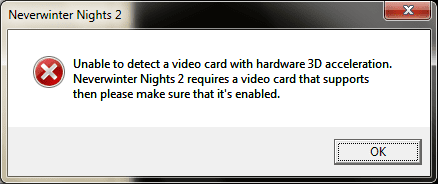
Unable to detect a video card with hardware 3D acceleration. Neverwinter Nights 2 requires a video card that supports then please make sure that it's enabled.
Hardware 3D acceleration appears to be disabled. If your video card supports hardware 3D acceleration, then please make sure that it's enabled.
 

My Computer

Computer Manufacturer/Model Number
Self-built
OS
W7 x64 build 7068
CPU
Intel Core 2 Duo E8400 @ 3.83GHz
Motherboard
Asus P5K Pro
Memory
6GB G.Skill DDR2 @ 1066MHz 5-5-5-15
Graphics Card(s)
BFG 8800GT OC
Sound Card
onboard Realtek ALC883
Monitor(s) Displays
Dell P992
Screen Resolution
1600x1200 @85Hz
Hard Drives
Seagate 7200.7 80GB x2 in Raid0
Seagate 7200.10 320GB
Seagate 7200.11 500GB
PSU
Cooler Master RealPower 450W
Case
Thermaltake Soprano
Cooling
Zalman 9500 AT CPU cooler
Keyboard
Logitech Elite
Mouse
Logitech G5
Internet Speed
10/1Mbit Cable
Other Info
FSB@425MHz
I get the exact same problem as Bargle... Also running 7057 (x64) =(

Is there anyway to trick the game into not trying to detect a 3D card? I have a feeling things may just work if I get past the error messages.
 

My Computer

OS
Win7 7057
Yeah, well I've just decided to use XP and wait until Windows 7 actually comes out. Hopefully then, they will be finished with DX11. I also had this problem a while ago with Halo 1, but eventually it just stopped happening, I think I turned on Compatibility mode for XP, but I dont' know.
 

My Computer

OS
Windows 7 build 7600 RTM (I pre-ordered 2 copies)
CPU
AMD Athlon 64 X2 6000+
Motherboard
Gigabyte 790GX Chipset
Memory
4GB
Graphics Card(s)
ATI HD 3870
Monitor(s) Displays
NEC AccuSync LCD24WMCX
Screen Resolution
1920x1200
Hard Drives
ST31500341AS ATA Device
Internet Speed
10MBPS
Interesting, I played Neverwinter Nights 2 flawlesslyon Build 7000 x86 but haven't installed it yet on Build 7057 x64. I'll do so in a few minutes and see if I can get it to work.
 

My Computer

Computer Manufacturer/Model Number
ASUS G73JH
OS
Windows 7 Ultimate x64
CPU
1.6 GHZ i7-720QM
Memory
12 GB @ 1333 mhz
Graphics Card(s)
AMD Radeon HD 5870M
Screen Resolution
1600x900
Hard Drives
120 GB SATA II SSD
500 GB HDD @ 7200 RPM
Mouse
Razer Death Adder
Internet Speed
15 mb down, 1 mb up
I just installed it, and got the same error you posted about ERROR_DX_INSTALL. I am guessing because of the error the game won't run but I haven't tried that yet and will do so shortly.
 

My Computer

Computer Manufacturer/Model Number
ASUS G73JH
OS
Windows 7 Ultimate x64
CPU
1.6 GHZ i7-720QM
Memory
12 GB @ 1333 mhz
Graphics Card(s)
AMD Radeon HD 5870M
Screen Resolution
1600x900
Hard Drives
120 GB SATA II SSD
500 GB HDD @ 7200 RPM
Mouse
Razer Death Adder
Internet Speed
15 mb down, 1 mb up
I get this message when booting it, haven't tried rebooting the PC yet or booting the program again, just got this on my first attempt.

neverwinter.png
 

My Computer

Computer Manufacturer/Model Number
ASUS G73JH
OS
Windows 7 Ultimate x64
CPU
1.6 GHZ i7-720QM
Memory
12 GB @ 1333 mhz
Graphics Card(s)
AMD Radeon HD 5870M
Screen Resolution
1600x900
Hard Drives
120 GB SATA II SSD
500 GB HDD @ 7200 RPM
Mouse
Razer Death Adder
Internet Speed
15 mb down, 1 mb up
I'm officially clueless. Tried everything I could think of, it never freezes for me, but always pops up with that same warning. I'm unsure though if the issue is with Build 7057 or with all x64 Builds of windows 7 as the Windows 7 Build I had it running on before was 7000 x86.
 

My Computer

Computer Manufacturer/Model Number
ASUS G73JH
OS
Windows 7 Ultimate x64
CPU
1.6 GHZ i7-720QM
Memory
12 GB @ 1333 mhz
Graphics Card(s)
AMD Radeon HD 5870M
Screen Resolution
1600x900
Hard Drives
120 GB SATA II SSD
500 GB HDD @ 7200 RPM
Mouse
Razer Death Adder
Internet Speed
15 mb down, 1 mb up
Back
Top