New guy needs help

kareengas

New member
Local time
8:15 AM
Messages
7
Location
Panama City Beach, FL.
I have a Dell D830 with a C: 80G HD, Windows 7 Home Premium, 32 bit, etc.
I am constantly close to being out of space without using external drives. While I have no real problem with this, it is sometimes a PITA.
AND, I got a 1T ext drive, loaded all things D830 on it, including system backup stuff and even though brand new, it stopped working after 10 days and all is lost.
All that being said, I would like to put a new drive in this thing. I ordered a medium price 320G unit.
I have tried to understand what it is I need to do to install that drive and I'm still not certain I can, or should do this myself.
I bought the D830 used and it came with the 7 installed (bottom case info indicates original install was Vista) and I do not have installation disks.
I have once again backed personal stuff up to another ext HD.
Tried loading system image to yet another ext HD but it is apparently not formatted in NTFS. Or whatever.
And I cannot use DVD's (the other option shown) because for some reason the D830 isn't reading those (they show up on the ASUS laptop we have).
So, is changing the HD something I should NOT do myself?
If I can do it, can someone please give me simple, in English, instructions on what I need to do, should do, etc.?
Do I need to somehow format the new drive? Can I just plug it into a USB port (I do have a HD reader) and transfer all needed info to it and then just pop it into the HD slot?
Do I need to create system image? Will it allow me to reinstall if I can't do the USB transfer thing?
Can I create the system image to a USB flash drive, install the new HD, then recreate drivers, files, etc.?
Help.....!
Thank you.
 

My Computer

Computer type
Laptop
Computer Manufacturer/Model Number
Dell D830
OS
Windows 7 Home Premium 32 bit
CPU
Intel Core Duo T7250 @ 2.00 Ghz
Memory
RAM 3G
Graphics Card(s)
Mobile Intel 965 Express Chipset family
Sound Card
Just says HD Audio Device
Monitor(s) Displays
Generic PnP Monitor
Hard Drives
Hitachi HTS 542580K9SA00 ATA device
Antivirus
AVG Free
Browser
Google Chrome
You have to make an image of your C partition and the System Reserved partition if you have one using Macrium Reflect, it`s free, onto your external drive.

You then transfer that image to the new hard drive.

I suggest you buy an ssd instead of a hard drive for windows.

SSD 850 EVO 2.5" SATA III 250GB | Samsung Solid State Drives

Macrium Reflect Free

The best and easiest thing to do is, fix your dvd drive and clean install windows 7.

If you do not own windows 7 and a legitimate key then buy it.

Microsoft Windows 7 Home Premium SP1 32-bit - Operating Systems - Newegg.com

If and when you get a new drive, come back and we`ll tell you how to set it up :)
 

My Computer

Computer type
PC/Desktop
Computer Manufacturer/Model Number
Skylake Special #666
OS
Windows 10 Pro x64
CPU
Intel Core i7 6700K
Motherboard
Asus Sabertooth Z170 Mark 1
Memory
GSkill TridentZ RGB 16GB 3600 16-16-16-36
Graphics Card(s)
EVGA GTX 980 Ti SC x2
Sound Card
Realtek High Definition
Monitor(s) Displays
AOC G2460PG
Screen Resolution
1920 x 1080 144Hz
Hard Drives
Samsung 860 Pro 256GB, Seagate Barracuda 4TB x2
PSU
EVGA 1000 P2, EVGA White Custom Braided Cables
Case
Corsair Vengeance C70 Gunmetal Black
Cooling
Corsair H100i v2, Corsair ML120 x2, Thermal Grizzly Kryonaut
Keyboard
Logitech G910 Orion Spectrum
Mouse
Logitech G700s
Internet Speed
Verizon Fios Quantum Gateway 75/75
Antivirus
Windows Defender, Malwarebytes Free 3.8.3
Browser
Chrome
Other Info
Corsair SP120 x4, LG Blu-ray Drive, Durabrand HT-395 100 Watt Dolby Digital Amp, Corsair H2100 Wireless 7.1 Headset
Well crap...I already have a HDD on the way. I can probably return it. I'll check into that.

I also already downloaded Macrium but haven't really learned how to use it yet.

I'm not sure why the DVD drive doesn't work since the same drive does CD's just fine. Well, it plays them. Haven't checked about burning. I'll do that too.

Is there any real benefit to moving up to 64 bit and a different version of Windows 7, i.e., PRO? Or just stay with the 32 bit and/or Home Premium?

This same laptop screen started losing pixels down in one corner for some reason. So I got a new screen, installed it yesterday and LO..it works! So confidence level has a jump start.

Thanks for the help and advice. I should have found this site first.
 

My Computer

Computer type
Laptop
Computer Manufacturer/Model Number
Dell D830
OS
Windows 7 Home Premium 32 bit
CPU
Intel Core Duo T7250 @ 2.00 Ghz
Memory
RAM 3G
Graphics Card(s)
Mobile Intel 965 Express Chipset family
Sound Card
Just says HD Audio Device
Monitor(s) Displays
Generic PnP Monitor
Hard Drives
Hitachi HTS 542580K9SA00 ATA device
Antivirus
AVG Free
Browser
Google Chrome
If you plan to keep less than 3gb RAM I'd use 32 bit, but if you plan to have more than 4gb RAM then I'd use 64 bit. You can use either bit-version with each license.

Macrium makes it easy to install or use the boot disk to drag the old OS partition to the new drive, then a link appears beneath the new OS partition to adjust its size if needed. All of the settings are handled automatically. Just unplug the source drive and boot the new drive.

An SSD is the best upgrade you can have for Win7, even faster than getting a new higher-end PC without one.

There is no advantage to buying a higher version unless you specifically need an extra feature. The higher versions are the same exact OS as Home Premium with just a few extra expensive features unlocked. Compare Windows 7 Editions - Windows 7 Forums
 
OK.
Working on DVD drive. Tried the filter registry thing but no filters show up. I did have to remove the filters for the CD as it stopped working not long ago too. Same registry?
Properties for the drive tell me DVD drivers etc are working properly. I hear noise and disk tries to load but nothing happens. Same disk loads just fine in the other laptop.
Sorry to be such an immediate PITB but all this just started happening. Laptop has not been dropped or otherwise abused. Just started freaking out.
I have ordered the Windows 7 32 bit SP 1 pkg. It's on the way. But apparently I have to get the CD/DVD fixed before I can do much of anything else right?
 

My Computer

Computer type
Laptop
Computer Manufacturer/Model Number
Dell D830
OS
Windows 7 Home Premium 32 bit
CPU
Intel Core Duo T7250 @ 2.00 Ghz
Memory
RAM 3G
Graphics Card(s)
Mobile Intel 965 Express Chipset family
Sound Card
Just says HD Audio Device
Monitor(s) Displays
Generic PnP Monitor
Hard Drives
Hitachi HTS 542580K9SA00 ATA device
Antivirus
AVG Free
Browser
Google Chrome
DVD drive does Play pre recorded DVD. Just won't load or recognize blank.
 

My Computer

Computer type
Laptop
Computer Manufacturer/Model Number
Dell D830
OS
Windows 7 Home Premium 32 bit
CPU
Intel Core Duo T7250 @ 2.00 Ghz
Memory
RAM 3G
Graphics Card(s)
Mobile Intel 965 Express Chipset family
Sound Card
Just says HD Audio Device
Monitor(s) Displays
Generic PnP Monitor
Hard Drives
Hitachi HTS 542580K9SA00 ATA device
Antivirus
AVG Free
Browser
Google Chrome
You can install using flash stick as discussed in Step 1 of Clean Reinstall Windows 7.
Note that if you have UEFI BIOS it requires a special tool and booting stick/disk as UEFI device, delete all partitions to reset formatting to GPT.
 
BIOS is A17.
 

My Computer

Computer type
Laptop
Computer Manufacturer/Model Number
Dell D830
OS
Windows 7 Home Premium 32 bit
CPU
Intel Core Duo T7250 @ 2.00 Ghz
Memory
RAM 3G
Graphics Card(s)
Mobile Intel 965 Express Chipset family
Sound Card
Just says HD Audio Device
Monitor(s) Displays
Generic PnP Monitor
Hard Drives
Hitachi HTS 542580K9SA00 ATA device
Antivirus
AVG Free
Browser
Google Chrome
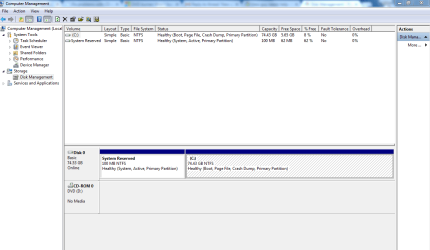
Geez..if this works you've already expanded my knowledge. Probably boring as H**l for you but kinda cool for me.
 

Attachments

  • Capture.PNG
    Capture.PNG
    27.3 KB · Views: 0

My Computer

Computer type
Laptop
Computer Manufacturer/Model Number
Dell D830
OS
Windows 7 Home Premium 32 bit
CPU
Intel Core Duo T7250 @ 2.00 Ghz
Memory
RAM 3G
Graphics Card(s)
Mobile Intel 965 Express Chipset family
Sound Card
Just says HD Audio Device
Monitor(s) Displays
Generic PnP Monitor
Hard Drives
Hitachi HTS 542580K9SA00 ATA device
Antivirus
AVG Free
Browser
Google Chrome
Update on DVD problem. There are no apparent problems indicated by all manner of diagnostics I have so far run. No "yellow triangles", the CD/DVD shows up as available drive, and it will play the prerecorded DVD's.
Ran MS Fixit then tried System Image thing. Several times. I have 3 different kinds of DVD-R's here and it tells me the same thing every time, "the media in the drive is not writable". Really? Is that my problem that simple? I need DVD-RW instead of DVD-R?
It does burn CD's and I don't know that I have ever created any sort of DVD but is it not the same device?

Onward....
Mr. "Gregrocker"-
I do have to go back to "work" tomorrow. 2 full days in Panama City then on the road for 3 or 4 days. May be out of touch. But I really appreciate your guidance so far.
E
 

My Computer

Computer type
Laptop
Computer Manufacturer/Model Number
Dell D830
OS
Windows 7 Home Premium 32 bit
CPU
Intel Core Duo T7250 @ 2.00 Ghz
Memory
RAM 3G
Graphics Card(s)
Mobile Intel 965 Express Chipset family
Sound Card
Just says HD Audio Device
Monitor(s) Displays
Generic PnP Monitor
Hard Drives
Hitachi HTS 542580K9SA00 ATA device
Antivirus
AVG Free
Browser
Google Chrome
You do not have an EFI BIOS or there would be an EFI System Partition instead of the legacy install's System Reserved partition which boots Win7.

As long as you stick with the steps in Clean Reinstall Windows 7 then you will get and keep a perfect install for as long as you do. Feel free to ask back any questions and let us know how it goes.
 
Back
Top