- Local time
- 2:40 AM
- Messages
- 51
So, this is a nightmare.
On Friday, I purchased a Seagate 1TB HDD (link) and plugged it into my computer. It worked for about 15 minutes then completely disappeared from Windows. I originally thought it was my PSU since my computer was underpowered with a 400W PSU. I replaced it with a Corsair GS800 and still had this issue. I returned the HDD and got a replacement (same model). Still wouldn't stay in Windows. Today, I returned it and got a different Seagate model (link) and lo-and-behold, it still lasts only 15 minutes at max before disappearing from Windows 7.
I downloaded SeaTools to see what it said on each of the HDDs.
First: didn't even pass the Short Generic test
Second: passed the Short Generic but failed the Long Generic
Current: passed the Short Generic but failed the Long Generic
When the HDDs disappear from Windows, it cannot be found anywhere until I restart the computer. It's gone from Windows Explorer. It's gone from Device Manager. It's gone from the partition wizard.
My computer's hardware is as follows:
Windows 7 Pro 64bit
Intel i7-3770K Ivy 3.5GHz processor
Intel DZ77GAL-70K (visual BIOS)
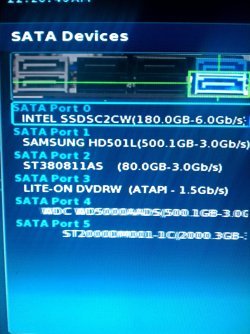
Intel SSD 520 180GB [C drive]
Samsung HD501LJ 500GB HDD [D drive]
ST380811AS 80GB HDD [E drive]
WDC WD5000AADS-00S9B0 500GB HDD [F drive]
System Reserved 100 MB [G drive]
LITE-ON DVDRW LH-20ALS [I drive]
Corsair Vengence 16GB (4x4GB) RAM
Nvidia GTX 550ti 2GB Graphics Card
The 'faulty' HDDs are never initialized when I first plug them in. I initialize them and partition them to be my H drive.
I have one 3.0Gbps SATA port available but since these HDDs are 6.0Gbps, I didn't try it. I have tried both of my available 6.0Gbps ports and both have this issue. I believe I have a PCI SATA card if it'd be useful for troubleshooting.
Something of note:
I had two BSOD errors when I had the second HDD installed. One while playing DmC Devil May Cry and the other overnight so I didn't see when it happened. I can post those dump files if people want them.
I hope that this is something either faulty with Seagate HDDs or where I need to update a driver cuz replacing anything else is gonna be expensive.
On Friday, I purchased a Seagate 1TB HDD (link) and plugged it into my computer. It worked for about 15 minutes then completely disappeared from Windows. I originally thought it was my PSU since my computer was underpowered with a 400W PSU. I replaced it with a Corsair GS800 and still had this issue. I returned the HDD and got a replacement (same model). Still wouldn't stay in Windows. Today, I returned it and got a different Seagate model (link) and lo-and-behold, it still lasts only 15 minutes at max before disappearing from Windows 7.
I downloaded SeaTools to see what it said on each of the HDDs.
First: didn't even pass the Short Generic test
Second: passed the Short Generic but failed the Long Generic
Current: passed the Short Generic but failed the Long Generic
When the HDDs disappear from Windows, it cannot be found anywhere until I restart the computer. It's gone from Windows Explorer. It's gone from Device Manager. It's gone from the partition wizard.
- I have used the SATA cables that came with the HDDs. (so a brand new one each time)
- I have used multiple SATA 6.0Gbps ports (haven't tried a 3.0Gbps port yet).
- This issue is present with both of my PSUs so I don't believe it has something to do with power.
- I've looked on the MOBO and have not found any blown capacitors (a friend of mine suggested this).
- I have not done anything with BIOS yet
My computer's hardware is as follows:
Windows 7 Pro 64bit
Intel i7-3770K Ivy 3.5GHz processor
Intel DZ77GAL-70K (visual BIOS)
Intel SSD 520 180GB [C drive]
Samsung HD501LJ 500GB HDD [D drive]
ST380811AS 80GB HDD [E drive]
WDC WD5000AADS-00S9B0 500GB HDD [F drive]
System Reserved 100 MB [G drive]
LITE-ON DVDRW LH-20ALS [I drive]
Corsair Vengence 16GB (4x4GB) RAM
Nvidia GTX 550ti 2GB Graphics Card
The 'faulty' HDDs are never initialized when I first plug them in. I initialize them and partition them to be my H drive.
I have one 3.0Gbps SATA port available but since these HDDs are 6.0Gbps, I didn't try it. I have tried both of my available 6.0Gbps ports and both have this issue. I believe I have a PCI SATA card if it'd be useful for troubleshooting.
Something of note:
I had two BSOD errors when I had the second HDD installed. One while playing DmC Devil May Cry and the other overnight so I didn't see when it happened. I can post those dump files if people want them.
I hope that this is something either faulty with Seagate HDDs or where I need to update a driver cuz replacing anything else is gonna be expensive.
My Computer
At a glance
Win7 Pro - 64bitIntel i7-3770kCorsair Vengeance 4x4GBNvidia Geforce GTX 550-ti
- Computer type
- PC/Desktop
- Computer Manufacturer/Model Number
- Custom Build
- OS
- Win7 Pro - 64bit
- CPU
- Intel i7-3770k
- Motherboard
- Intel DZ77GAL-70K
- Memory
- Corsair Vengeance 4x4GB
- Graphics Card(s)
- Nvidia Geforce GTX 550-ti
- Sound Card
- Integrated
- Hard Drives
- 180gb Intel SSD
80gb SATA
500gb Samsung SATA
500gb Western Digital SATA
- PSU
- Corsair GS800
- Case
- Antec 300
- Browser
- Chrome