
Solved New HDD, installed windows, trying to remove windows off old HDD

Anagog

New member
Local time
5:04 PM
Messages
4
Location
Near London
I recently got a new HDD (WD Black 1 TB) and installed windows on it. I am now trying to uninstall windows off the old HDD (Which is being booted through and then onto the Black) but have run into quite a few problems.
I have tried quite a few different things but have not yet managed to get it to work.

The first problem was the 100MB system reserve partition which i successfully removed but then made the computer unbootable (Woops). I then installed windows back onto the old HDD (I formatted it after I took all my data off it.) so that I could get it to boot. Now I am wondering how I can get my new HDD to boot standalone and be able to remove the new(er) windows installation from bootmgr.

This is the diskmgt screen if needed.
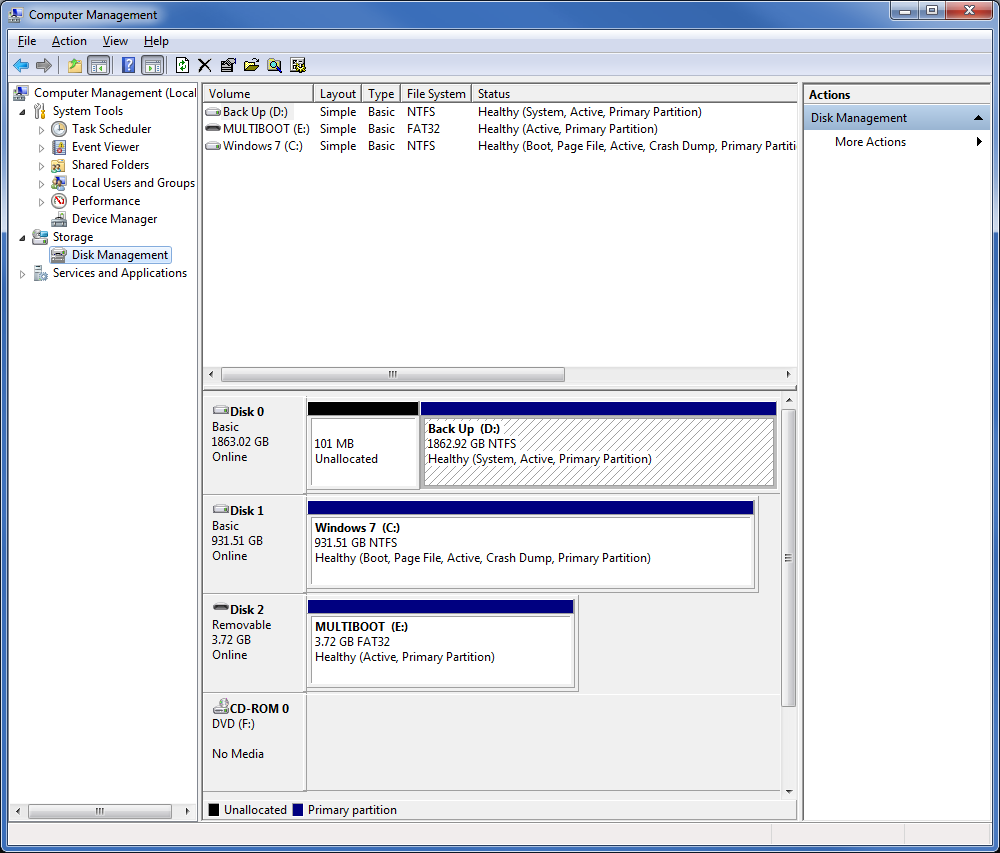
dlNM4Mh.png


EDIT:My Windows 7 Installation USB can not do a startup repair. The option is there but it can't run an actual repair because it isn't the same version.
 

My Computer My Computer

At a glance

Windows 7 Ultimate 64biti5 2500k @4ghz8gb 1333mhzAsus 560ti
Computer type
PC/Desktop
Computer Manufacturer/Model Number
Custom Build
OS
Windows 7 Ultimate 64bit
CPU
i5 2500k @4ghz
Motherboard
Asus P8-Z68
Memory
8gb 1333mhz
Graphics Card(s)
Asus 560ti
Monitor(s) Displays
1 LG Flatrion IPS225 and a TV
Screen Resolution
3840 X 1080
Hard Drives
WD Black 1 TB
Samsung F4 2 TB
PSU
Corsair AX 650w Non Modular
Case
Fractal Design Define R3
Cooling
Noctua DH-14
Keyboard
Filco Majestouch 2 Brown Switches
Mouse
Logitech G9x
Internet Speed
30mb up/1mb down
Antivirus
MSE
Browser
Chrome
Other Info
Want to upgrade :<
Unplug all HD's except Win7 on C, swap DISK1 cable to it so it becomes Disk0.

Download and burn a new DVD or flash stick from Clean Reinstall - Factory OEM Windows 7 or make a Win7 System Repair Disk. Boot to run Startup Repair - Run up to 3 Separate Times until C starts and holds the System flag showing it's booting the OS.

Plug back in the other HD's making sure DISK0 remains set first HD to boot in BIOS setup.

Mark the old Win7 partition Inactive: Partition - Mark as Inactive - Windows 7 Forums

To wipe the slate cleanest I would move the data off of D and wipe it's HD with Diskpart Clean Command, repartition in Disk Mgmt as a data partition.
 
Unplug all HD's except Win7 on C, swap DISK0 cable to it so it becomes Disk0.

Download and burn a new DVD or flash stick from Clean Reinstall - Factory OEM Windows 7 or make a Win7 System Repair Disk. Boot to run Startup Repair - Run up to 3 Separate Times until C starts and holds the System flag showing it's booting the OS.

Plug back in the other HD's making sure DISK0 remains set first HD to boot in BIOS setup.

Mark the old Win7 partition Inactive: Partition - Mark as Inactive - Windows 7 Forums

To wipe the slate cleanest I would move the data off of D and wipe it's HD with Diskpart Clean Command, repartition in Disk Mgmt as a data partition.

"swap DISK0 cable to it so it becomes Disk0." Did you typo here? Or am I missing something?
 

My Computer My Computer

At a glance

Windows 7 Ultimate 64biti5 2500k @4ghz8gb 1333mhzAsus 560ti
Computer type
PC/Desktop
Computer Manufacturer/Model Number
Custom Build
OS
Windows 7 Ultimate 64bit
CPU
i5 2500k @4ghz
Motherboard
Asus P8-Z68
Memory
8gb 1333mhz
Graphics Card(s)
Asus 560ti
Monitor(s) Displays
1 LG Flatrion IPS225 and a TV
Screen Resolution
3840 X 1080
Hard Drives
WD Black 1 TB
Samsung F4 2 TB
PSU
Corsair AX 650w Non Modular
Case
Fractal Design Define R3
Cooling
Noctua DH-14
Keyboard
Filco Majestouch 2 Brown Switches
Mouse
Logitech G9x
Internet Speed
30mb up/1mb down
Antivirus
MSE
Browser
Chrome
Other Info
Want to upgrade :<
Thanks, that worked :D Computer now boots from the WD drive even with the other one unplugged. One issue though, there is still 2 options in boot mgr (even with other HDD unplugged). Any ideas on how to remove the other boot option?
 

My Computer My Computer

At a glance

Windows 7 Ultimate 64biti5 2500k @4ghz8gb 1333mhzAsus 560ti
Computer type
PC/Desktop
Computer Manufacturer/Model Number
Custom Build
OS
Windows 7 Ultimate 64bit
CPU
i5 2500k @4ghz
Motherboard
Asus P8-Z68
Memory
8gb 1333mhz
Graphics Card(s)
Asus 560ti
Monitor(s) Displays
1 LG Flatrion IPS225 and a TV
Screen Resolution
3840 X 1080
Hard Drives
WD Black 1 TB
Samsung F4 2 TB
PSU
Corsair AX 650w Non Modular
Case
Fractal Design Define R3
Cooling
Noctua DH-14
Keyboard
Filco Majestouch 2 Brown Switches
Mouse
Logitech G9x
Internet Speed
30mb up/1mb down
Antivirus
MSE
Browser
Chrome
Other Info
Want to upgrade :<
Did you correctly delete the old OS partition before creating a new one, as suggested wipe the old Win7 HD to get it cleanest? This should remove the old listing.

If not, type msconfig in Start Search box, rightclick result to Run as Admin. On Boot tab look for the ghost listing, highlight it to Delete.

If this fails install EasyBCD (click Download - no Name or Email required) to delete the old OS listing on Edit menu.
 
I restarted again and it wasn't there. So I guess it did fix it but took a restart to realise it. Thanks for your help! :D
 

My Computer My Computer

At a glance

Windows 7 Ultimate 64biti5 2500k @4ghz8gb 1333mhzAsus 560ti
Computer type
PC/Desktop
Computer Manufacturer/Model Number
Custom Build
OS
Windows 7 Ultimate 64bit
CPU
i5 2500k @4ghz
Motherboard
Asus P8-Z68
Memory
8gb 1333mhz
Graphics Card(s)
Asus 560ti
Monitor(s) Displays
1 LG Flatrion IPS225 and a TV
Screen Resolution
3840 X 1080
Hard Drives
WD Black 1 TB
Samsung F4 2 TB
PSU
Corsair AX 650w Non Modular
Case
Fractal Design Define R3
Cooling
Noctua DH-14
Keyboard
Filco Majestouch 2 Brown Switches
Mouse
Logitech G9x
Internet Speed
30mb up/1mb down
Antivirus
MSE
Browser
Chrome
Other Info
Want to upgrade :<
Back
Top