Hey Guys,
New to the forum as I've come stuck on a pretty major issue. I hope this is the right place to put it, sorry to admins if not.
I was using Acronis Disk Director to resize a partition which subsequently failed due to bad blocks and then needed a boot disk to do a startup repair, I went through the options and wouldn't repair, running it a number of times. left without PC and no other ideas In my infinite wisdom decided to reinstall windows over the top of the old OS, (didnt use the format option).
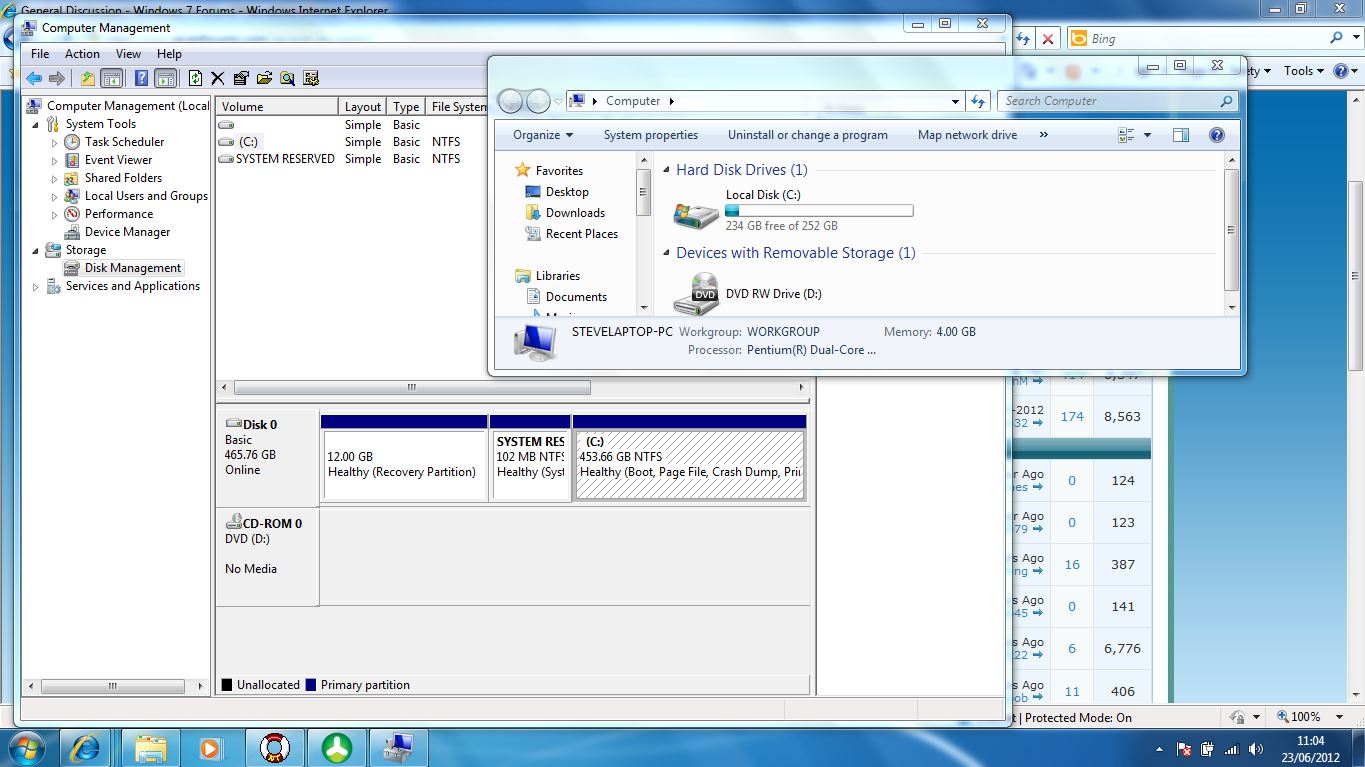
I had thought this would leave the old files in windows.old liek ti used to, but seemingly not. I'm running a 500gb hard drive but the new partition is only recognising 252 which was the remaining space prior to me messing everything up. I've now ran getdataback for NTFS and it doesn't bring up any of my old documents, but I can find old program files etc..
Does anyone have any idea how I can get my old documents and if it's even possible? Ideally I could do with images folder and music, but that isn't the end of the world if I don't get those...
I've now realised the importance of a backup and that my googledrive will come in much more useful....
Many thanks for your help in advance
Steve
New to the forum as I've come stuck on a pretty major issue. I hope this is the right place to put it, sorry to admins if not.
I was using Acronis Disk Director to resize a partition which subsequently failed due to bad blocks and then needed a boot disk to do a startup repair, I went through the options and wouldn't repair, running it a number of times. left without PC and no other ideas In my infinite wisdom decided to reinstall windows over the top of the old OS, (didnt use the format option).
I had thought this would leave the old files in windows.old liek ti used to, but seemingly not. I'm running a 500gb hard drive but the new partition is only recognising 252 which was the remaining space prior to me messing everything up. I've now ran getdataback for NTFS and it doesn't bring up any of my old documents, but I can find old program files etc..
Does anyone have any idea how I can get my old documents and if it's even possible? Ideally I could do with images folder and music, but that isn't the end of the world if I don't get those...
I've now realised the importance of a backup and that my googledrive will come in much more useful....
Many thanks for your help in advance
Steve
My Computer
- OS
- Windows 7 Home Premiun 64bit