
You are using an out of date browser. It may not display this or other websites correctly.
You should upgrade or use an alternative browser.
You should upgrade or use an alternative browser.
New optional update KB3035583 available
- Thread starter DavidE
- Start date

I don't know what's up with this KB, but i got alerted this update is ready and waiting as important.
It shows a published date of yesterday (2015-04-03).
You're not alone ... for me it was changed from optional to important ...
It shows a published date of yesterday (2015-04-03).
You're not alone ... for me it was changed from optional to important ...
My Computer
- Computer type
- PC/Desktop
- Computer Manufacturer/Model Number
- home built
- OS
- Multi-Boot W7_Pro_x64 W8.1_Pro_x64 W10_Pro_x64 +Linux_VMs +Chromium_VM
- CPU
- AMD Athlon II x4 620
- Motherboard
- Gigabyte GA-MA785G-UD3H
- Memory
- 6GB GSkill DDR2 800
- Graphics Card(s)
- AMD 4670 GPU + AMD 4200 IGP
- Sound Card
- on board Realtek ALC889A
- Monitor(s) Displays
- RCA 40" LCD TV, Insignia 32" LCD TV, HP 15" LCD monitor
- Screen Resolution
- 1680 x 1050
- Hard Drives
- OCZ Vertex 3 120GB,
Samsung F3 1TB (3),
Several others - WD, Seagate, Hitachi, ...
- PSU
- Corsair 500 W
- Case
- Rosewill mid tower
- Cooling
- CM 90mm rifle
- Keyboard
- Gyration wireless, Logitech wireless, Dell USB wired
- Mouse
- Gyration wireless, Logitech wireless, V7 USB wired
- Internet Speed
- Spectrum - 100Mbps D / 10Mbps U
- Antivirus
- Avast, MBAM3, EMET, WinPatrol
- Browser
- Pale Moon, Firefox, IE
- Other Info
- 2 multi-boot PC's
Mainly HTPC/Office/Gen purpose (no gaming).
Trendnet USB KVM.
LG DVD burner/Blue Ray Player.
Tray system for removable SATA backup drives.
Not currently OCd, under-volted.
I use Hybrid sleep, rarely re-boot or shutdown.
Hauppauge HD-PVR, Avermedia PCIe TV Tuner, Hauppauge PCI TV Tuner.

I was offered it optionally it in Win 8.1 and I installed it on April 1, but no sign yet in either of my Win 7 SP1's.
It is the update that enables Windows Update to offer Windows 10, when the time comes.
It is the update that enables Windows Update to offer Windows 10, when the time comes.
My Computer
- Computer type
- PC/Desktop
- Computer Manufacturer/Model Number
- Alienware® ALX X58
- OS
- Win 7 Ult SP1/Win 10 Pro (all x64)
- CPU
- Intel® Core™ i7-975 Extreme O/C to 4.02 GHz, 8MB Cache
- Motherboard
- Asus® P6T Deluxe V2 X58 LGA1366
- Memory
- 24GB Corsair Vengeance DDR3 SDRAM at 1600MHz - 6 x 4096MB
- Graphics Card(s)
- 1792 MB NVIDIA® GeForce® GTX 295 Dual Core
- Sound Card
- Onboard Soundmax® High-Definition 7.1 Performance Audio
- Monitor(s) Displays
- Samsung XL2370 LED backlit 23" W/S 2ms response time
- Screen Resolution
- 1920 X 1080
- Hard Drives
- 2 x 500gb SATA II
1 x 1TB SATA II
1 external eSATA LaCie 3TB
(Non-RAID)
- PSU
- Alienware® 1200 Watt Multi-GPU
- Case
- Alienware® P2 ALX Chassis with AlienIce™ 3.0 Video Cooling
- Cooling
- Alienware® High-Perf. Liquid Cooling + Acoustic Dampening
- Keyboard
- Microsoft® Wireless Entertainment 8000 + Logitech® G15 Wired
- Mouse
- Microsoft® Wireless Laser 8000 + Logitech® G9 Wired
- Internet Speed
- 1Gb/s
- Antivirus
- McAfee LiveSafe
- Browser
- Firefox - latest
- Other Info
- Using non-RAID on purpose as I find RAID to be too temperamental.
Now set to AHCI
Well so much for the stupid Windows Search in Win 7...not nearly as functional as in Vista or even XP for that matter.
After delving through all my updates, I found that yes indeed, my Win 7 SP1's both received it on March 28. Around the same time as the GWX folder was created in Windows\System 32, which looks to be an intro to Win 10 folder as I see the Win 10 logo on at least 2 of them.
Mind you some dates are fixed in stone because I just upgraded my main system from Vista SP2 to 7 SP1 and Windows isn't so hot on dates for folder creation, changes etc. etc.
Whomever at MS thought of blank windows as a good emblem for a system, really needs a lesson on aesthetics.
After delving through all my updates, I found that yes indeed, my Win 7 SP1's both received it on March 28. Around the same time as the GWX folder was created in Windows\System 32, which looks to be an intro to Win 10 folder as I see the Win 10 logo on at least 2 of them.
Mind you some dates are fixed in stone because I just upgraded my main system from Vista SP2 to 7 SP1 and Windows isn't so hot on dates for folder creation, changes etc. etc.
Whomever at MS thought of blank windows as a good emblem for a system, really needs a lesson on aesthetics.
My Computer
- Computer type
- PC/Desktop
- Computer Manufacturer/Model Number
- Alienware® ALX X58
- OS
- Win 7 Ult SP1/Win 10 Pro (all x64)
- CPU
- Intel® Core™ i7-975 Extreme O/C to 4.02 GHz, 8MB Cache
- Motherboard
- Asus® P6T Deluxe V2 X58 LGA1366
- Memory
- 24GB Corsair Vengeance DDR3 SDRAM at 1600MHz - 6 x 4096MB
- Graphics Card(s)
- 1792 MB NVIDIA® GeForce® GTX 295 Dual Core
- Sound Card
- Onboard Soundmax® High-Definition 7.1 Performance Audio
- Monitor(s) Displays
- Samsung XL2370 LED backlit 23" W/S 2ms response time
- Screen Resolution
- 1920 X 1080
- Hard Drives
- 2 x 500gb SATA II
1 x 1TB SATA II
1 external eSATA LaCie 3TB
(Non-RAID)
- PSU
- Alienware® 1200 Watt Multi-GPU
- Case
- Alienware® P2 ALX Chassis with AlienIce™ 3.0 Video Cooling
- Cooling
- Alienware® High-Perf. Liquid Cooling + Acoustic Dampening
- Keyboard
- Microsoft® Wireless Entertainment 8000 + Logitech® G15 Wired
- Mouse
- Microsoft® Wireless Laser 8000 + Logitech® G9 Wired
- Internet Speed
- 1Gb/s
- Antivirus
- McAfee LiveSafe
- Browser
- Firefox - latest
- Other Info
- Using non-RAID on purpose as I find RAID to be too temperamental.
Now set to AHCI

:focus: KB3035583
Read about it here:
Update for Windows 7 and 8.1 silently installs Windows 10 downloader - Myce.com
Jim
Read about it here:
Update for Windows 7 and 8.1 silently installs Windows 10 downloader - Myce.com
Jim
My Computer
- Computer type
- PC/Desktop
- Computer Manufacturer/Model Number
- Home Built
- OS
- Windows 8.1 Pro w/Media Center 64bit, Windows 7 HP 64bit
- CPU
- Phenom II X6 1100T
- Motherboard
- ASUS M5A99X EVO
- Memory
- Crucial Balistic 8gb DDR3-1866 CL9
- Graphics Card(s)
- MSI R6850 Cyclone IGD5 PE
- Sound Card
- On Board
- Monitor(s) Displays
- ASUS VE258Q 25" LED with DVI-HDMI-DisplayPort
- Screen Resolution
- 1920 x 1080
- Hard Drives
- Two WD Cavier Black 2TB Sata III, WD My Book Essential 2TB USB 3.0
- PSU
- Seasonic X650 80 Plus GOLD Modular
- Case
- Corsair 400R
- Cooling
- Antec Kuhler H2O 620, Two 120mm and four 140mm
- Keyboard
- Logitech K120
- Mouse
- Logitech Marble Mouse USB, Logitech Precision Game Pad
- Internet Speed
- 15MB
- Antivirus
- Norton IS 2013, Malwarebytes Pro Beta 2
- Browser
- IE-11, FF-27
- Other Info
- APC UPS ES 750, Netgear WNR3500L Gigabit & Wireless N Router with SamKnows Test Program, Motorola SB6120 Gigabit Cable Modem. Brother HL-2170W Laser Printer, Epson V300 Scanner

I had a feeling this update was fishy and why I hide the sucker 
Thanks for the link
Thanks for the link
My Computer
- Computer type
- PC/Desktop
- Computer Manufacturer/Model Number
- Custom assembled by me :}
- OS
- Win-7-Pro64bit 7-H-Prem-64bit
- CPU
- i7-5930K 2nd i9-9940x both water blocked VRM's too
- Motherboard
- ASUS SABERTOOTH X99 2nd ASUS x299 Apex
- Memory
- Trident-z 3200C14 2nd Trident-z 3600C16
- Graphics Card(s)
- EVGA 1080ti ftw3 2nd Titan Xp both water blocked
- Sound Card
- Built-in Realtek
- Monitor(s) Displays
- 1-AOC G2460PG 24"G-Sync 144Hz/ 2nd 1-ASUS VG248QE 24" 144Hz
- Screen Resolution
- 1920 x 1080 144Hz
- Hard Drives
- 2-Samsung M.2 Evo & Evo Plus
2-Samsung 850 EVO 500GB SSD's/ 3-2.5 W.D. Black 1tb-&3-1tb/3-3.5 WD Black 1tb hdd's
- PSU
- EVGA SuperNOVA 1000-P2 2nd 1200-P2
- Case
- 2-Corsair Obsidian Series 450D Black ATX Mid Tower
- Cooling
- Custom water loops
- Keyboard
- Logitech G710+/ 2nd Logitech G910
- Mouse
- 2-RedDragon M901 Perdition 16400 dpi Gaming mouse = wired
- Internet Speed
- Comcast Ping 19ms 89.31mbps download speed 6.12mbps upload
- Antivirus
- Malwarebytes Pro/ Superantispyware Pro
- Browser
- FireFox & Pale moon
- Other Info
- 2nd ASUS X299 Apex/Intel i9-9940x with Custom water loop/7H-Prem-x64/Corsair 450D case/Ram Trident-z 3600C16 4x8gb / Samsung970Evo plus 500gb SSD/Dual ssd EZ swap evo/PSU EVGA SuperNova 1200w-P2 80+Platinum/GPU Titan Xp /8-ML-140 on push-pull on 2-280GTX rads
That headline is misleading, all it does it exactly what MS have done in the past to enable, for instance, Service Packs to be offered, all this does is enable Windows Update to offer Windows 10 when the time comes, you can always say no if you'd prefer to hang on to what you've got.
My Computer
- Computer type
- PC/Desktop
- Computer Manufacturer/Model Number
- Alienware® ALX X58
- OS
- Win 7 Ult SP1/Win 10 Pro (all x64)
- CPU
- Intel® Core™ i7-975 Extreme O/C to 4.02 GHz, 8MB Cache
- Motherboard
- Asus® P6T Deluxe V2 X58 LGA1366
- Memory
- 24GB Corsair Vengeance DDR3 SDRAM at 1600MHz - 6 x 4096MB
- Graphics Card(s)
- 1792 MB NVIDIA® GeForce® GTX 295 Dual Core
- Sound Card
- Onboard Soundmax® High-Definition 7.1 Performance Audio
- Monitor(s) Displays
- Samsung XL2370 LED backlit 23" W/S 2ms response time
- Screen Resolution
- 1920 X 1080
- Hard Drives
- 2 x 500gb SATA II
1 x 1TB SATA II
1 external eSATA LaCie 3TB
(Non-RAID)
- PSU
- Alienware® 1200 Watt Multi-GPU
- Case
- Alienware® P2 ALX Chassis with AlienIce™ 3.0 Video Cooling
- Cooling
- Alienware® High-Perf. Liquid Cooling + Acoustic Dampening
- Keyboard
- Microsoft® Wireless Entertainment 8000 + Logitech® G15 Wired
- Mouse
- Microsoft® Wireless Laser 8000 + Logitech® G9 Wired
- Internet Speed
- 1Gb/s
- Antivirus
- McAfee LiveSafe
- Browser
- Firefox - latest
- Other Info
- Using non-RAID on purpose as I find RAID to be too temperamental.
Now set to AHCI
From what I can tell it looks like a separate program to be used to upgrade to Windows 10. It runs the GWX program on my system at every boot and has already downloaded some updated config files (config.xml is now ver 3) to be used in its process. Its not fully functional yet and gets some Event Errors. Reading the config.xml (use edit) is interesting in what it is doing in each phase. I am going to let it run and see what it does as we get closer to GA.
Jim
Jim
My Computer
- Computer type
- PC/Desktop
- Computer Manufacturer/Model Number
- Home Built
- OS
- Windows 8.1 Pro w/Media Center 64bit, Windows 7 HP 64bit
- CPU
- Phenom II X6 1100T
- Motherboard
- ASUS M5A99X EVO
- Memory
- Crucial Balistic 8gb DDR3-1866 CL9
- Graphics Card(s)
- MSI R6850 Cyclone IGD5 PE
- Sound Card
- On Board
- Monitor(s) Displays
- ASUS VE258Q 25" LED with DVI-HDMI-DisplayPort
- Screen Resolution
- 1920 x 1080
- Hard Drives
- Two WD Cavier Black 2TB Sata III, WD My Book Essential 2TB USB 3.0
- PSU
- Seasonic X650 80 Plus GOLD Modular
- Case
- Corsair 400R
- Cooling
- Antec Kuhler H2O 620, Two 120mm and four 140mm
- Keyboard
- Logitech K120
- Mouse
- Logitech Marble Mouse USB, Logitech Precision Game Pad
- Internet Speed
- 15MB
- Antivirus
- Norton IS 2013, Malwarebytes Pro Beta 2
- Browser
- IE-11, FF-27
- Other Info
- APC UPS ES 750, Netgear WNR3500L Gigabit & Wireless N Router with SamKnows Test Program, Motorola SB6120 Gigabit Cable Modem. Brother HL-2170W Laser Printer, Epson V300 Scanner
Windows 10 is being released on July 29, 2015 according to article today at USA Today.
Windows 10 to arrive July 29 Internet Explorer is not part of the Release. (Replaced by "Edge").
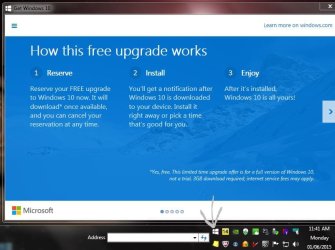
Interestingly this just appeared on my desktop..and anyone who is up to date with Windows Update will now see the Windows 10 logo in their taskbar, and clicking it results in the attached (click to enlarge)
(Only applies to those with fully updated Windows 7 SP1, Windows 8 and 8.1)
Windows 10 to arrive July 29 Internet Explorer is not part of the Release. (Replaced by "Edge").
Interestingly this just appeared on my desktop..and anyone who is up to date with Windows Update will now see the Windows 10 logo in their taskbar, and clicking it results in the attached (click to enlarge)
(Only applies to those with fully updated Windows 7 SP1, Windows 8 and 8.1)
Attachments
My Computer
- Computer type
- PC/Desktop
- Computer Manufacturer/Model Number
- Alienware® ALX X58
- OS
- Win 7 Ult SP1/Win 10 Pro (all x64)
- CPU
- Intel® Core™ i7-975 Extreme O/C to 4.02 GHz, 8MB Cache
- Motherboard
- Asus® P6T Deluxe V2 X58 LGA1366
- Memory
- 24GB Corsair Vengeance DDR3 SDRAM at 1600MHz - 6 x 4096MB
- Graphics Card(s)
- 1792 MB NVIDIA® GeForce® GTX 295 Dual Core
- Sound Card
- Onboard Soundmax® High-Definition 7.1 Performance Audio
- Monitor(s) Displays
- Samsung XL2370 LED backlit 23" W/S 2ms response time
- Screen Resolution
- 1920 X 1080
- Hard Drives
- 2 x 500gb SATA II
1 x 1TB SATA II
1 external eSATA LaCie 3TB
(Non-RAID)
- PSU
- Alienware® 1200 Watt Multi-GPU
- Case
- Alienware® P2 ALX Chassis with AlienIce™ 3.0 Video Cooling
- Cooling
- Alienware® High-Perf. Liquid Cooling + Acoustic Dampening
- Keyboard
- Microsoft® Wireless Entertainment 8000 + Logitech® G15 Wired
- Mouse
- Microsoft® Wireless Laser 8000 + Logitech® G9 Wired
- Internet Speed
- 1Gb/s
- Antivirus
- McAfee LiveSafe
- Browser
- Firefox - latest
- Other Info
- Using non-RAID on purpose as I find RAID to be too temperamental.
Now set to AHCI
 sorry
sorryI seldom have problems with Windows 7 Updates.
Noel might find a fix. He does things like that.
Finding fixes hidden in the dark corners of Microsoft is a challenge.
I have run into a couple of issues but that's usually lately because I hide ie11,
Once I unhide it and restart my machine and recheck for updates the issue goes away,
I understand your using ie11 but I was just adding details to my issue,
I now just leave it listed as a Optional update along with Silverlight.
Yes Noel is the magician
I know this is an old thread, but I don't want to open another.
You mentioned hiding IE11. I also hid all IE kb's since I don't use IE. I have IE8 installed, but rarely/almost never use it.
Do I need all these IE11/10/9 updates if I never use IE?
I hid IE kb's but all IE updates are important and upon hiding they just disappear. How did you manage to make them optional? I am about to install a large batch of updates after installing Win7 and want it to go as smooth as possible.
My Computer
- Computer type
- Laptop
- Computer Manufacturer/Model Number
- Toshiba
- OS
- Windows 7 Home Premium 64
- CPU
- Intel T6400 Core 2 Duo
- Memory
- 4GB
- Graphics Card(s)
- Intel 4500MHD
Hi,
If you don't use internet explorer I would at the least update it to current ie11 and still not use it
I don't use ie11 either but I don't hide updates either for anything.
If you don't use internet explorer I would at the least update it to current ie11 and still not use it
I don't use ie11 either but I don't hide updates either for anything.
My Computer
- Computer type
- PC/Desktop
- Computer Manufacturer/Model Number
- Custom assembled by me :}
- OS
- Win-7-Pro64bit 7-H-Prem-64bit
- CPU
- i7-5930K 2nd i9-9940x both water blocked VRM's too
- Motherboard
- ASUS SABERTOOTH X99 2nd ASUS x299 Apex
- Memory
- Trident-z 3200C14 2nd Trident-z 3600C16
- Graphics Card(s)
- EVGA 1080ti ftw3 2nd Titan Xp both water blocked
- Sound Card
- Built-in Realtek
- Monitor(s) Displays
- 1-AOC G2460PG 24"G-Sync 144Hz/ 2nd 1-ASUS VG248QE 24" 144Hz
- Screen Resolution
- 1920 x 1080 144Hz
- Hard Drives
- 2-Samsung M.2 Evo & Evo Plus
2-Samsung 850 EVO 500GB SSD's/ 3-2.5 W.D. Black 1tb-&3-1tb/3-3.5 WD Black 1tb hdd's
- PSU
- EVGA SuperNOVA 1000-P2 2nd 1200-P2
- Case
- 2-Corsair Obsidian Series 450D Black ATX Mid Tower
- Cooling
- Custom water loops
- Keyboard
- Logitech G710+/ 2nd Logitech G910
- Mouse
- 2-RedDragon M901 Perdition 16400 dpi Gaming mouse = wired
- Internet Speed
- Comcast Ping 19ms 89.31mbps download speed 6.12mbps upload
- Antivirus
- Malwarebytes Pro/ Superantispyware Pro
- Browser
- FireFox & Pale moon
- Other Info
- 2nd ASUS X299 Apex/Intel i9-9940x with Custom water loop/7H-Prem-x64/Corsair 450D case/Ram Trident-z 3600C16 4x8gb / Samsung970Evo plus 500gb SSD/Dual ssd EZ swap evo/PSU EVGA SuperNova 1200w-P2 80+Platinum/GPU Titan Xp /8-ML-140 on push-pull on 2-280GTX rads
No matter if IE11 is used or not you should keep it up to date for security reasons as many processes utilize it in the background.
It's part of the OS and should be updated like everything else but nobody forces you to use it, simply make whatever browser of choice the default, that's all.
It's part of the OS and should be updated like everything else but nobody forces you to use it, simply make whatever browser of choice the default, that's all.
My Computer
- Computer type
- PC/Desktop
- Computer Manufacturer/Model Number
- Alienware® ALX X58
- OS
- Win 7 Ult SP1/Win 10 Pro (all x64)
- CPU
- Intel® Core™ i7-975 Extreme O/C to 4.02 GHz, 8MB Cache
- Motherboard
- Asus® P6T Deluxe V2 X58 LGA1366
- Memory
- 24GB Corsair Vengeance DDR3 SDRAM at 1600MHz - 6 x 4096MB
- Graphics Card(s)
- 1792 MB NVIDIA® GeForce® GTX 295 Dual Core
- Sound Card
- Onboard Soundmax® High-Definition 7.1 Performance Audio
- Monitor(s) Displays
- Samsung XL2370 LED backlit 23" W/S 2ms response time
- Screen Resolution
- 1920 X 1080
- Hard Drives
- 2 x 500gb SATA II
1 x 1TB SATA II
1 external eSATA LaCie 3TB
(Non-RAID)
- PSU
- Alienware® 1200 Watt Multi-GPU
- Case
- Alienware® P2 ALX Chassis with AlienIce™ 3.0 Video Cooling
- Cooling
- Alienware® High-Perf. Liquid Cooling + Acoustic Dampening
- Keyboard
- Microsoft® Wireless Entertainment 8000 + Logitech® G15 Wired
- Mouse
- Microsoft® Wireless Laser 8000 + Logitech® G9 Wired
- Internet Speed
- 1Gb/s
- Antivirus
- McAfee LiveSafe
- Browser
- Firefox - latest
- Other Info
- Using non-RAID on purpose as I find RAID to be too temperamental.
Now set to AHCI
Windows will do that for you. Just install the KB and that should be all that's necessary.
I, like you, use another browser, but strangely I came across one website the other day that I often have used in the past, and suddenly it would not display at all in Firefox or Chrome...only in IE11.
So it does have some uses .
.
I, like you, use another browser, but strangely I came across one website the other day that I often have used in the past, and suddenly it would not display at all in Firefox or Chrome...only in IE11.
So it does have some uses
.My Computer
- Computer type
- PC/Desktop
- Computer Manufacturer/Model Number
- Alienware® ALX X58
- OS
- Win 7 Ult SP1/Win 10 Pro (all x64)
- CPU
- Intel® Core™ i7-975 Extreme O/C to 4.02 GHz, 8MB Cache
- Motherboard
- Asus® P6T Deluxe V2 X58 LGA1366
- Memory
- 24GB Corsair Vengeance DDR3 SDRAM at 1600MHz - 6 x 4096MB
- Graphics Card(s)
- 1792 MB NVIDIA® GeForce® GTX 295 Dual Core
- Sound Card
- Onboard Soundmax® High-Definition 7.1 Performance Audio
- Monitor(s) Displays
- Samsung XL2370 LED backlit 23" W/S 2ms response time
- Screen Resolution
- 1920 X 1080
- Hard Drives
- 2 x 500gb SATA II
1 x 1TB SATA II
1 external eSATA LaCie 3TB
(Non-RAID)
- PSU
- Alienware® 1200 Watt Multi-GPU
- Case
- Alienware® P2 ALX Chassis with AlienIce™ 3.0 Video Cooling
- Cooling
- Alienware® High-Perf. Liquid Cooling + Acoustic Dampening
- Keyboard
- Microsoft® Wireless Entertainment 8000 + Logitech® G15 Wired
- Mouse
- Microsoft® Wireless Laser 8000 + Logitech® G9 Wired
- Internet Speed
- 1Gb/s
- Antivirus
- McAfee LiveSafe
- Browser
- Firefox - latest
- Other Info
- Using non-RAID on purpose as I find RAID to be too temperamental.
Now set to AHCI
Some sites i want to use such as the Microsoft Update Catalog require using IE.
Try this site with different browsers and see how it works:
Microsoft Update Catalog
Try this site with different browsers and see how it works:
Microsoft Update Catalog
My Computer
- Computer type
- PC/Desktop
- Computer Manufacturer/Model Number
- home built
- OS
- Multi-Boot W7_Pro_x64 W8.1_Pro_x64 W10_Pro_x64 +Linux_VMs +Chromium_VM
- CPU
- AMD Athlon II x4 620
- Motherboard
- Gigabyte GA-MA785G-UD3H
- Memory
- 6GB GSkill DDR2 800
- Graphics Card(s)
- AMD 4670 GPU + AMD 4200 IGP
- Sound Card
- on board Realtek ALC889A
- Monitor(s) Displays
- RCA 40" LCD TV, Insignia 32" LCD TV, HP 15" LCD monitor
- Screen Resolution
- 1680 x 1050
- Hard Drives
- OCZ Vertex 3 120GB,
Samsung F3 1TB (3),
Several others - WD, Seagate, Hitachi, ...
- PSU
- Corsair 500 W
- Case
- Rosewill mid tower
- Cooling
- CM 90mm rifle
- Keyboard
- Gyration wireless, Logitech wireless, Dell USB wired
- Mouse
- Gyration wireless, Logitech wireless, V7 USB wired
- Internet Speed
- Spectrum - 100Mbps D / 10Mbps U
- Antivirus
- Avast, MBAM3, EMET, WinPatrol
- Browser
- Pale Moon, Firefox, IE
- Other Info
- 2 multi-boot PC's
Mainly HTPC/Office/Gen purpose (no gaming).
Trendnet USB KVM.
LG DVD burner/Blue Ray Player.
Tray system for removable SATA backup drives.
Not currently OCd, under-volted.
I use Hybrid sleep, rarely re-boot or shutdown.
Hauppauge HD-PVR, Avermedia PCIe TV Tuner, Hauppauge PCI TV Tuner.
Windows will do that for you. Just install the KB and that should be all that's necessary.
I, like you, use another browser, but strangely I came across one website the other day that I often have used in the past, and suddenly it would not display at all in Firefox or Chrome...only in IE11.
So it does have some uses
I have two IE related KB's. Since Win will uninstall IE8, why do I need the IE8 KB? Or will it go away once I install IE11?
See attached.
Attachments

My Computer
- Computer type
- Laptop
- Computer Manufacturer/Model Number
- Toshiba
- OS
- Windows 7 Home Premium 64
- CPU
- Intel T6400 Core 2 Duo
- Memory
- 4GB
- Graphics Card(s)
- Intel 4500MHD
Hi,
Mostly because it's likely an Important update
ie11 on the other hand is likely a Recommended update and you have the updates showing in the same Important section.
In simple terms your update settings are off is all I can figure
Go to change settings and uncheck the box
Give me Recommended updates the same as Import ones.
Mostly because it's likely an Important update
ie11 on the other hand is likely a Recommended update and you have the updates showing in the same Important section.
In simple terms your update settings are off is all I can figure
Go to change settings and uncheck the box
Give me Recommended updates the same as Import ones.
My Computer
- Computer type
- PC/Desktop
- Computer Manufacturer/Model Number
- Custom assembled by me :}
- OS
- Win-7-Pro64bit 7-H-Prem-64bit
- CPU
- i7-5930K 2nd i9-9940x both water blocked VRM's too
- Motherboard
- ASUS SABERTOOTH X99 2nd ASUS x299 Apex
- Memory
- Trident-z 3200C14 2nd Trident-z 3600C16
- Graphics Card(s)
- EVGA 1080ti ftw3 2nd Titan Xp both water blocked
- Sound Card
- Built-in Realtek
- Monitor(s) Displays
- 1-AOC G2460PG 24"G-Sync 144Hz/ 2nd 1-ASUS VG248QE 24" 144Hz
- Screen Resolution
- 1920 x 1080 144Hz
- Hard Drives
- 2-Samsung M.2 Evo & Evo Plus
2-Samsung 850 EVO 500GB SSD's/ 3-2.5 W.D. Black 1tb-&3-1tb/3-3.5 WD Black 1tb hdd's
- PSU
- EVGA SuperNOVA 1000-P2 2nd 1200-P2
- Case
- 2-Corsair Obsidian Series 450D Black ATX Mid Tower
- Cooling
- Custom water loops
- Keyboard
- Logitech G710+/ 2nd Logitech G910
- Mouse
- 2-RedDragon M901 Perdition 16400 dpi Gaming mouse = wired
- Internet Speed
- Comcast Ping 19ms 89.31mbps download speed 6.12mbps upload
- Antivirus
- Malwarebytes Pro/ Superantispyware Pro
- Browser
- FireFox & Pale moon
- Other Info
- 2nd ASUS X299 Apex/Intel i9-9940x with Custom water loop/7H-Prem-x64/Corsair 450D case/Ram Trident-z 3600C16 4x8gb / Samsung970Evo plus 500gb SSD/Dual ssd EZ swap evo/PSU EVGA SuperNova 1200w-P2 80+Platinum/GPU Titan Xp /8-ML-140 on push-pull on 2-280GTX rads
Hi,
Mostly because it's likely an Important update
ie11 on the other hand is likely a Recommended update and you have the updates showing in the same Important section.
In simple terms your update settings are off is all I can figure
Go to change settings and uncheck the box
Give me Recommended updates the same as Import ones.
That box is already unchecked.
My Computer
- Computer type
- Laptop
- Computer Manufacturer/Model Number
- Toshiba
- OS
- Windows 7 Home Premium 64
- CPU
- Intel T6400 Core 2 Duo
- Memory
- 4GB
- Graphics Card(s)
- Intel 4500MHD
- Local time
- 5:04 AM
- Messages
- 8,138
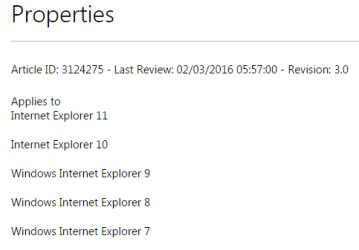
If you leave both of those checked, IE11 should install first and KB3124275 should install after that. KB3124275 applies to more than just IE8. You see IE8 in the title for the KB because IE8 was installed when the search for updates was made. If you had already installed IE11, then the title for KB3124275 would say IE11.I have two IE related KB's. Since Win will uninstall IE8, why do I need the IE8 KB? Or will it go away once I install IE11?
See attached.

MS16-001: Security update for Internet Explorer: January 12, 2016
My Computer
- Computer type
- Laptop
- Computer Manufacturer/Model Number
- Employer provided Dell Latitude
- OS
- W7 Pro SP1 64bit
- CPU
- i7
- Memory
- 8GB
- Graphics Card(s)
- Intel HD Graphics
- Hard Drives
- crappy SSD
- Antivirus
- Employer mandated Symantec Endpoint Protection
- Browser
- Pale Moon 64bit, IE11 64bit & Chrome 64bit
Similar threads
- Replies
- 6
- Views
- 3K

- Replies
- 2
- Views
- 2K

- Replies
- 9
- Views
- 6K

- Replies
- 30
- Views
- 15K
