
- Local time
- 3:36 PM
- Messages
- 252
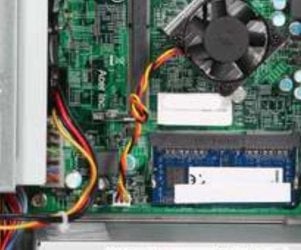
When I ordered a replacement fan after my old one died with a scream of death (blades locked and wouldn't budge)
The new (package of 3) 40mm 12v fans arrived but they had about 8-10 blades instead of the 7 in the picture and title
Also when turning off they make a plasticy grindy noise when they're about to stop even though they are super quiet when actually running
They also dont have a very high speed and vibrate quite a bit (bad magnetic field proportions?) Even at twice their rated speed and voltage they barely blow a feather around yet vibrate wildly (Dont know how they can survive that)
And they dont have an RPM reading at all. 3rd (tach) wire is there but computer doesnt register any RPM in bios or with speedfan.
They do spin though.
I've tried using a combination of resistors and/or capacitors to create my own "tach" signal but it still doesn't seem to do anything. Still reports 0 RPM and that causes my computer to make a 2nd beep on startup. (Covered beeper with a dab of hot glue since it's ear piercingly loud)
Did I get a batch of reject fans possibly? They have thin poorly constructed blades with a number of physical defects (Factory molded plastic bits here and there)
What would you recommend if I should return these for something else?
The fan is "enough" to cool my CPU but just that alone. (5W CPU with integrated graphics)
The new (package of 3) 40mm 12v fans arrived but they had about 8-10 blades instead of the 7 in the picture and title
Also when turning off they make a plasticy grindy noise when they're about to stop even though they are super quiet when actually running
They also dont have a very high speed and vibrate quite a bit (bad magnetic field proportions?) Even at twice their rated speed and voltage they barely blow a feather around yet vibrate wildly (Dont know how they can survive that)
And they dont have an RPM reading at all. 3rd (tach) wire is there but computer doesnt register any RPM in bios or with speedfan.
They do spin though.
I've tried using a combination of resistors and/or capacitors to create my own "tach" signal but it still doesn't seem to do anything. Still reports 0 RPM and that causes my computer to make a 2nd beep on startup. (Covered beeper with a dab of hot glue since it's ear piercingly loud)
Did I get a batch of reject fans possibly? They have thin poorly constructed blades with a number of physical defects (Factory molded plastic bits here and there)
What would you recommend if I should return these for something else?
The fan is "enough" to cool my CPU but just that alone. (5W CPU with integrated graphics)
My Computer
At a glance
Windows 7 Pro x64i7 3770k 3.5ghz up to 3.9ghz turbo boost 4 co...32GB 4x8GB DDR3 1600mhz CL9 patriot viper gam...ZOTAC GTX 1650 low profile overclocked GPU
- Computer type
- PC/Desktop
- Computer Manufacturer/Model Number
- HP Elite 8300 compaq SFF
- OS
- Windows 7 Pro x64
- CPU
- i7 3770k 3.5ghz up to 3.9ghz turbo boost 4 core 8 thread CPU
- Motherboard
- HP Elite 8300 compaq SFF OEM board
- Memory
- 32GB 4x8GB DDR3 1600mhz CL9 patriot viper gaming ram
- Graphics Card(s)
- ZOTAC GTX 1650 low profile overclocked GPU
- Sound Card
- realtek integrated HD audio
- Monitor(s) Displays
- 23" acer gaming 144hz 1ms monitor
- Screen Resolution
- 1920x1080 @120hz/144hz
- Hard Drives
- ADATA 128GB SSD
ADAtA 256GB SSD
x1 Seagate 250GB 7200 RPM drive
x1 Seagate 500GB 7200 RPM drive
- PSU
- 430w thermaltake smart
- Case
- HP Elite 8300 compaq SFF
- Cooling
- Stock + new thermal paste
- Keyboard
- REDRAGON mechanical blue switch
- Mouse
- ZELOTES wired T-90 mouse
- Internet Speed
- 10MB/s (80mbps) download good internet
- Antivirus
- in-use/other
- Browser
- IE11 + firefox + Google Chrome randomly switches between
- Other Info
- Info updated
power supply doesnt fit but still works with adapter its just sitting on the desk behind the computer wires going into the case where the old power supply was.




 )
)

