New to OCing

Case1

New member
Member
VIP
Local time
12:50 AM
Messages
147
Location
Texas
I want to learn how to OC my new build. Can somebody get me started in the right direction? Currently I have the BIOS set to something called OC Genie Lite that took it from stock 3.2Ghz to 3.6 Ghz. I want to go faster lol.

Case
 

My Computer My Computer

At a glance

Windows 7 Home PremiumAMD Phenom II 955 Black Edition Quad CoreCorsair XMS3 8GBATI Eyefinity HD 5770 5 mini display ports
Computer type
PC/Desktop
Computer Manufacturer/Model Number
Custom Build
OS
Windows 7 Home Premium
CPU
AMD Phenom II 955 Black Edition Quad Core
Motherboard
MSI 870-G45
Memory
Corsair XMS3 8GB
Graphics Card(s)
ATI Eyefinity HD 5770 5 mini display ports
Sound Card
Realtek High Definition 6.1
Monitor(s) Displays
2 DELL E207WFP 21.5" - 1 Acer 21.5"
Screen Resolution
2 Dells 1680x1050 - Acer 1920x1080
Hard Drives
Intel 40GB SSD
WD 500GB internal
WD 500Gb external
PSU
Cooler Master 500w
Case
Cooler Master 430 Black Elite
Keyboard
HP
Mouse
MIBRU
Internet Speed
10 mbs
Antivirus
Trend Micro
Browser
Chrome

My Computer My Computer

At a glance

Windows 10 ProIntel Core i7-4770K (3.5Ghz)32 gig Corsair Dominator Platinum (4x8Gig)Sapphire Tri-X R9 Fury
Computer type
PC/Desktop
Computer Manufacturer/Model Number
Custom built by me.
OS
Windows 10 Pro
CPU
Intel Core i7-4770K (3.5Ghz)
Motherboard
Gigabyte G1 Sniper 5 (F10 Bios)
Memory
32 gig Corsair Dominator Platinum (4x8Gig)
Graphics Card(s)
Sapphire Tri-X R9 Fury
Sound Card
Soundblaster ZXR
Monitor(s) Displays
NEC PA242W 24" LCD Monitor
Screen Resolution
1920 x 1200
Hard Drives
Primary - Samsung 850 Pro (512gig), Samsung 840 Pro (256gig), 2TB WD Caviar Black.
PSU
EVGA Supernova 1000 G2
Case
Cooler Master HAF X
Cooling
Corsair H100i with Corsair Air Series SP120 Quiet Fans
Keyboard
Logitech Wireless Wave
Mouse
Logitech Performance MX
Internet Speed
High Speed Cable
Antivirus
Norton Security
Browser
IE11
Other Info
Memory Timings - 1866MHz @ 9-9-9-27-1T @ 1.5 volts
I want to go faster
and that means more heat, paying attention to cooling is a must when OCing.
 

My Computer My Computer

At a glance

Windows 7 Professional 64-bit SP1Intel E84004GB Crucial BallistixATI ASUS Radeon HD 4830
Computer Manufacturer/Model Number
Home Built
OS
Windows 7 Professional 64-bit SP1
CPU
Intel E8400
Motherboard
MSI P35 Neo
Memory
4GB Crucial Ballistix
Graphics Card(s)
ATI ASUS Radeon HD 4830
Sound Card
Realtek ALC888 on Board
Monitor(s) Displays
Asus 22-inch VH226H Widescreen
Screen Resolution
1920 x 1080
Hard Drives
Two Western Digital 500GB
PSU
Hiper HPU-4M 530W
Case
Thermaltake Tsunami Dream Black
Cooling
Air/Fans
Keyboard
Saitek Eclipse
Mouse
Razer
Internet Speed
Sky Broadband
Other Info
USB Hub/Card Reader - 2 Pen Drives, 1 Phone Dock
Thanks Sygnus21 and Ciara!

For starters I was reading in my MOBO manual and there is something called OC Genie Lite which allows the system to detect the maximum FSB clock and to OC automatically. It raised it from 3.2 to 3.6GHz and the temps when I have a lot of stuff open don't get over 41*C and that is with the stock HS. Although I do want to learn to OC manually so thanks for the advice. Siara I do have a Noctura NH-D14 HS on the way for cooler temps. Here is what the BIOS looks like when I have OC Genie Lite enabled.

http://www.qfpost.com/download.do?get=c27ca0638fbcc7be9f6564abbdf0b2cf
http://www.qfpost.com/download.do?get=d65b9c6c8b2567375aad74d75591d453
 

My Computer My Computer

At a glance

Windows 7 Home PremiumAMD Phenom II 955 Black Edition Quad CoreCorsair XMS3 8GBATI Eyefinity HD 5770 5 mini display ports
Computer type
PC/Desktop
Computer Manufacturer/Model Number
Custom Build
OS
Windows 7 Home Premium
CPU
AMD Phenom II 955 Black Edition Quad Core
Motherboard
MSI 870-G45
Memory
Corsair XMS3 8GB
Graphics Card(s)
ATI Eyefinity HD 5770 5 mini display ports
Sound Card
Realtek High Definition 6.1
Monitor(s) Displays
2 DELL E207WFP 21.5" - 1 Acer 21.5"
Screen Resolution
2 Dells 1680x1050 - Acer 1920x1080
Hard Drives
Intel 40GB SSD
WD 500GB internal
WD 500Gb external
PSU
Cooler Master 500w
Case
Cooler Master 430 Black Elite
Keyboard
HP
Mouse
MIBRU
Internet Speed
10 mbs
Antivirus
Trend Micro
Browser
Chrome
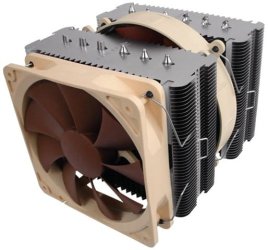
Siara I do have a Noctura NH-D14 HS on the way for cooler temps.

That thing is more than adequate for your cooling needs.... unless you plan on going far beyond 4+ gigs :D

NH-D14.jpg

Anyway like I said, read read read.

Good luck.
 

My Computer My Computer

At a glance

Windows 10 ProIntel Core i7-4770K (3.5Ghz)32 gig Corsair Dominator Platinum (4x8Gig)Sapphire Tri-X R9 Fury
Computer type
PC/Desktop
Computer Manufacturer/Model Number
Custom built by me.
OS
Windows 10 Pro
CPU
Intel Core i7-4770K (3.5Ghz)
Motherboard
Gigabyte G1 Sniper 5 (F10 Bios)
Memory
32 gig Corsair Dominator Platinum (4x8Gig)
Graphics Card(s)
Sapphire Tri-X R9 Fury
Sound Card
Soundblaster ZXR
Monitor(s) Displays
NEC PA242W 24" LCD Monitor
Screen Resolution
1920 x 1200
Hard Drives
Primary - Samsung 850 Pro (512gig), Samsung 840 Pro (256gig), 2TB WD Caviar Black.
PSU
EVGA Supernova 1000 G2
Case
Cooler Master HAF X
Cooling
Corsair H100i with Corsair Air Series SP120 Quiet Fans
Keyboard
Logitech Wireless Wave
Mouse
Logitech Performance MX
Internet Speed
High Speed Cable
Antivirus
Norton Security
Browser
IE11
Other Info
Memory Timings - 1866MHz @ 9-9-9-27-1T @ 1.5 volts
Read Read Read.... and then read more as you don't want to fry your system chasing other peoples numbers and temps.

Overclocking is an art - and it takes a lot of patience and practice.

Good luck.

Very true. Also, at some point if you start adjusting the speed manually, I've found that it's helpful to do so in small increments rather than making large increases at once. That way you lessen the risks a little by taking a slow, steady approach.
 

My Computer My Computer

At a glance

Windows 7 Home Premium x64Intel Core i7-2600 @3.40GHz8.00GB DDR3NVIDIA GeForce GTX 555 w/1.0GB RAM
Computer Manufacturer/Model Number
Alienware X51
OS
Windows 7 Home Premium x64
CPU
Intel Core i7-2600 @3.40GHz
Memory
8.00GB DDR3
Graphics Card(s)
NVIDIA GeForce GTX 555 w/1.0GB RAM
Monitor(s) Displays
BenQ XL2420TX
Screen Resolution
1920x1080@120Hz
Hard Drives
1TB
PSU
330-watt
Keyboard
Logitech Wireless Illuminated Keyboard K800
Mouse
Razer Orochi
Internet Speed
Campus Internet
Thanks for the help! It is greatly appreciated. I have been reading and it seems the more I read the more confused I get. Some say to raise the multiplier and don't increase the voltage and others say to increase voltage. Then there is CPU voltage and NB-volts. I have something on my MO BO called OC stepper. Then there are the various benchmark and testing programs, which ones are the best? I guess the more I read the more it will all make sense.
 

My Computer My Computer

At a glance

Windows 7 Home PremiumAMD Phenom II 955 Black Edition Quad CoreCorsair XMS3 8GBATI Eyefinity HD 5770 5 mini display ports
Computer type
PC/Desktop
Computer Manufacturer/Model Number
Custom Build
OS
Windows 7 Home Premium
CPU
AMD Phenom II 955 Black Edition Quad Core
Motherboard
MSI 870-G45
Memory
Corsair XMS3 8GB
Graphics Card(s)
ATI Eyefinity HD 5770 5 mini display ports
Sound Card
Realtek High Definition 6.1
Monitor(s) Displays
2 DELL E207WFP 21.5" - 1 Acer 21.5"
Screen Resolution
2 Dells 1680x1050 - Acer 1920x1080
Hard Drives
Intel 40GB SSD
WD 500GB internal
WD 500Gb external
PSU
Cooler Master 500w
Case
Cooler Master 430 Black Elite
Keyboard
HP
Mouse
MIBRU
Internet Speed
10 mbs
Antivirus
Trend Micro
Browser
Chrome
Thanks for the help! It is greatly appreciated. I have been reading and it seems the more I read the more confused I get. Some say to raise the multiplier and don't increase the voltage and others say to increase voltage. Then there is CPU voltage and NB-volts. I have something on my MO BO called OC stepper. Then there are the various benchmark and testing programs, which ones are the best? I guess the more I read the more it will all make sense.

As you've probably already learned, and as a few others in this topic have said, overclocking is going to work different for every setup. For some people it's better to raise the multiplier, for others it's better to raise the voltage, etc. Different things are going to work for different people.
 

My Computer My Computer

At a glance

Windows 7 Home Premium x64Intel Core i7-2600 @3.40GHz8.00GB DDR3NVIDIA GeForce GTX 555 w/1.0GB RAM
Computer Manufacturer/Model Number
Alienware X51
OS
Windows 7 Home Premium x64
CPU
Intel Core i7-2600 @3.40GHz
Memory
8.00GB DDR3
Graphics Card(s)
NVIDIA GeForce GTX 555 w/1.0GB RAM
Monitor(s) Displays
BenQ XL2420TX
Screen Resolution
1920x1080@120Hz
Hard Drives
1TB
PSU
330-watt
Keyboard
Logitech Wireless Illuminated Keyboard K800
Mouse
Razer Orochi
Internet Speed
Campus Internet
Thanks for the help! It is greatly appreciated. I have been reading and it seems the more I read the more confused I get. Some say to raise the multiplier and don't increase the voltage and others say to increase voltage. Then there is CPU voltage and NB-volts. I have something on my MO BO called OC stepper. Then there are the various benchmark and testing programs, which ones are the best? I guess the more I read the more it will all make sense.

It depends on what you have for a setup as well as what you're trying to accomplish.

Overclocking an i7 system is different from overclocking an older FSB system. Just as overclocking an AMD system is different than overclocking an Intel system.

Then there's the overclock itself - small to med overclocks may not involve voltage tweaking whereas more aggressive ones will require lots of voltage adjustments. Also the processor itself will determine a whether a voltage adjustment is needed or not, and how much.

Yes, there are some software programs that ship with motherboards that will let you click a button and you have a small to med overclock. While they might work, you don't exactly know what they are doing, which could cause problems later on should an issue arise.

Most experienced overclockers run from those because most tend to give generic settings that may not be optimized for specific systems, and they very often tend to "over-volt" which can lead to heat problems - something an overclocker is always trying to fight.

So the first thing you need to do/understand is to find out what's applicable to you.

Than how far do you want to go with your overclock, and whether you feel like tweaking voltages or not – be aware that more often than not, you will have to tweak some voltage settings anyway in order to maintain a stable system. It’s one thing to say you can run at 4gig, it’s another to run 24/7 stable!

So while you're reading ask yourself how/does this apply to me? That should help eliminate some of the fluff out there. Again, a good reputable forum to visit for overclocking is Overclockers Forums - The Performance Computing Community

Bottom line: Overclocking is an art form that has many components to learn, and here your main enemy is heat.

Good luck.
 

My Computer My Computer

At a glance

Windows 10 ProIntel Core i7-4770K (3.5Ghz)32 gig Corsair Dominator Platinum (4x8Gig)Sapphire Tri-X R9 Fury
Computer type
PC/Desktop
Computer Manufacturer/Model Number
Custom built by me.
OS
Windows 10 Pro
CPU
Intel Core i7-4770K (3.5Ghz)
Motherboard
Gigabyte G1 Sniper 5 (F10 Bios)
Memory
32 gig Corsair Dominator Platinum (4x8Gig)
Graphics Card(s)
Sapphire Tri-X R9 Fury
Sound Card
Soundblaster ZXR
Monitor(s) Displays
NEC PA242W 24" LCD Monitor
Screen Resolution
1920 x 1200
Hard Drives
Primary - Samsung 850 Pro (512gig), Samsung 840 Pro (256gig), 2TB WD Caviar Black.
PSU
EVGA Supernova 1000 G2
Case
Cooler Master HAF X
Cooling
Corsair H100i with Corsair Air Series SP120 Quiet Fans
Keyboard
Logitech Wireless Wave
Mouse
Logitech Performance MX
Internet Speed
High Speed Cable
Antivirus
Norton Security
Browser
IE11
Other Info
Memory Timings - 1866MHz @ 9-9-9-27-1T @ 1.5 volts
I've tried the Auto system before and did not like them at all.

1 good example of why I do not the built in OC tools.

Mine, when set to Auto OC to a 400FSB, sets my Vcore for the CPU at 1.36V.

For my particular CPU to run at a 400FSB, stable, requires no extra voltage.
It sits comfortably at its 1.23V stock setting. Thats a pretty big jump for really no reason.


As everyone has already said, every system will show OC a bit differently.
Even if you have 2 systems set exactly the, piece by piece, both of them may very well require different setting for the same speed.

My advice would be much the same:

Wait untill you get better cooling in place.
Go in small steps and test along the way.
Keep a close eye on your tempratures (Use a stress test to fully load the system like Prime 95)

Take your time, learn all the in and out of your bios. What all the settings mean & what impact they have on things.

Just have some fun with it. :)
 

My Computer My Computer

At a glance

Windows 7 Home Premium 64bitIntel Core i7 2700k8GB Mushkin Redline Ridgebacks @1866EVGA GTX570 SC
Computer Manufacturer/Model Number
Custom (Self Build)
OS
Windows 7 Home Premium 64bit
CPU
Intel Core i7 2700k
Motherboard
eVGA P67 SLI
Memory
8GB Mushkin Redline Ridgebacks @1866
Graphics Card(s)
EVGA GTX570 SC
Sound Card
XiFi Titanium HD
Monitor(s) Displays
LG W2453V
Screen Resolution
1920x1080
Hard Drives
Intel 320 80GB -- Intel X25-V 40GB --WD Black 1TB x2 -- WD Blue 640GB
PSU
Seasonic x750
Case
Corsair 600T SE White
Cooling
eVGA Superclocked CPU Cooler
Keyboard
Saitek Cyborg
Antivirus
Kaspersky
Browser
IE
Other Info
LG BD/DVD
Sygnus, Ciara, BCXtreme, Wishmaster,

Thank you a bunch! I have an AMD 955 Black Edition Quad core. The reason I need a fast computer is not because I am a big gamer, although I do like to play, it is because I trade stocks. The faster I can make my computer the better. This will give you an example of what I am trying to accomplish:

Multiple Monitor Computers

What I did so far is raise the multiplier to 18X, left the voltage on auto and the FSB is at 200 MHz and it raised it to 3.6GHz. My temps which I monitor on HW monitor didn't get over 41*C, then I raised the multiplier to 19X still left the voltage stock and the FSB at 200MHz. it went to 3.8Ghz. With my trading program on, a web page, Microsoft Outlook, CPU-Z, HW monitor the max temp is 43*C. Should I try the stress test now like Prime 95?

I will wait till the new HS arrives though before trying to go higher.
 

My Computer My Computer

At a glance

Windows 7 Home PremiumAMD Phenom II 955 Black Edition Quad CoreCorsair XMS3 8GBATI Eyefinity HD 5770 5 mini display ports
Computer type
PC/Desktop
Computer Manufacturer/Model Number
Custom Build
OS
Windows 7 Home Premium
CPU
AMD Phenom II 955 Black Edition Quad Core
Motherboard
MSI 870-G45
Memory
Corsair XMS3 8GB
Graphics Card(s)
ATI Eyefinity HD 5770 5 mini display ports
Sound Card
Realtek High Definition 6.1
Monitor(s) Displays
2 DELL E207WFP 21.5" - 1 Acer 21.5"
Screen Resolution
2 Dells 1680x1050 - Acer 1920x1080
Hard Drives
Intel 40GB SSD
WD 500GB internal
WD 500Gb external
PSU
Cooler Master 500w
Case
Cooler Master 430 Black Elite
Keyboard
HP
Mouse
MIBRU
Internet Speed
10 mbs
Antivirus
Trend Micro
Browser
Chrome
Ideally youll want to let Prime 95 run overnight (approx 10hrs is a good amount of time) to ensure your OC is stable.

But letting it run for 15-20min will give you an idea of what your tempratures will be at a full load.

Keep in mind, that you will likely never stress your PC that hard in any realworld situation, to get it that hot.
However, your loaded temps in Prime95 should still be within a safe margin.
 

My Computer My Computer

At a glance

Windows 7 Home Premium 64bitIntel Core i7 2700k8GB Mushkin Redline Ridgebacks @1866EVGA GTX570 SC
Computer Manufacturer/Model Number
Custom (Self Build)
OS
Windows 7 Home Premium 64bit
CPU
Intel Core i7 2700k
Motherboard
eVGA P67 SLI
Memory
8GB Mushkin Redline Ridgebacks @1866
Graphics Card(s)
EVGA GTX570 SC
Sound Card
XiFi Titanium HD
Monitor(s) Displays
LG W2453V
Screen Resolution
1920x1080
Hard Drives
Intel 320 80GB -- Intel X25-V 40GB --WD Black 1TB x2 -- WD Blue 640GB
PSU
Seasonic x750
Case
Corsair 600T SE White
Cooling
eVGA Superclocked CPU Cooler
Keyboard
Saitek Cyborg
Antivirus
Kaspersky
Browser
IE
Other Info
LG BD/DVD
I wouldn’t attempt to run prime95 overnight until you are sure your temps are stable first. This means running prime for a few hours while keeping an eye on the temps. Once you feel comfortable they are stabilized, then if you want, you can run prime95 overnight.

Myself, I’ve never ran prime95 for more than 5 hours, but that’s me. And as Wishmaster stated, you’ll rarely run you system as hard as prime 95 does, so….

Anyway I was running my i7-930 (2.8gig) to 3.52gig crystal smooth without issues and prime95 load temps in the low 70’s.

Now that I have my i7-950 (3.06gig), I'm trying to push it to 3.8gig but I find this processor is not as voltage friendly as my 930 was, thus I'm battling heating issues because proportionately, this one needs more voltage. Bottom line, I think I got a bad chip compared to my 930.

This is what I mean when I say overclocking depends on the chip as well.
 

My Computer My Computer

At a glance

Windows 10 ProIntel Core i7-4770K (3.5Ghz)32 gig Corsair Dominator Platinum (4x8Gig)Sapphire Tri-X R9 Fury
Computer type
PC/Desktop
Computer Manufacturer/Model Number
Custom built by me.
OS
Windows 10 Pro
CPU
Intel Core i7-4770K (3.5Ghz)
Motherboard
Gigabyte G1 Sniper 5 (F10 Bios)
Memory
32 gig Corsair Dominator Platinum (4x8Gig)
Graphics Card(s)
Sapphire Tri-X R9 Fury
Sound Card
Soundblaster ZXR
Monitor(s) Displays
NEC PA242W 24" LCD Monitor
Screen Resolution
1920 x 1200
Hard Drives
Primary - Samsung 850 Pro (512gig), Samsung 840 Pro (256gig), 2TB WD Caviar Black.
PSU
EVGA Supernova 1000 G2
Case
Cooler Master HAF X
Cooling
Corsair H100i with Corsair Air Series SP120 Quiet Fans
Keyboard
Logitech Wireless Wave
Mouse
Logitech Performance MX
Internet Speed
High Speed Cable
Antivirus
Norton Security
Browser
IE11
Other Info
Memory Timings - 1866MHz @ 9-9-9-27-1T @ 1.5 volts
I wouldn’t attempt to run prime95 overnight until you are sure your temps are stable first. This means running prime for a few hours while keeping an eye on the temps. Once you feel comfortable they are stabilized, then if you want, you can run prime95 overnight.

Very good point and I certainly agree with you.
Thanks for pointing that out.
 

My Computer My Computer

At a glance

Windows 7 Home Premium 64bitIntel Core i7 2700k8GB Mushkin Redline Ridgebacks @1866EVGA GTX570 SC
Computer Manufacturer/Model Number
Custom (Self Build)
OS
Windows 7 Home Premium 64bit
CPU
Intel Core i7 2700k
Motherboard
eVGA P67 SLI
Memory
8GB Mushkin Redline Ridgebacks @1866
Graphics Card(s)
EVGA GTX570 SC
Sound Card
XiFi Titanium HD
Monitor(s) Displays
LG W2453V
Screen Resolution
1920x1080
Hard Drives
Intel 320 80GB -- Intel X25-V 40GB --WD Black 1TB x2 -- WD Blue 640GB
PSU
Seasonic x750
Case
Corsair 600T SE White
Cooling
eVGA Superclocked CPU Cooler
Keyboard
Saitek Cyborg
Antivirus
Kaspersky
Browser
IE
Other Info
LG BD/DVD

My Computer My Computer

At a glance

Windows 10 ProIntel Core i7-4770K (3.5Ghz)32 gig Corsair Dominator Platinum (4x8Gig)Sapphire Tri-X R9 Fury
Computer type
PC/Desktop
Computer Manufacturer/Model Number
Custom built by me.
OS
Windows 10 Pro
CPU
Intel Core i7-4770K (3.5Ghz)
Motherboard
Gigabyte G1 Sniper 5 (F10 Bios)
Memory
32 gig Corsair Dominator Platinum (4x8Gig)
Graphics Card(s)
Sapphire Tri-X R9 Fury
Sound Card
Soundblaster ZXR
Monitor(s) Displays
NEC PA242W 24" LCD Monitor
Screen Resolution
1920 x 1200
Hard Drives
Primary - Samsung 850 Pro (512gig), Samsung 840 Pro (256gig), 2TB WD Caviar Black.
PSU
EVGA Supernova 1000 G2
Case
Cooler Master HAF X
Cooling
Corsair H100i with Corsair Air Series SP120 Quiet Fans
Keyboard
Logitech Wireless Wave
Mouse
Logitech Performance MX
Internet Speed
High Speed Cable
Antivirus
Norton Security
Browser
IE11
Other Info
Memory Timings - 1866MHz @ 9-9-9-27-1T @ 1.5 volts
Not without doing some research. Im very unfamiliar with AMD these days.

If I recall correctly, their Vcore voltages are usually a bit higher than Intel, so 1.4 would sound reasonable to me for an AMD.
But Im not 100% sure on that.
 

My Computer My Computer

At a glance

Windows 7 Home Premium 64bitIntel Core i7 2700k8GB Mushkin Redline Ridgebacks @1866EVGA GTX570 SC
Computer Manufacturer/Model Number
Custom (Self Build)
OS
Windows 7 Home Premium 64bit
CPU
Intel Core i7 2700k
Motherboard
eVGA P67 SLI
Memory
8GB Mushkin Redline Ridgebacks @1866
Graphics Card(s)
EVGA GTX570 SC
Sound Card
XiFi Titanium HD
Monitor(s) Displays
LG W2453V
Screen Resolution
1920x1080
Hard Drives
Intel 320 80GB -- Intel X25-V 40GB --WD Black 1TB x2 -- WD Blue 640GB
PSU
Seasonic x750
Case
Corsair 600T SE White
Cooling
eVGA Superclocked CPU Cooler
Keyboard
Saitek Cyborg
Antivirus
Kaspersky
Browser
IE
Other Info
LG BD/DVD
Back
Top