New Windows 7 Install stuck on Boot screen

robby10101

New member
Member
Local time
8:12 PM
Messages
41
I ran fresh install on new ssd, since couple of days its just keep displaying screen to select OS and it only has one OS i,e win 7.

I put value as 0 in time to display operating systems and it kept giving a insane high pitch alarm sound, which sounded like an memory error.

No new hardware has been added on system apart form new ssd with new win 7 install from usb

Imgur: The magic of the Internet

Imgur: The magic of the Internet

screen it gets stuck on, just need to keep selecting win 7 to make it start !
 

My Computer My Computer

Computer type
PC/Desktop
OS
Windows 7 Ultimate x64
Hi robby10101,

I put value as 0 in time to display operating systems and it kept giving a insane high pitch alarm sound, which sounded like an memory error.

Firstly, please update your system specifications in your UserCP > Edit System Spec setup. It will help us to help you!

The tutorial below [Published by Brink and written by CyberZeus] makes doing this very easy.

How to See Your System Specs with "System Info"

Secondly, have you tried removing the RAM and then replacing it to see if that makes a difference?

Thirdly, the screenshots you posted don't show anything!

I hope this helps!
 

My Computer My Computer

Computer type
Laptop
Computer Manufacturer/Model Number
Fujitsu LIFEBOOK
OS
Win 7 HP SP1 64-bit Vista HB SP2 32-bit Linux Mint 18.3
CPU
Intel(R) Pentium(R) CPU P6200 @ 2.13GHz
Motherboard
FUJITSU FJNBB06
Memory
4.00 GB
Graphics Card(s)
Intel(R) Graphics Media Accelerator HD
Sound Card
[1] Realtek High Definition Audio [2] Intel(R) Display Audio
Screen Resolution
1366 x 768 x 32 bits (4294967296 colors) @ 59 Hz
Hard Drives
TOSHIBA MK5076GSX
Antivirus
AVG FREE
Please don't use external links. Use the paper clip, browse to the file - upload.
I guess you didn't detach the old Win drive when you did the fresh install.

Detach all other drives from MB (power or SATA cable) leaving on only the SSD.
It will probably won't boot. Boot the win 7 installation disk, go to repair and do a boot repair.
Once the SSD is booting normally, set on BIOS as priority and attach all other drives.
 

My Computers My Computers

System One System Two

  • Computer type
    PC/Desktop
    Computer Manufacturer/Model Number
    custom build
    OS
    Windows 7 HP 64
    CPU
    i5 6600K - 800MHz to 4200MHz
    Motherboard
    GA-Z170-HD3P
    Memory
    4+4G GSkill DDR4 3000
    Graphics Card(s)
    IG - Intel 530
    Monitor(s) Displays
    Samsung 226BW
    Screen Resolution
    1680x1050
    Hard Drives
    (1) -1 SM951 – 128GB M.2 AHCI PCIe SSD drive for Windows 7 and Lubuntu
    (2) -1 WD SATA 3 - 1T for Data
    (3) -1 WD SATA 3 - 1T for backup
    PSU
    Thermaltake 450W TR2 gold
    Keyboard
    Old and good Chicony mechanical keyboard
    Mouse
    Logitech mX performance - 9 buttons (had to disable some)
    Internet Speed
    500Mb/s
    Browser
    Firefox 64
    Other Info
    TinyWall firewall
  • Computer type
    Laptop
    System Manufacturer/Model Number
    Asus Q550LF
    OS
    Windows 7 Pro
    CPU
    i7-4500U 800MHz to 3.0GHz
    Motherboard
    Asus Q550LF
    Memory
    (4+4)G DDR3 1600
    Graphics Card(s)
    IG intel 4400 + NVIDIA GeForce GT 745M
    Sound Card
    Realtek
    Monitor(s) Displays
    LG Display LP156WF4-SPH1
    Screen Resolution
    1920 x 1080
    Hard Drives
    BX500 120G SSD for Windows and programs +
    1T HDD for data
    Internet Speed
    500 Mb/s
    Browser
    Firefox
    Other Info
    TinyWall firewall
On laptop I can use only one drive, so HDD was detached and ssd was in, it was working fine since one week, suddenly from last couple of days it's doing this.

It has original 2gb ram and I had added 4gb later, I tried to run it on 2gb too but still it was stuck on boot screen.


Now I get that alarm even someintes when I select win7. Have to restart it again.

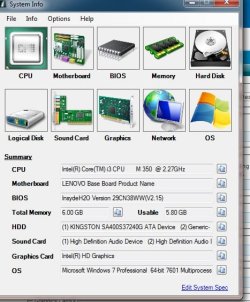
I will upload the specs today. It's an lenovo z560 (model name: 20060), i3 1st Gen , without graphic card model.
 

My Computer My Computer

Computer type
PC/Desktop
OS
Windows 7 Ultimate x64
Untitled.jpg specs attached
 

My Computer My Computer

Computer type
PC/Desktop
OS
Windows 7 Ultimate x64
On your profile specs it says that you have a Desktop not a Laptop.

Please update your system specifications in your User CP > Edit System Spec setup. It will help us to help you!

The tutorial below [Published by Brink and written by CyberZeus] makes doing this very easy.
System Info - See Your System Specs

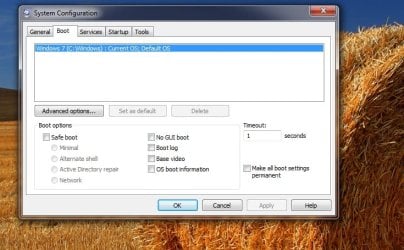
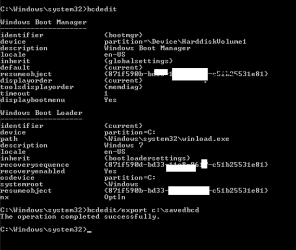
Open msconfig and on Boot tab select the one to delete - Delete the old and then mark "Make all boot settings permanent"
Apply and reboot
 

My Computers My Computers

System One System Two

  • Computer type
    PC/Desktop
    Computer Manufacturer/Model Number
    custom build
    OS
    Windows 7 HP 64
    CPU
    i5 6600K - 800MHz to 4200MHz
    Motherboard
    GA-Z170-HD3P
    Memory
    4+4G GSkill DDR4 3000
    Graphics Card(s)
    IG - Intel 530
    Monitor(s) Displays
    Samsung 226BW
    Screen Resolution
    1680x1050
    Hard Drives
    (1) -1 SM951 – 128GB M.2 AHCI PCIe SSD drive for Windows 7 and Lubuntu
    (2) -1 WD SATA 3 - 1T for Data
    (3) -1 WD SATA 3 - 1T for backup
    PSU
    Thermaltake 450W TR2 gold
    Keyboard
    Old and good Chicony mechanical keyboard
    Mouse
    Logitech mX performance - 9 buttons (had to disable some)
    Internet Speed
    500Mb/s
    Browser
    Firefox 64
    Other Info
    TinyWall firewall
  • Computer type
    Laptop
    System Manufacturer/Model Number
    Asus Q550LF
    OS
    Windows 7 Pro
    CPU
    i7-4500U 800MHz to 3.0GHz
    Motherboard
    Asus Q550LF
    Memory
    (4+4)G DDR3 1600
    Graphics Card(s)
    IG intel 4400 + NVIDIA GeForce GT 745M
    Sound Card
    Realtek
    Monitor(s) Displays
    LG Display LP156WF4-SPH1
    Screen Resolution
    1920 x 1080
    Hard Drives
    BX500 120G SSD for Windows and programs +
    1T HDD for data
    Internet Speed
    500 Mb/s
    Browser
    Firefox
    Other Info
    TinyWall firewall
ok but I have a desktop too, running win7, which has no issues.

Will add the specs today in profile, I am bit unwell.

1. In boot screen I only see one option of windows showing.

2. I had run win7 update and it keeps failing on some 11 updates ever since the install. I didn't bother much, as could not find any easy solutions online for it.

3. I have removed battery of laptop and the also used it with it, it.did not have any effect.

4. I was thinking of upgrading bios but I think lenove has no update on it since 2011 and it on latest version.
 

My Computer My Computer

Computer type
PC/Desktop
OS
Windows 7 Ultimate x64
On second image of post #1, it shows an Early version of Windows.
Who has installed Win 7? Did you had Win 10 on it?
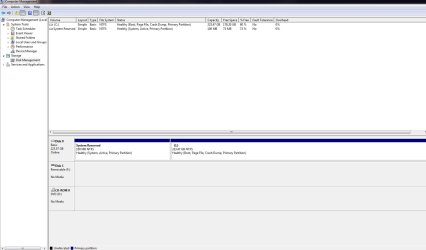
Can you post an image of Disk management (full window with expanded columns so we can read them)?
 

My Computers My Computers

System One System Two

  • Computer type
    PC/Desktop
    Computer Manufacturer/Model Number
    custom build
    OS
    Windows 7 HP 64
    CPU
    i5 6600K - 800MHz to 4200MHz
    Motherboard
    GA-Z170-HD3P
    Memory
    4+4G GSkill DDR4 3000
    Graphics Card(s)
    IG - Intel 530
    Monitor(s) Displays
    Samsung 226BW
    Screen Resolution
    1680x1050
    Hard Drives
    (1) -1 SM951 – 128GB M.2 AHCI PCIe SSD drive for Windows 7 and Lubuntu
    (2) -1 WD SATA 3 - 1T for Data
    (3) -1 WD SATA 3 - 1T for backup
    PSU
    Thermaltake 450W TR2 gold
    Keyboard
    Old and good Chicony mechanical keyboard
    Mouse
    Logitech mX performance - 9 buttons (had to disable some)
    Internet Speed
    500Mb/s
    Browser
    Firefox 64
    Other Info
    TinyWall firewall
  • Computer type
    Laptop
    System Manufacturer/Model Number
    Asus Q550LF
    OS
    Windows 7 Pro
    CPU
    i7-4500U 800MHz to 3.0GHz
    Motherboard
    Asus Q550LF
    Memory
    (4+4)G DDR3 1600
    Graphics Card(s)
    IG intel 4400 + NVIDIA GeForce GT 745M
    Sound Card
    Realtek
    Monitor(s) Displays
    LG Display LP156WF4-SPH1
    Screen Resolution
    1920 x 1080
    Hard Drives
    BX500 120G SSD for Windows and programs +
    1T HDD for data
    Internet Speed
    500 Mb/s
    Browser
    Firefox
    Other Info
    TinyWall firewall
On brand new SSD I have installed win 7 pro from USB, USB stick is no longer connected after install. No other install than win7 I have done as yet, nor plan too.

Laptop has no USB or HDD connected to it, other than ssd, will post the screen shot which you have asked for in a minute.
 

My Computer My Computer

Computer type
PC/Desktop
OS
Windows 7 Ultimate x64
You probably didn't deleted all partitions on the SSD.

Post an image of Disk management (full window with expanded columns so we can read them)
 

My Computers My Computers

System One System Two

  • Computer type
    PC/Desktop
    Computer Manufacturer/Model Number
    custom build
    OS
    Windows 7 HP 64
    CPU
    i5 6600K - 800MHz to 4200MHz
    Motherboard
    GA-Z170-HD3P
    Memory
    4+4G GSkill DDR4 3000
    Graphics Card(s)
    IG - Intel 530
    Monitor(s) Displays
    Samsung 226BW
    Screen Resolution
    1680x1050
    Hard Drives
    (1) -1 SM951 – 128GB M.2 AHCI PCIe SSD drive for Windows 7 and Lubuntu
    (2) -1 WD SATA 3 - 1T for Data
    (3) -1 WD SATA 3 - 1T for backup
    PSU
    Thermaltake 450W TR2 gold
    Keyboard
    Old and good Chicony mechanical keyboard
    Mouse
    Logitech mX performance - 9 buttons (had to disable some)
    Internet Speed
    500Mb/s
    Browser
    Firefox 64
    Other Info
    TinyWall firewall
  • Computer type
    Laptop
    System Manufacturer/Model Number
    Asus Q550LF
    OS
    Windows 7 Pro
    CPU
    i7-4500U 800MHz to 3.0GHz
    Motherboard
    Asus Q550LF
    Memory
    (4+4)G DDR3 1600
    Graphics Card(s)
    IG intel 4400 + NVIDIA GeForce GT 745M
    Sound Card
    Realtek
    Monitor(s) Displays
    LG Display LP156WF4-SPH1
    Screen Resolution
    1920 x 1080
    Hard Drives
    BX500 120G SSD for Windows and programs +
    1T HDD for data
    Internet Speed
    500 Mb/s
    Browser
    Firefox
    Other Info
    TinyWall firewall
Untitled.jpg
Untitled2.jpg
 

My Computer My Computer

Computer type
PC/Desktop
OS
Windows 7 Ultimate x64
Any update guys ?
1.Getting lag also now, on pinned taskbar items, Google chrome, it's, not opening or allowing to shift from one open window to other.
2. Folder icon in pinned taskbar is not working either.


Thanks
 

My Computer My Computer

Computer type
PC/Desktop
OS
Windows 7 Ultimate x64
A few thoughts. The iso on the usb may be corrupted. The ssd may not be compatible with the laptop (you mentioned no bios updates since x years). I had something similar once on an older machine that just would not load and run Windows 7 on a Samsung Evo ssd. But would load and run fine on a Crucial ssd.


That isn't very technical but some combinations seem to work better than others. I had one laptop that would only work with Sata 1 or Sata 2 drives due to firmware.
 

My Computer My Computer

Computer type
Laptop
Computer Manufacturer/Model Number
Sony Vaio VPCCW2S1E
OS
W7 HP 64 bit
CPU
Core i3 1st gen
Memory
8gb
Graphics Card(s)
Nvidia 330M
Internet Speed
8 mbps
Browser
Firefox
win7 iso i got from link posted here given by Paul. Which i activated using an oem key from ebay !

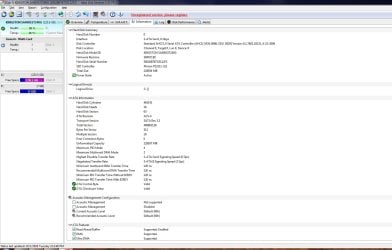
Untitled.jpg 1.SSD only few days old showing health at 99%, is it ok?, i can still order a replacement for it though !

2. I just used its original HDD and it was still stuck on selecting OS screen. There was no lag in shifting between open items in taskbar, that small preview window we get to be able to shift between one folder/software to another .

3. Every now and then getting coutinious beep sound once win loading screen come after selecting win7 and only option is to restart system again.
 
Last edited:

My Computer My Computer

Computer type
PC/Desktop
OS
Windows 7 Ultimate x64
Sad to say but key from ebay is probably pirate.

Once more, you didn't gave us the hardware specs. You're not helping us to help you.

On last image the ATA information is from a HDD not from a SSD?

Did you do a Clean Install Windows 7 or did you clone the HDD to the SSD.
On a clean install you don't have System Reserved partition. System Reserved partition is used on OEM computers (like Lenovo).
 

My Computers My Computers

System One System Two

  • Computer type
    PC/Desktop
    Computer Manufacturer/Model Number
    custom build
    OS
    Windows 7 HP 64
    CPU
    i5 6600K - 800MHz to 4200MHz
    Motherboard
    GA-Z170-HD3P
    Memory
    4+4G GSkill DDR4 3000
    Graphics Card(s)
    IG - Intel 530
    Monitor(s) Displays
    Samsung 226BW
    Screen Resolution
    1680x1050
    Hard Drives
    (1) -1 SM951 – 128GB M.2 AHCI PCIe SSD drive for Windows 7 and Lubuntu
    (2) -1 WD SATA 3 - 1T for Data
    (3) -1 WD SATA 3 - 1T for backup
    PSU
    Thermaltake 450W TR2 gold
    Keyboard
    Old and good Chicony mechanical keyboard
    Mouse
    Logitech mX performance - 9 buttons (had to disable some)
    Internet Speed
    500Mb/s
    Browser
    Firefox 64
    Other Info
    TinyWall firewall
  • Computer type
    Laptop
    System Manufacturer/Model Number
    Asus Q550LF
    OS
    Windows 7 Pro
    CPU
    i7-4500U 800MHz to 3.0GHz
    Motherboard
    Asus Q550LF
    Memory
    (4+4)G DDR3 1600
    Graphics Card(s)
    IG intel 4400 + NVIDIA GeForce GT 745M
    Sound Card
    Realtek
    Monitor(s) Displays
    LG Display LP156WF4-SPH1
    Screen Resolution
    1920 x 1080
    Hard Drives
    BX500 120G SSD for Windows and programs +
    1T HDD for data
    Internet Speed
    500 Mb/s
    Browser
    Firefox
    Other Info
    TinyWall firewall

My Computers My Computers

System One System Two

  • Computer type
    PC/Desktop
    OS
    7 X64
    CPU
    i5 8400
    Motherboard
    gigabyte b365m ds3h
    Memory
    2x8gb 3200mhz
    Hard Drives
    various
    PSU
    pure power 11 400w cm
    Case
    Coolermaster
    Cooling
    cryorig m9i
  • Computer type
    PC/Desktop
    OS
    7x64
    CPU
    g5400
    Motherboard
    ga b365m ds3h
    Memory
    8gb ddr4 2400
    PSU
    xfx pro 450w
I disabled AHCI and removed USB mouse adapter, boot alarm is gone but is annyoing, to keep removing USB adapter Everytime pc boots. I have disabled USB boot from BIOS too but still it given alarm and won't boot If USB adapter is in it.

Current problem is only of stuck taskbar now, it just freezes any programs in it. But can open fresh programs from desktop and start menue.

CPU and memory usage is minimal, and I could not find any warning in event management log either.

I have win7 genuine logo showing.
Megahertz07 I only posted the specs from that software you asked from ? Should I add specs. manually on forum as well ?
SIW2 too tired with all these trouble shoots, I don't even use this laptop in a year this much, the amount of time it had made me spent in last of couple days.

Uodate: All screenshots posted are from ssd, now I installed Samsung 860evo with iso from another source, same issue!
I have bascially now activated win 7, 3 times and updated as well in last one week !

I am gonna go off topic, if I get a new laptop the onbaord graphic card, will it matter if we're to connect to an LG HD tv, will TV's own card take care of quality without any loss?
 
Last edited:

My Computer My Computer

Computer type
PC/Desktop
OS
Windows 7 Ultimate x64
Keyboard was the fault, went on the site Keyboard Tester, and boom it showed which key was getting pressed lol, i disconnected, it's good as new.

I was pretty much about to sell of this lappy tomorrow and had almost ordered a new one, I had no intentions of selling it or contributing to rising e waste, though, it's a very good laptop :P

Thanks again guys, specially SIW2 :)
 

My Computer My Computer

Computer type
PC/Desktop
OS
Windows 7 Ultimate x64
Now only thing left to do is should I install os again for 4th time ? As currently it's on compatiblity mode and not AHCI, since it's currently brand new, install so it has no sofwares on it other than chrome, would AHCI make lot of difference comapred.to being on compatiblity mode ? It's on SATA 2.
 

My Computer My Computer

Computer type
PC/Desktop
OS
Windows 7 Ultimate x64
Great. :-)

You are using IDE mode. Ahci supports things such as native command queue and hotswap.
It is not essential for you to change to ahci.

If you do want to change, you can do it this way:

1.Type “regedit” in start search box and press Enter.

2. Click regedit when it pops up

2. Inside Windows Registry, (in the left pane) navigate to:

HKEY_LOCAL_MACHINE\SYSTEM\CurrentControlSet\services\msahci

3. At the right pane double click the 'Start' DWORD value and change its value data to 0 (zero). Click OK when finished.

4. Now navigate to:

HKEY_LOCAL_MACHINE\SYSTEM\CurrentControlSet\services\pciide

5. At the right pane double click the 'Start' DWORD value and change its value data to 0 (zero). Click OK when finished.

6. Restart PC to enter BIOS settings and specify the SATA mode as AHCI.

Then you can boot into windows in ahci mode.

That's it
 

My Computers My Computers

System One System Two

  • Computer type
    PC/Desktop
    OS
    7 X64
    CPU
    i5 8400
    Motherboard
    gigabyte b365m ds3h
    Memory
    2x8gb 3200mhz
    Hard Drives
    various
    PSU
    pure power 11 400w cm
    Case
    Coolermaster
    Cooling
    cryorig m9i
  • Computer type
    PC/Desktop
    OS
    7x64
    CPU
    g5400
    Motherboard
    ga b365m ds3h
    Memory
    8gb ddr4 2400
    PSU
    xfx pro 450w
Back
Top