Solved next step after cloning

theyoungwag

New member
Local time
3:34 PM
Messages
17
Hi everyone, thanks for your help before, superb. Got my new, large internal Hd, also new external Hd. Downloaded cloning software as recomended, copied existing drive which was about full, ( for which I have no cd's, all lost in house move), put the new drive in place, copied onto it, and it works. So thanks again for the help. Now, my question, how do I now format my old internal drive, which is not in the computer now, so that I can use it for storage for example? I have read that you cannot have two internal hd's with the same OS connected at the same time, and you cannot format a drive that is in use. Help.
 

My Computer My Computer

At a glance

Microsoft Windows 7 Home Premium 64-bit 7601 ...Intel(R) Core(TM) i5-2400 CPU @ 3.10GHz4.00 GBNVIDIA GeForce GT 430
Computer type
PC/Desktop
Computer Manufacturer/Model Number
custom build
OS
Microsoft Windows 7 Home Premium 64-bit 7601 Multiprocessor Free Service Pack 1
CPU
Intel(R) Core(TM) i5-2400 CPU @ 3.10GHz
Motherboard
ASUSTeK Computer INC. P8P67
Memory
4.00 GB
Graphics Card(s)
NVIDIA GeForce GT 430
Sound Card
(1) NVIDIA High Definition Audio (2) Bluetooth Stereo Audi
Screen Resolution
1280 x 720 x 32 bits (4294967296 colors) @ 60 Hz
Hard Drives
ST2000DM001-1ER164
Boot into Safe Mode with or without Network and see if you are allowed to format that 2nd hard-drive; if not, you might have to make Puppy Linux USB or DVD boot, boot it, use its internal format on that 2nd HD. Before doing anything, make sure you label each HDs' "C or OS"partitions a unique name, you want to make absolutely certain which C/OS partition you are going to format, do not depend upon drive letter assignments to guide you.
 

My Computer My Computer

At a glance

Windows 7 Professional 64-bitDesktop i5; Acers i5 & i7desktop 16GB; 1 Acer 8GB & 1 Acer 16GB
Computer type
PC/Desktop
Computer Manufacturer/Model Number
Antec desktop; Acer Aspire laptops
OS
Windows 7 Professional 64-bit
CPU
Desktop i5; Acers i5 & i7
Memory
desktop 16GB; 1 Acer 8GB & 1 Acer 16GB
Hard Drives
1TB split into 2 equal partitions [OS and data] usable by RJS
Internet Speed
AT&T DSL
Browser
FF, GChrome, msIE
Other Info
Windows 7 Firewall, Emsisoft AM/AV, MSE [scan-only], SpywareBlaster, Ruiware/BillP combine
Thanks RolandJS, if I understand this, I will now have to connect my old Hd as well as the new one, boot into safe mode, and go from there. Will this not mean that both drives will try to start at the same time because they both have the same OS on them, the new being a copy of the old? Sorry for the stupid questions, but I really am a beginner, even at 74yrs.
 

My Computer My Computer

At a glance

Microsoft Windows 7 Home Premium 64-bit 7601 ...Intel(R) Core(TM) i5-2400 CPU @ 3.10GHz4.00 GBNVIDIA GeForce GT 430
Computer type
PC/Desktop
Computer Manufacturer/Model Number
custom build
OS
Microsoft Windows 7 Home Premium 64-bit 7601 Multiprocessor Free Service Pack 1
CPU
Intel(R) Core(TM) i5-2400 CPU @ 3.10GHz
Motherboard
ASUSTeK Computer INC. P8P67
Memory
4.00 GB
Graphics Card(s)
NVIDIA GeForce GT 430
Sound Card
(1) NVIDIA High Definition Audio (2) Bluetooth Stereo Audi
Screen Resolution
1280 x 720 x 32 bits (4294967296 colors) @ 60 Hz
Hard Drives
ST2000DM001-1ER164
You only need the 2nd HD connected if you're USB or DVD booting. I know of no way of EZ-booting into Windows with both HDs connected -- unless you know how to pick SSD to boot via F8's boot menu.
 

My Computer My Computer

At a glance

Windows 7 Professional 64-bitDesktop i5; Acers i5 & i7desktop 16GB; 1 Acer 8GB & 1 Acer 16GB
Computer type
PC/Desktop
Computer Manufacturer/Model Number
Antec desktop; Acer Aspire laptops
OS
Windows 7 Professional 64-bit
CPU
Desktop i5; Acers i5 & i7
Memory
desktop 16GB; 1 Acer 8GB & 1 Acer 16GB
Hard Drives
1TB split into 2 equal partitions [OS and data] usable by RJS
Internet Speed
AT&T DSL
Browser
FF, GChrome, msIE
Other Info
Windows 7 Firewall, Emsisoft AM/AV, MSE [scan-only], SpywareBlaster, Ruiware/BillP combine
Don't feel bad about your age or being a beginner; we all had to start somewhere at whatever age (I was a bit of a late bloomer).

If you connect the old drive to the computer, such using a USB cable connected dock (if you don't have one, it's a worthwhile investment), after the computer has already booted, Windows will automatically reassign the drive letters on the old drive to avoid having duplicate drive letters. You do not even need to use safe mode (I never did). If you need help on the actual reformatting, let us know and one of us will walk you through it. It's simple once you know how.
 

My Computer My Computer

At a glance

Win 7 Ultimate 64 bitIntel i7-3930KKingston HyperX Genesis 32GB Kit (8x4GB Modul...MSI R7850 Twin Frozr 2GD5/OC Radeon HD 7850 2...
Computer type
PC/Desktop
Computer Manufacturer/Model Number
Custom Build
OS
Win 7 Ultimate 64 bit
CPU
Intel i7-3930K
Motherboard
ASUS P9X79 WS
Memory
Kingston HyperX Genesis 32GB Kit (8x4GB Modules) 1600MHz DDR
Graphics Card(s)
MSI R7850 Twin Frozr 2GD5/OC Radeon HD 7850 2GB 256-bit GDDR
Sound Card
Asus Xonar Essence STX
Monitor(s) Displays
3x Asus VG248QE 24", Vizio 32" TV
Screen Resolution
1920 x 1080, ?
Hard Drives
Samsung 128GB 840 Pro SSD (1),
Samsung 4TB 850 EVO SSDs (4)
Samsung 4TB 850 EVO SSDs (16) external backup drives used in 2.5" hot swap bays in the computer.
PSU
Corsair HX750w
Case
Antec Two Hundred v2 (modified)
Cooling
Cooler Master GeminII S524 120mm (fan replaced with a 140mm)
Keyboard
Logitech G510s
Mouse
Logitech M525 (two in use)
Internet Speed
=< 32Mbps down, 8Mbps up
Antivirus
AVAST!, MBAM, SAS, Spybot S&D (all but MBAM free) Glary Util
Browser
IE11
Other Info
LSI 9211-8i HBA card (8 SATA III ports), 2.5" & 3.5" Hot Swap Bays, HooToo HT-CR001 PCI-E to USB 3.0 Internal Hub + 6 Slot Card Reader, and LG Model CH12LS28 BD-ROM Optical Drive. Also, ScanSnap S1500 ADF duplexing scanner, Canon 9000F flat bed scanner, Corsair SP2500 2.1 speakers, Samsung CLP 415nw laser color printer, Cyberpower PP2200SW UPS
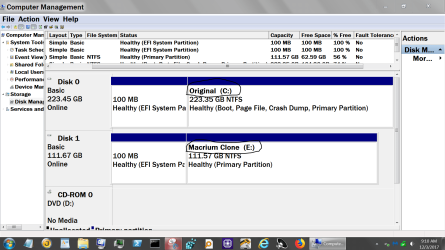
With both drives hooked up and booted into the drive you want to keep, just go to Disk Management and select the drive you want to format. Right tick on the drive you want to format and your selection to format will be listed.

**Make sure you are booted into the correct drive. That is a must.**

I do this by selecting boot order in bios and by naming each drive so I can tell one from the other.
Windows 7 should not let you format the drive you are booted into. Windows 7 is protecting itself.
If you right tick on a drive or partition that you are booted into you should not get the option to format.

To rename a drive is simple.
1. Tick on Start Orb
2. Select Computer
3. Right tick on the drive you want to rename and select Rename.
4. Type in what ever you want to call the drive you want to reformat.
That way you will be able to tell one drive from the other by using it's name.

Any questions just ask.

Example of renamed drives and partitions.

Disk Management.PNG


Jack
 

My Computer My Computer

At a glance

Windows 10 Pro. 64/ version 1709 Windows 7 Pr...Intel i7-6800K @ 4.3Corsair Platinum 16 gig @2400EVGA GTX 1070 OC
Computer type
PC/Desktop
Computer Manufacturer/Model Number
Home made Desktop
OS
Windows 10 Pro. 64/ version 1709 Windows 7 Pro/64
CPU
Intel i7-6800K @ 4.3
Motherboard
ASUS X-99 Deluxe II
Memory
Corsair Platinum 16 gig @2400
Graphics Card(s)
EVGA GTX 1070 OC
Monitor(s) Displays
Asus 27" LED LCD/VE278Q
Screen Resolution
1920-1080 or 1280-720 HDMI
Hard Drives
INTEL SSD 730-240 Gb Sata 3.0/
PSU
EVGA Platium 1200W
Case
Phanteks Luxe Tempered Glass 8 fans/ one radiator
Cooling
XSPC/ Water Cooled CPU
Keyboard
Das 4 Professional
Mouse
Logitech M705/MX Anywhere 2-S
Internet Speed
100 mbits
Antivirus
Microsoft Security Essentials/ Malwarebytes Premium 3.0/ SAS
Browser
I.E. 11 default/Firefox/ ISP Time Warner Cable/Spectrum
Other Info
LG BluRay Burner/
Sound system-KLipsch-THX/
Icy Dock ssd Hot Swap bays.
I'm grateful that my little advice was followed by much more thorough advice by others! :)
 

My Computer My Computer

At a glance

Windows 7 Professional 64-bitDesktop i5; Acers i5 & i7desktop 16GB; 1 Acer 8GB & 1 Acer 16GB
Computer type
PC/Desktop
Computer Manufacturer/Model Number
Antec desktop; Acer Aspire laptops
OS
Windows 7 Professional 64-bit
CPU
Desktop i5; Acers i5 & i7
Memory
desktop 16GB; 1 Acer 8GB & 1 Acer 16GB
Hard Drives
1TB split into 2 equal partitions [OS and data] usable by RJS
Internet Speed
AT&T DSL
Browser
FF, GChrome, msIE
Other Info
Windows 7 Firewall, Emsisoft AM/AV, MSE [scan-only], SpywareBlaster, Ruiware/BillP combine
Gentlemen and lady, I thank you for taking so much of your precious time to help me. Lady F, the drive that I want to format is the old Internal one, not External Usb, so I cannot go down that route, i don't think. RolandJS, what you call your "little advice" is in fact invaluable, it points me in the right direction and makes me start to think and look, important. Layback Bear, your post is so easy to follow, even an idiot like me should be able to get it right first time, I hope so, because I don't think that you get a second chance if you don't do it step by step. I have bought the cables to connect a second drive to the Sata board, so I wire them both in, power and data, fire the computer up, and it should run without it destroying both drives. Yes? Saw the local repair man in the bar at lunchtime, if I take it to him am tomorrow he will sort it, about an hour, 175euros. Nice man. I will post on how I get on myself. Thanks a lot all.
 

My Computer My Computer

At a glance

Microsoft Windows 7 Home Premium 64-bit 7601 ...Intel(R) Core(TM) i5-2400 CPU @ 3.10GHz4.00 GBNVIDIA GeForce GT 430
Computer type
PC/Desktop
Computer Manufacturer/Model Number
custom build
OS
Microsoft Windows 7 Home Premium 64-bit 7601 Multiprocessor Free Service Pack 1
CPU
Intel(R) Core(TM) i5-2400 CPU @ 3.10GHz
Motherboard
ASUSTeK Computer INC. P8P67
Memory
4.00 GB
Graphics Card(s)
NVIDIA GeForce GT 430
Sound Card
(1) NVIDIA High Definition Audio (2) Bluetooth Stereo Audi
Screen Resolution
1280 x 720 x 32 bits (4294967296 colors) @ 60 Hz
Hard Drives
ST2000DM001-1ER164
...Lady F, the drive that I want to format is the old Internal one, not External Usb, so I cannot go down that route, i don't think...

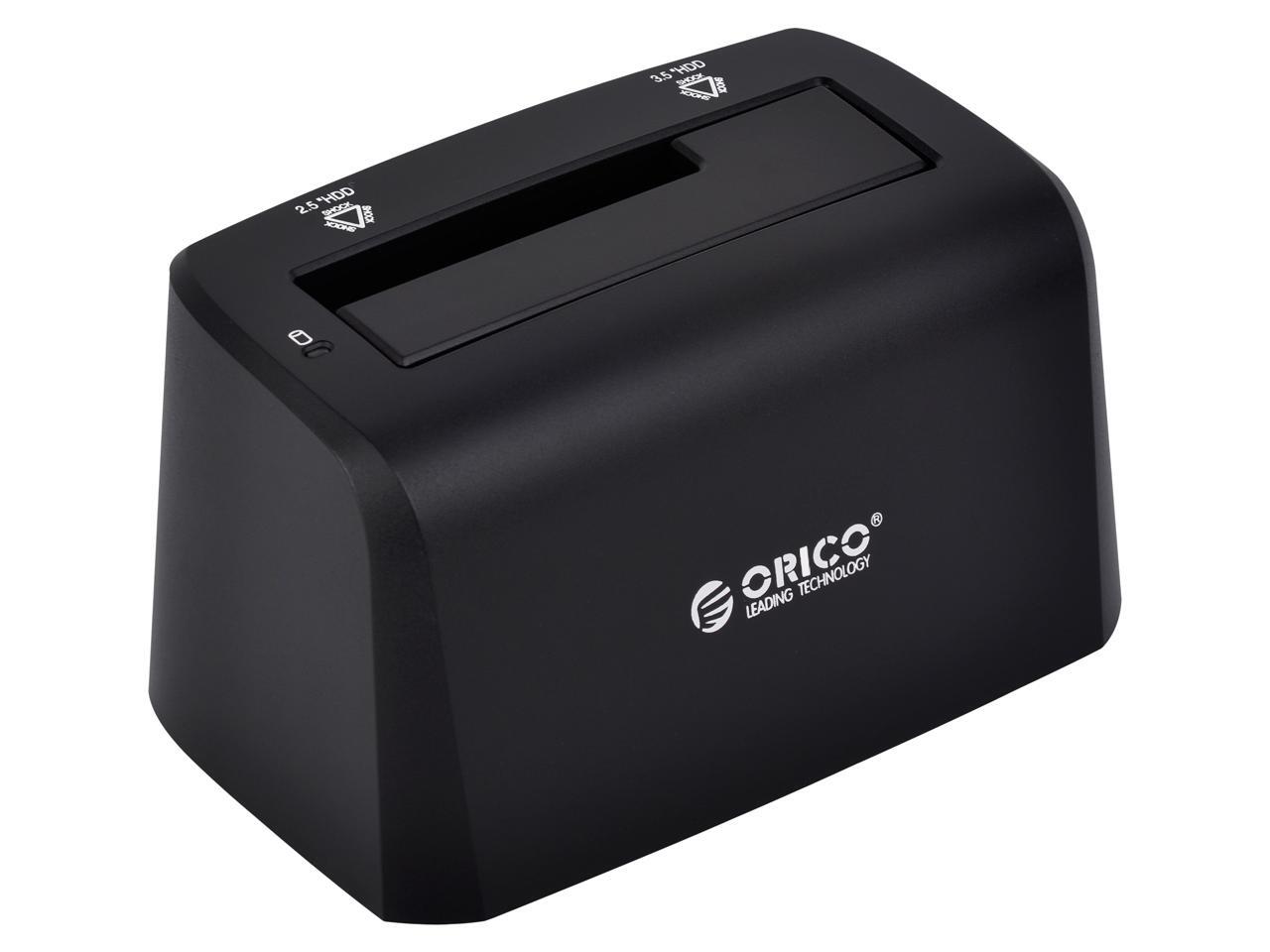
Actually, you can go that route. If you use an external dock (as I vaguely suggested; sorry), you can connect the dock to the computer via a USB cable and plug the internal type HDD into the dock and turn it on after you have booted the computer.

This is an example of an external dock:

A1DS_131248906230281295LagThiW9sR.jpg


You can read more about this one here. This is just an example of one kind; there are many others (this one will work with both 3.5" HDDs and 2.5" HDDs; Orico is a good brand, btw). You would have to find one in your neck of the world to ensure it is compatible with the power mains where you live.

A 3.5" dock will have a small power supply you plug into the dock and a wall power socket. it connects to the computer via a USB cable. When you plug the HDD into it and turn it on, the HDD will show up in your computer as though it had been installed inside. A dock makes accessing an HDD in this kind of situation both easier and safer. I strongly recommend any computer user beyond the most basic ones (and you have passed into beyond basic territory just by being here asking for help ;)) have a dock in their arsenal of computer tools.

A dock is also an excellent way to access a drive being used for backups (the importance of backing up one's data is something I cannot stress enough but that is a topic for another thread).
 

My Computer My Computer

At a glance

Win 7 Ultimate 64 bitIntel i7-3930KKingston HyperX Genesis 32GB Kit (8x4GB Modul...MSI R7850 Twin Frozr 2GD5/OC Radeon HD 7850 2...
Computer type
PC/Desktop
Computer Manufacturer/Model Number
Custom Build
OS
Win 7 Ultimate 64 bit
CPU
Intel i7-3930K
Motherboard
ASUS P9X79 WS
Memory
Kingston HyperX Genesis 32GB Kit (8x4GB Modules) 1600MHz DDR
Graphics Card(s)
MSI R7850 Twin Frozr 2GD5/OC Radeon HD 7850 2GB 256-bit GDDR
Sound Card
Asus Xonar Essence STX
Monitor(s) Displays
3x Asus VG248QE 24", Vizio 32" TV
Screen Resolution
1920 x 1080, ?
Hard Drives
Samsung 128GB 840 Pro SSD (1),
Samsung 4TB 850 EVO SSDs (4)
Samsung 4TB 850 EVO SSDs (16) external backup drives used in 2.5" hot swap bays in the computer.
PSU
Corsair HX750w
Case
Antec Two Hundred v2 (modified)
Cooling
Cooler Master GeminII S524 120mm (fan replaced with a 140mm)
Keyboard
Logitech G510s
Mouse
Logitech M525 (two in use)
Internet Speed
=< 32Mbps down, 8Mbps up
Antivirus
AVAST!, MBAM, SAS, Spybot S&D (all but MBAM free) Glary Util
Browser
IE11
Other Info
LSI 9211-8i HBA card (8 SATA III ports), 2.5" & 3.5" Hot Swap Bays, HooToo HT-CR001 PCI-E to USB 3.0 Internal Hub + 6 Slot Card Reader, and LG Model CH12LS28 BD-ROM Optical Drive. Also, ScanSnap S1500 ADF duplexing scanner, Canon 9000F flat bed scanner, Corsair SP2500 2.1 speakers, Samsung CLP 415nw laser color printer, Cyberpower PP2200SW UPS
Hi, Lady F, thanks for the detail, you are,of course, right, it looks like a great tool to have, I will look for one over here or in England. Why did I doubt a Lady, at my age I should know that they are always right.
 

My Computer My Computer

At a glance

Microsoft Windows 7 Home Premium 64-bit 7601 ...Intel(R) Core(TM) i5-2400 CPU @ 3.10GHz4.00 GBNVIDIA GeForce GT 430
Computer type
PC/Desktop
Computer Manufacturer/Model Number
custom build
OS
Microsoft Windows 7 Home Premium 64-bit 7601 Multiprocessor Free Service Pack 1
CPU
Intel(R) Core(TM) i5-2400 CPU @ 3.10GHz
Motherboard
ASUSTeK Computer INC. P8P67
Memory
4.00 GB
Graphics Card(s)
NVIDIA GeForce GT 430
Sound Card
(1) NVIDIA High Definition Audio (2) Bluetooth Stereo Audi
Screen Resolution
1280 x 720 x 32 bits (4294967296 colors) @ 60 Hz
Hard Drives
ST2000DM001-1ER164
Hi again Lady F, just had a quibk look, one site has about 10 pages of Orico products here in France, so as it is just after midnight I will have a good look tomorrow. Thanks.
 

My Computer My Computer

At a glance

Microsoft Windows 7 Home Premium 64-bit 7601 ...Intel(R) Core(TM) i5-2400 CPU @ 3.10GHz4.00 GBNVIDIA GeForce GT 430
Computer type
PC/Desktop
Computer Manufacturer/Model Number
custom build
OS
Microsoft Windows 7 Home Premium 64-bit 7601 Multiprocessor Free Service Pack 1
CPU
Intel(R) Core(TM) i5-2400 CPU @ 3.10GHz
Motherboard
ASUSTeK Computer INC. P8P67
Memory
4.00 GB
Graphics Card(s)
NVIDIA GeForce GT 430
Sound Card
(1) NVIDIA High Definition Audio (2) Bluetooth Stereo Audi
Screen Resolution
1280 x 720 x 32 bits (4294967296 colors) @ 60 Hz
Hard Drives
ST2000DM001-1ER164
...Why did I doubt a Lady, at my age I should know that they are always right.

:roflmao: I wish I had a dollar for every time I was wrong! ;)
 

My Computer My Computer

At a glance

Win 7 Ultimate 64 bitIntel i7-3930KKingston HyperX Genesis 32GB Kit (8x4GB Modul...MSI R7850 Twin Frozr 2GD5/OC Radeon HD 7850 2...
Computer type
PC/Desktop
Computer Manufacturer/Model Number
Custom Build
OS
Win 7 Ultimate 64 bit
CPU
Intel i7-3930K
Motherboard
ASUS P9X79 WS
Memory
Kingston HyperX Genesis 32GB Kit (8x4GB Modules) 1600MHz DDR
Graphics Card(s)
MSI R7850 Twin Frozr 2GD5/OC Radeon HD 7850 2GB 256-bit GDDR
Sound Card
Asus Xonar Essence STX
Monitor(s) Displays
3x Asus VG248QE 24", Vizio 32" TV
Screen Resolution
1920 x 1080, ?
Hard Drives
Samsung 128GB 840 Pro SSD (1),
Samsung 4TB 850 EVO SSDs (4)
Samsung 4TB 850 EVO SSDs (16) external backup drives used in 2.5" hot swap bays in the computer.
PSU
Corsair HX750w
Case
Antec Two Hundred v2 (modified)
Cooling
Cooler Master GeminII S524 120mm (fan replaced with a 140mm)
Keyboard
Logitech G510s
Mouse
Logitech M525 (two in use)
Internet Speed
=< 32Mbps down, 8Mbps up
Antivirus
AVAST!, MBAM, SAS, Spybot S&D (all but MBAM free) Glary Util
Browser
IE11
Other Info
LSI 9211-8i HBA card (8 SATA III ports), 2.5" & 3.5" Hot Swap Bays, HooToo HT-CR001 PCI-E to USB 3.0 Internal Hub + 6 Slot Card Reader, and LG Model CH12LS28 BD-ROM Optical Drive. Also, ScanSnap S1500 ADF duplexing scanner, Canon 9000F flat bed scanner, Corsair SP2500 2.1 speakers, Samsung CLP 415nw laser color printer, Cyberpower PP2200SW UPS

My Computer My Computer

At a glance

Windows 7 Professional 64-bitDesktop i5; Acers i5 & i7desktop 16GB; 1 Acer 8GB & 1 Acer 16GB
Computer type
PC/Desktop
Computer Manufacturer/Model Number
Antec desktop; Acer Aspire laptops
OS
Windows 7 Professional 64-bit
CPU
Desktop i5; Acers i5 & i7
Memory
desktop 16GB; 1 Acer 8GB & 1 Acer 16GB
Hard Drives
1TB split into 2 equal partitions [OS and data] usable by RJS
Internet Speed
AT&T DSL
Browser
FF, GChrome, msIE
Other Info
Windows 7 Firewall, Emsisoft AM/AV, MSE [scan-only], SpywareBlaster, Ruiware/BillP combine
Hi to you all again, this is to say a great big thank you, everything works. Cloned to an external hd, then put that onto a new large internal hd, back up and running first time. Then used Lady F's idea. bought this machine, formatted the old hd with ease. Then, I replaced the cloned copy back onto it, stupid you might think, then went down the route suggested by RolandJS and Layback Bear and did it all again their way, it worked again. Reason for this, I now know a bit more than before, more confident. Now, associated question, if I change my P8P67 board, the existing hd and the new board won't talk to each other, so if I formatted the hd and then put the cloned copy onto it, would it work? Probably not I think. Anyway that is just a thought at the moment. So, again, a great big thank you , you give your time and experience freely to help others, a rare thing in this day and age. Thanks. Bill
 

My Computer My Computer

At a glance

Microsoft Windows 7 Home Premium 64-bit 7601 ...Intel(R) Core(TM) i5-2400 CPU @ 3.10GHz4.00 GBNVIDIA GeForce GT 430
Computer type
PC/Desktop
Computer Manufacturer/Model Number
custom build
OS
Microsoft Windows 7 Home Premium 64-bit 7601 Multiprocessor Free Service Pack 1
CPU
Intel(R) Core(TM) i5-2400 CPU @ 3.10GHz
Motherboard
ASUSTeK Computer INC. P8P67
Memory
4.00 GB
Graphics Card(s)
NVIDIA GeForce GT 430
Sound Card
(1) NVIDIA High Definition Audio (2) Bluetooth Stereo Audi
Screen Resolution
1280 x 720 x 32 bits (4294967296 colors) @ 60 Hz
Hard Drives
ST2000DM001-1ER164
... if I change my P8P67 board, the existing hd and the new board won't talk to each other, so if I formatted the hd and then put the cloned copy onto it, would it work? Probably not I think. Anyway that is just a thought at the moment. So, again, a great big thank you , you give your time and experience freely to help others, a rare thing in this day and age. Thanks. Bill

You're welcome. We all have been where you are now once upon a time and received help from others so 'tis only fair we reciprocate.

On to your latest question... Usually, if you change your computer's motherboard (MOBO), the current installation of your operating system (OS, such as Win 7), both on the drive you are now using and on the cloned copy you have, will not work since the activation of the OS is tied to the serial number of the MOBO it was originally installed with plus a new MOBO, unless it is the exact same make and model, will need different drivers. It would be better to do a clean installation of the OS after changing the MOBO.

You might be able to use the same copy of the original OS that came with the computer (OEM) but you would have to call Microsoft (MS) and try to sweet talk them into reactivating the OS. It used to be easy to that but MS has become picky about that lately and getting a formerly used OEM OS reactivated has become a bit of a crap shoot and may take several calls to find a sympathetic agent to do the reactivation (if you find one at all).
 

My Computer My Computer

At a glance

Win 7 Ultimate 64 bitIntel i7-3930KKingston HyperX Genesis 32GB Kit (8x4GB Modul...MSI R7850 Twin Frozr 2GD5/OC Radeon HD 7850 2...
Computer type
PC/Desktop
Computer Manufacturer/Model Number
Custom Build
OS
Win 7 Ultimate 64 bit
CPU
Intel i7-3930K
Motherboard
ASUS P9X79 WS
Memory
Kingston HyperX Genesis 32GB Kit (8x4GB Modules) 1600MHz DDR
Graphics Card(s)
MSI R7850 Twin Frozr 2GD5/OC Radeon HD 7850 2GB 256-bit GDDR
Sound Card
Asus Xonar Essence STX
Monitor(s) Displays
3x Asus VG248QE 24", Vizio 32" TV
Screen Resolution
1920 x 1080, ?
Hard Drives
Samsung 128GB 840 Pro SSD (1),
Samsung 4TB 850 EVO SSDs (4)
Samsung 4TB 850 EVO SSDs (16) external backup drives used in 2.5" hot swap bays in the computer.
PSU
Corsair HX750w
Case
Antec Two Hundred v2 (modified)
Cooling
Cooler Master GeminII S524 120mm (fan replaced with a 140mm)
Keyboard
Logitech G510s
Mouse
Logitech M525 (two in use)
Internet Speed
=< 32Mbps down, 8Mbps up
Antivirus
AVAST!, MBAM, SAS, Spybot S&D (all but MBAM free) Glary Util
Browser
IE11
Other Info
LSI 9211-8i HBA card (8 SATA III ports), 2.5" & 3.5" Hot Swap Bays, HooToo HT-CR001 PCI-E to USB 3.0 Internal Hub + 6 Slot Card Reader, and LG Model CH12LS28 BD-ROM Optical Drive. Also, ScanSnap S1500 ADF duplexing scanner, Canon 9000F flat bed scanner, Corsair SP2500 2.1 speakers, Samsung CLP 415nw laser color printer, Cyberpower PP2200SW UPS
Hi, Dear Lady, your reply is almost what I thought it would be. The big problem for me, the reason for my query in the first place, is that when I came to France my computer arrived ok, but the boxes with all my discs, both my computer cd's and my music cd's, for some strange reason got lost. That leaves my unable to re-install Windows, Malwarebytes, Eset, and loads of other programs. Never mind, that's life. Thanks for your help, enjoy the festive season. Bill
 

My Computer My Computer

At a glance

Microsoft Windows 7 Home Premium 64-bit 7601 ...Intel(R) Core(TM) i5-2400 CPU @ 3.10GHz4.00 GBNVIDIA GeForce GT 430
Computer type
PC/Desktop
Computer Manufacturer/Model Number
custom build
OS
Microsoft Windows 7 Home Premium 64-bit 7601 Multiprocessor Free Service Pack 1
CPU
Intel(R) Core(TM) i5-2400 CPU @ 3.10GHz
Motherboard
ASUSTeK Computer INC. P8P67
Memory
4.00 GB
Graphics Card(s)
NVIDIA GeForce GT 430
Sound Card
(1) NVIDIA High Definition Audio (2) Bluetooth Stereo Audi
Screen Resolution
1280 x 720 x 32 bits (4294967296 colors) @ 60 Hz
Hard Drives
ST2000DM001-1ER164
...the boxes with all my discs, both my computer cd's and my music cd's, for some strange reason got lost...
Going forward, begin a log, on computer and/or on paper, of every license, product key, etc. of any software you purchase in the future, and, if you ever get those presently-lost boxes, the same with the software within. And, of course, make routine, at bi-monthly, full image backups of your OS and Data partitions onto affordable external media.
 
Last edited:

My Computer My Computer

At a glance

Windows 7 Professional 64-bitDesktop i5; Acers i5 & i7desktop 16GB; 1 Acer 8GB & 1 Acer 16GB
Computer type
PC/Desktop
Computer Manufacturer/Model Number
Antec desktop; Acer Aspire laptops
OS
Windows 7 Professional 64-bit
CPU
Desktop i5; Acers i5 & i7
Memory
desktop 16GB; 1 Acer 8GB & 1 Acer 16GB
Hard Drives
1TB split into 2 equal partitions [OS and data] usable by RJS
Internet Speed
AT&T DSL
Browser
FF, GChrome, msIE
Other Info
Windows 7 Firewall, Emsisoft AM/AV, MSE [scan-only], SpywareBlaster, Ruiware/BillP combine
Hi RolandJS, learnt my lesson, got a 2tb external usb hd, and now set to back-up on auto every 2 weeks. I thank you very much for you help and advice, it restores my faith a little in human nature. Have a nice time at Christmas.
 

My Computer My Computer

At a glance

Microsoft Windows 7 Home Premium 64-bit 7601 ...Intel(R) Core(TM) i5-2400 CPU @ 3.10GHz4.00 GBNVIDIA GeForce GT 430
Computer type
PC/Desktop
Computer Manufacturer/Model Number
custom build
OS
Microsoft Windows 7 Home Premium 64-bit 7601 Multiprocessor Free Service Pack 1
CPU
Intel(R) Core(TM) i5-2400 CPU @ 3.10GHz
Motherboard
ASUSTeK Computer INC. P8P67
Memory
4.00 GB
Graphics Card(s)
NVIDIA GeForce GT 430
Sound Card
(1) NVIDIA High Definition Audio (2) Bluetooth Stereo Audi
Screen Resolution
1280 x 720 x 32 bits (4294967296 colors) @ 60 Hz
Hard Drives
ST2000DM001-1ER164
Thanks for the gracious post! Let me add more good human nature: if you search on Lady Fitzgerald, you will find many posts in various threads, filled with very thorough, very helpful, advice about backups and much more.
 

My Computer My Computer

At a glance

Windows 7 Professional 64-bitDesktop i5; Acers i5 & i7desktop 16GB; 1 Acer 8GB & 1 Acer 16GB
Computer type
PC/Desktop
Computer Manufacturer/Model Number
Antec desktop; Acer Aspire laptops
OS
Windows 7 Professional 64-bit
CPU
Desktop i5; Acers i5 & i7
Memory
desktop 16GB; 1 Acer 8GB & 1 Acer 16GB
Hard Drives
1TB split into 2 equal partitions [OS and data] usable by RJS
Internet Speed
AT&T DSL
Browser
FF, GChrome, msIE
Other Info
Windows 7 Firewall, Emsisoft AM/AV, MSE [scan-only], SpywareBlaster, Ruiware/BillP combine
Hi, Dear Lady, your reply is almost what I thought it would be. The big problem for me, the reason for my query in the first place, is that when I came to France my computer arrived ok, but the boxes with all my discs, both my computer cd's and my music cd's, for some strange reason got lost. That leaves my unable to re-install Windows, Malwarebytes, Eset, and loads of other programs. Never mind, that's life. Thanks for your help, enjoy the festive season. Bill

What? Me never mind? You been talkin' to my late Mama (she always said I would never mind her)?

Roland gave you excellent advice about keeping a record of all your license keys. I pretty much do the same thing.

All seriousness aside, read this tutorial for various ways you can recover product keys for your programs.

Once you have your product keys, you can usually download the installation files for the latest versions of your programs, including Windows. Just plug in the program name in your favorite search engine (I refuse to plug Google; it's not the only search engine around) to find a download site for the program.

I'm practically OCD when it comes to backing up data, something you really should look into if you aren't already doing so (that would be a topic for another thread). One thing I always do when I download a program, an updates to an existing program, is to save the installation file into a folder. That way, if I ever need to reinstall a program or revert to an earlier version of a program (the latest versions aren't always the greatest), I can easily do so since I will have the appropriate file on hand. When saving an installation file, to make sure an overzealous Antivirus or Antimalware program doesn't zap it, I "sandbox" it in a zipped folder (I like 7-Zip for that) to protect the file. I can always unzip it when I need to use it.

I also backup my program installation CDs/DVDs by making an .iso file from each one. I use CDBurnerXP for that (don't let the name fool you; it works well in Windows XP through Win 10, including Win 7). It's not the most intuitive program to use but it does have a help screen on the internet you can access from the program plus one of us can walk you through the process (again, a topic for another thread). Once I've made the .ISO files of my program discs, I keep them in my safe deposit box at my credit union (I'm not only OCD, I'm paranoid ;) ) since I can use a virtual optical drive (generic name for CD and DVD drives) to open the .ISO files. I like Virtual CloneDrive for that. It shows up in My Computer like a regular optical drive and you use it by right clicking on a .ISO file you to open up and click on Mount with Virtual Clone Drive. If the only .ISO files you use are for program installation discs, you can just make Virtual CloneDrive your default program for .ISO files (I also have .ISO files of my movies so I can't do that).

I'm already enjoying the festive season so you do the same! I already had a wonderful Thanksgiving dinner, well seasoned with good friends. Christmas should be the same.

 

My Computer My Computer

At a glance

Win 7 Ultimate 64 bitIntel i7-3930KKingston HyperX Genesis 32GB Kit (8x4GB Modul...MSI R7850 Twin Frozr 2GD5/OC Radeon HD 7850 2...
Computer type
PC/Desktop
Computer Manufacturer/Model Number
Custom Build
OS
Win 7 Ultimate 64 bit
CPU
Intel i7-3930K
Motherboard
ASUS P9X79 WS
Memory
Kingston HyperX Genesis 32GB Kit (8x4GB Modules) 1600MHz DDR
Graphics Card(s)
MSI R7850 Twin Frozr 2GD5/OC Radeon HD 7850 2GB 256-bit GDDR
Sound Card
Asus Xonar Essence STX
Monitor(s) Displays
3x Asus VG248QE 24", Vizio 32" TV
Screen Resolution
1920 x 1080, ?
Hard Drives
Samsung 128GB 840 Pro SSD (1),
Samsung 4TB 850 EVO SSDs (4)
Samsung 4TB 850 EVO SSDs (16) external backup drives used in 2.5" hot swap bays in the computer.
PSU
Corsair HX750w
Case
Antec Two Hundred v2 (modified)
Cooling
Cooler Master GeminII S524 120mm (fan replaced with a 140mm)
Keyboard
Logitech G510s
Mouse
Logitech M525 (two in use)
Internet Speed
=< 32Mbps down, 8Mbps up
Antivirus
AVAST!, MBAM, SAS, Spybot S&D (all but MBAM free) Glary Util
Browser
IE11
Other Info
LSI 9211-8i HBA card (8 SATA III ports), 2.5" & 3.5" Hot Swap Bays, HooToo HT-CR001 PCI-E to USB 3.0 Internal Hub + 6 Slot Card Reader, and LG Model CH12LS28 BD-ROM Optical Drive. Also, ScanSnap S1500 ADF duplexing scanner, Canon 9000F flat bed scanner, Corsair SP2500 2.1 speakers, Samsung CLP 415nw laser color printer, Cyberpower PP2200SW UPS
Back
Top