Hi there,
So when I woke up my computer from sleep this morning, for whatever reason, the sound didn't appear to be working. Nothing seemed to be amiss, but I simply wasn't getting any sound. When I clicked on the speaker icon and tried adjusting the volume, the bar would show up, but there'd be no sound.
So I tried restarting the computer, and the speaker icon now had a red cross next to it, and says "No audio output device is installed" when hovering over it. Clicking it brings up a "detecting problems" window, but it always says that no problems have been found, and/or that hardware changes may not have been detected.
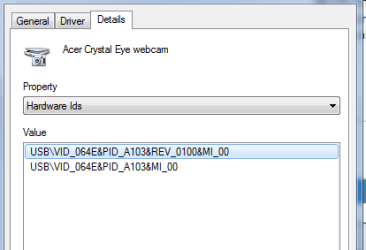
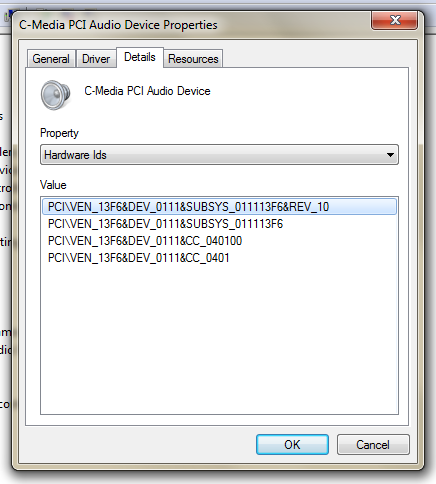
When I go into device manager, there's no tab for "Sound", instead, it shows "other devices" with a question mark symbol next to it, and below it is "multimedia audio controller", which has a yellow warning triangle next to it. Trying to update the drivers does nothing, it apparently can't find any. When I click on the properties for the device, it says "The drivers for this device are not installed. (Code 28)".
I can't seem to find what manufacturer it is or what not, since it lists everything as being "not known".
My computer is a Windows 7 64 bit, doesn't appear to be having any other issues currently aside from the sound not working at all. I've tried plugging in headphones as well (via the USB) to see if I could get sound from that, but nothing.
I haven't made any changes to my computer prior to this, aside from the usual Windows updates it does automatically, but I believe the last one was over a week ago. I did have a very similar problem to this about 2-3 years ago, where no matter what I tried the audio wouldn't work at all. I upgraded my PC from Vista to Windows 7, and still nothing. I ended up having to take it in to a repair store to be looked at, and they had to replace the sound card physically. I hope this current sound card isn't dying again.
Any advice?
Edit: So I tried my headset again, and it looks like I CAN get sound when I've got the headset plugged in via the USB. The speaker icon shows up normally again, and I can get sound perfectly fine through the headphones. It still shows the same results in device manager though, with the "multimedia audio controller" still having a clear issue, and it still won't work with just the standard speakers on the computer, the speaker icon just goes back to having the red cross as soon as I unplug the headset.
So when I woke up my computer from sleep this morning, for whatever reason, the sound didn't appear to be working. Nothing seemed to be amiss, but I simply wasn't getting any sound. When I clicked on the speaker icon and tried adjusting the volume, the bar would show up, but there'd be no sound.
So I tried restarting the computer, and the speaker icon now had a red cross next to it, and says "No audio output device is installed" when hovering over it. Clicking it brings up a "detecting problems" window, but it always says that no problems have been found, and/or that hardware changes may not have been detected.
When I go into device manager, there's no tab for "Sound", instead, it shows "other devices" with a question mark symbol next to it, and below it is "multimedia audio controller", which has a yellow warning triangle next to it. Trying to update the drivers does nothing, it apparently can't find any. When I click on the properties for the device, it says "The drivers for this device are not installed. (Code 28)".
I can't seem to find what manufacturer it is or what not, since it lists everything as being "not known".
My computer is a Windows 7 64 bit, doesn't appear to be having any other issues currently aside from the sound not working at all. I've tried plugging in headphones as well (via the USB) to see if I could get sound from that, but nothing.
I haven't made any changes to my computer prior to this, aside from the usual Windows updates it does automatically, but I believe the last one was over a week ago. I did have a very similar problem to this about 2-3 years ago, where no matter what I tried the audio wouldn't work at all. I upgraded my PC from Vista to Windows 7, and still nothing. I ended up having to take it in to a repair store to be looked at, and they had to replace the sound card physically. I hope this current sound card isn't dying again.
Any advice?
Edit: So I tried my headset again, and it looks like I CAN get sound when I've got the headset plugged in via the USB. The speaker icon shows up normally again, and I can get sound perfectly fine through the headphones. It still shows the same results in device manager though, with the "multimedia audio controller" still having a clear issue, and it still won't work with just the standard speakers on the computer, the speaker icon just goes back to having the red cross as soon as I unplug the headset.
My Computer
- Computer type
- PC/Desktop
- Computer Manufacturer/Model Number
- Commador
- OS
- Windows 7 64 Bit
- CPU
- Intel Core Quad Q6600
- Memory
- 4GB
- Hard Drives
- Two 500GB hard drives