No audio output device installed???

I swear this is going to kill me if I don't get it fixed. And I sure as hell ain't reinstalling the entire damn OS!

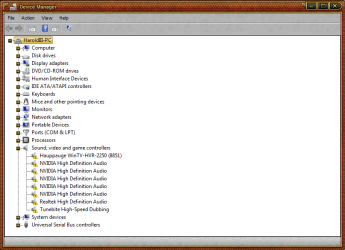
Here's what's shown with a yellow exclamation in Device Manager:
EVERYTHING under Sound, video and game controllers
-Hauppauge WinTV-HVR-2250 (8851)
-Microsoft Streaming Clock Proxy
-Microsoft Streaming Quality Manager Proxy
-Microsoft Streaming Service Proxy
-Microsoft Streaming Tee/Sink-to-Sink Converter (x2)
-Microsoft Trusted Audio Drivers
-NVIDIA High Definition Audio (x5)
-Realtek High Definition Audio

The audio stopped working when I tried a fix to a Blue Screen problem one of the users on this site gave me! Well, I'll tell you something...I would rather get blue screens once in a while than never have sound!

Now since it appears to be this forum's fault, this forum should be able to help me fix the problem!

EDIT: Before you ask, I already tried using System Restore. Several times.
 

My Computer

OS
Windows 7 Professional 32-bit Service Pack 1
CPU
AMD Phenom II X4 925
Motherboard
MSI NF750-G55
Memory
4.0GB Dual-Channel DDR3 @ 533MHz
Graphics Card(s)
NVIDIA GeForce 210
Sound Card
Realtek High Definition Audio
Monitor(s) Displays
HP w1907 19" Monitor
Screen Resolution
1440x900
Hard Drives
320GB Hitachi HDP725032GLA360
500GB Western Digital WD5000AADS-00S9B0
PSU
Cooler Master RS-500-PCAR-A3
Case
Cooler Master Elite 310
Cooling
3 120mm case fans
Keyboard
Microsoft Wireless Keyboard 2000
Mouse
Microsoft Wireless Optical Mouse 2000
Internet Speed
60 Mbps down, 6 Mbps up
Have you tried finding the drivers for your sound card, and TV tuner?

Also can you post a screen shot of your actual Device Manager?

The audio stopped working when I tried a fix to a Blue Screen problem one of the users on this site gave me!

Do you have a link to that post so we can get an idea of what's going on?

Edit. I found it - http://www.sevenforums.com/crashes-debugging/128507-bsod-when-browsing-web.html

Hi smurof; sorry for the delay. Please be patient with us. We are all volunteers here and this is a busy time of year for many of us. Your dump blames memory corruption and does not point to a specific cause. You will have to troubleshoot by the process of elimination..

Well, guess what? It's your fault that I have no audio! So thanks, thanks a lot!

If you can tell me how to fix this without breaking anything else, I would appreciate it.

As CarlT has said, we are volunteers here and try to help fix systems/problems that are not physically in front of us.

I will also add that we take GREAT pride in what we do here and would never want to see someone leave worse off than when they arrived. Nonetheless please remember we can only advise you, it is your responsibility to use this advice wisely. The suggestion/advice we provide is only as good as what we get from you.

I do hope we are able to get you up and running but we are not the ones sitting in front of your computer doing the actual work, you are.

Sorry.
 
Last edited:

My Computer

Computer type
PC/Desktop
Computer Manufacturer/Model Number
Custom built by me.
OS
Windows 10 Pro
CPU
Intel Core i7-4770K (3.5Ghz)
Motherboard
Gigabyte G1 Sniper 5 (F10 Bios)
Memory
32 gig Corsair Dominator Platinum (4x8Gig)
Graphics Card(s)
Sapphire Tri-X R9 Fury
Sound Card
Soundblaster ZXR
Monitor(s) Displays
NEC PA242W 24" LCD Monitor
Screen Resolution
1920 x 1200
Hard Drives
Primary - Samsung 850 Pro (512gig), Samsung 840 Pro (256gig), 2TB WD Caviar Black.
PSU
EVGA Supernova 1000 G2
Case
Cooler Master HAF X
Cooling
Corsair H100i with Corsair Air Series SP120 Quiet Fans
Keyboard
Logitech Wireless Wave
Mouse
Logitech Performance MX
Internet Speed
High Speed Cable
Antivirus
Norton Security
Browser
IE11
Other Info
Memory Timings - 1866MHz @ 9-9-9-27-1T @ 1.5 volts
Have you tried uninstalling these sound drivers then rebooting to let windows reinstall them?
 

My Computer

Computer type
PC/Desktop
Computer Manufacturer/Model Number
Custom Build
OS
Windows 7 Home Premium 64 bit SP1
CPU
Intel i7 4790k
Motherboard
MSI Z97-G55 SLI
Memory
16 GB Corsair 2400 MHz DDR3
Graphics Card(s)
Visiontek Radeon R9 285
Sound Card
None
Monitor(s) Displays
Gateway FHX2402L
Screen Resolution
1920 X 1080
Hard Drives
Samsung 840 EVO 500GB
PSU
Corsair 750 TX
Case
Fractal Design
Cooling
Stock fans
Keyboard
Logitech K800
Mouse
Logitech M510
Internet Speed
60.88 Mbps download 10.47 Mbps upload (Speedtest.net)
Antivirus
Norton
Browser
Opera
Other Info
First Computer used: A Commodore Pet of course
Love using Manjaro KDE Linux 64 bit and Windows 7/10 64 bit
Yes, I have. But apparently installing them does nothing.

Here is the thread: http://www.sevenforums.com/crashes-debugging/128507-bsod-when-browsing-web.html

Also, after another restore (this time unsuccessful) the Microsoft audio entries disappeared.

Commodore, yes I have.

To sum it up, I have done everything I could think of. Clicked on the volume icon with the red ex. Installation failed. Uninstalled everything under "sound video and game controllers." Installation still failed. Uninstalled and reinstalled the Realtek HD Audio Driver. Unsuccessful. Used System Restore. Unsuccessful. Tried to reinstall Realtek from disc this time. Still unsuccessful.
 

Attachments

  • Devmgmt.png
    Devmgmt.png
    130.2 KB · Views: 109

My Computer

OS
Windows 7 Professional 32-bit Service Pack 1
CPU
AMD Phenom II X4 925
Motherboard
MSI NF750-G55
Memory
4.0GB Dual-Channel DDR3 @ 533MHz
Graphics Card(s)
NVIDIA GeForce 210
Sound Card
Realtek High Definition Audio
Monitor(s) Displays
HP w1907 19" Monitor
Screen Resolution
1440x900
Hard Drives
320GB Hitachi HDP725032GLA360
500GB Western Digital WD5000AADS-00S9B0
PSU
Cooler Master RS-500-PCAR-A3
Case
Cooler Master Elite 310
Cooling
3 120mm case fans
Keyboard
Microsoft Wireless Keyboard 2000
Mouse
Microsoft Wireless Optical Mouse 2000
Internet Speed
60 Mbps down, 6 Mbps up
What did you do to break the sound. Do you have a restore point to go back to? Updating drivers should not break the sound. Tell me each thing that you did and we will back track.
 

My Computer

Computer Manufacturer/Model Number
Home built
OS
Windows 7 Ultimate 32 bit
CPU
Intel(R) Pentium(R) 4 CPU 3.00GHz
Motherboard
ASUS P4P800-VM Motherboard Chipset: Intel 865G + ICH5
Memory
2.50 GB RAM
Graphics Card(s)
NVIDIA GeForce 7600 GS
Sound Card
SoundMax Integrated Digital Audio (Chip)
Monitor(s) Displays
ViewSonic VX 1962 wm
Screen Resolution
1680 X 1050
Hard Drives
Seagate Barracuda 7200.10 80 GB
ST380215A ATA Device 18.6 GB
Western Digital "My Book" external hard drive 750 GB
Cooling
Fan based
Keyboard
Microsoft Comfort Curve Keyboard 2000 v10 USB
Mouse
Logitec optic USB
Internet Speed
3.01 Mb/s download 0.64 Mb/s upload
What did you do to break the sound. Do you have a restore point to go back to? Updating drivers should not break the sound. Tell me each thing that you did and we will back track.

Well, that IS what happened. It seems whenever I try to update my graphics card, I have this problem. And I'm not lying.


I will give you my list of things I did to the best of my ability to remember them.
-Removed all entries of "LV..." drivers belonging to a now long-gone Logitech webcam.
-Downloaded Nvidia driver. Installed.
-At this point I have no idea if I restarted or not.
-Uninstalled some HP programs related to an old printer, HP CP1215 (included all programs from same date - HPCarePackCore, HP Software Update, HPSSupply)
-Uninstalled something I never heard of, but apparently HP-related monitoring program. (MrvlUsgTracking)
-At this point, I'm sure I had restarted. When I noticed that I had no sound, I did a system restore.
-I have no idea what the problem was but the sound worked.
-Today when I woke up I turned on my computer to find that the sound stopped working. I tried restoring the computer to no avail.
 

My Computer

OS
Windows 7 Professional 32-bit Service Pack 1
CPU
AMD Phenom II X4 925
Motherboard
MSI NF750-G55
Memory
4.0GB Dual-Channel DDR3 @ 533MHz
Graphics Card(s)
NVIDIA GeForce 210
Sound Card
Realtek High Definition Audio
Monitor(s) Displays
HP w1907 19" Monitor
Screen Resolution
1440x900
Hard Drives
320GB Hitachi HDP725032GLA360
500GB Western Digital WD5000AADS-00S9B0
PSU
Cooler Master RS-500-PCAR-A3
Case
Cooler Master Elite 310
Cooling
3 120mm case fans
Keyboard
Microsoft Wireless Keyboard 2000
Mouse
Microsoft Wireless Optical Mouse 2000
Internet Speed
60 Mbps down, 6 Mbps up
I notice you have 5 Nvidia drivers installed. First you should uninstall your Nvidia graphics card driver and then see if any of these 5 drivers are left, If so remove them. Then reboot and before you install the latest nvidia driver for your graphics card see if sound is working, if so, install the driver for your card and see what happens, if not let me know.
 

My Computer

Computer type
PC/Desktop
Computer Manufacturer/Model Number
Custom Build
OS
Windows 7 Home Premium 64 bit SP1
CPU
Intel i7 4790k
Motherboard
MSI Z97-G55 SLI
Memory
16 GB Corsair 2400 MHz DDR3
Graphics Card(s)
Visiontek Radeon R9 285
Sound Card
None
Monitor(s) Displays
Gateway FHX2402L
Screen Resolution
1920 X 1080
Hard Drives
Samsung 840 EVO 500GB
PSU
Corsair 750 TX
Case
Fractal Design
Cooling
Stock fans
Keyboard
Logitech K800
Mouse
Logitech M510
Internet Speed
60.88 Mbps download 10.47 Mbps upload (Speedtest.net)
Antivirus
Norton
Browser
Opera
Other Info
First Computer used: A Commodore Pet of course
Love using Manjaro KDE Linux 64 bit and Windows 7/10 64 bit
Well, that IS what happened. It seems whenever I try to update my graphics card, I have this problem. And I'm not lying.

The motherboard has integrated Video, a NVIDIA GeForce 8200 and your specs say NVIDIA GeForce 210.

Do you have two graphics cards linked or are you using a PCIe graphics card and have disabled the integrated mainboard video?

All of the nvidia stuff under the audio section is probably the nVidia HDMI driver.

If you're not using the integrated graphics, go into the BIOS and disable it... if it's not already.

Before doing that I'd uninstall everything in the Sound section of Device manager, then reboot, get into BIOS and disable integrated graphics.

Was this an install over the top of WinXP?

Ap
 

My Computer

Computer Manufacturer/Model Number
Assembled in my workshop
OS
Windows 7 Home Premium
CPU
Intel Core 2 Duo @ 3.00gHz
Motherboard
Gigabyte GA-P35-S3G
Memory
4 GB
Graphics Card(s)
ATI Radeon HD 2600 XT
Sound Card
RME 24/96 Card, Realtek Internal Audio PreSonus FireStudio
Monitor(s) Displays
Acer 1917 (x2)
Screen Resolution
1280 x 1024 on both monitors
Hard Drives
Three 250GB Seagate SATA Barracuda 7200rpm
PSU
Rosewill 500-watt
Case
Rosewill mid-tower
Cooling
Noctua NH-U9B (CPU), PwrSupply fan + single large case Fan
Keyboard
Macally w/2/USB ports.
Mouse
Trackman Wheel
Other Info
Event 20/20 bas studio monitors, Yamaha sub.
Rackmount Korg/Roland/Yamaha synthesizers,
Cubase MIDI/audio recording. Sony Soundforge audio/mastering software. CD Architect Mastering. RME & Presonus audio interfaces.

My Computer

Computer type
PC/Desktop
Computer Manufacturer/Model Number
Custom built by me.
OS
Windows 10 Pro
CPU
Intel Core i7-4770K (3.5Ghz)
Motherboard
Gigabyte G1 Sniper 5 (F10 Bios)
Memory
32 gig Corsair Dominator Platinum (4x8Gig)
Graphics Card(s)
Sapphire Tri-X R9 Fury
Sound Card
Soundblaster ZXR
Monitor(s) Displays
NEC PA242W 24" LCD Monitor
Screen Resolution
1920 x 1200
Hard Drives
Primary - Samsung 850 Pro (512gig), Samsung 840 Pro (256gig), 2TB WD Caviar Black.
PSU
EVGA Supernova 1000 G2
Case
Cooler Master HAF X
Cooling
Corsair H100i with Corsair Air Series SP120 Quiet Fans
Keyboard
Logitech Wireless Wave
Mouse
Logitech Performance MX
Internet Speed
High Speed Cable
Antivirus
Norton Security
Browser
IE11
Other Info
Memory Timings - 1866MHz @ 9-9-9-27-1T @ 1.5 volts
What did you do to break the sound. Do you have a restore point to go back to? Updating drivers should not break the sound. Tell me each thing that you did and we will back track.

Well, that IS what happened. It seems whenever I try to update my graphics card, I have this problem. And I'm not lying.


I will give you my list of things I did to the best of my ability to remember them.
-Removed all entries of "LV..." drivers belonging to a now long-gone Logitech webcam.
-Downloaded Nvidia driver. Installed.
-At this point I have no idea if I restarted or not.
-Uninstalled some HP programs related to an old printer, HP CP1215 (included all programs from same date - HPCarePackCore, HP Software Update, HPSSupply)
-Uninstalled something I never heard of, but apparently HP-related monitoring program. (MrvlUsgTracking)
-At this point, I'm sure I had restarted. When I noticed that I had no sound, I did a system restore.
-I have no idea what the problem was but the sound worked.
-Today when I woke up I turned on my computer to find that the sound stopped working. I tried restoring the computer to no avail.

Good work on using the restore point. It is strange that the sound stopped working again after making no changes. When working with drivers, especially drivers that you are unsure about what they go to, it is best to rename them rather than delete them. That way if some does not work you can go back and rename the driver again. I recommend renaming a driver from .sys to .old or .bak.
 

My Computer

Computer Manufacturer/Model Number
Home built
OS
Windows 7 Ultimate 32 bit
CPU
Intel(R) Pentium(R) 4 CPU 3.00GHz
Motherboard
ASUS P4P800-VM Motherboard Chipset: Intel 865G + ICH5
Memory
2.50 GB RAM
Graphics Card(s)
NVIDIA GeForce 7600 GS
Sound Card
SoundMax Integrated Digital Audio (Chip)
Monitor(s) Displays
ViewSonic VX 1962 wm
Screen Resolution
1680 X 1050
Hard Drives
Seagate Barracuda 7200.10 80 GB
ST380215A ATA Device 18.6 GB
Western Digital "My Book" external hard drive 750 GB
Cooling
Fan based
Keyboard
Microsoft Comfort Curve Keyboard 2000 v10 USB
Mouse
Logitec optic USB
Internet Speed
3.01 Mb/s download 0.64 Mb/s upload
@ Aphelion,

You need to understand how he got here.... BSOD when browsing the web

Ah... ok, thanks for that.

I was just looking at the Device manager he posted.

Regardless of anything else... it looks like the nVidia nForce driver package installed the nVidia audio drivers... this used to be a known problem with nVidia driver packages, it will stop all audio from working, (the MB has a Realtek audio chip)

And if he does have integrated video and not using it, shouldn't it be disabled in the BIOS.

Ap
 

My Computer

Computer Manufacturer/Model Number
Assembled in my workshop
OS
Windows 7 Home Premium
CPU
Intel Core 2 Duo @ 3.00gHz
Motherboard
Gigabyte GA-P35-S3G
Memory
4 GB
Graphics Card(s)
ATI Radeon HD 2600 XT
Sound Card
RME 24/96 Card, Realtek Internal Audio PreSonus FireStudio
Monitor(s) Displays
Acer 1917 (x2)
Screen Resolution
1280 x 1024 on both monitors
Hard Drives
Three 250GB Seagate SATA Barracuda 7200rpm
PSU
Rosewill 500-watt
Case
Rosewill mid-tower
Cooling
Noctua NH-U9B (CPU), PwrSupply fan + single large case Fan
Keyboard
Macally w/2/USB ports.
Mouse
Trackman Wheel
Other Info
Event 20/20 bas studio monitors, Yamaha sub.
Rackmount Korg/Roland/Yamaha synthesizers,
Cubase MIDI/audio recording. Sony Soundforge audio/mastering software. CD Architect Mastering. RME & Presonus audio interfaces.
I have a question: do you want me to uninstall all of my graphics drivers? Including the sound (yes I know it's not graphics)?

Will I still be able to see the screen if I do that?
 

My Computer

OS
Windows 7 Professional 32-bit Service Pack 1
CPU
AMD Phenom II X4 925
Motherboard
MSI NF750-G55
Memory
4.0GB Dual-Channel DDR3 @ 533MHz
Graphics Card(s)
NVIDIA GeForce 210
Sound Card
Realtek High Definition Audio
Monitor(s) Displays
HP w1907 19" Monitor
Screen Resolution
1440x900
Hard Drives
320GB Hitachi HDP725032GLA360
500GB Western Digital WD5000AADS-00S9B0
PSU
Cooler Master RS-500-PCAR-A3
Case
Cooler Master Elite 310
Cooling
3 120mm case fans
Keyboard
Microsoft Wireless Keyboard 2000
Mouse
Microsoft Wireless Optical Mouse 2000
Internet Speed
60 Mbps down, 6 Mbps up
I have a question: do you want me to uninstall all of my graphics drivers? Including the sound (yes I know it's not graphics)?

Will I still be able to see the screen if I do that?


Someone had mentioned that, I think the system will install it's own basic drivers.

I was talking up about uninstalling all of the nvidia stuff under sound.
Or installing everything under sound and let Windows find the audio device after a reboot.

I would take a look under control panel/Programs & Features and see if there's any other audio drivers installed besides the Realtek or Microsoft HD.

Ap
 

My Computer

Computer Manufacturer/Model Number
Assembled in my workshop
OS
Windows 7 Home Premium
CPU
Intel Core 2 Duo @ 3.00gHz
Motherboard
Gigabyte GA-P35-S3G
Memory
4 GB
Graphics Card(s)
ATI Radeon HD 2600 XT
Sound Card
RME 24/96 Card, Realtek Internal Audio PreSonus FireStudio
Monitor(s) Displays
Acer 1917 (x2)
Screen Resolution
1280 x 1024 on both monitors
Hard Drives
Three 250GB Seagate SATA Barracuda 7200rpm
PSU
Rosewill 500-watt
Case
Rosewill mid-tower
Cooling
Noctua NH-U9B (CPU), PwrSupply fan + single large case Fan
Keyboard
Macally w/2/USB ports.
Mouse
Trackman Wheel
Other Info
Event 20/20 bas studio monitors, Yamaha sub.
Rackmount Korg/Roland/Yamaha synthesizers,
Cubase MIDI/audio recording. Sony Soundforge audio/mastering software. CD Architect Mastering. RME & Presonus audio interfaces.
Smurof7neves found that his sound problem was caused by a Windows update.
Sorry, Carl. Apparently it was some "critical update" that Windows made to my system, because after I restored the computer to before that, the sound worked again.

On that note, I'm still getting the bluescreens. I have been unsuccessful in updating my graphics software.
http://www.sevenforums.com/crashes-debugging/128507-bsod-when-browsing-web.html#post1118215

We are still working on the cause of the BSOD's.
 

My Computer

Computer Manufacturer/Model Number
Home built
OS
Windows 7 Ultimate 32 bit
CPU
Intel(R) Pentium(R) 4 CPU 3.00GHz
Motherboard
ASUS P4P800-VM Motherboard Chipset: Intel 865G + ICH5
Memory
2.50 GB RAM
Graphics Card(s)
NVIDIA GeForce 7600 GS
Sound Card
SoundMax Integrated Digital Audio (Chip)
Monitor(s) Displays
ViewSonic VX 1962 wm
Screen Resolution
1680 X 1050
Hard Drives
Seagate Barracuda 7200.10 80 GB
ST380215A ATA Device 18.6 GB
Western Digital "My Book" external hard drive 750 GB
Cooling
Fan based
Keyboard
Microsoft Comfort Curve Keyboard 2000 v10 USB
Mouse
Logitec optic USB
Internet Speed
3.01 Mb/s download 0.64 Mb/s upload
Smurof7neves found that his sound problem was caused by a Windows update.
Sorry, Carl. Apparently it was some "critical update" that Windows made to my system, because after I restored the computer to before that, the sound worked again.

On that note, I'm still getting the bluescreens. I have been unsuccessful in updating my graphics software.
http://www.sevenforums.com/crashes-debugging/128507-bsod-when-browsing-web.html#post1118215

We are still working on the cause of the BSOD's.


Thanks-

I had thought audio stopped again.

Good luck on the BSOD's.

Ap
 

My Computer

Computer Manufacturer/Model Number
Assembled in my workshop
OS
Windows 7 Home Premium
CPU
Intel Core 2 Duo @ 3.00gHz
Motherboard
Gigabyte GA-P35-S3G
Memory
4 GB
Graphics Card(s)
ATI Radeon HD 2600 XT
Sound Card
RME 24/96 Card, Realtek Internal Audio PreSonus FireStudio
Monitor(s) Displays
Acer 1917 (x2)
Screen Resolution
1280 x 1024 on both monitors
Hard Drives
Three 250GB Seagate SATA Barracuda 7200rpm
PSU
Rosewill 500-watt
Case
Rosewill mid-tower
Cooling
Noctua NH-U9B (CPU), PwrSupply fan + single large case Fan
Keyboard
Macally w/2/USB ports.
Mouse
Trackman Wheel
Other Info
Event 20/20 bas studio monitors, Yamaha sub.
Rackmount Korg/Roland/Yamaha synthesizers,
Cubase MIDI/audio recording. Sony Soundforge audio/mastering software. CD Architect Mastering. RME & Presonus audio interfaces.
Sorry guys, I meant sound drivers earlier not graphics drivers. This cold medicine that I am on is doing strange things to my mind!
 

My Computer

Computer type
PC/Desktop
Computer Manufacturer/Model Number
Custom Build
OS
Windows 7 Home Premium 64 bit SP1
CPU
Intel i7 4790k
Motherboard
MSI Z97-G55 SLI
Memory
16 GB Corsair 2400 MHz DDR3
Graphics Card(s)
Visiontek Radeon R9 285
Sound Card
None
Monitor(s) Displays
Gateway FHX2402L
Screen Resolution
1920 X 1080
Hard Drives
Samsung 840 EVO 500GB
PSU
Corsair 750 TX
Case
Fractal Design
Cooling
Stock fans
Keyboard
Logitech K800
Mouse
Logitech M510
Internet Speed
60.88 Mbps download 10.47 Mbps upload (Speedtest.net)
Antivirus
Norton
Browser
Opera
Other Info
First Computer used: A Commodore Pet of course
Love using Manjaro KDE Linux 64 bit and Windows 7/10 64 bit
Back
Top