No Audio Output Device is Installed

I've had this problem , i did a systym restore and it started working again ..
 

My Computer My Computer

Computer Manufacturer/Model Number
hewlett-packard
OS
windows 7 home premium 64-bit
CPU
900 @ 2.20Ghz 219Ghz
Memory
2.00Gb
I've had this problem , i did a systym restore and it started working again ..

Hi Skunner,
That's wonderful! But bragging about a fix that worked for you but not the OP here is hardly productive. If you didn't know that this fix would not work here? then you need to try to get in the practice of reading at least the first post completely. It's not always fesible to ead all of them I realize.

please refer to post #1 (esp. this portion):
-I am unable to go back to a restore point. I tried and it failed twice, now there are no additional restore points.

Thank you
Mike
 

My Computer My Computer

Computer Manufacturer/Model Number
Custom self build - Desktop
OS
MS Windows 7 Home Premium SP1 64-bit (Family Pack Lic.) Upgrade
CPU
AMD Phenom II X6: Black Ed 1090T - AM3 / 3.2GHz / 8MB
Motherboard
Biostar TA790XE3
Memory
2 dual ch sets OCZ DDR3 PC3-10666 Platinum 1333MHz 8GB total
Graphics Card(s)
Onboard
Sound Card
Onboard 5.1 channel HD
Monitor(s) Displays
SyncMaster "Legal-sized" LCD (rotatable)
Screen Resolution
unknown (8.5"x15")? pixels are not known
Hard Drives
HDD1: WD RE3 Enterprize [p/n: WD500ABYS-NDW]
________SATA-II (3Gb/s) 500GB/7200rpm/16MB

HDD2: Deskstar 7K1000.C [p/n: HDS721010CLA332]
________SATA-II (3Gb/s) 1TB/7200rpm/32MB
PSU
Antec 900W mATX 20+4 w/6-8SATA;2MLX;4x6(+2)PCIe[p/n HCG-900]
Case
Mid 10-bay tower - free space design interior & well vented
Cooling
CPU HS cooler, 14.5" Case-sysfan1, dual sysfan2, exhaust
Keyboard
Blue Star Ergonomic - ps/2
Mouse
LED coorded w/v. roller wheel - ps/2
Internet Speed
GbLAN 10/100/1000 & WLAN - on T1 (Peer Network)
Other Info
Harmon-Karden speakers (L,R @ sub)

APC (Lead/Acid Batt backup UPC+Surge protector+etc)

Sony DVD SATA(300) - RW DVD/CD SATA-II(300)
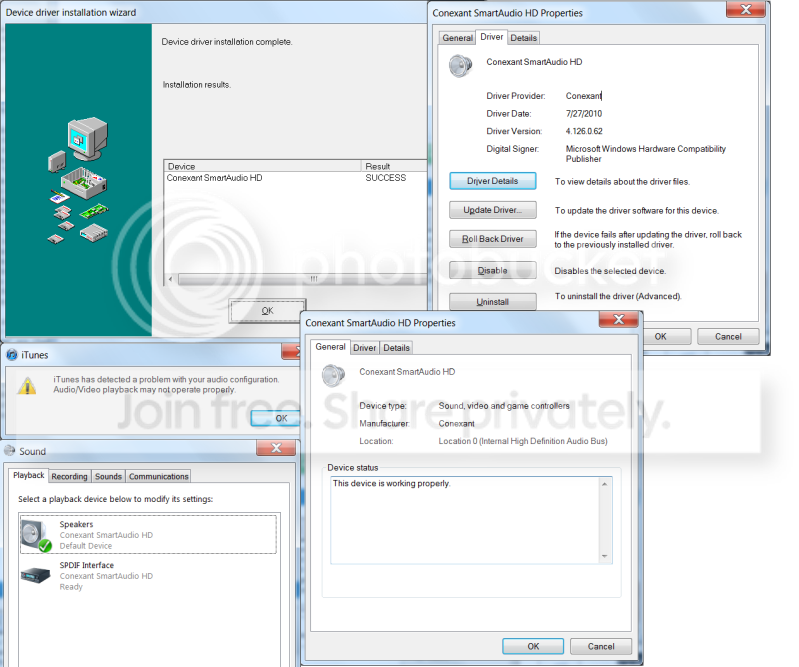
I tried this process (to the best of my ability) to no avail yesterday. I had already downloaded and installed this driver. I just tried again. Looks like no change. When I hover over the x it says "no audio output device is installed". In the sound window there is still the green check next to speakers. This process actually removes the headphones from the list and removes the green circle from the speaker properties>general tab>jack information, fwiw. I didn't mention previously, but itunes leaves an error message when I open it (attached), but will open. When I try to play a song, however, the time bar or whatever doesn't proceed at all like it would if the song were playing.

Dec1SoundDebacle.png


Again, I really appreciate all the work you are doing for me here! Is there any way installing an older driver the same way would fix it? If so, where would I find one?
 
Last edited:

My Computer My Computer

Computer Manufacturer/Model Number
Toshiba Qosmio X505
OS
Windows 7 Home Premium 64 bit
CPU
Intel Core i7 Q 740 @ 1.73 GHz
Sound Card
Conexant SmartAudio HD
Also, what about "NVIDIA"?
 

My Computer My Computer

Computer Manufacturer/Model Number
Toshiba Qosmio X505
OS
Windows 7 Home Premium 64 bit
CPU
Intel Core i7 Q 740 @ 1.73 GHz
Sound Card
Conexant SmartAudio HD
Well the version number is identical to the original release of the driver, and you can't go back further than that., IOW it's their only version for that driver. It is normal for this issue to cause problems with any software that plays audio like often mediaplayer will produce an error even if you try to play a movie w/sound, it wont even show the picture. so iTunes is expected to act like that in response to the source of the problem. I noticed you have a rollback option now, and i don't understand why if the two were the same version. I also noticed in your s-caps that device manager has at least 3-4 of the other driver, for HD output. all named the same This is not normal In any of my experience. I just pulled a customers computer that i had backlogged for probably next week (I have like 15 computers backlogged!) because it has exactly the same issue, although its a HP...well Compaq, same company, but it has the same drivers you do. I checked and confirmed only 2 sound drivers that you downloaded and the HD one.maybe look through the properties and see if they all are enabled or what? I'll work on this one and see if I can figure it out - as hands on is so much easier! (plus i get paid - ironically for the easier way) ha

You might also want to try to look through the error logs for anything weird to do with audio devices or a bunch of critical errors might help find something. I'll do what I can by trying this system - i mean it's identical - missing horizontal vol scrollbars, red x speaker icon and hover message. and the same drives so I might do better for the night (here, it midnight, i don't recall your local but I'll be up all night working anyway to play catchup.

Mike
 

My Computer My Computer

Computer Manufacturer/Model Number
Custom self build - Desktop
OS
MS Windows 7 Home Premium SP1 64-bit (Family Pack Lic.) Upgrade
CPU
AMD Phenom II X6: Black Ed 1090T - AM3 / 3.2GHz / 8MB
Motherboard
Biostar TA790XE3
Memory
2 dual ch sets OCZ DDR3 PC3-10666 Platinum 1333MHz 8GB total
Graphics Card(s)
Onboard
Sound Card
Onboard 5.1 channel HD
Monitor(s) Displays
SyncMaster "Legal-sized" LCD (rotatable)
Screen Resolution
unknown (8.5"x15")? pixels are not known
Hard Drives
HDD1: WD RE3 Enterprize [p/n: WD500ABYS-NDW]
________SATA-II (3Gb/s) 500GB/7200rpm/16MB

HDD2: Deskstar 7K1000.C [p/n: HDS721010CLA332]
________SATA-II (3Gb/s) 1TB/7200rpm/32MB
PSU
Antec 900W mATX 20+4 w/6-8SATA;2MLX;4x6(+2)PCIe[p/n HCG-900]
Case
Mid 10-bay tower - free space design interior & well vented
Cooling
CPU HS cooler, 14.5" Case-sysfan1, dual sysfan2, exhaust
Keyboard
Blue Star Ergonomic - ps/2
Mouse
LED coorded w/v. roller wheel - ps/2
Internet Speed
GbLAN 10/100/1000 & WLAN - on T1 (Peer Network)
Other Info
Harmon-Karden speakers (L,R @ sub)

APC (Lead/Acid Batt backup UPC+Surge protector+etc)

Sony DVD SATA(300) - RW DVD/CD SATA-II(300)
well i guess NVIDIA is not HD per se, at least not exclusively

i really dont know what to make of all the drivesrs for NVIDIA HD. I think the one and only ver is 1,0,0,0 but you could try to download it the same was and

just use NVIDIA HD instead of the previous one (not to be mixed up withe the other NVIDIA drivers for your comuter like video

Mike
 

My Computer My Computer

Computer Manufacturer/Model Number
Custom self build - Desktop
OS
MS Windows 7 Home Premium SP1 64-bit (Family Pack Lic.) Upgrade
CPU
AMD Phenom II X6: Black Ed 1090T - AM3 / 3.2GHz / 8MB
Motherboard
Biostar TA790XE3
Memory
2 dual ch sets OCZ DDR3 PC3-10666 Platinum 1333MHz 8GB total
Graphics Card(s)
Onboard
Sound Card
Onboard 5.1 channel HD
Monitor(s) Displays
SyncMaster "Legal-sized" LCD (rotatable)
Screen Resolution
unknown (8.5"x15")? pixels are not known
Hard Drives
HDD1: WD RE3 Enterprize [p/n: WD500ABYS-NDW]
________SATA-II (3Gb/s) 500GB/7200rpm/16MB

HDD2: Deskstar 7K1000.C [p/n: HDS721010CLA332]
________SATA-II (3Gb/s) 1TB/7200rpm/32MB
PSU
Antec 900W mATX 20+4 w/6-8SATA;2MLX;4x6(+2)PCIe[p/n HCG-900]
Case
Mid 10-bay tower - free space design interior & well vented
Cooling
CPU HS cooler, 14.5" Case-sysfan1, dual sysfan2, exhaust
Keyboard
Blue Star Ergonomic - ps/2
Mouse
LED coorded w/v. roller wheel - ps/2
Internet Speed
GbLAN 10/100/1000 & WLAN - on T1 (Peer Network)
Other Info
Harmon-Karden speakers (L,R @ sub)

APC (Lead/Acid Batt backup UPC+Surge protector+etc)

Sony DVD SATA(300) - RW DVD/CD SATA-II(300)
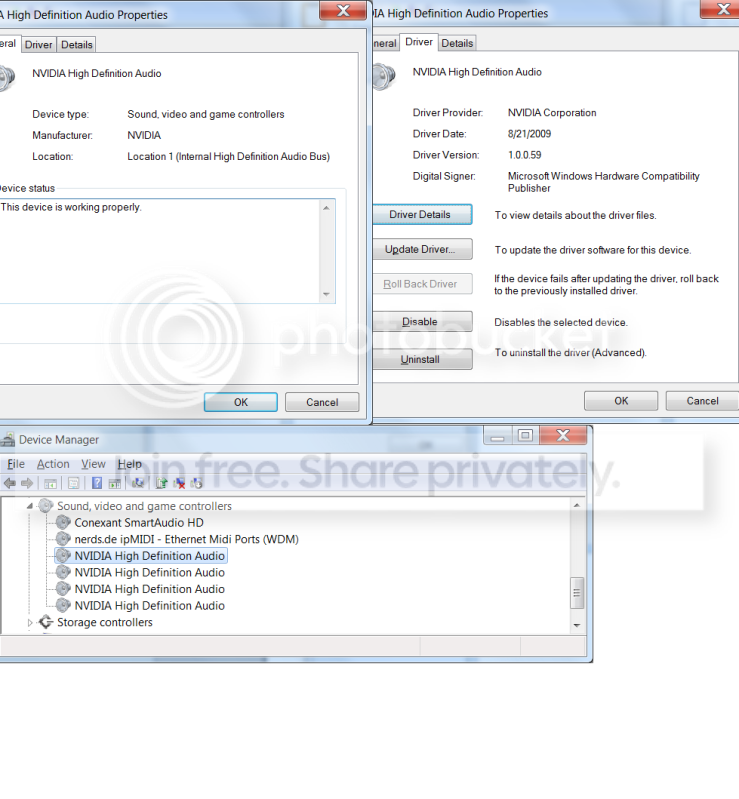
So from the same site, dl the NVIDIA HD Audio Driver and install it via the same process? I'm on it. The four NVIDIA High Definition Audio (drivers? applications?) all seem enabled, but all have the option to update. Should I consider uninstalling the drivers?

Dec1Sound2.png


Also, mediaplayer video is working fine.

edit: dl'd and installed the NVIDIA HD Audio from toshiba's site. No change. I had also tried this yesterday with no results. Mike: Good luck with that machine. I hope you figure it out before I throw my computer off the balcony.
 

My Computer My Computer

Computer Manufacturer/Model Number
Toshiba Qosmio X505
OS
Windows 7 Home Premium 64 bit
CPU
Intel Core i7 Q 740 @ 1.73 GHz
Sound Card
Conexant SmartAudio HD
I really feel like I should be leaving this one to you now Mike.

Just to make a small suggestion though- as I mentioned in earlier post,
there have been noted issues with this model lappy and the original driver
ie: Sound goes up and down, bass bad etc.. is what was reported.

What I'm saying is, if this is still looking like a driver issue and there were probs reported
with the first release, what's to say there isn't a prob with the latest release? I was sort of
alluding to trying to find a mid release driver for this model if that's the way of putting it.

It's just that also as previously mentioned, with an A200 I still have and the webcam driver that wouldn't work, I went back a few releases which I sort of saw as a "mid" release of the driver.

Hope I'm not just getting in the way here? :zip:
 

My Computer My Computer

OS
Windows 7 Home Premium 64 Bit OS
Allonthebus: If you can find one please let me know. At this point I am thinking of sacrificing a live animal.
 

My Computer My Computer

Computer Manufacturer/Model Number
Toshiba Qosmio X505
OS
Windows 7 Home Premium 64 bit
CPU
Intel Core i7 Q 740 @ 1.73 GHz
Sound Card
Conexant SmartAudio HD
Well Cruxone,
I feel your frustration, but in my experience, animal sacrifice is VERRRY rarely an effective fix. ;)

@AllOnTheBus - By all means, this is an open forum, and advice is always welcome from anyone! Any idea where a driver as your describing could be found, as the manufacturer only has one release, it's their most current one, and it was the original factory install version.

I've got a com paq laptop here w/the same issue, and I'm getting rather frustrated myself. Last night I did some poking around, and SF and the web is riddled with the exact same issue, and i have yet to see someone solve it, and reply back as fixed.

Mike
 

My Computer My Computer

Computer Manufacturer/Model Number
Custom self build - Desktop
OS
MS Windows 7 Home Premium SP1 64-bit (Family Pack Lic.) Upgrade
CPU
AMD Phenom II X6: Black Ed 1090T - AM3 / 3.2GHz / 8MB
Motherboard
Biostar TA790XE3
Memory
2 dual ch sets OCZ DDR3 PC3-10666 Platinum 1333MHz 8GB total
Graphics Card(s)
Onboard
Sound Card
Onboard 5.1 channel HD
Monitor(s) Displays
SyncMaster "Legal-sized" LCD (rotatable)
Screen Resolution
unknown (8.5"x15")? pixels are not known
Hard Drives
HDD1: WD RE3 Enterprize [p/n: WD500ABYS-NDW]
________SATA-II (3Gb/s) 500GB/7200rpm/16MB

HDD2: Deskstar 7K1000.C [p/n: HDS721010CLA332]
________SATA-II (3Gb/s) 1TB/7200rpm/32MB
PSU
Antec 900W mATX 20+4 w/6-8SATA;2MLX;4x6(+2)PCIe[p/n HCG-900]
Case
Mid 10-bay tower - free space design interior & well vented
Cooling
CPU HS cooler, 14.5" Case-sysfan1, dual sysfan2, exhaust
Keyboard
Blue Star Ergonomic - ps/2
Mouse
LED coorded w/v. roller wheel - ps/2
Internet Speed
GbLAN 10/100/1000 & WLAN - on T1 (Peer Network)
Other Info
Harmon-Karden speakers (L,R @ sub)

APC (Lead/Acid Batt backup UPC+Surge protector+etc)

Sony DVD SATA(300) - RW DVD/CD SATA-II(300)
Well Cruxone,


I've got a com paq laptop here w/the same issue, and I'm getting rather frustrated myself. Last night I did some poking around, and SF and the web is riddled with the exact same issue, and i have yet to see someone solve it, and reply back as fixed.

Mike


This is grim news.:sick::mad2:

Was there a windows update that screwed a bunch of people?

What is my next step? Is there a last resort? Factory restore?
 

My Computer My Computer

Computer Manufacturer/Model Number
Toshiba Qosmio X505
OS
Windows 7 Home Premium 64 bit
CPU
Intel Core i7 Q 740 @ 1.73 GHz
Sound Card
Conexant SmartAudio HD
Don't do a restore yet cruxone - ten deep breaths my friend!

At the Toshiba website for your model- this model being available in the U.S
and with a particular download site for your model has older drivers
for both the Conexant and Nvidia. What I am saying here is that I have located
your model, which I cant find drivers for on the Australian Toshiba support site
because that model is not sold here in Ausville.

Therefore, go back to the Support site for your model here: Model Content Page
(you will need to disregard some of my further instructions as this link opens your models driver download pages directly)

Click the download tab at this site which brings up the search feature.
Enter your model to search for your drivers- select the search criteria
Laptops in the first bit, Qosmio in the second bit and X505-Q890 in the
third bit.

Go to page two list of your drivers. You will notice that each driver is written
in blue- directly next to this is a small grey coloured square with a + symbol-
click on that square and there you will find listed the older drivers for your devices.

Uninstall the drivers you have on your machine from the Device manager again.
Download the earliest release of both the Conexant and Nvidia drivers in the
expanded sections for each of these (look for the earliest driver release date)

In effect- what you are doing by downloading and installing these drivers is a "rollback"
to a previous release which you may find to be stable.

Let us know how you go- I know this can be very frustrating but
don't throw the towel in just yet- chin up soldier! :)

By the way, if this by some chance does happen to work- I would be writing a very lengthy
email to the supplier of those latest driver releases and giving them a right old spray!
 

My Computer My Computer

OS
Windows 7 Home Premium 64 Bit OS
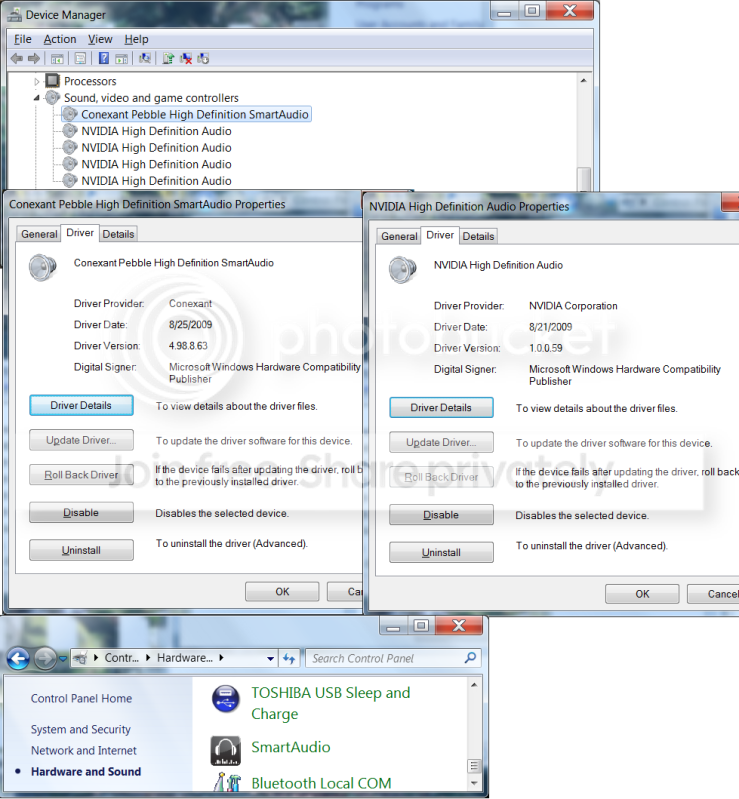
This didn't help. Conexant now says "Pebble" fwiw.

SoundDec2.png


Does the fact that, when I click this SmartAudio icon, it flashes for a split second on the screen and then disappears, have anything to do with it?

Also, if I buy USB Speakers will they work?

What is the next step here? Do I try the middle release? Did you get that compaq working?

Thanks for all the trouble you have been going through for me. Lets get this fixed!
 

My Computer My Computer

Computer Manufacturer/Model Number
Toshiba Qosmio X505
OS
Windows 7 Home Premium 64 bit
CPU
Intel Core i7 Q 740 @ 1.73 GHz
Sound Card
Conexant SmartAudio HD
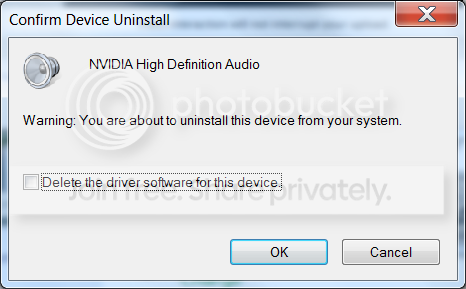
Uninstallwindow.png


I checked that box when I uninstalled. Was I not supposed to?
 

My Computer My Computer

Computer Manufacturer/Model Number
Toshiba Qosmio X505
OS
Windows 7 Home Premium 64 bit
CPU
Intel Core i7 Q 740 @ 1.73 GHz
Sound Card
Conexant SmartAudio HD
Ok- let's try again

By the way- uninstalling an re-installing drivers isn't going to do
any more damage- it can only serve to help , so don't panic.

It doesn't matter that you uninstalled the Nvidia driver as mentioned in
your last post as we are trying to find one that works and this is what NEEDS
to be done.

The drivers you have installed (as I can see in your screenshots) were the earliest releases
as I suggested. I remember saying that earlier I would steer clear of these as the
research I have done indicated that many people with your laptop model were unhappy
with the performance it provided the devices. At least now we have eliminated these earliest
release drivers as not working- or at least not working on your system. I am unsure why this would be the case in any situation.

Now again- I know this is painful, but try all the other releases starting with
Conexant Audio Driver(v4.98.16.61; 11-12-2009; 37.41M)

being for Conexant

and

nVidia HD Audio Driver for Windows 7 (32/64)(v1.00.00.55; 10-23-2009; 9.95M)

for Nvidia

After this I would try
Conexant Audio Driver(v4.121.0.60; 05-06-2010; 40.78M)
for Conexant. There are no other drivers available for Nvidia
so if this fails I would try combinations of each of the drivers to see if you
can get a working result.

Hint: Save all the drivers to your desktop so you are not using download
for the same downloads repeatedly.

If this doesn't work then at the moment I'll have to admit that I'm
starting to run fresh out of ideas. This being the case I would possibly start
assessing backing up whatever I could and doing a factory restore. Seeing as though
you are abroad, you may be concerned about needing recovery disks to do this,
however Toshiba ship with a recovery partition and there should be software
on your system which will allow you to do the factory restore from this recovery partition
and without the need for the recovery disks (which by the way you would/ should have
created when you first purchased your laptop)

Try the drivers first and then let me know if you want to factory restore and I'll find out exactly what
procedure you will need to accomplish this. Also let me know if want any advice on how to back
up what you need.

One last thing- you didn't happen to download that movie you were watching
through a shonky torrent site or something did you? Maybe we are back to the possibility
of malware or infection if this were the case. Even if malware isn't detected by a malware program doesn't mean that there is no malware- it could be slipping under the radar maybe.

 

My Computer My Computer

OS
Windows 7 Home Premium 64 Bit OS
Cruxone- this is important and I see that you are still viewing this post.

If you are reading this please respond - I have something for you
 

My Computer My Computer

OS
Windows 7 Home Premium 64 Bit OS
I am. Just tried all of the drivers
 

My Computer My Computer

Computer Manufacturer/Model Number
Toshiba Qosmio X505
OS
Windows 7 Home Premium 64 bit
CPU
Intel Core i7 Q 740 @ 1.73 GHz
Sound Card
Conexant SmartAudio HD
...to no avail.
 

My Computer My Computer

Computer Manufacturer/Model Number
Toshiba Qosmio X505
OS
Windows 7 Home Premium 64 bit
CPU
Intel Core i7 Q 740 @ 1.73 GHz
Sound Card
Conexant SmartAudio HD
OK - if you get this it may be a bonus!

I can't believe I missed this after the amount of posts we have
been through here, but it seems that the answer may have been
in front of us the whole time- like literally.

If you have a look under the part of this thread where it
says Post Quick Reply there is a link to another thread
titled "No audio devices are installed".

I have read this thread and then done a Google search
and came up with the following page: No sound in Windows 7 Pro 64 bit - Audio Service not started - Audio - Microsoft Answers

Now these instructions mention turning on the power service (in local services)
and the reason for this tutorial is due to a setting which can stop all audio
in Windows 7.

I aplogise if this has been a painful procedure, however after finding this Microsoft Answers article
my suggestion would be to get the LATEST drivers back on (and these have to be the correct
ones as they relate to the model number) and check that the Power service is set
as recommended in this article- you could maybe even go straight to the Power service check part
of what I am saying here and see what it is reporting.

Hope to hear some good news shortly- fingers crossed! (Please Lord- oh please let it be!!!)
 

My Computer My Computer

OS
Windows 7 Home Premium 64 Bit OS
On it! Fingers crossed xxx
 

My Computer My Computer

Computer Manufacturer/Model Number
Toshiba Qosmio X505
OS
Windows 7 Home Premium 64 bit
CPU
Intel Core i7 Q 740 @ 1.73 GHz
Sound Card
Conexant SmartAudio HD
Back
Top