
No Icons. Tried everything Help

cybertron989

New member
Local time
5:35 AM
Messages
13
I am experiencing this problem from sometime. I've tried almost everything.
Already read and tried all possible solutions from these forums
http://www.sevenforums.com/performance-maintenance/168865-iconcache-db-problem.html
http://www.sevenforums.com/tutorials/49819-icon-cache-rebuild.html
I never deleted the .db file. Moreover there is no iconcache.db file in any of my other computers in c:\users\username\appdata\local.
Has tried automatic iconcache builders, the color depth trick, system restore.
Help me Please i am in urgent need of you people.

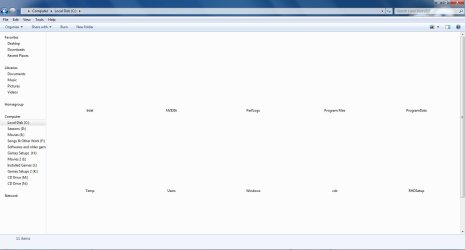
I have attached the pictures of my desktop and explorer for closer looks. Please help
 

Attachments
  • C drive.jpg
    C drive.jpg
    47.4 KB · Views: 33
  • desktop.jpg
    desktop.jpg
    79.4 KB · Views: 37
  • My computer.jpg
    My computer.jpg
    69.1 KB · Views: 27

My Computer

OS
Windows 7 Ultimate 32 Bit

My Computer

Computer Manufacturer/Model Number
Hewlett packard/p6512uk
OS
Microsoft Windows 7 Home Premium 64-bit 7600
CPU
IIx4 amd athelon 635 processor
Motherboard
FOXCONN 2AA9
Memory
2x2gb
Graphics Card(s)
ati radeon HD 5450
Sound Card
(1) Realtek High Definition Audio (2) AMD High Definition
Monitor(s) Displays
samsung lcd tv 32"
Screen Resolution
1360x 768
Hard Drives
(1) WDC WD10 01FAES-60Z2A0 SATA Disk Device (2) Maxtor OneTouch USB Device (3) ST310003 33AS USB Device (4) WD My Book 1111 USB Device
PSU
?
Cooling
air!
Keyboard
wireless hp
Mouse
wireless Hp,optical
Internet Speed
1.10mb/s
Antivirus
MSE
Browser
Firefox

My Computer

Computer type
PC/Desktop
Computer Manufacturer/Model Number
Self assembled
OS
Windows 10 Home 64Bit
CPU
Intel Core i5 10400 @ 2.90GHz
Motherboard
Intel Corporation DG41WV (PROCESSOR)
Memory
8.00GB Single-Channel Unknown @ 1329MHz (16-20-20-38)
Sound Card
Realtek High Definition Audio
Monitor(s) Displays
DELL E170S
Screen Resolution
1280x1024 pixels
Hard Drives
931GB TOSHIBA DT01ACA100 (SATA)
238GB TEAM TM8PS7256G (SATA SSD)
Case
Nothing Fancy
Cooling
Fans
Keyboard
A4 Tech Co LTD
Mouse
A4 Tech Co Ltd/Logitech
Internet Speed
25 Mbps
You missed all the system icons and third party programs icons throughout the system , and rebuilding icon cache etc didn't work?

You told almost everything . I am asking one more thing out of curiosity ... have you shifter from/to DVI\VGA etc shortly ? If so, try getting back to the native one.

IMO, one thing is left which solves almost all of the issues, that is http://www.sevenforums.com/tutorials/3413-repair-install.html .
 

My Computer

Computer type
PC/Desktop
Computer Manufacturer/Model Number
Self Assembled
OS
Microsoft Windows 10 Pro Insider Preview 64-bit
CPU
Intel(R) Core(TM) i3-4130 CPU @ 3.40GHz
Motherboard
Gigabyte Technology Co., Ltd. B85M-D3H
Memory
Corsair Vengence 4GB x2 (8.00GB Dual-Channel DDR3 @ 798MHz)
Graphics Card(s)
2047MB GeForce GTS 450 (ZOTAC International)
Sound Card
Onboard (Realtek High Definition Audio)
Monitor(s) Displays
LG Flatron E2040T
Screen Resolution
1600x900
Hard Drives
Western Digital 1 TB
Seagate 500 GB
PSU
Corsair VS550
Case
Cooler Master K380
Cooling
Cooler Master Seidon 120V Plus
Keyboard
Logitech MK260r
Mouse
Logitech MK260r
Internet Speed
PMPL Broadband
Antivirus
Windows Defender + MBAM
Browser
Firefox
Other Info
Dell Studio 15" Laptop
I am experiencing this problem from sometime. I've tried almost everything.
Already read and tried all possible solutions from these forums
http://www.sevenforums.com/performance-maintenance/168865-iconcache-db-problem.html
http://www.sevenforums.com/tutorials/49819-icon-cache-rebuild.html
I never deleted the .db file. Moreover there is no iconcache.db file in any of my other computers in c:\users\username\appdata\local.
Has tried automatic iconcache builders, the color depth trick, system restore.
Help me Please i am in urgent need of you people.

I have attached the pictures of my desktop and explorer for closer looks. Please help


If you were to logon to another user account, or create another user account with exactly the same account type as the one you had trouble, were the desktop icons present ?
 

My Computer

Computer Manufacturer/Model Number
Acer Aspire 7741Z
OS
Windows 7 Home Premium 64-bit, SP1
CPU
Intel Pentium P6200, Cores 2, 2.13 GHz
Memory
4 GB
Graphics Card(s)
Intel HD
Sound Card
unknown
Monitor(s) Displays
17.3 inches
Screen Resolution
1600 x 900
Hard Drives
640 GB, 5400 PRM
You missed all the system icons and third party programs icons throughout the system , and rebuilding icon cache etc didn't work?

You told almost everything . I am asking one more thing out of curiosity ... have you shifter from/to DVI\VGA etc shortly ? If so, try getting back to the native one.

IMO, one thing is left which solves almost all of the issues, that is http://www.sevenforums.com/tutorials/3413-repair-install.html .

Yeah i tried that 2-3 hours before the problem occurred. However the DVI port didn't work so i switched back to the VGA one.
 

My Computer

OS
Windows 7 Ultimate 32 Bit
You missed all the system icons and third party programs icons throughout the system , and rebuilding icon cache etc didn't work?

You told almost everything . I am asking one more thing out of curiosity ... have you shifter from/to DVI\VGA etc shortly ? If so, try getting back to the native one.

IMO, one thing is left which solves almost all of the issues, that is http://www.sevenforums.com/tutorials/3413-repair-install.html .

Yeah i tried that 2-3 hours before the problem occurred. However the DVI port didn't work so i switched back to the VGA one.
That is what I expected :( Sometimes these operations mess up display partially, but you got it seriously.

I'd suggest you to disconnect the VGA completely from both the ends , and then connect it back .

If still not worked, you may need to uninstall and reinstall your display driver .
 

My Computer

Computer type
PC/Desktop
Computer Manufacturer/Model Number
Self Assembled
OS
Microsoft Windows 10 Pro Insider Preview 64-bit
CPU
Intel(R) Core(TM) i3-4130 CPU @ 3.40GHz
Motherboard
Gigabyte Technology Co., Ltd. B85M-D3H
Memory
Corsair Vengence 4GB x2 (8.00GB Dual-Channel DDR3 @ 798MHz)
Graphics Card(s)
2047MB GeForce GTS 450 (ZOTAC International)
Sound Card
Onboard (Realtek High Definition Audio)
Monitor(s) Displays
LG Flatron E2040T
Screen Resolution
1600x900
Hard Drives
Western Digital 1 TB
Seagate 500 GB
PSU
Corsair VS550
Case
Cooler Master K380
Cooling
Cooler Master Seidon 120V Plus
Keyboard
Logitech MK260r
Mouse
Logitech MK260r
Internet Speed
PMPL Broadband
Antivirus
Windows Defender + MBAM
Browser
Firefox
Other Info
Dell Studio 15" Laptop
You missed all the system icons and third party programs icons throughout the system , and rebuilding icon cache etc didn't work?

You told almost everything . I am asking one more thing out of curiosity ... have you shifter from/to DVI\VGA etc shortly ? If so, try getting back to the native one.

IMO, one thing is left which solves almost all of the issues, that is http://www.sevenforums.com/tutorials/3413-repair-install.html .

Yeah i tried that 2-3 hours before the problem occurred. However the DVI port didn't work so i switched back to the VGA one.
That is what I expected :( Sometimes these operations mess up display partially, but you got it seriously.

I'd suggest you to disconnect the VGA completely from both the ends , and then connect it back .

If still not worked, you may need to uninstall and reinstall your display driver .

Done. Nothing happened. :cry:
 

My Computer

OS
Windows 7 Ultimate 32 Bit
Apparently there is no other way left but doing a clean install . I asked for more help in this thread, please wait a bit ... there may be any alternative way to fix it .
 

My Computer

Computer type
PC/Desktop
Computer Manufacturer/Model Number
Self Assembled
OS
Microsoft Windows 10 Pro Insider Preview 64-bit
CPU
Intel(R) Core(TM) i3-4130 CPU @ 3.40GHz
Motherboard
Gigabyte Technology Co., Ltd. B85M-D3H
Memory
Corsair Vengence 4GB x2 (8.00GB Dual-Channel DDR3 @ 798MHz)
Graphics Card(s)
2047MB GeForce GTS 450 (ZOTAC International)
Sound Card
Onboard (Realtek High Definition Audio)
Monitor(s) Displays
LG Flatron E2040T
Screen Resolution
1600x900
Hard Drives
Western Digital 1 TB
Seagate 500 GB
PSU
Corsair VS550
Case
Cooler Master K380
Cooling
Cooler Master Seidon 120V Plus
Keyboard
Logitech MK260r
Mouse
Logitech MK260r
Internet Speed
PMPL Broadband
Antivirus
Windows Defender + MBAM
Browser
Firefox
Other Info
Dell Studio 15" Laptop
Apparently there is no other way left but doing a clean install . I asked for more help in this thread, please wait a bit ... there may be any alternative way to fix it .
Don't say that :cry::cry::cry::cry::cry:
 

My Computer

OS
Windows 7 Ultimate 32 Bit
Have you tried:

  • Toggling your "Personalize" settings (e.g. resolution, themes, Aero on/off)?
  • Reinstalling your graphics driver?
 
Last edited:

My Computer

Computer type
PC/Desktop
Computer Manufacturer/Model Number
n/a
OS
W7 Ultimate SP1, LM19.2 MATE, W10 Home 1703, W10 Pro 1703 VM, #All 64 bit
CPU
AMD Phenom II x6 1100T, 3.3 GHz
Motherboard
ASUS M4A88T-M/USB3 (AM3)
Memory
12GB DDR3 1333 G-Skill (4GB x 2), G-Skill (2GB x 2)
Graphics Card(s)
NVIDIA GeForce GTX 660
Sound Card
Realtek?
Monitor(s) Displays
Samsung S23B350
Screen Resolution
1920x1080
Hard Drives
WD Green 2TB (SATA), WD Green 3TB (SATA), WD Blue 4TB (SATA), WD Blue 6TB (SATA)
PSU
Cooler Master
Case
Antec GX300 Tower
Cooling
3x Antec TRICOOL 120mm Fans
Mouse
Wired Optical
Internet Speed
DSL
Antivirus
Avast
Browser
Pale Moon (64 bit)
Other Info
2018-12-27 Upgraded HDDs
2015-12-10 Upgraded case, graphics card, storage
2015-08-15 Upgraded motherboard & RAM
2015-07-15 Upgraded LM17.1 to LM17.2
If i had a windows disk. i would have performed a clean install till now
 

My Computer

OS
Windows 7 Ultimate 32 Bit
If you have the OEM manufacturers system recovery disk, you can go for a factory restore, obviously after making all your data backed up secured .
 

My Computer

Computer type
PC/Desktop
Computer Manufacturer/Model Number
Self Assembled
OS
Microsoft Windows 10 Pro Insider Preview 64-bit
CPU
Intel(R) Core(TM) i3-4130 CPU @ 3.40GHz
Motherboard
Gigabyte Technology Co., Ltd. B85M-D3H
Memory
Corsair Vengence 4GB x2 (8.00GB Dual-Channel DDR3 @ 798MHz)
Graphics Card(s)
2047MB GeForce GTS 450 (ZOTAC International)
Sound Card
Onboard (Realtek High Definition Audio)
Monitor(s) Displays
LG Flatron E2040T
Screen Resolution
1600x900
Hard Drives
Western Digital 1 TB
Seagate 500 GB
PSU
Corsair VS550
Case
Cooler Master K380
Cooling
Cooler Master Seidon 120V Plus
Keyboard
Logitech MK260r
Mouse
Logitech MK260r
Internet Speed
PMPL Broadband
Antivirus
Windows Defender + MBAM
Browser
Firefox
Other Info
Dell Studio 15" Laptop
Where did you get Win7? What is the version and bit-rate? How is it activated?
 
Vendor gave me installed with the pc. 32 bit
 

My Computer

OS
Windows 7 Ultimate 32 Bit
What is the licensed version printed on the COA sticker on machine? Is it 32- or 64-bit?

Is the Product Key readable? Back it up now as it is good for the life of the machine, for Repair Installs and Reinstalls.
 
i can't reinstall the OS dudes. if possible tell me the correction methods of problem
 

My Computer

OS
Windows 7 Ultimate 32 Bit
Back
Top