No icons when I open My Computer

crassulaca

New member
Local time
10:57 PM
Messages
2
My laptop is an eMachines E725 with a 3GB DDR3 RAM. I installed the Windows 7 Ultimate 32-bit version on it. When I open 'My Computer', I can't see any icons sometimes. I can't even see the thumbnails of picture files. In order to correct that, I have to go to Control Panel everytime, close it, and then open 'My Computer'. How can I get rid of this problem?

I wish I could explain it in better detail but my computer lingo isn't that great. PLEASE HELP ME!
 

My Computer My Computer

OS
Windows 7 Ultimate x32
Last edited:

My Computer My Computer

Computer type
PC/Desktop
Computer Manufacturer/Model Number
Dell XPS 420
OS
Windows 10, Home Clean Install
CPU
Intel Core2 processsor Q8200(2.33Ghz 1333FSB) Quad Core Tech
Motherboard
Dell
Memory
6 gb
Graphics Card(s)
ATI Radeon 256MB HD3650
Sound Card
Intergrated 7.1 Channel Audio
Monitor(s) Displays
Dell SP2009W 20"
Hard Drives
640 GB Serial ATA Hard drive
Cooling
Fan
Keyboard
Dell USB Keyboard
Mouse
Dell Premium Optical USB
Internet Speed
DSL 2.85
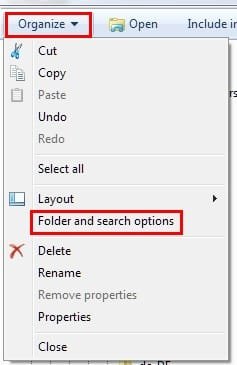
Try resetting your folder views by opening Explorer and clicking on "Organize" then clicking "Folder and Search Options"
Screenshot_1.jpg

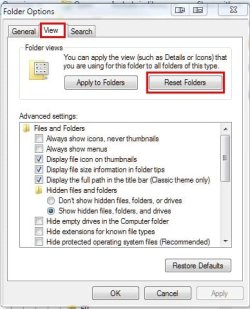
Then go to the "View" tab and, finally, click on "Reset Folders"
Screenshot_2.jpg
 

My Computer My Computer

Computer Manufacturer/Model Number
Toshiba L355D
OS
Windows 7 Ultimate x64 SP1
CPU
Core2 Duo
Motherboard
Intel
Memory
4 GB
Graphics Card(s)
GM965 on-board
Sound Card
RealTek on-board
Monitor(s) Displays
19"+17"(laptop)
Screen Resolution
1440x900 (x 2)
Hard Drives
500GB Ext. 200GB Internal
PSU
N/A
Case
N/A
Cooling
N/A
Guys, guys, neither of the methods has worked. I've taken a snapshot of how it looks like:
Is there any other way it can be corrected? PLEASE HELP!
 

Attachments

  • SnapShot_090902.png
    SnapShot_090902.png
    18.4 KB · Views: 36
Last edited:

My Computer My Computer

OS
Windows 7 Ultimate x32
Back
Top