
PatentPendingX
New member
- Local time
- 4:36 PM
- Messages
- 3
My sound has always been working just fine. I usually had it plugged in the front panel of my Ultra eTorque case and I had the Realtek HD audio driver installed. But earlier today, I moved my computer to the living room to connect it to the TV through the DVI port and when I had my computer displayed on the plasma TV through HDMI, my sound just disappeared. All I did was unplug the cables to move it to the living room and connect it back and then it just stopped working.
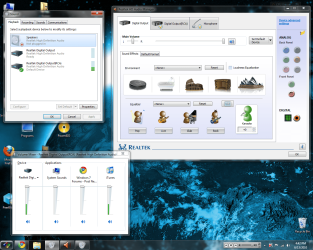
What's worse is how the Audio Manager is just acting... odd. For example, right now I have no speakers or anything connected to any audio jacks or mic jacks or anything of the sort. And yet, when I pull up the manager, it says there's a mic already plugged into the front panel. I've never even owned a mic so it's a bit odd to me why this would happen. And I have iTunes playing in the background and it shows the audio is playing as Realtek Digital Output(RCA), but nothing's coming out, as you can see in the first picture.
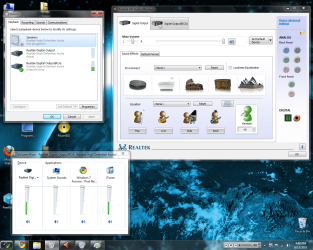
Now to top that off, I go ahead and plug in the speakers into the front panel, and a few things happen. First, the "mic" is unplugged and I get a warning in the bottom corner says an audio device has been unplugged, as seen in the second screenshot. Then, I get an odd pulsating high pitch from the speakers, it's not very noticeable but it's there and it's definitely not normal. I've already tried plugging it into the rear panel but no success.
I've already searched through the forums and haven't found anything to help that I haven't already tried. I'm not sure if this is relevant, but if someone can assure me that this could be my solution, I'd be heavily grateful.
http://www.sevenforums.com/sound-audio/2197-realtek-hd-changing-jack-output-reassignments-fix.html
I'm just hoping to get a bit of help here, and I'll be more than happy to give more information or try a few things you guys have to suggest. Thanks in advance!
What's worse is how the Audio Manager is just acting... odd. For example, right now I have no speakers or anything connected to any audio jacks or mic jacks or anything of the sort. And yet, when I pull up the manager, it says there's a mic already plugged into the front panel. I've never even owned a mic so it's a bit odd to me why this would happen. And I have iTunes playing in the background and it shows the audio is playing as Realtek Digital Output(RCA), but nothing's coming out, as you can see in the first picture.
Now to top that off, I go ahead and plug in the speakers into the front panel, and a few things happen. First, the "mic" is unplugged and I get a warning in the bottom corner says an audio device has been unplugged, as seen in the second screenshot. Then, I get an odd pulsating high pitch from the speakers, it's not very noticeable but it's there and it's definitely not normal. I've already tried plugging it into the rear panel but no success.
I've already searched through the forums and haven't found anything to help that I haven't already tried. I'm not sure if this is relevant, but if someone can assure me that this could be my solution, I'd be heavily grateful.
http://www.sevenforums.com/sound-audio/2197-realtek-hd-changing-jack-output-reassignments-fix.html
I'm just hoping to get a bit of help here, and I'll be more than happy to give more information or try a few things you guys have to suggest. Thanks in advance!
Attachments
Last edited:
My Computer
At a glance
Windows 7 UltimateIntel Duo Quad Core1GB DDR2 RAM, 4GB ReadyBoost RAMEVGA GeForce FX 5500
- Computer Manufacturer/Model Number
- Handmade Computer
- OS
- Windows 7 Ultimate
- CPU
- Intel Duo Quad Core
- Motherboard
- XFX nForce 750i Sli Motherboard (Extreme Black Edition)
- Memory
- 1GB DDR2 RAM, 4GB ReadyBoost RAM
- Graphics Card(s)
- EVGA GeForce FX 5500
- Sound Card
- 7.1channel Azalia (HAD)
- Monitor(s) Displays
- 17" LCD
- Hard Drives
- 150 GB Western Digital ATA
75 GB Seagate ATA
40 GB Seagate ATA
25 GB Western Digital ATA
- PSU
- HP 250Watt ATX Power Supply
- Case
- Ultra eTorque ULT33180 Mid-Tower ATX Case
- Cooling
- Socket 775 w/ Advanced Copper Base OEM CPU Fan
