No USB Icon on Taskbar

Leo625

New member
Member
Local time
4:15 PM
Messages
70
So I recently built a PC...
MSI B450M PRO-M2
Ryzen 5 1200 w/fan
Gigabyte 4350 video card...

I used SIW2's really neat tool to integrate Simplix, Abbodi's Vis C++, DotNet, and the drivers that SIW2 provided.
Everything went perfect concerning the install and except for one puzzling hiccup all is well...
When I plug a USB device into one of the board receptacles Windows 7 doesn't acknowledge the device by putting the USB icon on the task bar.
When I go to Disk Management or Computer the USB device shows up no problem and I can use any of the devices I have tried. In addition, there is no way to shut down the device from the task bar since the USB icon isn't there.
So I added reg. entries for a "no usb" problem from the Tutorials section but even though now I see the icon on the desktop (not the taskbar), I still don't have the USB device show up.
I'm thinking maybe a driver conflict? But when I look at the USB hardware properties there are no indications of a conflict (no bangs!). Any advice is appreciated.
 

My Computer

Computer type
PC/Desktop
Computer Manufacturer/Model Number
Leo625`s Amazing Time Killers
OS
Win 7 Ultimate X64
CPU
AMD RYZEN 5 2600
Motherboard
GIGABYTE X470 AORUS Gaming 7 WIFI
Memory
MEM 2Gx8|G.SKILL AEGIS
Graphics Card(s)
NVIDIA 750 Ti
Sound Card
MB
Monitor(s) Displays
LG
Screen Resolution
1920 X 1080
Hard Drives
WD 1TB Black
PSU
Corsair 750
Case
Old and Sturdy
Cooling
3 - 120MM Fans and CoolerMaster Hyper 612 on CPU
Keyboard
Logitech wired and lighted
Mouse
Logitech wireless
Browser
Firefox
Maybe someone will correct me but, to my knowledge, devices aren't shown on the taskbar. They would be shown in Windows Explorer.
 

My Computer

Computer type
Laptop
Computer Manufacturer/Model Number
Dell M6500 Precision Work Station
OS
Windows 7 Pro SP1 64 bit
Memory
8 GB
Screen Resolution
1920x
Internet Speed
30 Mbps
Antivirus
Norton Security
Browser
IE 11
Leo625:

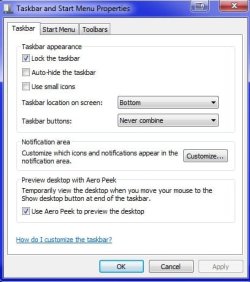
Do you have this taskbar setting selected?
 

Attachments

  • Capture.JPG
    Capture.JPG
    10.7 KB · Views: 23

My Computer

Computer type
PC/Desktop
Computer Manufacturer/Model Number
Dell OptiPlex 9020
OS
Windows 7 Professional SP1 64-bit
CPU
Intel Core i7-4790 3.60 GHz
Memory
32 GB DDR3-1600 MHz
Graphics Card(s)
Integrated Intel HD Graphics 4600
Monitor(s) Displays
Viewsonic 32" LCD
Hard Drives
Kingston SATA 3 240 GB SSD
Internet Speed
Spectrum Internet 1000 Mbps
I took a look at that and, after installing a flash drive, it didn't show up in the list. I do have a drive set up to open AutoPlay so those options came up. Other USB devices, such as my printer, etc., don't show up.
 

My Computer

Computer type
Laptop
Computer Manufacturer/Model Number
Dell M6500 Precision Work Station
OS
Windows 7 Pro SP1 64 bit
Memory
8 GB
Screen Resolution
1920x
Internet Speed
30 Mbps
Antivirus
Norton Security
Browser
IE 11
Weird. When I plug in any USB device normally, a little icon shows up on my taskbar. It isn't an icon for that particular device. Just a generic Windows USB icon. Then, when I get ready to unplug a USB device I simply click on this icon and a message comes up which lists all USB devices and I can choose which to disconnect.
I've installed this Win 7 several times over the years and had no problem till now.
 

My Computer

Computer type
PC/Desktop
Computer Manufacturer/Model Number
Leo625`s Amazing Time Killers
OS
Win 7 Ultimate X64
CPU
AMD RYZEN 5 2600
Motherboard
GIGABYTE X470 AORUS Gaming 7 WIFI
Memory
MEM 2Gx8|G.SKILL AEGIS
Graphics Card(s)
NVIDIA 750 Ti
Sound Card
MB
Monitor(s) Displays
LG
Screen Resolution
1920 X 1080
Hard Drives
WD 1TB Black
PSU
Corsair 750
Case
Old and Sturdy
Cooling
3 - 120MM Fans and CoolerMaster Hyper 612 on CPU
Keyboard
Logitech wired and lighted
Mouse
Logitech wireless
Browser
Firefox
The only place I've seen that kind of setup is under the Safely Remove Devices icon in the notifications area. Is that what you're referring to? You would have to select Show Hidden Icons in the taskbar to see that icon.
 

My Computer

Computer type
Laptop
Computer Manufacturer/Model Number
Dell M6500 Precision Work Station
OS
Windows 7 Pro SP1 64 bit
Memory
8 GB
Screen Resolution
1920x
Internet Speed
30 Mbps
Antivirus
Norton Security
Browser
IE 11
Right click the task bar below and select properties. Now see if your options for the Taskbar match mine at least.
 

Attachments

  • ygjngy.jpg
    ygjngy.jpg
    56.1 KB · Views: 19

My Computer

Computer type
PC/Desktop
OS
Windows 7 Ultimate x64
F22 Simpilot Yes my Taskbar settings match yours.

And yes wither 2 it is the Safely Remove Devices icon that is missing. Thanks! Couldn't remember the name!
 

My Computer

Computer type
PC/Desktop
Computer Manufacturer/Model Number
Leo625`s Amazing Time Killers
OS
Win 7 Ultimate X64
CPU
AMD RYZEN 5 2600
Motherboard
GIGABYTE X470 AORUS Gaming 7 WIFI
Memory
MEM 2Gx8|G.SKILL AEGIS
Graphics Card(s)
NVIDIA 750 Ti
Sound Card
MB
Monitor(s) Displays
LG
Screen Resolution
1920 X 1080
Hard Drives
WD 1TB Black
PSU
Corsair 750
Case
Old and Sturdy
Cooling
3 - 120MM Fans and CoolerMaster Hyper 612 on CPU
Keyboard
Logitech wired and lighted
Mouse
Logitech wireless
Browser
Firefox
Actually, it's called Safely Remove Hardware. My mistake. :(

In the screen shot above, click on Customize. Scroll through the list. Is that option there? If so, change its Behavior to Show.
 

My Computer

Computer type
Laptop
Computer Manufacturer/Model Number
Dell M6500 Precision Work Station
OS
Windows 7 Pro SP1 64 bit
Memory
8 GB
Screen Resolution
1920x
Internet Speed
30 Mbps
Antivirus
Norton Security
Browser
IE 11
I have "Show All Icons and Notifications" selected. Still no "Safely Remove Hardware" icon.
 

My Computer

Computer type
PC/Desktop
Computer Manufacturer/Model Number
Leo625`s Amazing Time Killers
OS
Win 7 Ultimate X64
CPU
AMD RYZEN 5 2600
Motherboard
GIGABYTE X470 AORUS Gaming 7 WIFI
Memory
MEM 2Gx8|G.SKILL AEGIS
Graphics Card(s)
NVIDIA 750 Ti
Sound Card
MB
Monitor(s) Displays
LG
Screen Resolution
1920 X 1080
Hard Drives
WD 1TB Black
PSU
Corsair 750
Case
Old and Sturdy
Cooling
3 - 120MM Fans and CoolerMaster Hyper 612 on CPU
Keyboard
Logitech wired and lighted
Mouse
Logitech wireless
Browser
Firefox
Guess what? I've haven't been on my Win 7 system for a while. I got on it last night and, just like you, the Safely Remove.......... is also not available. It's supposed to be under Windows Explorer in the notifications section but that's not there.
 

My Computer

Computer type
Laptop
Computer Manufacturer/Model Number
Dell M6500 Precision Work Station
OS
Windows 7 Pro SP1 64 bit
Memory
8 GB
Screen Resolution
1920x
Internet Speed
30 Mbps
Antivirus
Norton Security
Browser
IE 11
Did you ever get this squared away. I'm thinking that it's not on mine because Dell installs it's own software that may disable it.
 

My Computer

Computer type
Laptop
Computer Manufacturer/Model Number
Dell M6500 Precision Work Station
OS
Windows 7 Pro SP1 64 bit
Memory
8 GB
Screen Resolution
1920x
Internet Speed
30 Mbps
Antivirus
Norton Security
Browser
IE 11
Back
Top