
Solved No users shown at login screen?

QuentinX5

New member
Local time
7:22 AM
Messages
16
Alright, so I did as much research and tried as many different methods as I could to solve this issue, but I am afraid that it is far too different from other problems that people are talking about, and here is why...
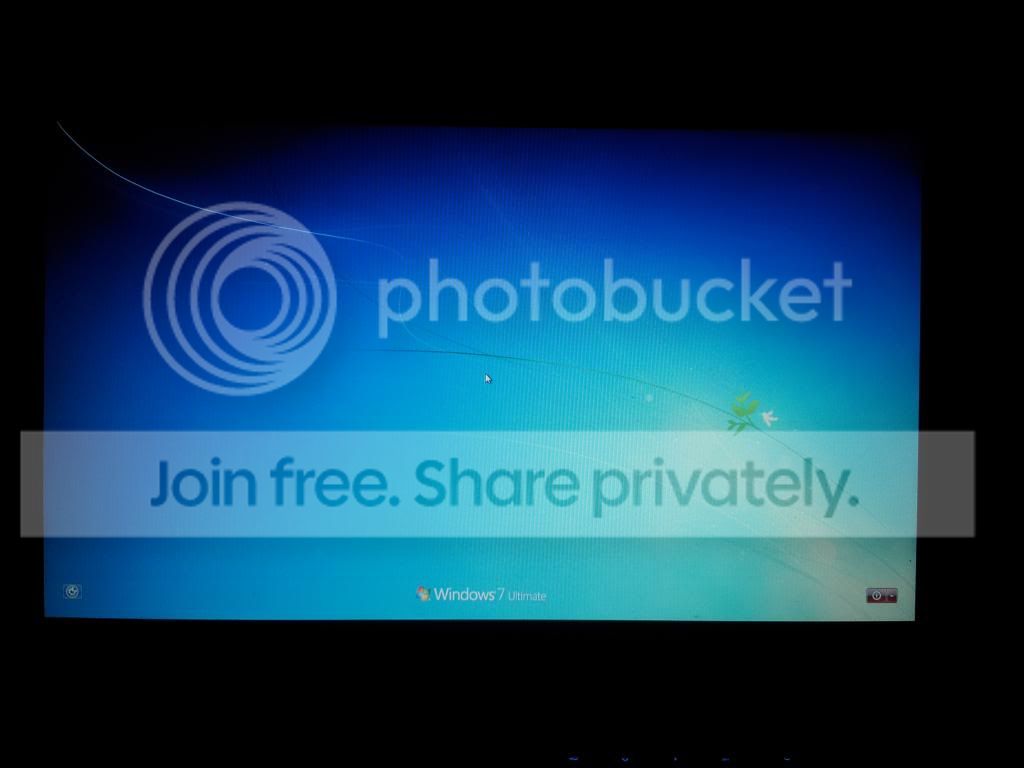
IMG_20130705_224632_zps3bbdd53d.jpg


The above photo shown is the Windows 7 Login Screen, and lo and behind, there is no users to be found at all! Only the shutdown commands. Now, some people have suggested trying to ALT+CTRL+DEL twice to show the users, and this doesn't work. There was also an idea to go WinKey + R to bring up CMD (correct me if I am wrong on this, mainly because I can't do it. :P), but this idea does nothing as well. There was also a suggestion about editing your registry under HKEY_LOCAL_MACHINE...\ProfileLists, but this does nothing either. This only happens when I try to access the account normally. I can log in just fine in Safe Mode.

Does anyone have any clue as to what could be going on? I'm ridiculously stumped, especially because I've never even seen or heard of something like this happening, and my first thought was a virus, but I can't even run a proper virus scan on the HD in Safe Mode... Any ideas at all?
Thank you for any and all help. :D
 

My Computer

Computer type
PC/Desktop
Computer Manufacturer/Model Number
QuentinX5 - Custom Build
OS
Windows 7 Professional x64
CPU
Intel i7 4771 @ 3.6 GHz
Motherboard
ASUS ROG Maximus IV
Memory
8 GB DDR3-1333
Graphics Card(s)
NVIDIA GeForce GTX 750Ti
Monitor(s) Displays
Samsung 23" & Acer 19" Widescreen Displays
Hard Drives
OCZ Technology Vertex4 256 GB SSD
Western Digital Blue 1 TB HD
Cooling
Stock fan/chassis fan cooling
Keyboard
Logitech G510s Gaming Keyboard
Mouse
Logitech M510
Internet Speed
Comcast ISP
Antivirus
Kaspersky Internet Security
Browser
Mozilla/Chrome
Are there user accounts in Safe Mode? If yes, try creating a new user account with administrator privileges while you're in Safe Mode.
 

My Computer

Computer type
PC/Desktop
Computer Manufacturer/Model Number
Samsung Series 3 NP300V5A
OS
Windows 7 Ultimate x64
CPU
Intel® Core™ i7-2670QM
Memory
8GB DDR3 1333Mhz
Graphics Card(s)
1GB Nvidia 520MX
Monitor(s) Displays
1
Screen Resolution
1366x768
Hard Drives
750GB HDD
Plus other external HDD's
PSU
(laptop)
Internet Speed
~300Mbit
Antivirus
Eset 5.2.9.1
Browser
Chrome v.26
Other Info
(laptop)
Hello Quentin,

You might see if you may be able to do a system restore at boot using a restore point (if available) dated before this happened to hopefully undo and fix this.

Hope this helps, :)
Shawn
 

My Computer

Computer type
PC/Desktop
Computer Manufacturer/Model Number
Self built custom
OS
64-bit Windows 11 Pro for Workstations
CPU
Intel i7-8700K OC'd to 5 GHz
Motherboard
ASUS ROG Maximus XI Formula Z390
Memory
64 GB (4x16GB) G.SKILL TridentZ RGB DDR4 3600 MHz
Graphics Card(s)
ASUS ROG-STRIX-GTX1080TI-O11G-GAMING
Sound Card
Integrated
Monitor(s) Displays
2 x Samsung Odyssey G7 27"
Screen Resolution
2560x1440
Hard Drives
1TB Samsung 990 PRO M.2,
4TB Samsung 990 PRO PRO M.2,
TerraMaster F8 SSD Plus NAS
PSU
Seasonic Prime Titanium 850W
Case
Thermaltake Core P3
Cooling
Corsair Hydro H115i
Keyboard
Logitech wireless K800
Mouse
Logitech MX Master 4
Internet Speed
2 Gb/s Download and 100 Mb/s Upload
Antivirus
Malwarebyte Anti-Malware Premium
Browser
Google Chrome
Other Info
Logitech Z625 speaker system,
Logitech BRIO 4K Pro webcam,
HP Color LaserJet Pro MFP M477fdn,
APC SMART-UPS RT 1000 XL - SURT1000XLI,
Galaxy S23 Plus phone
Open up the registry in Safe Mode

Click :orb: type regedit inside
2nqbqes.png
when you see REGEDIT inside the start menu right click on REGEDIT and choose
mawket.jpg
and click the Yes button if you get a UAC window .

Inside the registry navigate to

  • HKEY_LOCAL_MACHINE
  • SOFTWARE
  • Microsoft
  • Windows
  • CurrentVersion
  • Policies
  • System

On the right hand side see if you see dontdisplaylastusername it might have a value of 1 if it does change it to 0 by right clicking on dontdisplaylastusername and choose Modify and just delete the 1 and input 0 and click Ok button close the registry and try to login .
 

My Computer

Computer Manufacturer/Model Number
Custom Built
OS
Windows 7 Ultimate 32-Bit & Windows 7 Ultimate 64-Bit
CPU
Intel Core i7 CPU 950 @ 3.07GHz
Motherboard
ASUS P6T DELUXE V2
Memory
OCZ 6GB (3 x 2GB) 240-Pin DDR3 SDRAM DDR3 1600 OCZ3X1600R2
Graphics Card(s)
ATI Radeon HD 5700 Series
Sound Card
OnBoard
Hard Drives
WD6400AACS-00M3B0 (640GB SATA )
PSU
CORSAIR 850w
Case
NZXT LEXA
Cooling
Intel Stock Heatsink Fan
Keyboard
Microsoft Wireless Laser Keyboard 7000
Mouse
Microsoft Wireless Laser Mouse 7000
Are there user accounts in Safe Mode? If yes, try creating a new user account with administrator privileges while you're in Safe Mode.

The user accounts are there in safe mode. I tried creating another account and it still didn't show up... :X

Hello Quentin,

You might see if you may be able to do a system restore at boot using a restore point (if available) dated before this happened to hopefully undo and fix this.

Hope this helps, :)
Shawn

You guys are going to smack me for this one...
I had a backup, but I formatted the drive because it was running low on space and it was scheduled to do a backup last night before this happened. -.-
*EDIT* Apparently a System Restore is different than a backup, but that still didn't fix it. :P

Open up the registry in Safe Mode

Click :orb: type regedit inside
2nqbqes.png
when you see REGEDIT inside the start menu right click on REGEDIT and choose
mawket.jpg
and click the Yes button if you get a UAC window .

Inside the registry navigate to

  • HKEY_LOCAL_MACHINE
  • SOFTWARE
  • Microsoft
  • Windows
  • CurrentVersion
  • Policies
  • System

On the right hand side see if you see dontdisplaylastusername it might have a value of 1 if it does change it to 0 by right clicking on dontdisplaylastusername and choose Modify and just delete the 1 and input 0 and click Ok button close the registry and try to login .

It had a value of 0, so I'll try changing it to 1 and seeing what happens.
Nope, that didn't do me any good. :P


Don't know if this will help anyone, but when I was trying to log in to the computer at first, it started creating these profiles, like Quentin.Quentin-PC (User, Computer Name), Quentin.Quentin-PC 001, etc.
I ended up deleting them and it finally made a User folder called TEMP when I logged in and said that "Windows cannot find the local profile and is logging you on with a temporary profile. Changes you make to this profile will be lost when you log off."
I found a couple other errors in the Event Viewer talking about how the computer was not assigned an address from the network. This computer isn't set up to run from a network, so could that be the issue?
 
Last edited:

My Computer

Computer type
PC/Desktop
Computer Manufacturer/Model Number
QuentinX5 - Custom Build
OS
Windows 7 Professional x64
CPU
Intel i7 4771 @ 3.6 GHz
Motherboard
ASUS ROG Maximus IV
Memory
8 GB DDR3-1333
Graphics Card(s)
NVIDIA GeForce GTX 750Ti
Monitor(s) Displays
Samsung 23" & Acer 19" Widescreen Displays
Hard Drives
OCZ Technology Vertex4 256 GB SSD
Western Digital Blue 1 TB HD
Cooling
Stock fan/chassis fan cooling
Keyboard
Logitech G510s Gaming Keyboard
Mouse
Logitech M510
Internet Speed
Comcast ISP
Antivirus
Kaspersky Internet Security
Browser
Mozilla/Chrome
Lets see something else . Open the registry once more navigate to

HKEY_Local_Machine\SOFTWARE\Microsoft\Windows NT\CurrentVersion\Winlogon\SpecialAccounts\UserList

Are there any user names on the right side when you click on UserList on the left side ?
 

My Computer

Computer Manufacturer/Model Number
Custom Built
OS
Windows 7 Ultimate 32-Bit & Windows 7 Ultimate 64-Bit
CPU
Intel Core i7 CPU 950 @ 3.07GHz
Motherboard
ASUS P6T DELUXE V2
Memory
OCZ 6GB (3 x 2GB) 240-Pin DDR3 SDRAM DDR3 1600 OCZ3X1600R2
Graphics Card(s)
ATI Radeon HD 5700 Series
Sound Card
OnBoard
Hard Drives
WD6400AACS-00M3B0 (640GB SATA )
PSU
CORSAIR 850w
Case
NZXT LEXA
Cooling
Intel Stock Heatsink Fan
Keyboard
Microsoft Wireless Laser Keyboard 7000
Mouse
Microsoft Wireless Laser Mouse 7000
Lets see something else . Open the registry once more navigate to

HKEY_Local_Machine\SOFTWARE\Microsoft\Windows NT\CurrentVersion\Winlogon\SpecialAccounts\UserList

Are there any user names on the right side when you click on UserList on the left side ?

The farthest I can get is to Winlogon. There is no SpecialAccounts.
 

My Computer

Computer type
PC/Desktop
Computer Manufacturer/Model Number
QuentinX5 - Custom Build
OS
Windows 7 Professional x64
CPU
Intel i7 4771 @ 3.6 GHz
Motherboard
ASUS ROG Maximus IV
Memory
8 GB DDR3-1333
Graphics Card(s)
NVIDIA GeForce GTX 750Ti
Monitor(s) Displays
Samsung 23" & Acer 19" Widescreen Displays
Hard Drives
OCZ Technology Vertex4 256 GB SSD
Western Digital Blue 1 TB HD
Cooling
Stock fan/chassis fan cooling
Keyboard
Logitech G510s Gaming Keyboard
Mouse
Logitech M510
Internet Speed
Comcast ISP
Antivirus
Kaspersky Internet Security
Browser
Mozilla/Chrome
Open up an Elevated Command Prompt. Click on :orb: in
2nqbqes.png
type CMD . Right click on CMD under Programs (1) choose
mawket.jpg
. On the User Access Control window click on the Yes button . Command Prompt opens up to C:\Windows\System32>_

In the Command prompt type in the highlighted item below

wmic useraccount get name,sid > %UserProfile%\Desktop\UserAccounts.txt and press [ENTER] key

UserAccounts.txt will be on the desktop upload the file
 

My Computer

Computer Manufacturer/Model Number
Custom Built
OS
Windows 7 Ultimate 32-Bit & Windows 7 Ultimate 64-Bit
CPU
Intel Core i7 CPU 950 @ 3.07GHz
Motherboard
ASUS P6T DELUXE V2
Memory
OCZ 6GB (3 x 2GB) 240-Pin DDR3 SDRAM DDR3 1600 OCZ3X1600R2
Graphics Card(s)
ATI Radeon HD 5700 Series
Sound Card
OnBoard
Hard Drives
WD6400AACS-00M3B0 (640GB SATA )
PSU
CORSAIR 850w
Case
NZXT LEXA
Cooling
Intel Stock Heatsink Fan
Keyboard
Microsoft Wireless Laser Keyboard 7000
Mouse
Microsoft Wireless Laser Mouse 7000
Open up an Elevated Command Prompt. Click on :orb: in
2nqbqes.png
type CMD . Right click on CMD under Programs (1) choose
mawket.jpg
. On the User Access Control window click on the Yes button . Command Prompt opens up to C:\Windows\System32>_

In the Command prompt type in the highlighted item below

wmic useraccount get name,sid > %UserProfile%\Desktop\UserAccounts.txt and press [ENTER] key

UserAccounts.txt will be on the desktop upload the file

Here's the information in it:

Code:
Name            SID                                             
Administrator   S-1-5-21-3073979907-1502391631-1876639865-500   
Guest           S-1-5-21-3073979907-1502391631-1876639865-501   
HomeGroupUser$  S-1-5-21-3073979907-1502391631-1876639865-1002  
Quentin         S-1-5-21-3073979907-1502391631-1876639865-1001

It's also attached in case you need the actual .txt file
 

Attachments

My Computer

Computer type
PC/Desktop
Computer Manufacturer/Model Number
QuentinX5 - Custom Build
OS
Windows 7 Professional x64
CPU
Intel i7 4771 @ 3.6 GHz
Motherboard
ASUS ROG Maximus IV
Memory
8 GB DDR3-1333
Graphics Card(s)
NVIDIA GeForce GTX 750Ti
Monitor(s) Displays
Samsung 23" & Acer 19" Widescreen Displays
Hard Drives
OCZ Technology Vertex4 256 GB SSD
Western Digital Blue 1 TB HD
Cooling
Stock fan/chassis fan cooling
Keyboard
Logitech G510s Gaming Keyboard
Mouse
Logitech M510
Internet Speed
Comcast ISP
Antivirus
Kaspersky Internet Security
Browser
Mozilla/Chrome
Open up the registry in Safe Mode

Click :orb: type regedit inside
2nqbqes.png
when you see REGEDIT inside the start menu right click on REGEDIT and choose
mawket.jpg
and click the Yes button if you get a UAC window .

Inside the registry navigate to

  • HKEY_LOCAL_MACHINE
  • SOFTWARE
  • Microsoft
  • Windows
  • CurrentVersion
  • Policies
  • System

On the right hand side see if you see dontdisplaylastusername it might have a value of 1 if it does change it to 0 by right clicking on dontdisplaylastusername and choose Modify and just delete the 1 and input 0 and click Ok button close the registry and try to login .


VistaKing,

Sorry, but that has absolutely nothing to do with Quentin's issue. That's only to log in by having to type both user name and password instead of just password. ;)

http://www.sevenforums.com/tutorials/61650-log-user-name-password.html
 

My Computer

Computer type
PC/Desktop
Computer Manufacturer/Model Number
Self built custom
OS
64-bit Windows 11 Pro for Workstations
CPU
Intel i7-8700K OC'd to 5 GHz
Motherboard
ASUS ROG Maximus XI Formula Z390
Memory
64 GB (4x16GB) G.SKILL TridentZ RGB DDR4 3600 MHz
Graphics Card(s)
ASUS ROG-STRIX-GTX1080TI-O11G-GAMING
Sound Card
Integrated
Monitor(s) Displays
2 x Samsung Odyssey G7 27"
Screen Resolution
2560x1440
Hard Drives
1TB Samsung 990 PRO M.2,
4TB Samsung 990 PRO PRO M.2,
TerraMaster F8 SSD Plus NAS
PSU
Seasonic Prime Titanium 850W
Case
Thermaltake Core P3
Cooling
Corsair Hydro H115i
Keyboard
Logitech wireless K800
Mouse
Logitech MX Master 4
Internet Speed
2 Gb/s Download and 100 Mb/s Upload
Antivirus
Malwarebyte Anti-Malware Premium
Browser
Google Chrome
Other Info
Logitech Z625 speaker system,
Logitech BRIO 4K Pro webcam,
HP Color LaserJet Pro MFP M477fdn,
APC SMART-UPS RT 1000 XL - SURT1000XLI,
Galaxy S23 Plus phone
Hello Quentin,

You might see if you may be able to do a system restore at boot using a restore point (if available) dated before this happened to hopefully undo and fix this.

Hope this helps, :)
Shawn

You guys are going to smack me for this one...
I had a backup, but I formatted the drive because it was running low on space and it was scheduled to do a backup last night before this happened. -.-
*EDIT* Apparently a System Restore is different than a backup, but that still didn't fix it. :P

If available, you might try using an older restore point to see if it may work instead.
 

My Computer

Computer type
PC/Desktop
Computer Manufacturer/Model Number
Self built custom
OS
64-bit Windows 11 Pro for Workstations
CPU
Intel i7-8700K OC'd to 5 GHz
Motherboard
ASUS ROG Maximus XI Formula Z390
Memory
64 GB (4x16GB) G.SKILL TridentZ RGB DDR4 3600 MHz
Graphics Card(s)
ASUS ROG-STRIX-GTX1080TI-O11G-GAMING
Sound Card
Integrated
Monitor(s) Displays
2 x Samsung Odyssey G7 27"
Screen Resolution
2560x1440
Hard Drives
1TB Samsung 990 PRO M.2,
4TB Samsung 990 PRO PRO M.2,
TerraMaster F8 SSD Plus NAS
PSU
Seasonic Prime Titanium 850W
Case
Thermaltake Core P3
Cooling
Corsair Hydro H115i
Keyboard
Logitech wireless K800
Mouse
Logitech MX Master 4
Internet Speed
2 Gb/s Download and 100 Mb/s Upload
Antivirus
Malwarebyte Anti-Malware Premium
Browser
Google Chrome
Other Info
Logitech Z625 speaker system,
Logitech BRIO 4K Pro webcam,
HP Color LaserJet Pro MFP M477fdn,
APC SMART-UPS RT 1000 XL - SURT1000XLI,
Galaxy S23 Plus phone
I don't see a temp account .

Have you tried what Brink preferred
 

My Computer

Computer Manufacturer/Model Number
Custom Built
OS
Windows 7 Ultimate 32-Bit & Windows 7 Ultimate 64-Bit
CPU
Intel Core i7 CPU 950 @ 3.07GHz
Motherboard
ASUS P6T DELUXE V2
Memory
OCZ 6GB (3 x 2GB) 240-Pin DDR3 SDRAM DDR3 1600 OCZ3X1600R2
Graphics Card(s)
ATI Radeon HD 5700 Series
Sound Card
OnBoard
Hard Drives
WD6400AACS-00M3B0 (640GB SATA )
PSU
CORSAIR 850w
Case
NZXT LEXA
Cooling
Intel Stock Heatsink Fan
Keyboard
Microsoft Wireless Laser Keyboard 7000
Mouse
Microsoft Wireless Laser Mouse 7000
Hello Quentin,

You might see if you may be able to do a system restore at boot using a restore point (if available) dated before this happened to hopefully undo and fix this.

Hope this helps, :)
Shawn

You guys are going to smack me for this one...
I had a backup, but I formatted the drive because it was running low on space and it was scheduled to do a backup last night before this happened. -.-
*EDIT* Apparently a System Restore is different than a backup, but that still didn't fix it. :P

If available, you might try using an older restore point to see if it may work instead.

That did the trick. My best guess would be the registry got corrupted somehow...

I don't see a temp account .

Have you tried what Brink preferred

I deleted the temporary account and restored permissions so I could access my actual account, which is why you don't see it. :P
 

My Computer

Computer type
PC/Desktop
Computer Manufacturer/Model Number
QuentinX5 - Custom Build
OS
Windows 7 Professional x64
CPU
Intel i7 4771 @ 3.6 GHz
Motherboard
ASUS ROG Maximus IV
Memory
8 GB DDR3-1333
Graphics Card(s)
NVIDIA GeForce GTX 750Ti
Monitor(s) Displays
Samsung 23" & Acer 19" Widescreen Displays
Hard Drives
OCZ Technology Vertex4 256 GB SSD
Western Digital Blue 1 TB HD
Cooling
Stock fan/chassis fan cooling
Keyboard
Logitech G510s Gaming Keyboard
Mouse
Logitech M510
Internet Speed
Comcast ISP
Antivirus
Kaspersky Internet Security
Browser
Mozilla/Chrome
The Restore fixed your issue ?
 

My Computer

Computer Manufacturer/Model Number
Custom Built
OS
Windows 7 Ultimate 32-Bit & Windows 7 Ultimate 64-Bit
CPU
Intel Core i7 CPU 950 @ 3.07GHz
Motherboard
ASUS P6T DELUXE V2
Memory
OCZ 6GB (3 x 2GB) 240-Pin DDR3 SDRAM DDR3 1600 OCZ3X1600R2
Graphics Card(s)
ATI Radeon HD 5700 Series
Sound Card
OnBoard
Hard Drives
WD6400AACS-00M3B0 (640GB SATA )
PSU
CORSAIR 850w
Case
NZXT LEXA
Cooling
Intel Stock Heatsink Fan
Keyboard
Microsoft Wireless Laser Keyboard 7000
Mouse
Microsoft Wireless Laser Mouse 7000
The Restore fixed your issue ?

Yeah. The first restore I tried from 7/5 did nothing, but the second one that went back to 6/30 fixed it.
 

My Computer

Computer type
PC/Desktop
Computer Manufacturer/Model Number
QuentinX5 - Custom Build
OS
Windows 7 Professional x64
CPU
Intel i7 4771 @ 3.6 GHz
Motherboard
ASUS ROG Maximus IV
Memory
8 GB DDR3-1333
Graphics Card(s)
NVIDIA GeForce GTX 750Ti
Monitor(s) Displays
Samsung 23" & Acer 19" Widescreen Displays
Hard Drives
OCZ Technology Vertex4 256 GB SSD
Western Digital Blue 1 TB HD
Cooling
Stock fan/chassis fan cooling
Keyboard
Logitech G510s Gaming Keyboard
Mouse
Logitech M510
Internet Speed
Comcast ISP
Antivirus
Kaspersky Internet Security
Browser
Mozilla/Chrome
Great news. I'm glad it was able to get it sorted for you. :)
 

My Computer

Computer type
PC/Desktop
Computer Manufacturer/Model Number
Self built custom
OS
64-bit Windows 11 Pro for Workstations
CPU
Intel i7-8700K OC'd to 5 GHz
Motherboard
ASUS ROG Maximus XI Formula Z390
Memory
64 GB (4x16GB) G.SKILL TridentZ RGB DDR4 3600 MHz
Graphics Card(s)
ASUS ROG-STRIX-GTX1080TI-O11G-GAMING
Sound Card
Integrated
Monitor(s) Displays
2 x Samsung Odyssey G7 27"
Screen Resolution
2560x1440
Hard Drives
1TB Samsung 990 PRO M.2,
4TB Samsung 990 PRO PRO M.2,
TerraMaster F8 SSD Plus NAS
PSU
Seasonic Prime Titanium 850W
Case
Thermaltake Core P3
Cooling
Corsair Hydro H115i
Keyboard
Logitech wireless K800
Mouse
Logitech MX Master 4
Internet Speed
2 Gb/s Download and 100 Mb/s Upload
Antivirus
Malwarebyte Anti-Malware Premium
Browser
Google Chrome
Other Info
Logitech Z625 speaker system,
Logitech BRIO 4K Pro webcam,
HP Color LaserJet Pro MFP M477fdn,
APC SMART-UPS RT 1000 XL - SURT1000XLI,
Galaxy S23 Plus phone
Great news. I'm glad it was able to get it sorted for you. :)

Me too. Thanks for all your help guys. :D
And now, I have learned the magic of System Restore. :party:
 

My Computer

Computer type
PC/Desktop
Computer Manufacturer/Model Number
QuentinX5 - Custom Build
OS
Windows 7 Professional x64
CPU
Intel i7 4771 @ 3.6 GHz
Motherboard
ASUS ROG Maximus IV
Memory
8 GB DDR3-1333
Graphics Card(s)
NVIDIA GeForce GTX 750Ti
Monitor(s) Displays
Samsung 23" & Acer 19" Widescreen Displays
Hard Drives
OCZ Technology Vertex4 256 GB SSD
Western Digital Blue 1 TB HD
Cooling
Stock fan/chassis fan cooling
Keyboard
Logitech G510s Gaming Keyboard
Mouse
Logitech M510
Internet Speed
Comcast ISP
Antivirus
Kaspersky Internet Security
Browser
Mozilla/Chrome
Glad you got your issue fixed .
 

My Computer

Computer Manufacturer/Model Number
Custom Built
OS
Windows 7 Ultimate 32-Bit & Windows 7 Ultimate 64-Bit
CPU
Intel Core i7 CPU 950 @ 3.07GHz
Motherboard
ASUS P6T DELUXE V2
Memory
OCZ 6GB (3 x 2GB) 240-Pin DDR3 SDRAM DDR3 1600 OCZ3X1600R2
Graphics Card(s)
ATI Radeon HD 5700 Series
Sound Card
OnBoard
Hard Drives
WD6400AACS-00M3B0 (640GB SATA )
PSU
CORSAIR 850w
Case
NZXT LEXA
Cooling
Intel Stock Heatsink Fan
Keyboard
Microsoft Wireless Laser Keyboard 7000
Mouse
Microsoft Wireless Laser Mouse 7000
Back
Top