
None system drive marked as active

magicant

New member
Member
Local time
12:23 PM
Messages
52
I was looking around in disk management and I noticed one of my data drives is marked as active (the option to mark as active is greyed out). The only other drive like this is the hidden partition on my system drive.

I don't believe I ever accidentally marked this as active, and on my other computer no other drives are active.

I read that if you mark another drive as active your system may not boot. I obviously have had no problems so I'm wondering if I should worry about this.

I found online how to make a drive inactive using disk part but when I try I get this message:
The INACTIVE command can only be used on fixed MBR disk

I tried choosing the actual partition of the drive and trying again but I get the same message. I also tried making the drive offline and trying to make it inactive, but still no luck.

Anyone have this issue, know a way to make this inactive, or feel it is not an issue?

Thanks.

[FONT=&quot]System specs:

--OS: - Microsoft Windows 7 Ultimate (64 bit) SP1 with latest updates.
--Monitor: - Dell UltraSharp U3011 30-inch Widescreen
--Case: - COOLER MASTER HAF X RC-942-KKN1 ATX Full Tower
--Motherboard: MSI Big Bang-XPower LGA 1366 Intel X58 with latest Bios v1.7
--CPU: - Intel Core i7-980X Extreme Edition Gulftown 3.33GHz
--CPU Cooler: - CoolIT Systems VAN-R120 Vantage A.L.C. Liquid Coole
--Power Supply: - CORSAIR Professional Series AX1200 1200W
--Sound Card: - Creative Sound Blaster X-Fi Titanium Fatal1ty
--Video Card: - EVGA GeForce GTX 980 Ti SC+
--Memory: - G.SKILL Ripjaws Series 24GB (6 x 4GB) 240-Pin DDR3 SDRAM
--Memory Cooler: - G.SKILL FTB-3500C5-D Fans
--1st Hard Drive: - SAMSUNG 850 PRO 256GB SSD
--2nd Hard Drive - SAMSUNG 850 PRO 256GB SSD
--3rd Hard Drive: - Western Digital VelociRaptor WD1000DHTZ
--4th Hard Drive: -Seagate Barracuda XT 2TB 7200 RPM 64MB Cache
--1st Optical Drive: - LG WH10LS30K 10X Blu-ray Burner
--2nd Optical Drive: - LG WH10LS30K 10X Blu-ray Burner
--Keyboard/Mouse: - Logitech MX 5500 Revolution Bluetooth Cordless Desktop
--Card Reader: Nippon Labs Delux 3.5" Internal Card Reader/Writer
--Speakers: - Altec Lansing ADA995 5.1 surround speakers[/FONT]
 
Last edited:

My Computer My Computer

Computer type
PC/Desktop
OS
Windows 7 Ultimate 64bit SP1 w/latest updates
CPU
Intel Core i7-980X Extreme Edition Gulftown 3.33GHz
Motherboard
MSI Big Bang-XPower LGA 1366 Intel X58 with latest Bios v1.7
Memory
G.SKILL Ripjaws Series 24GB (6 x 4GB) 240-Pin DDR3 SDRAM
Graphics Card(s)
EVGA GeForce GTX 980 Ti SC+
Sound Card
Creative Sound Blaster X-Fi Titanium Fatal1ty
Monitor(s) Displays
Dell UltraSharp U3011 30-inch Widescreen
Screen Resolution
2560x1600
Hard Drives
--1st Hard Drive: - SAMSUNG 850 PRO 256GB SSD
--2nd Hard Drive - SAMSUNG 850 PRO 256GB SSD
--3rd Hard Drive: - Western Digital VelociRaptor WD1000DHTZ
--4th Hard Drive: -Seagate Barracuda XT 2TB 7200 RPM 64MB Cache
PSU
CORSAIR Professional Series AX1200 1200W
Case
COOLER MASTER HAF X RC-942-KKN1 ATX Full Tower
Cooling
CoolIT Systems VAN-R120 Vantage A.L.C. Liquid Cooler
Keyboard
Logitech MX 5500 Revolution Bluetooth Cordless Keyboard
Mouse
Logitech MX 5500 Revolution Bluetooth Cordless Mouse
Internet Speed
100 Mbps download / 40 Mbps upload
Antivirus
Norton Internet Secutiry 2015
Browser
Firefox
Other Info
--Card Reader: Nippon Labs Delux 3.5" Internal Card Reader/Writer
--Speakers: - Altec Lansing ADA995 5.1 surround speakers
--Webcam: Logitech HD Pro C920 1080p Widescreen
--Microphone: Telex M-560 Super-Directional USB Digital Microphone

My Computer My Computer

Computer type
PC/Desktop
Computer Manufacturer/Model Number
Self built using existing case
OS
Windows 7 Home Premium 64 bit sp1
CPU
Intel i5 3570 3.4Ghz Ivy Bridge SKT 1155 quad core
Motherboard
Gigabyte Z77-HD3 SKT 1155 2xSata 3, 4x USB 3.0
Memory
G-Skill Rip Jaws 16Gb (8x2) DDR3 -1600 PC3 12800 CL 10 red
Graphics Card(s)
Gigabyte NVIDIA GT610 1Gb DDR3 810/1200 PCI-E 2.0 Silent
Sound Card
NVIDIA High Definition & Realtech High Definition Audio
Monitor(s) Displays
2 x Philips 226V4L 16:9 aspect ratio
Screen Resolution
1920 x 1080 HD
Hard Drives
Samsung 840 Pro 256gb SSD, SATA 3.
Hitachi Touro Portable 1tb, USB 3.0 HDD used for image b/ups.
PSU
Corsair VS450
Case
Codeng
Cooling
PSU fan & CPU fan
Keyboard
Logitech
Mouse
Logitech Wireless trackball M570
Internet Speed
Wireless 3G. 3mg down & 550kb up.
Antivirus
Bitdefender Internet Security 2020
Browser
Opera (Current Version) & Firefox
Other Info
MS Office 2013 Pro. Davis weather station software. MGE Nova 600 avr UPS.

My Computer My Computer

Computer type
PC/Desktop
Computer Manufacturer/Model Number
Home made Desktop
OS
Windows 10 Pro. 64/ version 1709 Windows 7 Pro/64
CPU
Intel i7-6800K @ 4.3
Motherboard
ASUS X-99 Deluxe II
Memory
Corsair Platinum 16 gig @2400
Graphics Card(s)
EVGA GTX 1070 OC
Monitor(s) Displays
Asus 27" LED LCD/VE278Q
Screen Resolution
1920-1080 or 1280-720 HDMI
Hard Drives
INTEL SSD 730-240 Gb Sata 3.0/
PSU
EVGA Platium 1200W
Case
Phanteks Luxe Tempered Glass 8 fans/ one radiator
Cooling
XSPC/ Water Cooled CPU
Keyboard
Das 4 Professional
Mouse
Logitech M705/MX Anywhere 2-S
Internet Speed
100 mbits
Antivirus
Microsoft Security Essentials/ Malwarebytes Premium 3.0/ SAS
Browser
I.E. 11 default/Firefox/ ISP Time Warner Cable/Spectrum
Other Info
LG BluRay Burner/
Sound system-KLipsch-THX/
Icy Dock ssd Hot Swap bays.
You should be able to mark it inactive with Partition Wizard.

Best Free Partition Manager for Windows | MiniTool Partition Free

It`s nothing to worry about, but your PC should only have 1 Active Partition, unless of course you are doing a Dual boot and have unplugged all other drives when installing windows to each drive.
 

My Computer My Computer

Computer type
PC/Desktop
Computer Manufacturer/Model Number
Skylake Special #666
OS
Windows 10 Pro x64
CPU
Intel Core i7 6700K
Motherboard
Asus Sabertooth Z170 Mark 1
Memory
GSkill TridentZ RGB 16GB 3600 16-16-16-36
Graphics Card(s)
EVGA GTX 980 Ti SC x2
Sound Card
Realtek High Definition
Monitor(s) Displays
AOC G2460PG
Screen Resolution
1920 x 1080 144Hz
Hard Drives
Samsung 860 Pro 256GB, Seagate Barracuda 4TB x2
PSU
EVGA 1000 P2, EVGA White Custom Braided Cables
Case
Corsair Vengeance C70 Gunmetal Black
Cooling
Corsair H100i v2, Corsair ML120 x2, Thermal Grizzly Kryonaut
Keyboard
Logitech G910 Orion Spectrum
Mouse
Logitech G700s
Internet Speed
Verizon Fios Quantum Gateway 75/75
Antivirus
Windows Defender, Malwarebytes Free 3.8.3
Browser
Chrome
Other Info
Corsair SP120 x4, LG Blu-ray Drive, Durabrand HT-395 100 Watt Dolby Digital Amp, Corsair H2100 Wireless 7.1 Headset
I realized title should be NON system drive, not none.

I'll post a screenshot of disk management tonight.

I only have one OS installed, and when I installed it I only had my main hard drive connected. I didn't connect the other drives until after windows was completely installed and updated. So not sure why this drive is marked active, or if it has been that way from the beginning.

I'll take a look at that partition program to see if that works, since disk management is not letting me do it.

Thanks
 

My Computer My Computer

Computer type
PC/Desktop
OS
Windows 7 Ultimate 64bit SP1 w/latest updates
CPU
Intel Core i7-980X Extreme Edition Gulftown 3.33GHz
Motherboard
MSI Big Bang-XPower LGA 1366 Intel X58 with latest Bios v1.7
Memory
G.SKILL Ripjaws Series 24GB (6 x 4GB) 240-Pin DDR3 SDRAM
Graphics Card(s)
EVGA GeForce GTX 980 Ti SC+
Sound Card
Creative Sound Blaster X-Fi Titanium Fatal1ty
Monitor(s) Displays
Dell UltraSharp U3011 30-inch Widescreen
Screen Resolution
2560x1600
Hard Drives
--1st Hard Drive: - SAMSUNG 850 PRO 256GB SSD
--2nd Hard Drive - SAMSUNG 850 PRO 256GB SSD
--3rd Hard Drive: - Western Digital VelociRaptor WD1000DHTZ
--4th Hard Drive: -Seagate Barracuda XT 2TB 7200 RPM 64MB Cache
PSU
CORSAIR Professional Series AX1200 1200W
Case
COOLER MASTER HAF X RC-942-KKN1 ATX Full Tower
Cooling
CoolIT Systems VAN-R120 Vantage A.L.C. Liquid Cooler
Keyboard
Logitech MX 5500 Revolution Bluetooth Cordless Keyboard
Mouse
Logitech MX 5500 Revolution Bluetooth Cordless Mouse
Internet Speed
100 Mbps download / 40 Mbps upload
Antivirus
Norton Internet Secutiry 2015
Browser
Firefox
Other Info
--Card Reader: Nippon Labs Delux 3.5" Internal Card Reader/Writer
--Speakers: - Altec Lansing ADA995 5.1 surround speakers
--Webcam: Logitech HD Pro C920 1080p Widescreen
--Microphone: Telex M-560 Super-Directional USB Digital Microphone
This is only a problem if that drive is high in the boot sequence (higher than the real boot drive). I would recommend though to mark it as inactive to avoid any confusion.
 

My Computer My Computer

Computer Manufacturer/Model Number
HP, Dell, Gateway, Toshiba - 4 laptops and 2 desktops
OS
Vista, Windows7, Mint Mate, Zorin, Windows 8
CPU
from 1.6GHz Duo to i7
Monitor(s) Displays
2x HP w2207
Hard Drives
5x HDD, 7x SSD, 12x Externals
Keyboard
with trackball - no mices
Mouse
Trackball mice
Internet Speed
DSL 6000
You should post the Disk Management screen print BEFORE making any changes.
If you make a change and things don't work right, no-one here will know for sure what you had before the change(s), without that screen print.
 

My Computer My Computer

Computer type
PC/Desktop
Computer Manufacturer/Model Number
home built
OS
Multi-Boot W7_Pro_x64 W8.1_Pro_x64 W10_Pro_x64 +Linux_VMs +Chromium_VM
CPU
AMD Athlon II x4 620
Motherboard
Gigabyte GA-MA785G-UD3H
Memory
6GB GSkill DDR2 800
Graphics Card(s)
AMD 4670 GPU + AMD 4200 IGP
Sound Card
on board Realtek ALC889A
Monitor(s) Displays
RCA 40" LCD TV, Insignia 32" LCD TV, HP 15" LCD monitor
Screen Resolution
1680 x 1050
Hard Drives
OCZ Vertex 3 120GB,
Samsung F3 1TB (3),
Several others - WD, Seagate, Hitachi, ...
PSU
Corsair 500 W
Case
Rosewill mid tower
Cooling
CM 90mm rifle
Keyboard
Gyration wireless, Logitech wireless, Dell USB wired
Mouse
Gyration wireless, Logitech wireless, V7 USB wired
Internet Speed
Spectrum - 100Mbps D / 10Mbps U
Antivirus
Avast, MBAM3, EMET, WinPatrol
Browser
Pale Moon, Firefox, IE
Other Info
2 multi-boot PC's
Mainly HTPC/Office/Gen purpose (no gaming).
Trendnet USB KVM.
LG DVD burner/Blue Ray Player.
Tray system for removable SATA backup drives.

Not currently OCd, under-volted.
I use Hybrid sleep, rarely re-boot or shutdown.

Hauppauge HD-PVR, Avermedia PCIe TV Tuner, Hauppauge PCI TV Tuner.
Attached is a screenshot of disk management. You can see I right clicked on the I drive and the option to make it active is greyed out. I have not made any changes yet. I will look into that disk partition program later.

Thanks.
 

Attachments

  • Disk Management.png
    Disk Management.png
    57.3 KB · Views: 9

My Computer My Computer

Computer type
PC/Desktop
OS
Windows 7 Ultimate 64bit SP1 w/latest updates
CPU
Intel Core i7-980X Extreme Edition Gulftown 3.33GHz
Motherboard
MSI Big Bang-XPower LGA 1366 Intel X58 with latest Bios v1.7
Memory
G.SKILL Ripjaws Series 24GB (6 x 4GB) 240-Pin DDR3 SDRAM
Graphics Card(s)
EVGA GeForce GTX 980 Ti SC+
Sound Card
Creative Sound Blaster X-Fi Titanium Fatal1ty
Monitor(s) Displays
Dell UltraSharp U3011 30-inch Widescreen
Screen Resolution
2560x1600
Hard Drives
--1st Hard Drive: - SAMSUNG 850 PRO 256GB SSD
--2nd Hard Drive - SAMSUNG 850 PRO 256GB SSD
--3rd Hard Drive: - Western Digital VelociRaptor WD1000DHTZ
--4th Hard Drive: -Seagate Barracuda XT 2TB 7200 RPM 64MB Cache
PSU
CORSAIR Professional Series AX1200 1200W
Case
COOLER MASTER HAF X RC-942-KKN1 ATX Full Tower
Cooling
CoolIT Systems VAN-R120 Vantage A.L.C. Liquid Cooler
Keyboard
Logitech MX 5500 Revolution Bluetooth Cordless Keyboard
Mouse
Logitech MX 5500 Revolution Bluetooth Cordless Mouse
Internet Speed
100 Mbps download / 40 Mbps upload
Antivirus
Norton Internet Secutiry 2015
Browser
Firefox
Other Info
--Card Reader: Nippon Labs Delux 3.5" Internal Card Reader/Writer
--Speakers: - Altec Lansing ADA995 5.1 surround speakers
--Webcam: Logitech HD Pro C920 1080p Widescreen
--Microphone: Telex M-560 Super-Directional USB Digital Microphone
Maybe it is my old eyes, but I really don't see where the problem is. And why would you want to make the I-drive active.
 

My Computer My Computer

Computer Manufacturer/Model Number
HP, Dell, Gateway, Toshiba - 4 laptops and 2 desktops
OS
Vista, Windows7, Mint Mate, Zorin, Windows 8
CPU
from 1.6GHz Duo to i7
Monitor(s) Displays
2x HP w2207
Hard Drives
5x HDD, 7x SSD, 12x Externals
Keyboard
with trackball - no mices
Mouse
Trackball mice
Internet Speed
DSL 6000
I only see 1 partition marked Active, which is how it should be.

Why is your page file on Disk 2 ?

Did you do that on purpose ?

And why is your System Reserved partition lettered ?

It should not have a letter.
 

My Computer My Computer

Computer type
PC/Desktop
Computer Manufacturer/Model Number
Skylake Special #666
OS
Windows 10 Pro x64
CPU
Intel Core i7 6700K
Motherboard
Asus Sabertooth Z170 Mark 1
Memory
GSkill TridentZ RGB 16GB 3600 16-16-16-36
Graphics Card(s)
EVGA GTX 980 Ti SC x2
Sound Card
Realtek High Definition
Monitor(s) Displays
AOC G2460PG
Screen Resolution
1920 x 1080 144Hz
Hard Drives
Samsung 860 Pro 256GB, Seagate Barracuda 4TB x2
PSU
EVGA 1000 P2, EVGA White Custom Braided Cables
Case
Corsair Vengeance C70 Gunmetal Black
Cooling
Corsair H100i v2, Corsair ML120 x2, Thermal Grizzly Kryonaut
Keyboard
Logitech G910 Orion Spectrum
Mouse
Logitech G700s
Internet Speed
Verizon Fios Quantum Gateway 75/75
Antivirus
Windows Defender, Malwarebytes Free 3.8.3
Browser
Chrome
Other Info
Corsair SP120 x4, LG Blu-ray Drive, Durabrand HT-395 100 Watt Dolby Digital Amp, Corsair H2100 Wireless 7.1 Headset
I don't want to make the I drive active, I want to make it inactive. Since the option to make it active is greyed out, I assume it is already active, which it shouldn't be. The only other partition that is active is the 100mb windows partition on my C drive.

On my other computer, that is the only active drive, so I am not sure why I is also active.

I gave the 100mb partition a drive letter. When I installed windows on my other computer years ago, I couldn't make any changes to msconfig (setting safe boot, etc). and I read somewhere that giving that partition a drive letter would solve the problem, so I did. I did it on this computer too, to be consistent. I have not had any problems in years by doing this so I don't think that is the problem. And like I said, my other computer only has that partition active.

So my concern is why my I drive is active.

And yes, I moved the paging file to a 10,000 rpm mechanical disk cause I had read it was better to keep it off an SSD. I did it on my other computer for that reason, and to save space as that SSD was much smaller. So I figured I would do it on this computer as well. And again, this has not cause any noticeable problems to me.

So the real question is why is I active and why can't I make it inactive with disk part.

Thank you.
 

My Computer My Computer

Computer type
PC/Desktop
OS
Windows 7 Ultimate 64bit SP1 w/latest updates
CPU
Intel Core i7-980X Extreme Edition Gulftown 3.33GHz
Motherboard
MSI Big Bang-XPower LGA 1366 Intel X58 with latest Bios v1.7
Memory
G.SKILL Ripjaws Series 24GB (6 x 4GB) 240-Pin DDR3 SDRAM
Graphics Card(s)
EVGA GeForce GTX 980 Ti SC+
Sound Card
Creative Sound Blaster X-Fi Titanium Fatal1ty
Monitor(s) Displays
Dell UltraSharp U3011 30-inch Widescreen
Screen Resolution
2560x1600
Hard Drives
--1st Hard Drive: - SAMSUNG 850 PRO 256GB SSD
--2nd Hard Drive - SAMSUNG 850 PRO 256GB SSD
--3rd Hard Drive: - Western Digital VelociRaptor WD1000DHTZ
--4th Hard Drive: -Seagate Barracuda XT 2TB 7200 RPM 64MB Cache
PSU
CORSAIR Professional Series AX1200 1200W
Case
COOLER MASTER HAF X RC-942-KKN1 ATX Full Tower
Cooling
CoolIT Systems VAN-R120 Vantage A.L.C. Liquid Cooler
Keyboard
Logitech MX 5500 Revolution Bluetooth Cordless Keyboard
Mouse
Logitech MX 5500 Revolution Bluetooth Cordless Mouse
Internet Speed
100 Mbps download / 40 Mbps upload
Antivirus
Norton Internet Secutiry 2015
Browser
Firefox
Other Info
--Card Reader: Nippon Labs Delux 3.5" Internal Card Reader/Writer
--Speakers: - Altec Lansing ADA995 5.1 surround speakers
--Webcam: Logitech HD Pro C920 1080p Widescreen
--Microphone: Telex M-560 Super-Directional USB Digital Microphone
Forgive me if i sounded rude in my response. I just reread it and it sounds that way. That was not my intention. It doesn't seem like i have to worry about this but I'm just wondering why the option to make the I drive is greyed put but it is not for any other drive (except the 100mb partition)

Thanks
 
Last edited:

My Computer My Computer

Computer type
PC/Desktop
OS
Windows 7 Ultimate 64bit SP1 w/latest updates
CPU
Intel Core i7-980X Extreme Edition Gulftown 3.33GHz
Motherboard
MSI Big Bang-XPower LGA 1366 Intel X58 with latest Bios v1.7
Memory
G.SKILL Ripjaws Series 24GB (6 x 4GB) 240-Pin DDR3 SDRAM
Graphics Card(s)
EVGA GeForce GTX 980 Ti SC+
Sound Card
Creative Sound Blaster X-Fi Titanium Fatal1ty
Monitor(s) Displays
Dell UltraSharp U3011 30-inch Widescreen
Screen Resolution
2560x1600
Hard Drives
--1st Hard Drive: - SAMSUNG 850 PRO 256GB SSD
--2nd Hard Drive - SAMSUNG 850 PRO 256GB SSD
--3rd Hard Drive: - Western Digital VelociRaptor WD1000DHTZ
--4th Hard Drive: -Seagate Barracuda XT 2TB 7200 RPM 64MB Cache
PSU
CORSAIR Professional Series AX1200 1200W
Case
COOLER MASTER HAF X RC-942-KKN1 ATX Full Tower
Cooling
CoolIT Systems VAN-R120 Vantage A.L.C. Liquid Cooler
Keyboard
Logitech MX 5500 Revolution Bluetooth Cordless Keyboard
Mouse
Logitech MX 5500 Revolution Bluetooth Cordless Mouse
Internet Speed
100 Mbps download / 40 Mbps upload
Antivirus
Norton Internet Secutiry 2015
Browser
Firefox
Other Info
--Card Reader: Nippon Labs Delux 3.5" Internal Card Reader/Writer
--Speakers: - Altec Lansing ADA995 5.1 surround speakers
--Webcam: Logitech HD Pro C920 1080p Widescreen
--Microphone: Telex M-560 Super-Directional USB Digital Microphone
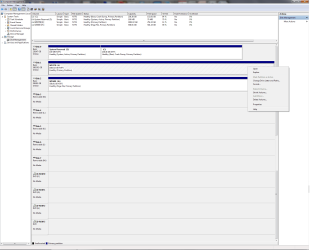
Forgive me if i sounded rude in my response. I just reread it and it sounds that way. That was not my intention. It doesn't seem like i have to worry about this but I'm just wondering why the option to make the I drive is greyed put but it is not for any other drive (except the 100mb partition)

Thanks

The reason that your I drive Active is greyed out is because there should only be one active partition in the system, which in your case is the main Operating System drive & that is correct.

You could move the Page File back to the SSD which would make the system faster. I only have an SSD in my computer & the page file is therefore on the SSD. You can also reduce the size of the Page File when using an SSD.

I see you have 24GB of RAM installed so your page file could be up to 30+GB. Unless you are doing very heavy video editing or similar you could probably run with a very small or no page file at all.
 

My Computer My Computer

Computer type
PC/Desktop
Computer Manufacturer/Model Number
Self built using existing case
OS
Windows 7 Home Premium 64 bit sp1
CPU
Intel i5 3570 3.4Ghz Ivy Bridge SKT 1155 quad core
Motherboard
Gigabyte Z77-HD3 SKT 1155 2xSata 3, 4x USB 3.0
Memory
G-Skill Rip Jaws 16Gb (8x2) DDR3 -1600 PC3 12800 CL 10 red
Graphics Card(s)
Gigabyte NVIDIA GT610 1Gb DDR3 810/1200 PCI-E 2.0 Silent
Sound Card
NVIDIA High Definition & Realtech High Definition Audio
Monitor(s) Displays
2 x Philips 226V4L 16:9 aspect ratio
Screen Resolution
1920 x 1080 HD
Hard Drives
Samsung 840 Pro 256gb SSD, SATA 3.
Hitachi Touro Portable 1tb, USB 3.0 HDD used for image b/ups.
PSU
Corsair VS450
Case
Codeng
Cooling
PSU fan & CPU fan
Keyboard
Logitech
Mouse
Logitech Wireless trackball M570
Internet Speed
Wireless 3G. 3mg down & 550kb up.
Antivirus
Bitdefender Internet Security 2020
Browser
Opera (Current Version) & Firefox
Other Info
MS Office 2013 Pro. Davis weather station software. MGE Nova 600 avr UPS.
But why if I right click on my H drive is there an option to make it active? It is only greyed out on the I drive which I don't understand.

I haven't noticed any slow down with the page file being on the 10,000 rpm drive, but I guess I would have to move it to the SSD to see if I notice a difference. And I do some video editing so I definitely want a page file.

Thanks.
 

My Computer My Computer

Computer type
PC/Desktop
OS
Windows 7 Ultimate 64bit SP1 w/latest updates
CPU
Intel Core i7-980X Extreme Edition Gulftown 3.33GHz
Motherboard
MSI Big Bang-XPower LGA 1366 Intel X58 with latest Bios v1.7
Memory
G.SKILL Ripjaws Series 24GB (6 x 4GB) 240-Pin DDR3 SDRAM
Graphics Card(s)
EVGA GeForce GTX 980 Ti SC+
Sound Card
Creative Sound Blaster X-Fi Titanium Fatal1ty
Monitor(s) Displays
Dell UltraSharp U3011 30-inch Widescreen
Screen Resolution
2560x1600
Hard Drives
--1st Hard Drive: - SAMSUNG 850 PRO 256GB SSD
--2nd Hard Drive - SAMSUNG 850 PRO 256GB SSD
--3rd Hard Drive: - Western Digital VelociRaptor WD1000DHTZ
--4th Hard Drive: -Seagate Barracuda XT 2TB 7200 RPM 64MB Cache
PSU
CORSAIR Professional Series AX1200 1200W
Case
COOLER MASTER HAF X RC-942-KKN1 ATX Full Tower
Cooling
CoolIT Systems VAN-R120 Vantage A.L.C. Liquid Cooler
Keyboard
Logitech MX 5500 Revolution Bluetooth Cordless Keyboard
Mouse
Logitech MX 5500 Revolution Bluetooth Cordless Mouse
Internet Speed
100 Mbps download / 40 Mbps upload
Antivirus
Norton Internet Secutiry 2015
Browser
Firefox
Other Info
--Card Reader: Nippon Labs Delux 3.5" Internal Card Reader/Writer
--Speakers: - Altec Lansing ADA995 5.1 surround speakers
--Webcam: Logitech HD Pro C920 1080p Widescreen
--Microphone: Telex M-560 Super-Directional USB Digital Microphone
The reason the H drive has the Active option is probably because the Page File is there & it is considered as part of the main OS. Normally the page file would be on the same partition as the OS as it really is part of it.

However don't make your H drive active as this could cause problems with booting the system.
 

My Computer My Computer

Computer type
PC/Desktop
Computer Manufacturer/Model Number
Self built using existing case
OS
Windows 7 Home Premium 64 bit sp1
CPU
Intel i5 3570 3.4Ghz Ivy Bridge SKT 1155 quad core
Motherboard
Gigabyte Z77-HD3 SKT 1155 2xSata 3, 4x USB 3.0
Memory
G-Skill Rip Jaws 16Gb (8x2) DDR3 -1600 PC3 12800 CL 10 red
Graphics Card(s)
Gigabyte NVIDIA GT610 1Gb DDR3 810/1200 PCI-E 2.0 Silent
Sound Card
NVIDIA High Definition & Realtech High Definition Audio
Monitor(s) Displays
2 x Philips 226V4L 16:9 aspect ratio
Screen Resolution
1920 x 1080 HD
Hard Drives
Samsung 840 Pro 256gb SSD, SATA 3.
Hitachi Touro Portable 1tb, USB 3.0 HDD used for image b/ups.
PSU
Corsair VS450
Case
Codeng
Cooling
PSU fan & CPU fan
Keyboard
Logitech
Mouse
Logitech Wireless trackball M570
Internet Speed
Wireless 3G. 3mg down & 550kb up.
Antivirus
Bitdefender Internet Security 2020
Browser
Opera (Current Version) & Firefox
Other Info
MS Office 2013 Pro. Davis weather station software. MGE Nova 600 avr UPS.
ah ok. And so the I drive is greyed out because C is already active. So I is not actually active I guess?
Then I should just leave things the way they are.

The thing is on my other computer, all other drives (even the one with the page file) have the option to click make active. That is why I'm confused that it is different on this computer.

But I guess everything is working so I will leave it.
 

My Computer My Computer

Computer type
PC/Desktop
OS
Windows 7 Ultimate 64bit SP1 w/latest updates
CPU
Intel Core i7-980X Extreme Edition Gulftown 3.33GHz
Motherboard
MSI Big Bang-XPower LGA 1366 Intel X58 with latest Bios v1.7
Memory
G.SKILL Ripjaws Series 24GB (6 x 4GB) 240-Pin DDR3 SDRAM
Graphics Card(s)
EVGA GeForce GTX 980 Ti SC+
Sound Card
Creative Sound Blaster X-Fi Titanium Fatal1ty
Monitor(s) Displays
Dell UltraSharp U3011 30-inch Widescreen
Screen Resolution
2560x1600
Hard Drives
--1st Hard Drive: - SAMSUNG 850 PRO 256GB SSD
--2nd Hard Drive - SAMSUNG 850 PRO 256GB SSD
--3rd Hard Drive: - Western Digital VelociRaptor WD1000DHTZ
--4th Hard Drive: -Seagate Barracuda XT 2TB 7200 RPM 64MB Cache
PSU
CORSAIR Professional Series AX1200 1200W
Case
COOLER MASTER HAF X RC-942-KKN1 ATX Full Tower
Cooling
CoolIT Systems VAN-R120 Vantage A.L.C. Liquid Cooler
Keyboard
Logitech MX 5500 Revolution Bluetooth Cordless Keyboard
Mouse
Logitech MX 5500 Revolution Bluetooth Cordless Mouse
Internet Speed
100 Mbps download / 40 Mbps upload
Antivirus
Norton Internet Secutiry 2015
Browser
Firefox
Other Info
--Card Reader: Nippon Labs Delux 3.5" Internal Card Reader/Writer
--Speakers: - Altec Lansing ADA995 5.1 surround speakers
--Webcam: Logitech HD Pro C920 1080p Widescreen
--Microphone: Telex M-560 Super-Directional USB Digital Microphone
I would not worry about the page file. With that kind of RAM it will probably never be used. I would give it 1GB and put it any place.
 

My Computer My Computer

Computer Manufacturer/Model Number
HP, Dell, Gateway, Toshiba - 4 laptops and 2 desktops
OS
Vista, Windows7, Mint Mate, Zorin, Windows 8
CPU
from 1.6GHz Duo to i7
Monitor(s) Displays
2x HP w2207
Hard Drives
5x HDD, 7x SSD, 12x Externals
Keyboard
with trackball - no mices
Mouse
Trackball mice
Internet Speed
DSL 6000
I've always read it should be at leaat the size of your ram. I think i have it set that way (i have to check) It has been like this for 5 years and i haven't had any problems.
 

My Computer My Computer

Computer type
PC/Desktop
OS
Windows 7 Ultimate 64bit SP1 w/latest updates
CPU
Intel Core i7-980X Extreme Edition Gulftown 3.33GHz
Motherboard
MSI Big Bang-XPower LGA 1366 Intel X58 with latest Bios v1.7
Memory
G.SKILL Ripjaws Series 24GB (6 x 4GB) 240-Pin DDR3 SDRAM
Graphics Card(s)
EVGA GeForce GTX 980 Ti SC+
Sound Card
Creative Sound Blaster X-Fi Titanium Fatal1ty
Monitor(s) Displays
Dell UltraSharp U3011 30-inch Widescreen
Screen Resolution
2560x1600
Hard Drives
--1st Hard Drive: - SAMSUNG 850 PRO 256GB SSD
--2nd Hard Drive - SAMSUNG 850 PRO 256GB SSD
--3rd Hard Drive: - Western Digital VelociRaptor WD1000DHTZ
--4th Hard Drive: -Seagate Barracuda XT 2TB 7200 RPM 64MB Cache
PSU
CORSAIR Professional Series AX1200 1200W
Case
COOLER MASTER HAF X RC-942-KKN1 ATX Full Tower
Cooling
CoolIT Systems VAN-R120 Vantage A.L.C. Liquid Cooler
Keyboard
Logitech MX 5500 Revolution Bluetooth Cordless Keyboard
Mouse
Logitech MX 5500 Revolution Bluetooth Cordless Mouse
Internet Speed
100 Mbps download / 40 Mbps upload
Antivirus
Norton Internet Secutiry 2015
Browser
Firefox
Other Info
--Card Reader: Nippon Labs Delux 3.5" Internal Card Reader/Writer
--Speakers: - Altec Lansing ADA995 5.1 surround speakers
--Webcam: Logitech HD Pro C920 1080p Widescreen
--Microphone: Telex M-560 Super-Directional USB Digital Microphone
The reason they recommend it to be the size of your RAM is so that a memory dump could be recorded and would fit. That is the only drawback if you make it smaller - you lose that capability. But maintaining the RAM size makes only sense when you know how to deal with a memory dump.
 

My Computer My Computer

Computer Manufacturer/Model Number
HP, Dell, Gateway, Toshiba - 4 laptops and 2 desktops
OS
Vista, Windows7, Mint Mate, Zorin, Windows 8
CPU
from 1.6GHz Duo to i7
Monitor(s) Displays
2x HP w2207
Hard Drives
5x HDD, 7x SSD, 12x Externals
Keyboard
with trackball - no mices
Mouse
Trackball mice
Internet Speed
DSL 6000
Although this has strayed from my original issue (which I believe the answer is don't worry about the fact that the I drive is possibly set to active), since I have not noticed any problems with my computer for 5 years (including doing video editing), is there any reason I should set my page file to smaller than my amount of ram, and/or move it to my SSD drive?

Thank you.
 

My Computer My Computer

Computer type
PC/Desktop
OS
Windows 7 Ultimate 64bit SP1 w/latest updates
CPU
Intel Core i7-980X Extreme Edition Gulftown 3.33GHz
Motherboard
MSI Big Bang-XPower LGA 1366 Intel X58 with latest Bios v1.7
Memory
G.SKILL Ripjaws Series 24GB (6 x 4GB) 240-Pin DDR3 SDRAM
Graphics Card(s)
EVGA GeForce GTX 980 Ti SC+
Sound Card
Creative Sound Blaster X-Fi Titanium Fatal1ty
Monitor(s) Displays
Dell UltraSharp U3011 30-inch Widescreen
Screen Resolution
2560x1600
Hard Drives
--1st Hard Drive: - SAMSUNG 850 PRO 256GB SSD
--2nd Hard Drive - SAMSUNG 850 PRO 256GB SSD
--3rd Hard Drive: - Western Digital VelociRaptor WD1000DHTZ
--4th Hard Drive: -Seagate Barracuda XT 2TB 7200 RPM 64MB Cache
PSU
CORSAIR Professional Series AX1200 1200W
Case
COOLER MASTER HAF X RC-942-KKN1 ATX Full Tower
Cooling
CoolIT Systems VAN-R120 Vantage A.L.C. Liquid Cooler
Keyboard
Logitech MX 5500 Revolution Bluetooth Cordless Keyboard
Mouse
Logitech MX 5500 Revolution Bluetooth Cordless Mouse
Internet Speed
100 Mbps download / 40 Mbps upload
Antivirus
Norton Internet Secutiry 2015
Browser
Firefox
Other Info
--Card Reader: Nippon Labs Delux 3.5" Internal Card Reader/Writer
--Speakers: - Altec Lansing ADA995 5.1 surround speakers
--Webcam: Logitech HD Pro C920 1080p Widescreen
--Microphone: Telex M-560 Super-Directional USB Digital Microphone
Back
Top