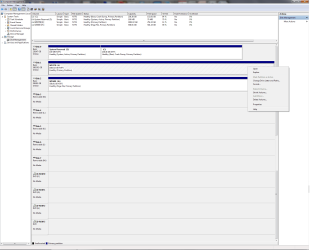
I was looking around in disk management and I noticed one of my data drives is marked as active (the option to mark as active is greyed out). The only other drive like this is the hidden partition on my system drive.
I don't believe I ever accidentally marked this as active, and on my other computer no other drives are active.
I read that if you mark another drive as active your system may not boot. I obviously have had no problems so I'm wondering if I should worry about this.
I found online how to make a drive inactive using disk part but when I try I get this message:
The INACTIVE command can only be used on fixed MBR disk
I tried choosing the actual partition of the drive and trying again but I get the same message. I also tried making the drive offline and trying to make it inactive, but still no luck.
Anyone have this issue, know a way to make this inactive, or feel it is not an issue?
Thanks.
[FONT="]System specs:
--OS: - Microsoft Windows 7 Ultimate (64 bit) SP1 with latest updates.
--Monitor: - Dell UltraSharp U3011 30-inch Widescreen
--Case: - COOLER MASTER HAF X RC-942-KKN1 ATX Full Tower
--Motherboard: MSI Big Bang-XPower LGA 1366 Intel X58 with latest Bios v1.7
--CPU: - Intel Core i7-980X Extreme Edition Gulftown 3.33GHz
--CPU Cooler: - CoolIT Systems VAN-R120 Vantage A.L.C. Liquid Coole
--Power Supply: - CORSAIR Professional Series AX1200 1200W
--Sound Card: - Creative Sound Blaster X-Fi Titanium Fatal1ty
--Video Card: - EVGA GeForce GTX 980 Ti SC+
--Memory: - G.SKILL Ripjaws Series 24GB (6 x 4GB) 240-Pin DDR3 SDRAM
--Memory Cooler: - G.SKILL FTB-3500C5-D Fans
--1st Hard Drive: - SAMSUNG 850 PRO 256GB SSD
--2nd Hard Drive - SAMSUNG 850 PRO 256GB SSD
--3rd Hard Drive: - Western Digital VelociRaptor WD1000DHTZ
--4th Hard Drive: -Seagate Barracuda XT 2TB 7200 RPM 64MB Cache
--1st Optical Drive: - LG WH10LS30K 10X Blu-ray Burner
--2nd Optical Drive: - LG WH10LS30K 10X Blu-ray Burner
--Keyboard/Mouse: - Logitech MX 5500 Revolution Bluetooth Cordless Desktop
--Card Reader: Nippon Labs Delux 3.5" Internal Card Reader/Writer
--Speakers: - Altec Lansing ADA995 5.1 surround speakers[/FONT]
I don't believe I ever accidentally marked this as active, and on my other computer no other drives are active.
I read that if you mark another drive as active your system may not boot. I obviously have had no problems so I'm wondering if I should worry about this.
I found online how to make a drive inactive using disk part but when I try I get this message:
The INACTIVE command can only be used on fixed MBR disk
I tried choosing the actual partition of the drive and trying again but I get the same message. I also tried making the drive offline and trying to make it inactive, but still no luck.
Anyone have this issue, know a way to make this inactive, or feel it is not an issue?
Thanks.
[FONT="]System specs:
--OS: - Microsoft Windows 7 Ultimate (64 bit) SP1 with latest updates.
--Monitor: - Dell UltraSharp U3011 30-inch Widescreen
--Case: - COOLER MASTER HAF X RC-942-KKN1 ATX Full Tower
--Motherboard: MSI Big Bang-XPower LGA 1366 Intel X58 with latest Bios v1.7
--CPU: - Intel Core i7-980X Extreme Edition Gulftown 3.33GHz
--CPU Cooler: - CoolIT Systems VAN-R120 Vantage A.L.C. Liquid Coole
--Power Supply: - CORSAIR Professional Series AX1200 1200W
--Sound Card: - Creative Sound Blaster X-Fi Titanium Fatal1ty
--Video Card: - EVGA GeForce GTX 980 Ti SC+
--Memory: - G.SKILL Ripjaws Series 24GB (6 x 4GB) 240-Pin DDR3 SDRAM
--Memory Cooler: - G.SKILL FTB-3500C5-D Fans
--1st Hard Drive: - SAMSUNG 850 PRO 256GB SSD
--2nd Hard Drive - SAMSUNG 850 PRO 256GB SSD
--3rd Hard Drive: - Western Digital VelociRaptor WD1000DHTZ
--4th Hard Drive: -Seagate Barracuda XT 2TB 7200 RPM 64MB Cache
--1st Optical Drive: - LG WH10LS30K 10X Blu-ray Burner
--2nd Optical Drive: - LG WH10LS30K 10X Blu-ray Burner
--Keyboard/Mouse: - Logitech MX 5500 Revolution Bluetooth Cordless Desktop
--Card Reader: Nippon Labs Delux 3.5" Internal Card Reader/Writer
--Speakers: - Altec Lansing ADA995 5.1 surround speakers[/FONT]
Last edited:
My Computer
- Computer type
- PC/Desktop
- OS
- Windows 7 Ultimate 64bit SP1 w/latest updates
- CPU
- Intel Core i7-980X Extreme Edition Gulftown 3.33GHz
- Motherboard
- MSI Big Bang-XPower LGA 1366 Intel X58 with latest Bios v1.7
- Memory
- G.SKILL Ripjaws Series 24GB (6 x 4GB) 240-Pin DDR3 SDRAM
- Graphics Card(s)
- EVGA GeForce GTX 980 Ti SC+
- Sound Card
- Creative Sound Blaster X-Fi Titanium Fatal1ty
- Monitor(s) Displays
- Dell UltraSharp U3011 30-inch Widescreen
- Screen Resolution
- 2560x1600
- Hard Drives
- --1st Hard Drive: - SAMSUNG 850 PRO 256GB SSD
--2nd Hard Drive - SAMSUNG 850 PRO 256GB SSD
--3rd Hard Drive: - Western Digital VelociRaptor WD1000DHTZ
--4th Hard Drive: -Seagate Barracuda XT 2TB 7200 RPM 64MB Cache
- PSU
- CORSAIR Professional Series AX1200 1200W
- Case
- COOLER MASTER HAF X RC-942-KKN1 ATX Full Tower
- Cooling
- CoolIT Systems VAN-R120 Vantage A.L.C. Liquid Cooler
- Keyboard
- Logitech MX 5500 Revolution Bluetooth Cordless Keyboard
- Mouse
- Logitech MX 5500 Revolution Bluetooth Cordless Mouse
- Internet Speed
- 100 Mbps download / 40 Mbps upload
- Antivirus
- Norton Internet Secutiry 2015
- Browser
- Firefox
- Other Info
- --Card Reader: Nippon Labs Delux 3.5" Internal Card Reader/Writer
--Speakers: - Altec Lansing ADA995 5.1 surround speakers
--Webcam: Logitech HD Pro C920 1080p Widescreen
--Microphone: Telex M-560 Super-Directional USB Digital Microphone