
Norton 360 goes awol after window update

Megacycle

New member
Local time
7:44 AM
Messages
3
It seems every time I update windows I then have trouble with Norton 360 and it has to be removed and reinstalled.
The last time after several updates being installed if I open a window for Norton they are "completely Transparent" so I could not see any controls, and then it would report Norton has stopped working.
After an hour of on-line help from a Norton representative we got nowhere and I ended up restoring a Norton ghost image to put the computer right.
I have attached the list of updates in case anyone can identify one that could cause this problem.
 

Attachments
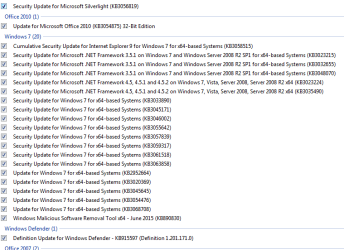
  • Capture updates.PNG
    Capture updates.PNG
    12.5 KB · Views: 1

My Computer My Computer

At a glance

Window 7 Pro x64intel core2 duo E8400 3.00GHz
Computer type
PC/Desktop
Computer Manufacturer/Model Number
custom build
OS
Window 7 Pro x64
CPU
intel core2 duo E8400 3.00GHz
Antivirus
Norton 360
Browser
Google Chrome
KB2952664? It's caused problems of different sorts for quite a few. I have W7 HP X64 and NIS with no issues on updates. I have all of the W10 preparation updates hidden though. I'm wondering if the W10 prep. updates are messing up your Norton360.
 

My Computer My Computer

At a glance

Windows 7 Home Premium 64 bit SP1i5-2320 @3.00 GHz6GBNVIDIA GeForce 7300 LE
Computer type
PC/Desktop
Computer Manufacturer/Model Number
ASUS
OS
Windows 7 Home Premium 64 bit SP1
CPU
i5-2320 @3.00 GHz
Memory
6GB
Graphics Card(s)
NVIDIA GeForce 7300 LE
Monitor(s) Displays
Acer S200HQL 19.5 LED
Screen Resolution
1280 x 800 (1900 x 900 max)
Hard Drives
Drive 1: 1 TB SATA internal: C drive
Drive 2: 250 GB SATA internal: User Data Backup
Drive 3: 500 GB SATA USB: Full System Backup 1, Father
Drive 4: 500 GB SATA USB: Full System Backup 2, Son
Drive 5: 40 GB IDE USB: Kindle, ASUS Tabl
Keyboard
ASUS KB34211
Mouse
Logitech m325 cordless
Internet Speed
27Mb down, 3 Mb up cable modem w/Netgear R6400 WiFi
Antivirus
NIS, Spybot S&D, CCleaner, Malwarebytes, MSERT, MRT
Browser
FF v44.0.2;IE11 v11.0.9600.18015,uv11.0.23;Chrome v44.0.2403
Other Info
FF has AdBlockPlus and Ghostery plugins,
Thanks for that.
If I get brave enough I might try doing one at a time and see how it goes without KB2952664.
Its just a pain when it goes wrong.
 

My Computer My Computer

At a glance

Window 7 Pro x64intel core2 duo E8400 3.00GHz
Computer type
PC/Desktop
Computer Manufacturer/Model Number
custom build
OS
Window 7 Pro x64
CPU
intel core2 duo E8400 3.00GHz
Antivirus
Norton 360
Browser
Google Chrome
Pleasefollow the WindowsUpdate Posting Instructions and postthe requested data


If thefile is too large (8MB compressed), remove the older CBSPersist cab files untilthe final file is below the limit - you can always post them separately afterzipping them. (the forum doesn't allow the upload of bare CAB files, for anumber of reasons)


Pleasealso post the C:\Windows\windowsudpate.log file


My Computer My Computer

At a glance

Win 7 x64 Home Premium (and x86 VirtualBox VM...i3 370M/i7 6500U8GB - finally :)/8GBit's an i3, dude!/dual Intel&nVidia
Computer type
Laptop
Computer Manufacturer/Model Number
Asus K52F or Lenovo B51-80
OS
Win 7 x64 Home Premium (and x86 VirtualBox VM)/Win10
CPU
i3 370M/i7 6500U
Motherboard
Asus/Lenovo
Memory
8GB - finally :)/8GB
Graphics Card(s)
it's an i3, dude!/dual Intel&nVidia
Sound Card
onboard
Monitor(s) Displays
15.6" built-in
Screen Resolution
1366x768/1920x1080
Hard Drives
750GB Seagate internal
Sundry external drives attached to other computers on the local network
1TB SSD on the Lenovo
PSU
n/a
Internet Speed
as much as I can get - usually on a dongle/phone, so <1MB/s
Antivirus
MSE/Defender
Browser
IE11/12/Edge/Chrome/FF(if I must)
It seems every time I update windows I then have trouble with Norton 360 and it has to be removed and reinstalled.
The last time after several updates being installed if I open a window for Norton they are "completely Transparent" so I could not see any controls, and then it would report Norton has stopped working.
After an hour of on-line help from a Norton representative we got nowhere and I ended up restoring a Norton ghost image to put the computer right.
I have attached the list of updates in case anyone can identify one that could cause this problem.

Hi,

Sorry to hear that. Norton might be corrupted during update, can you please reinstall Norton and see if that helps?

Praveen
Norton Support.
 

My Computer My Computer

At a glance

Windows 7 Ultimate x64
Computer type
PC/Desktop
OS
Windows 7 Ultimate x64
Hi Praveen
I had someone from Norton Support try that remotely
He removed Norton 360 and the file that he downloaded to re-install also had a transparent window so he could not see anything to click on.
So after over an hour of trying to fix it I decided it was a windows issue thanked the gentleman for his help and restored my computer using Norton Ghost which takes an image once a week so I just lost the previous week emails etc.
Still trying to get the nerve to do one at a time updates to see what happens.
 

My Computer My Computer

At a glance

Window 7 Pro x64intel core2 duo E8400 3.00GHz
Computer type
PC/Desktop
Computer Manufacturer/Model Number
custom build
OS
Window 7 Pro x64
CPU
intel core2 duo E8400 3.00GHz
Antivirus
Norton 360
Browser
Google Chrome
Hi,

Great! If you ever need any help with Norton, you can always contact us.
Thanks for you patience! :)

Praveen
Norton Support.
 

My Computer My Computer

At a glance

Windows 7 Ultimate x64
Computer type
PC/Desktop
OS
Windows 7 Ultimate x64
Umm... errrr... I think he was trying to say that Norton support FAILED (again) to solve what should have been a simple problem?

I may be wrong - it's fairly late on a Friday night after all ;)
 

My Computer My Computer

At a glance

Win 7 x64 Home Premium (and x86 VirtualBox VM...i3 370M/i7 6500U8GB - finally :)/8GBit's an i3, dude!/dual Intel&nVidia
Computer type
Laptop
Computer Manufacturer/Model Number
Asus K52F or Lenovo B51-80
OS
Win 7 x64 Home Premium (and x86 VirtualBox VM)/Win10
CPU
i3 370M/i7 6500U
Motherboard
Asus/Lenovo
Memory
8GB - finally :)/8GB
Graphics Card(s)
it's an i3, dude!/dual Intel&nVidia
Sound Card
onboard
Monitor(s) Displays
15.6" built-in
Screen Resolution
1366x768/1920x1080
Hard Drives
750GB Seagate internal
Sundry external drives attached to other computers on the local network
1TB SSD on the Lenovo
PSU
n/a
Internet Speed
as much as I can get - usually on a dongle/phone, so <1MB/s
Antivirus
MSE/Defender
Browser
IE11/12/Edge/Chrome/FF(if I must)
Back
Top