Not booting into Xp in dual boot with win7

Having two OS's on one partition, can cause problems with each other.
 

My Computer My Computer

At a glance

ME/XP/Vista/Win7
OS
ME/XP/Vista/Win7
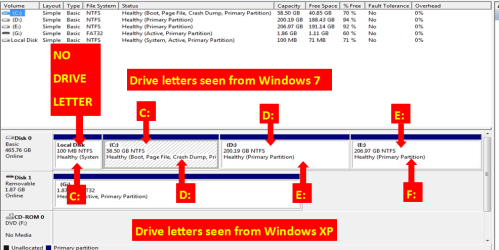
When installing Win XP, you need install to partition 3 E: as seen from Win XP.

IBMre.PNG
 

My Computer My Computer

At a glance

ME/XP/Vista/Win7
OS
ME/XP/Vista/Win7
Thanks for much help theog.
I kinda figured that xp was altering my drive letters in such way, but this screenshot was very helpful and i finally knew that it was due to xp's tendency to show that 100 MB partition that those drives were appearing with their letter changed.........:thumbsup::thumbsup:
 

My Computer My Computer

At a glance

Windows 7 Ultimate 32-bit
OS
Windows 7 Ultimate 32-bit
I did a clean install of Xp on drive D: and deleted that WINDOWS folder which was installed on my drive C: and everything is fine.
But can you pls tell me why do i always have to change my bios setting from AHCI to AHCI compatible in order to run xp and back to AHCI to run Win7 even though i slipstreamed the Xp cd rom with the AHCI drivers??
 

My Computer My Computer

At a glance

Windows 7 Ultimate 32-bit
OS
Windows 7 Ultimate 32-bit
1) What drivers did you slipstreamed in to the Xp cd?

2) Did you have your set to IDE mode, when install Win XP?
(needs to be AHCI mode)

3) NO drivers slipstreamed in to the Xp cd?
 

My Computer My Computer

At a glance

ME/XP/Vista/Win7
OS
ME/XP/Vista/Win7
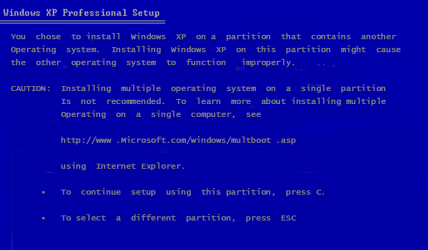
When you first install Win XP, did you not read this CAUTION.

IBM006.PNG


This caution still stands, as when you install Win XP to the Windows 7 partition, XP deleted some Windows 7 files & folders, & replaced XP versions.

IMO, It would be best to reinstall Windows 7 & Win XP.
 

My Computer My Computer

At a glance

ME/XP/Vista/Win7
OS
ME/XP/Vista/Win7
When you first install Win XP, did you not read this CAUTION.

View attachment 165987


This caution still stands, as when you install Win XP to the Windows 7 partition, XP deleted some Windows 7 files & folders, & replaced XP versions.

IMO, It would be best to reinstall Windows 7 & Win XP.

. +1
 

My Computer My Computer

At a glance

W 7 64-bit UltimateIntel Q9550 Yorkfield8GB Dominator 8500C5DATI : XFX 5870
Computer Manufacturer/Model Number
* BFK Customs *
OS
W 7 64-bit Ultimate
CPU
Intel Q9550 Yorkfield
Motherboard
ASUS P5Q Pro
Memory
8GB Dominator 8500C5D
Graphics Card(s)
ATI : XFX 5870
Sound Card
Realtek HD Audio 7-1
Monitor(s) Displays
1x 47" LCD HDMI & 3x 26" LCD HDMI
Screen Resolution
1920x1080P & 1920x1200
Hard Drives
1x 80GB Intel X25-M G2 SSD : 1x 500GB & 1x 640GB WD Caviar Black(s)
PSU
Corsair 620HX
Case
Cooler Master RC-690
Cooling
Tuniq Tower 120, 2x 140mm and 3x 120mm case fans
Keyboard
Microsoft 500
Mouse
Razer Diamondback 3G
Internet Speed
14 Mb/s
Other Info
1x Koutech 3Gb/s SATA HDD Hot Swap Rack
I actually used two sets of drivers and created two setups using both sets. These were the files i included-

SET1-
Drivers1.jpg


SET2-
Drivers2.jpg
 

My Computer My Computer

At a glance

Windows 7 Ultimate 32-bit
OS
Windows 7 Ultimate 32-bit
1.) The setup wasnt running on AHCI mode so i used the AHCI compatible feature to run the installation which worked.
With AHCI it was terminating with a BSOD(0x000007E or 7B error as far as i can remember)

2.) When i try to strt win7 using AHCI compatible it too terminates with a BSOD, so i constantly need to switch b/w ahci to ahci compatible to boot into win7 and xp respectively.

3.) And no theog i didnt got that sort of screen it never warned me of multiboot..

I tried both set of drivers in the setup but the prblm is still there.
 

My Computer My Computer

At a glance

Windows 7 Ultimate 32-bit
OS
Windows 7 Ultimate 32-bit
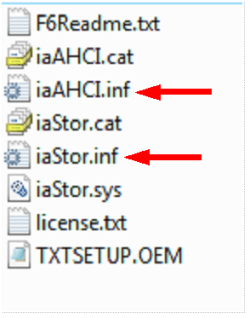
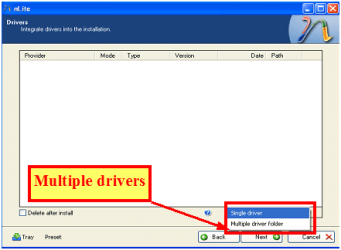
You need to add All drivers & all Sata Controllers, use both inf files.

Capture3-1.PNG

Capture222.PNG
 

My Computer My Computer

At a glance

ME/XP/Vista/Win7
OS
ME/XP/Vista/Win7
Wait...i just double chkd the installation disc and i found both of these drivers in my xp disk. I didnt missed either of them.
 

My Computer My Computer

At a glance

Windows 7 Ultimate 32-bit
OS
Windows 7 Ultimate 32-bit
In each inf file, there are about 20 sata controllers.

If you go for only one, it must be the right one, or add all.
 

My Computer My Computer

At a glance

ME/XP/Vista/Win7
OS
ME/XP/Vista/Win7
I added all of them theog.
But it doesnt matter i think i am fine by BIOS switching thing, besides i dont think i have any more of strength left for another windows installation. I finally was able to install all the xp drivers to my ideapad :D:D, which were a great pain in the neck for me as the lenovo site supplied me with outdated and unnecessary drivers....darn them.

 

My Computer My Computer

At a glance

Windows 7 Ultimate 32-bit
OS
Windows 7 Ultimate 32-bit
Thanks to this forum. theog, gregrocker and huge thnks to all of them who helped. I think now i have got one hell of an experience to this multiboot issue and i will provide my help to this forum in any way i can.
THNKS...
 

My Computer My Computer

At a glance

Windows 7 Ultimate 32-bit
OS
Windows 7 Ultimate 32-bit
You are welcome.
 

My Computer My Computer

At a glance

ME/XP/Vista/Win7
OS
ME/XP/Vista/Win7
Back
Top