Not connecting to router automatically

Lykele

New member
Member
Local time
9:13 PM
Messages
47
I have a new Dell laptop that does not automatically see and connect to my Linksys router. Instead, I see in the lower right hand corner of the Taskbar a blinking yellow dot. When I right click on this a list pops up showing my Linksys and other wifi choices. I have no idea who or what the other choices are, but if I click on Linksys I'm good to go.

Is there a way to default to the Linksys at startup automatically?

Thanks for any ideas.

Jim
 

My Computer My Computer

OS
Windows XP
have you try windows 7 solution center.its an app with flag.try to check internet connections,on the taskbar near the internet symbol.or update your drivers
 

My Computer My Computer

Computer Manufacturer/Model Number
hp pavillion dv6312eu
OS
w7 ultimate
CPU
1.6
Motherboard
quanta 30 b7
Memory
2gb
Graphics Card(s)
nvidia geforce go 6150
Sound Card
Altec Lansing® speakers 3D Sound Blaster Pro compatible soun
Monitor(s) Displays
15.4” WXGA High Definition BrightView Widescreen
Screen Resolution
15.4” WXGA High Definition BrightView Widescreen (1280
Hard Drives
120 GB (5400 rpm)
PSU
dont know
Case
dont know
Cooling
dont know
Internet Speed
24mb
sorry for the reply.you have windows xp.i thought was w7.but try update drivers
 

My Computer My Computer

Computer Manufacturer/Model Number
hp pavillion dv6312eu
OS
w7 ultimate
CPU
1.6
Motherboard
quanta 30 b7
Memory
2gb
Graphics Card(s)
nvidia geforce go 6150
Sound Card
Altec Lansing® speakers 3D Sound Blaster Pro compatible soun
Monitor(s) Displays
15.4” WXGA High Definition BrightView Widescreen
Screen Resolution
15.4” WXGA High Definition BrightView Widescreen (1280
Hard Drives
120 GB (5400 rpm)
PSU
dont know
Case
dont know
Cooling
dont know
Internet Speed
24mb
Actually I do have Windows 7. Not sure how that Windows XP appears under my name. I will try that.
 

My Computer My Computer

OS
Windows XP
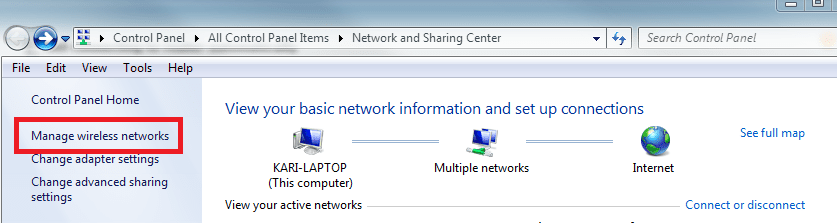
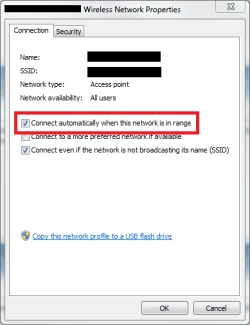
Open the Network and Sharing Center, click Manage wireless networks. Double click your network to open it's properties, check that you have allowed to connect automatically to this network.

Kari

Manage_Networks.png

WiFi_Connect_Automatically.png
 

My Computer My Computer

Computer type
Laptop
Computer Manufacturer/Model Number
HP ENVY 17-1150eg
OS
Windows 10 Pro x64 EN-GB
CPU
1.6 GHz Intel Core i7-720QM Processor
Memory
6 GB
Graphics Card(s)
ATI Mobility Radeon HD 5850 Graphics
Sound Card
Beats sound system with integrated subwoofer
Monitor(s) Displays
17" laptop display, 22" LED and 32" Full HD TV through HDMI
Screen Resolution
1600*900 (1), 1920*1080 (2&3)
Hard Drives
Internal: 2 x 500 GB SATA Hard Disk Drive 7200 rpm
External: 2TB for backups, 3TB USB3 network drive for media
Cooling
As Envy runs a bit warm, I have it on a Cooler Master pad
Keyboard
Logitech diNovo Media Desktop Laser (bluetooth)
Mouse
Logitech Performance Mouse MX
Internet Speed
50/10 Mbps VDSL
Antivirus
Windows Defender 4.3.9431.0
Browser
Maxthon 3.5.2., IE11
Ah, I think that was it.

Thanks for your time.

Jim
 

My Computer My Computer

OS
Windows XP
You are welcome.
 

My Computer My Computer

Computer type
Laptop
Computer Manufacturer/Model Number
HP ENVY 17-1150eg
OS
Windows 10 Pro x64 EN-GB
CPU
1.6 GHz Intel Core i7-720QM Processor
Memory
6 GB
Graphics Card(s)
ATI Mobility Radeon HD 5850 Graphics
Sound Card
Beats sound system with integrated subwoofer
Monitor(s) Displays
17" laptop display, 22" LED and 32" Full HD TV through HDMI
Screen Resolution
1600*900 (1), 1920*1080 (2&3)
Hard Drives
Internal: 2 x 500 GB SATA Hard Disk Drive 7200 rpm
External: 2TB for backups, 3TB USB3 network drive for media
Cooling
As Envy runs a bit warm, I have it on a Cooler Master pad
Keyboard
Logitech diNovo Media Desktop Laser (bluetooth)
Mouse
Logitech Performance Mouse MX
Internet Speed
50/10 Mbps VDSL
Antivirus
Windows Defender 4.3.9431.0
Browser
Maxthon 3.5.2., IE11
Back
Top