Not re-installing programs in separate D: drive upon windows 7 install

JohnAtanasoff

New member
Local time
1:32 AM
Messages
20
Is there a software allowing you not not to re-install programs in my separate D: drive upon windows 7 reinstall?

Some apps still work after windows reinstall; other don't!
A software that copies registry entries and other needed files and puts them back in after a clean install.


My C: SSD is for windows and apps that are native to C drive.

Most of my other apps are in my separate D: drive.
 

My Computer My Computer

Computer type
PC/Desktop
OS
Windows 7 Ultimate x64
CPU
i7 3770K
Motherboard
ASUSTeK COMPUTER INC. P8Z77-V PRO/THUNDERBOLT
Memory
16GB
Graphics Card(s)
P8Z77-V PRO/THUNDERBOLT builtin Graphics Card
Hard Drives
OCZ vertex 4
western digital black caviar 1tb
Antivirus
avast
Browser
ff, chrome
When you do a clean install of Windows 7 their should not be any 3rd party programs installed. When you do the install their should only be the destination drive installed. If you are using a DVD of course it will also have to be hooked up.


Exactly what programs are you referring to?

Looking at your previous threads it could be I.E. 11.
I would suggest not removing Internet Explorer.

Could you complete this tutorial by Golden so we can have a look at things.
It will give us a better idea of what you have.

Disk Management - Post a Screen Capture Image - Windows 7 Help Forums

Jack
 

My Computer My Computer

Computer type
PC/Desktop
Computer Manufacturer/Model Number
Home made Desktop
OS
Windows 10 Pro. 64/ version 1709 Windows 7 Pro/64
CPU
Intel i7-6800K @ 4.3
Motherboard
ASUS X-99 Deluxe II
Memory
Corsair Platinum 16 gig @2400
Graphics Card(s)
EVGA GTX 1070 OC
Monitor(s) Displays
Asus 27" LED LCD/VE278Q
Screen Resolution
1920-1080 or 1280-720 HDMI
Hard Drives
INTEL SSD 730-240 Gb Sata 3.0/
PSU
EVGA Platium 1200W
Case
Phanteks Luxe Tempered Glass 8 fans/ one radiator
Cooling
XSPC/ Water Cooled CPU
Keyboard
Das 4 Professional
Mouse
Logitech M705/MX Anywhere 2-S
Internet Speed
100 mbits
Antivirus
Microsoft Security Essentials/ Malwarebytes Premium 3.0/ SAS
Browser
I.E. 11 default/Firefox/ ISP Time Warner Cable/Spectrum
Other Info
LG BluRay Burner/
Sound system-KLipsch-THX/
Icy Dock ssd Hot Swap bays.
Jack,

I am referring to 3rd party apps!
I have most of them installed in my separate D: drive!

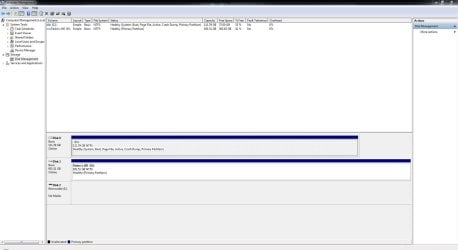
Disk Management capture attached!
 

Attachments

  • Disk Management.JPG
    Disk Management.JPG
    108.6 KB · Views: 5

My Computer My Computer

Computer type
PC/Desktop
OS
Windows 7 Ultimate x64
CPU
i7 3770K
Motherboard
ASUSTeK COMPUTER INC. P8Z77-V PRO/THUNDERBOLT
Memory
16GB
Graphics Card(s)
P8Z77-V PRO/THUNDERBOLT builtin Graphics Card
Hard Drives
OCZ vertex 4
western digital black caviar 1tb
Antivirus
avast
Browser
ff, chrome
I'm not understanding your problem.

If you are wanting to do a Clean Install on Disk '0' and Disk '1' is disconnected, how in the world are you getting the programs that are on Disk '1' partition 'D' included with your install of Windows 7 on Disk '0'?

No 3rd party programs are installed when doing a Clean Install.
-------------------
Now if your question is how to get your 3rd party programs on your Disk '0' after you have completed your Clean Install, the answer is simple.
Do fresh/clean install of the programs you desire to your 'C' partition on Disk '0'.

I see Disk '1' has a lot of data. You can plug it back in if you desire.
Personally I leave all Drives not in use unplugged except my DVD player.
If you normally use Drive '1' a lot you can keep it plugged in.
If Drive '1' is used for your backups, I would keep it unplugged unless using it.
It keep you data safer.


Jack
 

My Computer My Computer

Computer type
PC/Desktop
Computer Manufacturer/Model Number
Home made Desktop
OS
Windows 10 Pro. 64/ version 1709 Windows 7 Pro/64
CPU
Intel i7-6800K @ 4.3
Motherboard
ASUS X-99 Deluxe II
Memory
Corsair Platinum 16 gig @2400
Graphics Card(s)
EVGA GTX 1070 OC
Monitor(s) Displays
Asus 27" LED LCD/VE278Q
Screen Resolution
1920-1080 or 1280-720 HDMI
Hard Drives
INTEL SSD 730-240 Gb Sata 3.0/
PSU
EVGA Platium 1200W
Case
Phanteks Luxe Tempered Glass 8 fans/ one radiator
Cooling
XSPC/ Water Cooled CPU
Keyboard
Das 4 Professional
Mouse
Logitech M705/MX Anywhere 2-S
Internet Speed
100 mbits
Antivirus
Microsoft Security Essentials/ Malwarebytes Premium 3.0/ SAS
Browser
I.E. 11 default/Firefox/ ISP Time Warner Cable/Spectrum
Other Info
LG BluRay Burner/
Sound system-KLipsch-THX/
Icy Dock ssd Hot Swap bays.
Jack,

It's not a problem!
It's a question! :)

You didn't understand!

C: (drive 0) is dedicated for windows mostly and a few apps! When i install windows, it's obvious its going to wipe out C: drive.

D: (drive 1) is another internal "separate" drive on my Desktop. it's where i have documents and most applications.

Installing windows will not change anything in D: drive, apart that many programs in it will not work with the new windows install. They need to be re installed! You understand?

I am asking if there is a solution for that?
 

My Computer My Computer

Computer type
PC/Desktop
OS
Windows 7 Ultimate x64
CPU
i7 3770K
Motherboard
ASUSTeK COMPUTER INC. P8Z77-V PRO/THUNDERBOLT
Memory
16GB
Graphics Card(s)
P8Z77-V PRO/THUNDERBOLT builtin Graphics Card
Hard Drives
OCZ vertex 4
western digital black caviar 1tb
Antivirus
avast
Browser
ff, chrome
Nothing will change on Drive '1' if it's not hooked up when you install Windows 7, period.
Yes, their is a chance that problems can occur if you have Drive '1' hooked up when you install Windows 7 on Drive'0'.
That is why I posted to have it unhooked when installing Windows 7.

I know of no better way other than installing programs clean,fresh, new after a Clean Install.
Many times when moving a program from one drive, (where it is saved) to a Clean Install drive, I have problems with that program. So I always install all programs fresh/new on the drive I just installed Windows 7 on.

If this doesn't answer you question another member will have to; because we are not on the same page.

Jack.
 

My Computer My Computer

Computer type
PC/Desktop
Computer Manufacturer/Model Number
Home made Desktop
OS
Windows 10 Pro. 64/ version 1709 Windows 7 Pro/64
CPU
Intel i7-6800K @ 4.3
Motherboard
ASUS X-99 Deluxe II
Memory
Corsair Platinum 16 gig @2400
Graphics Card(s)
EVGA GTX 1070 OC
Monitor(s) Displays
Asus 27" LED LCD/VE278Q
Screen Resolution
1920-1080 or 1280-720 HDMI
Hard Drives
INTEL SSD 730-240 Gb Sata 3.0/
PSU
EVGA Platium 1200W
Case
Phanteks Luxe Tempered Glass 8 fans/ one radiator
Cooling
XSPC/ Water Cooled CPU
Keyboard
Das 4 Professional
Mouse
Logitech M705/MX Anywhere 2-S
Internet Speed
100 mbits
Antivirus
Microsoft Security Essentials/ Malwarebytes Premium 3.0/ SAS
Browser
I.E. 11 default/Firefox/ ISP Time Warner Cable/Spectrum
Other Info
LG BluRay Burner/
Sound system-KLipsch-THX/
Icy Dock ssd Hot Swap bays.
:D I def appreciate you, and your help!

But you are complicating :)

C will be wiped out! And whatever is to be on it will be installed clean! This is the standard process. So i won't be copying apps from another drive to C.

What i am talking about here is my D: (drive 1) HD! Because the program registry entries are linked to the C drive, that's where regedit is, in "C:\Windows". When windows is re installed the links break!

And because i can be picky and spend much time tweaking and configuring software like cubase to my liking; it's a pain in the ass to install and tweak everything again. That's all i am talking about! And yes i have all this stuff in my D drive.
I would like to know if there is some solution for that. Some software to make the programs work again without having to install everything again.


I am by no means acting like i'm outsmarting you or whatever; it's normal you do things and think differently when it comes to computers. But do you understand it now? If not, would be great if you can hook another gold member like you on the thread. Maybe he will get it.


Trust me there are many simple concepts i don't grasp or understand at times. So no one is better here :)
 

My Computer My Computer

Computer type
PC/Desktop
OS
Windows 7 Ultimate x64
CPU
i7 3770K
Motherboard
ASUSTeK COMPUTER INC. P8Z77-V PRO/THUNDERBOLT
Memory
16GB
Graphics Card(s)
P8Z77-V PRO/THUNDERBOLT builtin Graphics Card
Hard Drives
OCZ vertex 4
western digital black caviar 1tb
Antivirus
avast
Browser
ff, chrome
I think I got it.
You want to be sure programs that are on Drive '1' with all their tweaks will link up properly to Drive '0' after you install Windows 7.

In my experience some will and some won't. That is why I do fresh installs of such programs and redo the tweaks.
Don't worry their will be others by to voice/type their ideas and experiences.

I will put in a request to other members for their input.

Jack
 

My Computer My Computer

Computer type
PC/Desktop
Computer Manufacturer/Model Number
Home made Desktop
OS
Windows 10 Pro. 64/ version 1709 Windows 7 Pro/64
CPU
Intel i7-6800K @ 4.3
Motherboard
ASUS X-99 Deluxe II
Memory
Corsair Platinum 16 gig @2400
Graphics Card(s)
EVGA GTX 1070 OC
Monitor(s) Displays
Asus 27" LED LCD/VE278Q
Screen Resolution
1920-1080 or 1280-720 HDMI
Hard Drives
INTEL SSD 730-240 Gb Sata 3.0/
PSU
EVGA Platium 1200W
Case
Phanteks Luxe Tempered Glass 8 fans/ one radiator
Cooling
XSPC/ Water Cooled CPU
Keyboard
Das 4 Professional
Mouse
Logitech M705/MX Anywhere 2-S
Internet Speed
100 mbits
Antivirus
Microsoft Security Essentials/ Malwarebytes Premium 3.0/ SAS
Browser
I.E. 11 default/Firefox/ ISP Time Warner Cable/Spectrum
Other Info
LG BluRay Burner/
Sound system-KLipsch-THX/
Icy Dock ssd Hot Swap bays.
+1 with Jack; the "original" Windows on C remembers quite a bit about what was installed on D, registry, shortcuts, etc. The clean install Windows will not have any of that "old memory" about anything installed on D. After your fresh reinstall, very likely, even though everything on D is untouched, unchanged, you will have re-educate [very probably via 3rd party program re-installs] the "new" C Windows about the stuff that was installed on D. I have to hurry off to PE class, I hope I read the thread correctly.
 

My Computer My Computer

Computer type
PC/Desktop
Computer Manufacturer/Model Number
Antec desktop; Acer Aspire laptops
OS
Windows 7 Professional 64-bit
CPU
Desktop i5; Acers i5 & i7
Memory
desktop 16GB; 1 Acer 8GB & 1 Acer 16GB
Hard Drives
1TB split into 2 equal partitions [OS and data] usable by RJS
Internet Speed
AT&T DSL
Browser
FF, GChrome, msIE
Other Info
Windows 7 Firewall, Emsisoft AM/AV, MSE [scan-only], SpywareBlaster, Ruiware/BillP combine
There are two Possible solutions to what you wish to do - Neither of which are simple or guaranteed to work. It may be possible to slipstream the programs you want into the install media used for windows - This is done in many large multinational companies where Images are used to create the system software and all the software needed for the work performed in a single install, which is then loaded onto hundreds or thousands of systems . There are tutorials available for the methods of producing these media but I'm not sure if the large amount of work involved would be worth it as it would likely take considerably longer to set-up that what you are doing at present.

One thing that may work is to export the Registry branches for the software (that set's the location and special settings) and re-install these after a standard regular re-install. The possible data stored other than in the Registry would need to be considered to.

All of this would take a lot of research and it's possibility for success would depend on the information being available and someone having the time and will to get things done - I've seen similar re-install augmentation done with program like the Firefox browser, which has all it's main settings in a profile file which makes thins easier
 

My Computers My Computers

System One System Two

  • Computer type
    PC/Desktop
    Computer Manufacturer/Model Number
    ChillBlast - Custom to my design
    OS
    Windows 11 Pro x64 [Latest Release and Release Preview]
    CPU
    Ryzen 9 5950X, 3.8 - 5.2 MHz
    Motherboard
    Asus Prime X570-Pro
    Memory
    64GB [2 x 32GB] DDR4 3200MHz
    Graphics Card(s)
    4GB NVIDIA GEFORCE GTX 1650 Ti
    Sound Card
    On-board SPDIF to 5.1 System + HDMI [5.1 system]
    Monitor(s) Displays
    32" UHD 32 Bit HDR Monitor + 43" UHD 4K 32Bit HDR TV
    Screen Resolution
    2 x 3840 x 2160 @60Hz
    Hard Drives
    1TB M2 SSD OS, 500GB Fast Access SSD, 2 x 8TB Data + Various Externals from 1TB to 4TB, 10TB NAS
    PSU
    NZXT C750 80 PLUS Gold 750W Modular PSU
    Case
    Workstation Case [Matt Black]
    Cooling
    NZXT Kraken X63 280mm CPU Cooler +2x Quiet Case fans
    Keyboard
    Logitech Wireless MX Keys & K400 + others
    Mouse
    Logitech Wireless MX Master 3S
    Internet Speed
    920 MB Down 50 MB Up
    Antivirus
    BitDefender Total Security Pro
    Browser
    Chrome (always run latest Non-Beta)
    Other Info
    Also run ...
    Laptop - Quad 8GB - Windows 10 Pro x64
    Nexus 7 Android tablet x2
    Samsung 10.2" tablet
    Blackview TAB 8 4G Android Tablet c/w Keyboard
    Wacom Intuos Pro Medium Pen Pad
    Wacom Intuos Pro Small Pen Pad
    Wacom Expresskeys Remote
    Loopdeck+ Graphics Controller
    Shuttle Pro v2 Control
  • Computer type
    Laptop
    System Manufacturer/Model Number
    Dell XPS 17 10750H
    OS
    Windows 11 Pro x64 Latest RP
    CPU
    Intel I7 10750H 5.0GHz
    Motherboard
    Dell XPS
    Memory
    32GB [2x16GB] DDR4 2933 MHz
    Graphics Card(s)
    nVidia GTX1650Ti 4 GB GDDR6
    Sound Card
    Stock [Realtek] 4 Speaker
    Monitor(s) Displays
    17" IPS UHD+ Infinity Edge Touchscreen
    Screen Resolution
    3840 x 2400
    Hard Drives
    2TB M2 NVMe, 4TB External + various 500GB & 1TB External NVMe (also have access to spinner HDD from
    PSU
    Stock
    Case
    Stock XPS Aluminium & Carbon Fibre
    Cooling
    Stock - Active Fan Control
    Keyboard
    Backlit + Various Logitech
    Mouse
    Stock Track Pad + Logitech MX Trackball
    Internet Speed
    72 MB Down 18MB Up
    Browser
    Chrome
    Other Info
    Also run ...
    Laptop - Quad 8GB - Windows 10 Pro x64
    Nexus 7 Android tablet x2
    10.2" tablet
    Sony Z3 Android Smartphone
    Wacom Intuos Pro Medium Pen Pad
    Wacom Intuos Pro Small Pen Pad
    Wacom Expresskeys Remote
    Loopdeck+ Graphics Controller
    Shuttle Pro v2 Control Pad
    10TB NAS
I think I got it.
You want to be sure programs that are on Drive '1' with all their tweaks will link up properly to Drive '0' after you install Windows 7.

In my experience some will and some won't. That is why I do fresh installs of such programs and redo the tweaks.
Don't worry their will be others by to voice/type their ideas and experiences.

I will put in a request to other members for their input.

Jack

You got it! And it wouldn't be just for the tweaks but programs in general. Some take quite some time to install, and time is a precious asset ;) Thanks for hooking other cats!

+1 with Jack; the "original" Windows on C remembers quite a bit about what was installed on D, registry, shortcuts, etc. The clean install Windows will not have any of that "old memory" about anything installed on D. After your fresh reinstall, very likely, even though everything on D is untouched, unchanged, you will have re-educate [very probably via 3rd party program re-installs] the "new" C Windows about the stuff that was installed on D. I have to hurry off to PE class, I hope I read the thread correctly.

You got it! ;)

There are two Possible solutions to what you wish to do - Neither of which are simple or guaranteed to work. It may be possible to slipstream the programs you want into the install media used for windows - This is done in many large multinational companies where Images are used to create the system software and all the software needed for the work performed in a single install, which is then loaded onto hundreds or thousands of systems . There are tutorials available for the methods of producing these media but I'm not sure if the large amount of work involved would be worth it as it would likely take considerably longer to set-up that what you are doing at present.

One thing that may work is to export the Registry branches for the software (that set's the location and special settings) and re-install these after a standard regular re-install. The possible data stored other than in the Registry would need to be considered to.

All of this would take a lot of research and it's possibility for success would depend on the information being available and someone having the time and will to get things done - I've seen similar re-install augmentation done with program like the Firefox browser, which has all it's main settings in a profile file which makes thins easier


You are right, the large amount of work involved might not be worth it as it might take considerably longer to set-up that what i am doing at present.

I just thought there was some Cutting Edge Software available to take care of this quickly. Maybe there is, but i am not aware off. If any of you guys finds out something let me know!

I am sure this has been thought, but the market need might be too small, for such a niche :)
 

My Computer My Computer

Computer type
PC/Desktop
OS
Windows 7 Ultimate x64
CPU
i7 3770K
Motherboard
ASUSTeK COMPUTER INC. P8Z77-V PRO/THUNDERBOLT
Memory
16GB
Graphics Card(s)
P8Z77-V PRO/THUNDERBOLT builtin Graphics Card
Hard Drives
OCZ vertex 4
western digital black caviar 1tb
Antivirus
avast
Browser
ff, chrome
This might be what you're looking for: Linkmaker for Windows It's not elegant, but it's used to create shortcut, symbolic links and NTFS hard links / junction points, one thing I noticed is you have to do each connection separately I saw no option for batch operation. look at the bottom of the linkmaker page for alternatives.

There may be better options on the google search page I used to find linkmaker.

Here's search variations on a theme:
Hard Links
Symlinks and Hardlinks
 

My Computer My Computer

Computer type
PC/Desktop
Computer Manufacturer/Model Number
Gateway DX4831-01e (Mid-Tower Desktop)
OS
Originally Win 7 Hm Prem x64 Ver 6.1.7600 Build 7601-SP1 | Upgraded to Windows 10 December 14, 2019
CPU
Intel i3 530 2.93GHz, 2933MHz 2 Cores 4 Logical Processors
Motherboard
Gateway H57M01 133 megahertz
Memory
6GB of 1,333MHz DDR3 SDRAM
Graphics Card(s)
32MB Intel Graphics Media Accelerator HD IGChip
Sound Card
Realtek High Definition Audio
Monitor(s) Displays
Gateway HX2000 20inch TFT active matrix TN
Screen Resolution
1600 x 900 x 59 hertz
Hard Drives
WDC WD10EADS-00M2B0 [HDD] (1000.20 GB) -- drive 0,
HL-DT-ST DVDRAM GH41N [CD-ROM dr]
Four card readers, and Four USB 2.0
PSU
300watts.
Case
Mid-Tower Desktop
Cooling
Stock from Gateway
Keyboard
Natural Ergonomic Keyboard 4000, see Other Info
Mouse
Orig. Gateway wore out now using Insignia USB wired optical
Internet Speed
Vz FIOS 10ms png 57.64Mbps down 65.53Mbps up Speedtest.org
Antivirus
Zamana Anti-logger with Anti-malware, MSE, Windows Firewall,
Browser
IE11.0.9600.19399-Upd ver11.0.135, Firefox 68.0.1 x64
Other Info
System Specs by Belarc.

BIOS: American Megatrends Inc. P01-A0 11/17/2009

Replaced the MS 'Natural' Standard PS/2 Enhanced 101-102 Keyboard with a new Natural Ergonomic Keyboard 4000 on August 1st 2014.

Canon Pixma MG3222 Printer.

Updated to IE11 on 12102015 | Fios Quantum Router g1100

Additional AV: SpywareBlaster, manual Mbam, SAS
Installing windows will not change anything in D: drive, apart that many programs in it will not work with the new windows install. They need to be re installed! You understand?

Now I am probably missing something here because not being any expert and the thread is somwhat confusing throughout but I really am not sure what you mean by what is in the quote.

The programs on the secondary drive did they work in Windows when you had the original install up and running - if so then why will they not now??

To me that is like buying an identical model of your car and then taking the wheels of it and putting them on the same model car only the second car is just a new one??
 

My Computer My Computer

Computer type
PC/Desktop
Computer Manufacturer/Model Number
Own build (new) Desk1 / Asus ROG Win 7 / Desk2 1st build
OS
Desk1 7 Home Prem / Desk2 10 Pro / Main lap Asus ROG 10 Pro 2 laptop Toshiba 7 Pro Asus P2520 7 & 10
CPU
Desk1 i5 3750K / Laptop i7 GTX 860M / Desk2 i5 2500
Motherboard
Desk1 Asus P877-V / Desk2 Gigabyte H67 UD3H / Laptop ?
Memory
Desk1 8GB (1866) / Desk2 16GB (1333) / Laptop 8Gb DDR3
Graphics Card(s)
Desk 1& 2NVidia GTX 650 & Laptops on board Intel
Sound Card
Desk 1 & 2 -XONAR DG Realtek High Def audio Laptop
Monitor(s) Displays
Desk 1 Benq HD 2450 / Desk2 Philips 24" / Laptop 17.5"
Screen Resolution
1920x1080 D1 & D2 & Laptop 1
Hard Drives
Desk1 Samsung 120GB 830 SSD
Asus ROG 256GB 850 Pro SSD
Desk2 Samsung 840 256 SSD
Toshiba 120GB EVO
PSU
Desk 1 Corsair HX 1050/ Laptop ? / Desk 2 Corsair HX 650
Case
Desk 1 Cooler HAF XM ? Toshiba laptop / Desk2 Coolermaster
Cooling
Fans on all Desk1 -2 Desk2 - all Coolermasters 5 Laptop ?
Keyboard
Desk 1 MS Sidewinder X6 Desk 2 MS Sidewinder X 4
Mouse
Desk 1&2 - Gigabyte MS 900 gamer - laptop - Logitec wireless
Internet Speed
ADSL2+
Other Info
One other Desktop (tester) and spare Toshba laptop both with SSD's
Running Kaspersky 2016 ISS on all machines config'd identically
Logitec audio stereo systems on each machine (x3)
Canon MG5250MFC
Router/modem TP-Link running WPA2SK
"...To me that is like buying an identical model of your car and then taking the wheels of it and putting them on the same model car only the second car is just a new one??" If I read correctly, the new car would not have the radio presets, the GPS presets, and other presets that the original car had.
 

My Computer My Computer

Computer type
PC/Desktop
Computer Manufacturer/Model Number
Antec desktop; Acer Aspire laptops
OS
Windows 7 Professional 64-bit
CPU
Desktop i5; Acers i5 & i7
Memory
desktop 16GB; 1 Acer 8GB & 1 Acer 16GB
Hard Drives
1TB split into 2 equal partitions [OS and data] usable by RJS
Internet Speed
AT&T DSL
Browser
FF, GChrome, msIE
Other Info
Windows 7 Firewall, Emsisoft AM/AV, MSE [scan-only], SpywareBlaster, Ruiware/BillP combine
"...To me that is like buying an identical model of your car and then taking the wheels of it and putting them on the same model car only the second car is just a new one??" If I read correctly, the new car would not have the radio presets, the GPS presets, and other presets that the original car had.
He he yep I guess you have a point but if you had those presets stored somewhere surely they would and could still work with the new car if you hooked up the storage device to the new car??

I am missing something I know but again if the storage worked with the original install and the new install is exactly the same as the original one only it is squeaky clean now then why can't the storage be worked with the new install??

I think I had better leave this one to you folks I am just too logical for my own good:geek:
 

My Computer My Computer

Computer type
PC/Desktop
Computer Manufacturer/Model Number
Own build (new) Desk1 / Asus ROG Win 7 / Desk2 1st build
OS
Desk1 7 Home Prem / Desk2 10 Pro / Main lap Asus ROG 10 Pro 2 laptop Toshiba 7 Pro Asus P2520 7 & 10
CPU
Desk1 i5 3750K / Laptop i7 GTX 860M / Desk2 i5 2500
Motherboard
Desk1 Asus P877-V / Desk2 Gigabyte H67 UD3H / Laptop ?
Memory
Desk1 8GB (1866) / Desk2 16GB (1333) / Laptop 8Gb DDR3
Graphics Card(s)
Desk 1& 2NVidia GTX 650 & Laptops on board Intel
Sound Card
Desk 1 & 2 -XONAR DG Realtek High Def audio Laptop
Monitor(s) Displays
Desk 1 Benq HD 2450 / Desk2 Philips 24" / Laptop 17.5"
Screen Resolution
1920x1080 D1 & D2 & Laptop 1
Hard Drives
Desk1 Samsung 120GB 830 SSD
Asus ROG 256GB 850 Pro SSD
Desk2 Samsung 840 256 SSD
Toshiba 120GB EVO
PSU
Desk 1 Corsair HX 1050/ Laptop ? / Desk 2 Corsair HX 650
Case
Desk 1 Cooler HAF XM ? Toshiba laptop / Desk2 Coolermaster
Cooling
Fans on all Desk1 -2 Desk2 - all Coolermasters 5 Laptop ?
Keyboard
Desk 1 MS Sidewinder X6 Desk 2 MS Sidewinder X 4
Mouse
Desk 1&2 - Gigabyte MS 900 gamer - laptop - Logitec wireless
Internet Speed
ADSL2+
Other Info
One other Desktop (tester) and spare Toshba laptop both with SSD's
Running Kaspersky 2016 ISS on all machines config'd identically
Logitec audio stereo systems on each machine (x3)
Canon MG5250MFC
Router/modem TP-Link running WPA2SK
What some users do is to use an imaging system to create a quicker re-installation "Experience"

Using something like Macrium Reflect or one of several image based backup systems, you create an image backup of all parts of the system, (in your case the contents of both the 0 and 1 disks), when it is working how you want it - If you need to re-install you simply clear the system and re-install the images

To enable this you would need access to a suitable Hard drive to take the Image files, so it would have to be at least as large as the used space on both disks ( plus a bit more for safety) It would be best if this was an external drive for convenience, and kept at another location to cover for disaster recovery, (fire or theft).

These Disks are easily available for "reasonable" amounts and the software is available for free or low cost, you would have to periodically re-create the images as software evolves, OS and other programs, but could reduce an interim re-install due to virus, or other catastrophic loss from Days or weeks to minutes or hours :)
 

My Computers My Computers

System One System Two

  • Computer type
    PC/Desktop
    Computer Manufacturer/Model Number
    ChillBlast - Custom to my design
    OS
    Windows 11 Pro x64 [Latest Release and Release Preview]
    CPU
    Ryzen 9 5950X, 3.8 - 5.2 MHz
    Motherboard
    Asus Prime X570-Pro
    Memory
    64GB [2 x 32GB] DDR4 3200MHz
    Graphics Card(s)
    4GB NVIDIA GEFORCE GTX 1650 Ti
    Sound Card
    On-board SPDIF to 5.1 System + HDMI [5.1 system]
    Monitor(s) Displays
    32" UHD 32 Bit HDR Monitor + 43" UHD 4K 32Bit HDR TV
    Screen Resolution
    2 x 3840 x 2160 @60Hz
    Hard Drives
    1TB M2 SSD OS, 500GB Fast Access SSD, 2 x 8TB Data + Various Externals from 1TB to 4TB, 10TB NAS
    PSU
    NZXT C750 80 PLUS Gold 750W Modular PSU
    Case
    Workstation Case [Matt Black]
    Cooling
    NZXT Kraken X63 280mm CPU Cooler +2x Quiet Case fans
    Keyboard
    Logitech Wireless MX Keys & K400 + others
    Mouse
    Logitech Wireless MX Master 3S
    Internet Speed
    920 MB Down 50 MB Up
    Antivirus
    BitDefender Total Security Pro
    Browser
    Chrome (always run latest Non-Beta)
    Other Info
    Also run ...
    Laptop - Quad 8GB - Windows 10 Pro x64
    Nexus 7 Android tablet x2
    Samsung 10.2" tablet
    Blackview TAB 8 4G Android Tablet c/w Keyboard
    Wacom Intuos Pro Medium Pen Pad
    Wacom Intuos Pro Small Pen Pad
    Wacom Expresskeys Remote
    Loopdeck+ Graphics Controller
    Shuttle Pro v2 Control
  • Computer type
    Laptop
    System Manufacturer/Model Number
    Dell XPS 17 10750H
    OS
    Windows 11 Pro x64 Latest RP
    CPU
    Intel I7 10750H 5.0GHz
    Motherboard
    Dell XPS
    Memory
    32GB [2x16GB] DDR4 2933 MHz
    Graphics Card(s)
    nVidia GTX1650Ti 4 GB GDDR6
    Sound Card
    Stock [Realtek] 4 Speaker
    Monitor(s) Displays
    17" IPS UHD+ Infinity Edge Touchscreen
    Screen Resolution
    3840 x 2400
    Hard Drives
    2TB M2 NVMe, 4TB External + various 500GB & 1TB External NVMe (also have access to spinner HDD from
    PSU
    Stock
    Case
    Stock XPS Aluminium & Carbon Fibre
    Cooling
    Stock - Active Fan Control
    Keyboard
    Backlit + Various Logitech
    Mouse
    Stock Track Pad + Logitech MX Trackball
    Internet Speed
    72 MB Down 18MB Up
    Browser
    Chrome
    Other Info
    Also run ...
    Laptop - Quad 8GB - Windows 10 Pro x64
    Nexus 7 Android tablet x2
    10.2" tablet
    Sony Z3 Android Smartphone
    Wacom Intuos Pro Medium Pen Pad
    Wacom Intuos Pro Small Pen Pad
    Wacom Expresskeys Remote
    Loopdeck+ Graphics Controller
    Shuttle Pro v2 Control Pad
    10TB NAS
I believe some programs that were installed in the different partition should work. I said "some" because some programs will work but in an unstable way or would work fine but will start like it was newly installed.
 

My Computer My Computer

Computer type
PC/Desktop
Computer Manufacturer/Model Number
ASUS X550ZE
OS
Windows 7 Home Premium 64-BIT
CPU
AMD A8 7200P
Motherboard
N/A
Memory
8GB 1600mhz
Graphics Card(s)
Radeon R5 (APU) + Radeon R5 M230 2GB Dual Graphics
Sound Card
Realtek ALC269 with SonicMaster
Monitor(s) Displays
Laptop Display
Screen Resolution
1920 x 1080 @60hz
Hard Drives
WDC WD50 00LPVX-80V0TT0 (500GB)
PSU
Laptop Charger
Mouse
ARMAGGEDON TEXTRON SCORPION 7
Internet Speed
100 mbps DOWN / 50 mbps UP
Antivirus
Windows Defender
Browser
Mozzila FireFox, Valve Steam in-game internet browser
I follow you now, ICIT2LOL, I got it; we are both correct -- once the new install gets the presets -- all is good to go!
 

My Computer My Computer

Computer type
PC/Desktop
Computer Manufacturer/Model Number
Antec desktop; Acer Aspire laptops
OS
Windows 7 Professional 64-bit
CPU
Desktop i5; Acers i5 & i7
Memory
desktop 16GB; 1 Acer 8GB & 1 Acer 16GB
Hard Drives
1TB split into 2 equal partitions [OS and data] usable by RJS
Internet Speed
AT&T DSL
Browser
FF, GChrome, msIE
Other Info
Windows 7 Firewall, Emsisoft AM/AV, MSE [scan-only], SpywareBlaster, Ruiware/BillP combine
Thank you all for answering my request for help!

Jack
 

My Computer My Computer

Computer type
PC/Desktop
Computer Manufacturer/Model Number
Home made Desktop
OS
Windows 10 Pro. 64/ version 1709 Windows 7 Pro/64
CPU
Intel i7-6800K @ 4.3
Motherboard
ASUS X-99 Deluxe II
Memory
Corsair Platinum 16 gig @2400
Graphics Card(s)
EVGA GTX 1070 OC
Monitor(s) Displays
Asus 27" LED LCD/VE278Q
Screen Resolution
1920-1080 or 1280-720 HDMI
Hard Drives
INTEL SSD 730-240 Gb Sata 3.0/
PSU
EVGA Platium 1200W
Case
Phanteks Luxe Tempered Glass 8 fans/ one radiator
Cooling
XSPC/ Water Cooled CPU
Keyboard
Das 4 Professional
Mouse
Logitech M705/MX Anywhere 2-S
Internet Speed
100 mbits
Antivirus
Microsoft Security Essentials/ Malwarebytes Premium 3.0/ SAS
Browser
I.E. 11 default/Firefox/ ISP Time Warner Cable/Spectrum
Other Info
LG BluRay Burner/
Sound system-KLipsch-THX/
Icy Dock ssd Hot Swap bays.
You're welcome Jack.
 

My Computer My Computer

Computer type
PC/Desktop
Computer Manufacturer/Model Number
Gateway DX4831-01e (Mid-Tower Desktop)
OS
Originally Win 7 Hm Prem x64 Ver 6.1.7600 Build 7601-SP1 | Upgraded to Windows 10 December 14, 2019
CPU
Intel i3 530 2.93GHz, 2933MHz 2 Cores 4 Logical Processors
Motherboard
Gateway H57M01 133 megahertz
Memory
6GB of 1,333MHz DDR3 SDRAM
Graphics Card(s)
32MB Intel Graphics Media Accelerator HD IGChip
Sound Card
Realtek High Definition Audio
Monitor(s) Displays
Gateway HX2000 20inch TFT active matrix TN
Screen Resolution
1600 x 900 x 59 hertz
Hard Drives
WDC WD10EADS-00M2B0 [HDD] (1000.20 GB) -- drive 0,
HL-DT-ST DVDRAM GH41N [CD-ROM dr]
Four card readers, and Four USB 2.0
PSU
300watts.
Case
Mid-Tower Desktop
Cooling
Stock from Gateway
Keyboard
Natural Ergonomic Keyboard 4000, see Other Info
Mouse
Orig. Gateway wore out now using Insignia USB wired optical
Internet Speed
Vz FIOS 10ms png 57.64Mbps down 65.53Mbps up Speedtest.org
Antivirus
Zamana Anti-logger with Anti-malware, MSE, Windows Firewall,
Browser
IE11.0.9600.19399-Upd ver11.0.135, Firefox 68.0.1 x64
Other Info
System Specs by Belarc.

BIOS: American Megatrends Inc. P01-A0 11/17/2009

Replaced the MS 'Natural' Standard PS/2 Enhanced 101-102 Keyboard with a new Natural Ergonomic Keyboard 4000 on August 1st 2014.

Canon Pixma MG3222 Printer.

Updated to IE11 on 12102015 | Fios Quantum Router g1100

Additional AV: SpywareBlaster, manual Mbam, SAS
Back
Top