Nvidia Windows Kernel Mode Driver Stopped responding...Please Help.

brook4

New member
Member
Local time
2:44 PM
Messages
43
Hello,

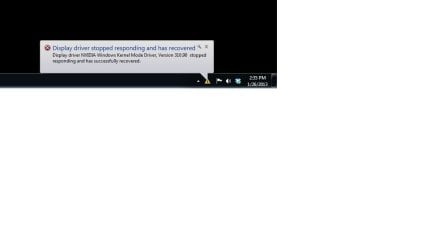
This has happened a few times where my monitor turns weird colors and goes black for a second then comes back with the message you can see in the screen shot i've posted.

Can some one please help me figure out how to fix this.
Thank you!

Nvidia Driver Malfunction.jpg
 

My Computer

Computer Manufacturer/Model Number
Self Made
OS
Windows 7 home premium 64Bit
CPU
Intel i5 3.4ghz
Motherboard
Asus Sabertooth Z77
Memory
8 gigs
Graphics Card(s)
Invidia GTX 560
Sound Card
none
Screen Resolution
Dell monitor
Case
Antec
Cooling
4 case fans
I've installed the latest drivers and that doesn't seem to keep it from happening. I have not uninstalled drivers then started from scratch again if that's what you are asking.
 

My Computer

Computer Manufacturer/Model Number
Self Made
OS
Windows 7 home premium 64Bit
CPU
Intel i5 3.4ghz
Motherboard
Asus Sabertooth Z77
Memory
8 gigs
Graphics Card(s)
Invidia GTX 560
Sound Card
none
Screen Resolution
Dell monitor
Case
Antec
Cooling
4 case fans
Try this method. It seems complicated, but is quite simple and takes less than 5 minutes.

Download the latest driver for your card from Nvidia and save it to the desktop.

Go to C:/Nvidia (The usual location for Display drivers.) Open the folder and there will be a folder for display drivers, open it. Inside will be a folder for every Nvidia driver you have installed. They will be named 306.23, 310.90 etc. Delete all of them but do not delete the display driver folder itself.

Disconnect from the Internet to keep windows from installing a generic display driver. It will install a display adapter, but that's OK.

Go to Control Panel > Uninstall programs and find Nvidia. Important: If you have an Nvidia chipset DO NOT uninstall the chipset driver. Uninstall the 3D driver, PhysX driver, HDMI Driver and all other drivers. IMPORTANT: Uninstall the Display driver Last. After uninstalling the display driver you will be prompted to reboot. Do so. When you come back, Windows will install the display adapter, It's OK.

Begin installing the driver you downloaded from Nvidia on your desktop. Select the language, accept the agreement and select Custom Install. Make sure the 'Clean Install' box is checked. Uncheck all drivers except the Display driver and the Physx Driver. Do not install any of the other drivers unless you have a particular need for the 3D driver. Complete the install and reboot.

Connect to the Internet again and you are done.

The very long explanation for these: http://www.evga.com/forums/tm.aspx?m=1174372&mpage=1

 

My Computers

System One System Two

  • Computer type
    PC/Desktop
    Computer Manufacturer/Model Number
    ALWAYS UNDER CONSTRUCTION
    OS
    Windows 11 Pro
    CPU
    Ryzen 9 5900X
    Motherboard
    Asus X570 Crosshair Viii Hero
    Memory
    32GB G Skill DDR4-3600
    Graphics Card(s)
    EVGA RTX 3080 FTW 3 Ultra
    Sound Card
    On Board/Sennheiser PC37X Headset
    Monitor(s) Displays
    3 X Asus 27"
    Screen Resolution
    2560x1440
    Hard Drives
    2 X 1 TB NVME drives
    PSU
    EVGA 850
    Case
    Phanteks Eclipse P400A
    Cooling
    EVGA 280 AIO
    Keyboard
    Logitech G510s/ Logitech G13
    Mouse
    Logitech G502
    Internet Speed
    24/1
    Antivirus
    ESET/MBAM Pro/SAS Pro
    Browser
    Chrome/ Firefox/ Edge
  • Computer type
    Laptop
    System Manufacturer/Model Number
    Dell 16 Plus
    OS
    Windows 11 Pro
    CPU
    Intel Ultra 9 288V
    Memory
    32 GB LPDDR5X 8533
    Monitor(s) Displays
    16" Mini-LED HDR600 Touch 90 Hz
    Screen Resolution
    2560X1600
    Hard Drives
    1 TB NVME
Thank you very much for you help. I have followed your instructions. Hopefully this will fix the problem.
I'll write back if the crash happens again.

Thanks!
 

My Computer

Computer Manufacturer/Model Number
Self Made
OS
Windows 7 home premium 64Bit
CPU
Intel i5 3.4ghz
Motherboard
Asus Sabertooth Z77
Memory
8 gigs
Graphics Card(s)
Invidia GTX 560
Sound Card
none
Screen Resolution
Dell monitor
Case
Antec
Cooling
4 case fans
Back
Top