JavaScript is disabled. For a better experience, please enable JavaScript in your browser before proceeding.
You are using an out of date browser. It may not display this or other websites correctly.
You should upgrade or use an
alternative browser .
Solved Odd hover background in recent programs in Start Menu
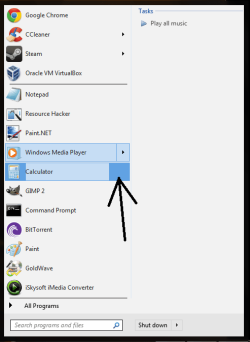
As you can see in the attachment, whenever I hover over any recent program in the Start Menu that doesn't have an arrow, the background image appears with 2 different colors. I was tinkering with aero.msstyles, but I don't know how to fix this, and I'd really prefer not to start customizing over again. I believe the image #s (w/ ResHack) dealing with recent programs in the Start Menu are 795-802, but I think there may be another image that is causing the weird background image.
I've uploaded the aero.msstyles file here:
http://www.**************/?oj645dh4n0oiqpo (mediafire)
The #s are the same as the default unchanged aero.msstyles
I'd greatly appreciate any help with this theme.
start menu problem.png
52.6 KB
· Views: 5
Computer type PC/Desktop Computer Manufacturer/Model Number Acer OS Windows 7 Home Premium x64 Internet Speed 20 Mbps Browser Firefox
Jerry ☮ 1956-2019 R.I.P.
VIP
SF Team
I replaced image #795 with the default image and it was gone.
Your image is 6x296 the default is 7x296 try editing it again.
Jerry
Computer type Laptop Computer Manufacturer/Model Number Sager NP9170 OS Win 7 Pro x64 / Win 10 Pro CPU Intel(R) Core(TM) i7-3630QM CPU @ 2.40GHz Motherboard CLEVO P170EM Memory 12 GB Graphics Card(s) (1) Intel(R) HD Graphics 4000 (2) NVIDIA GeForce GTX 675M Sound Card (1) Realtek High Definition Audio (2) Intel(R) Display Aud Monitor(s) Displays 17.3 Screen Resolution 1920x1080 Hard Drives (1) Samsung 860 EVO 500GB(OS) (1) Samsung 860 EVO 500GB(Data) Keyboard Backlite Antivirus MSE, Malwarebytes Pro Browser Firefox Other Info DESKTOP: Custom-built.
OS: Win 10 Pro x64.
CASE: Rosewill R5.
CPU: Intel I5 4670K CPU @ 3.40GHz.
CPU COOLER: Cool Master Hyper 212 EVO.
MOTHERBOARD: Asus Z87-A.
MEMORY: Kingston HyperX 2x4 GB.
GPU: Nvidia Geforce 650 TI.
PSU: Corsair TX750.
DRIVES: (1) Samsung 840 120 GB SSD (2) Western Digital blue 500 GB 7200 RPM.
New member
Member
Thread Starter
Adding another pixel fixed the problem! Thank you very much. I guess 1 pixel really can make a difference.
Computer type PC/Desktop Computer Manufacturer/Model Number Acer OS Windows 7 Home Premium x64 Internet Speed 20 Mbps Browser Firefox
Jerry ☮ 1956-2019 R.I.P.
VIP
SF Team
You're welcome
In most images you can change sizes but in this case you can not.
Jerry
Computer type Laptop Computer Manufacturer/Model Number Sager NP9170 OS Win 7 Pro x64 / Win 10 Pro CPU Intel(R) Core(TM) i7-3630QM CPU @ 2.40GHz Motherboard CLEVO P170EM Memory 12 GB Graphics Card(s) (1) Intel(R) HD Graphics 4000 (2) NVIDIA GeForce GTX 675M Sound Card (1) Realtek High Definition Audio (2) Intel(R) Display Aud Monitor(s) Displays 17.3 Screen Resolution 1920x1080 Hard Drives (1) Samsung 860 EVO 500GB(OS) (1) Samsung 860 EVO 500GB(Data) Keyboard Backlite Antivirus MSE, Malwarebytes Pro Browser Firefox Other Info DESKTOP: Custom-built.
OS: Win 10 Pro x64.
CASE: Rosewill R5.
CPU: Intel I5 4670K CPU @ 3.40GHz.
CPU COOLER: Cool Master Hyper 212 EVO.
MOTHERBOARD: Asus Z87-A.
MEMORY: Kingston HyperX 2x4 GB.
GPU: Nvidia Geforce 650 TI.
PSU: Corsair TX750.
DRIVES: (1) Samsung 840 120 GB SSD (2) Western Digital blue 500 GB 7200 RPM.