
I Installed Office 2010 and this changed my Windows Update Settings Permanently.
I know it was due to some option I choose in the Office Installation ( cannot remember the name ), as I was able to avoid this issue with another Installation of Office 2010.
I want to reset my Windows Update to my previous setting prior to Office 2010 installation.
I have always chosen the Windows Update Option "Let me know of updates but chose when to download and install "
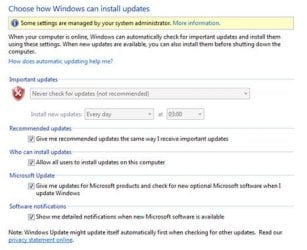
After installation of Office 2010 this is now set to "Never Check for updates" and the box is greyed out with no option to change and also now says "Some settings are managed by your system administrator". This was never the case prior to the Office 2010 install.Now I have to manually check for updates.
I have ran all the MS Fix It tools, etc and nothing has resolved issue.
I have now removed MS Office 2010 and the problem still remains.
I know it was due to some option I choose in the Office Installation ( cannot remember the name ), as I was able to avoid this issue with another Installation of Office 2010.
I want to reset my Windows Update to my previous setting prior to Office 2010 installation.
I have always chosen the Windows Update Option "Let me know of updates but chose when to download and install "
After installation of Office 2010 this is now set to "Never Check for updates" and the box is greyed out with no option to change and also now says "Some settings are managed by your system administrator". This was never the case prior to the Office 2010 install.Now I have to manually check for updates.
I have ran all the MS Fix It tools, etc and nothing has resolved issue.
I have now removed MS Office 2010 and the problem still remains.
Attachments
My Computer
- Computer type
- PC/Desktop
- OS
- Windows 7 Professional 64


