Re-installing the OS is probably best/faster... sometimes, the desire to know what is wrong (and/or learn stuff) makes people spend days/weeks/months trying lots of "fixes". It is up to you if you want to try more things.
The tools that VistaKing has had you use generate some info in files, but I cannot always tell what command and switches were used to generate the output file. The file that you attached to post #81 seems to indicate that the computer has a problem performing NSLOOKUP operations;
but the author of that minitoolbox app states:
Code:
[COLOR=Red]DNS request timed out.[/COLOR]
    timeout was 2 seconds.
Server:  UnKnown
Address:  192.168.1.254

DNS request timed out.
    timeout was 2 seconds.
DNS request timed out.
    timeout was 2 seconds.
DNS request timed out.
    timeout was 2 seconds.
DNS request timed out.
    timeout was 2 seconds.
That output quoted above appears to be from a failed NSLOOKUP query.
That same file from post #81 shows a successful ping to yahoo.com. I would interpret that to mean that DNS is working. The computer was able to ask a DNS server what the IP address is for yahoo.com. And you have manually pinged websites that showed DNS to be working.
You might try this tool:
I receive the message that my ESET installation ended prematurely - ESET Knowledgebase
It is meant to repair a long list of stuff that infections can damage.
And while I've read every post in this thread a few days back, I do not recall everything that you have tried. Have you tried surfing to websites using IE while in the safe mode with networking.
In your original post, I seem to recall that you said something like "running an sfc scan returned no results". Hopefully, the SFC scan did return results and those results were that there were no integrity violations found.
You might also want to make a new user profile and see if you can surf normally with IE from there.
And you might want to try a clean boot:
http://www.sevenforums.com/tutorial...ation-conflicts-performing-clean-startup.html
Mind if I ask why you have National Instruments software on this computer? Is this computer on a university network? The 128 IP address mentioned in post 19 seems to be assigned to a university.


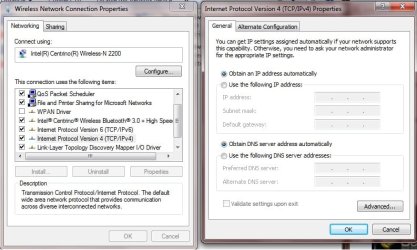
 rb: button , and then clicking Control Panel. In the search box, type adapter, and then, under Network and Sharing Center, click View network connections.