Solved Only FireFox (and a handful of other programs) can connect!

Download MiniToolBox

Click on the link MiniToolBox to download

Drag the MiniToolbox.exe from the Downloads to the Desktop

Place a check next to

  • Flush DNS
  • Report FF proxy settings
  • List IP Configuration


and click on the Go button . Upload the Result.txt file


Nice find! This is a useful program. I've attached the results.

I've read this thread and learned much stuff. However, I'm in total awe how much you two went through and there are no solutions yet... :\

It's been good times =)
 

Attachments

My Computer My Computer

At a glance

Windows 7 64 bitintel core i7nvidia geforce gtx 660m
Computer type
PC/Desktop
Computer Manufacturer/Model Number
Lenovo Y580
OS
Windows 7 64 bit
CPU
intel core i7
Graphics Card(s)
nvidia geforce gtx 660m
Antivirus
Microsoft Firewall
Browser
Firefox
Lets see something


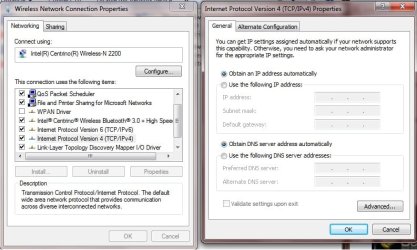
  • Open Network Connections by clicking the :orb: button , and then clicking Control Panel. In the search box, type adapter, and then, under Network and Sharing Center, click View network connections.

  • Right-click the Wireless connection and then click Properties. If you're prompted for an administrator password or confirmation, type the password or provide confirmation.
  • Click the Networking tab. Under This connection uses the following items, click Internet Protocol Version 4 (TCP/IPv4) and then click Properties
Let me know which setting has a dot


Obtain DNS server address automatically

Or

Use the following DNS server addresses
 

My Computer My Computer

At a glance

Windows 7 Ultimate 32-Bit & Windows 7 Ultimat...Intel Core i7 CPU 950 @ 3.07GHzOCZ 6GB (3 x 2GB) 240-Pin DDR3 SDRAM DDR3 160...ATI Radeon HD 5700 Series
Computer Manufacturer/Model Number
Custom Built
OS
Windows 7 Ultimate 32-Bit & Windows 7 Ultimate 64-Bit
CPU
Intel Core i7 CPU 950 @ 3.07GHz
Motherboard
ASUS P6T DELUXE V2
Memory
OCZ 6GB (3 x 2GB) 240-Pin DDR3 SDRAM DDR3 1600 OCZ3X1600R2
Graphics Card(s)
ATI Radeon HD 5700 Series
Sound Card
OnBoard
Hard Drives
WD6400AACS-00M3B0 (640GB SATA )
PSU
CORSAIR 850w
Case
NZXT LEXA
Cooling
Intel Stock Heatsink Fan
Keyboard
Microsoft Wireless Laser Keyboard 7000
Mouse
Microsoft Wireless Laser Mouse 7000
Obtain DNS server address automatically is selected.
 

Attachments

  • DNSsSettings.jpg
    DNSsSettings.jpg
    64 KB · Views: 3

My Computer My Computer

At a glance

Windows 7 64 bitintel core i7nvidia geforce gtx 660m
Computer type
PC/Desktop
Computer Manufacturer/Model Number
Lenovo Y580
OS
Windows 7 64 bit
CPU
intel core i7
Graphics Card(s)
nvidia geforce gtx 660m
Antivirus
Microsoft Firewall
Browser
Firefox
So I guess I'll format since it seems no other options are available. Any advice?
 

My Computer My Computer

At a glance

Windows 7 64 bitintel core i7nvidia geforce gtx 660m
Computer type
PC/Desktop
Computer Manufacturer/Model Number
Lenovo Y580
OS
Windows 7 64 bit
CPU
intel core i7
Graphics Card(s)
nvidia geforce gtx 660m
Antivirus
Microsoft Firewall
Browser
Firefox

My Computer My Computer

At a glance

Windows 7 Ultimate 32-Bit & Windows 7 Ultimat...Intel Core i7 CPU 950 @ 3.07GHzOCZ 6GB (3 x 2GB) 240-Pin DDR3 SDRAM DDR3 160...ATI Radeon HD 5700 Series
Computer Manufacturer/Model Number
Custom Built
OS
Windows 7 Ultimate 32-Bit & Windows 7 Ultimate 64-Bit
CPU
Intel Core i7 CPU 950 @ 3.07GHz
Motherboard
ASUS P6T DELUXE V2
Memory
OCZ 6GB (3 x 2GB) 240-Pin DDR3 SDRAM DDR3 1600 OCZ3X1600R2
Graphics Card(s)
ATI Radeon HD 5700 Series
Sound Card
OnBoard
Hard Drives
WD6400AACS-00M3B0 (640GB SATA )
PSU
CORSAIR 850w
Case
NZXT LEXA
Cooling
Intel Stock Heatsink Fan
Keyboard
Microsoft Wireless Laser Keyboard 7000
Mouse
Microsoft Wireless Laser Mouse 7000
Now if this was me I would have suggested the reinstall after the very first page. I know a dead end when I see one. :)

Way to stick with it though VistaKing, you have more patience than I do.
 

My Computer My Computer

At a glance

Windows 7 Ult, Windows 8.1 Pro,Q9650-4.275GHz, E8600 4.5GHz, E6750-3.8GHzG.Skill PC2 9600 1200Mhz 5 5 5 15 2TGTX480
Computer type
PC/Desktop
Computer Manufacturer/Model Number
Home built
OS
Windows 7 Ult, Windows 8.1 Pro,
CPU
Q9650-4.275GHz, E8600 4.5GHz, E6750-3.8GHz
Motherboard
Evga 780i FTW
Memory
G.Skill PC2 9600 1200Mhz 5 5 5 15 2T
Graphics Card(s)
GTX480
Sound Card
Asus Xonar D2
Monitor(s) Displays
HannsG
Screen Resolution
1680X1050
Hard Drives
GSkill Phoenix Pro 120GB SSD
PSU
ThermalTake Toughpower 1000Watt modular
Case
ThermalTake XaserV
Cooling
Xigmatek S1283
Keyboard
Logitech G15
Mouse
Logitech G9
Internet Speed
T1
I only reformat if I really have to . That is my last resort .
 

My Computer My Computer

At a glance

Windows 7 Ultimate 32-Bit & Windows 7 Ultimat...Intel Core i7 CPU 950 @ 3.07GHzOCZ 6GB (3 x 2GB) 240-Pin DDR3 SDRAM DDR3 160...ATI Radeon HD 5700 Series
Computer Manufacturer/Model Number
Custom Built
OS
Windows 7 Ultimate 32-Bit & Windows 7 Ultimate 64-Bit
CPU
Intel Core i7 CPU 950 @ 3.07GHz
Motherboard
ASUS P6T DELUXE V2
Memory
OCZ 6GB (3 x 2GB) 240-Pin DDR3 SDRAM DDR3 1600 OCZ3X1600R2
Graphics Card(s)
ATI Radeon HD 5700 Series
Sound Card
OnBoard
Hard Drives
WD6400AACS-00M3B0 (640GB SATA )
PSU
CORSAIR 850w
Case
NZXT LEXA
Cooling
Intel Stock Heatsink Fan
Keyboard
Microsoft Wireless Laser Keyboard 7000
Mouse
Microsoft Wireless Laser Mouse 7000
I only reformat if I really have to . That is my last resort .

I agree but at a certain point it becomes much easier and faster to restore the system rather than trying to fix a system that has been plagued with viruses. Virus evasion = never to be trusted again.

The problem with this networking section is that fully 90 percent of these messed up machines have already been compromised. They only come in here when it's so bad that they can't even get online any more. :(
 

My Computer My Computer

At a glance

Windows 7 Ult, Windows 8.1 Pro,Q9650-4.275GHz, E8600 4.5GHz, E6750-3.8GHzG.Skill PC2 9600 1200Mhz 5 5 5 15 2TGTX480
Computer type
PC/Desktop
Computer Manufacturer/Model Number
Home built
OS
Windows 7 Ult, Windows 8.1 Pro,
CPU
Q9650-4.275GHz, E8600 4.5GHz, E6750-3.8GHz
Motherboard
Evga 780i FTW
Memory
G.Skill PC2 9600 1200Mhz 5 5 5 15 2T
Graphics Card(s)
GTX480
Sound Card
Asus Xonar D2
Monitor(s) Displays
HannsG
Screen Resolution
1680X1050
Hard Drives
GSkill Phoenix Pro 120GB SSD
PSU
ThermalTake Toughpower 1000Watt modular
Case
ThermalTake XaserV
Cooling
Xigmatek S1283
Keyboard
Logitech G15
Mouse
Logitech G9
Internet Speed
T1
I only reformat if I really have to . That is my last resort .

I agree but at a certain point it becomes much easier and faster to restore the system rather than trying to fix a system that has been plagued with viruses. Virus evasion = never to be trusted again.

The problem with this networking section is that fully 90 percent of these messed up machines have already been compromised. They only come in here when it's so bad that they can't even get online any more. :(

I agree 100% ... you eventually reach the point of diminishing returns, and then its time to bite the bullet and either restore a system image ( if you have made one ) or do a fresh install. Forensics can be fun, but in the end, what the OP wants is a stable system, and spending 20 minutes on a fresh install, beats 3 days of bug hunting! ;)
 

My Computer My Computer

At a glance

64-bit Windows 8.1 ProCore(TM) i5 CPU 4330 Haswell @ 3.20GHz12.00 GBIntel(R) HD Graphics
Computer type
PC/Desktop
Computer Manufacturer/Model Number
LENOVO K450 @3.0GHZ
OS
64-bit Windows 8.1 Pro
CPU
Core(TM) i5 CPU 4330 Haswell @ 3.20GHz
Motherboard
LENOVO
Memory
12.00 GB
Graphics Card(s)
Intel(R) HD Graphics
Sound Card
Intel HD integtrated
Monitor(s) Displays
HP 25' ISP Monitor
Screen Resolution
1900/1020
Hard Drives
(1) ST1000DM003-1CH162 (2) Generic STORAGE DEVICE USB Device (3) Generic STORAGE DEVICE USB Device
Internet Speed
100mb down/10mb up
Re-installing the OS is probably best/faster... sometimes, the desire to know what is wrong (and/or learn stuff) makes people spend days/weeks/months trying lots of "fixes". It is up to you if you want to try more things.

The tools that VistaKing has had you use generate some info in files, but I cannot always tell what command and switches were used to generate the output file. The file that you attached to post #81 seems to indicate that the computer has a problem performing NSLOOKUP operations; but the author of that minitoolbox app states:
Code:
[COLOR=Red]DNS request timed out.[/COLOR]
    timeout was 2 seconds.
Server:  UnKnown
Address:  192.168.1.254

DNS request timed out.
    timeout was 2 seconds.
DNS request timed out.
    timeout was 2 seconds.
DNS request timed out.
    timeout was 2 seconds.
DNS request timed out.
    timeout was 2 seconds.
That output quoted above appears to be from a failed NSLOOKUP query.

That same file from post #81 shows a successful ping to yahoo.com. I would interpret that to mean that DNS is working. The computer was able to ask a DNS server what the IP address is for yahoo.com. And you have manually pinged websites that showed DNS to be working.

You might try this tool:
I receive the message that my ESET installation ended prematurely - ESET Knowledgebase
It is meant to repair a long list of stuff that infections can damage.

And while I've read every post in this thread a few days back, I do not recall everything that you have tried. Have you tried surfing to websites using IE while in the safe mode with networking.

In your original post, I seem to recall that you said something like "running an sfc scan returned no results". Hopefully, the SFC scan did return results and those results were that there were no integrity violations found.

You might also want to make a new user profile and see if you can surf normally with IE from there.

And you might want to try a clean boot:
http://www.sevenforums.com/tutorial...ation-conflicts-performing-clean-startup.html

Mind if I ask why you have National Instruments software on this computer? Is this computer on a university network? The 128 IP address mentioned in post 19 seems to be assigned to a university.

 

My Computer My Computer

At a glance

W7 Pro SP1 64biti78GBIntel HD Graphics
Computer type
Laptop
Computer Manufacturer/Model Number
Employer provided Dell Latitude
OS
W7 Pro SP1 64bit
CPU
i7
Memory
8GB
Graphics Card(s)
Intel HD Graphics
Hard Drives
crappy SSD
Antivirus
Employer mandated Symantec Endpoint Protection
Browser
Pale Moon 64bit, IE11 64bit & Chrome 64bit
Re-installing the OS is probably best/faster... sometimes, the desire to know what is wrong (and/or learn stuff) makes people spend days/weeks/months trying lots of "fixes". It is up to you if you want to try more things.

The tools that VistaKing has had you use generate some info in files, but I cannot always tell what command and switches were used to generate the output file. The file that you attached to post #81 seems to indicate that the computer has a problem performing NSLOOKUP operations; but the author of that minitoolbox app states:
Code:
[COLOR=Red]DNS request timed out.[/COLOR]
    timeout was 2 seconds.
Server:  UnKnown
Address:  192.168.1.254

DNS request timed out.
    timeout was 2 seconds.
DNS request timed out.
    timeout was 2 seconds.
DNS request timed out.
    timeout was 2 seconds.
DNS request timed out.
    timeout was 2 seconds.
That output quoted above appears to be from a failed NSLOOKUP query.

That same file from post #81 shows a successful ping to yahoo.com. I would interpret that to mean that DNS is working. The computer was able to ask a DNS server what the IP address is for yahoo.com. And you have manually pinged websites that showed DNS to be working.

You might try this tool:
I receive the message that my ESET installation ended prematurely - ESET Knowledgebase
It is meant to repair a long list of stuff that infections can damage.

And while I've read every post in this thread a few days back, I do not recall everything that you have tried. Have you tried surfing to websites using IE while in the safe mode with networking.

In your original post, I seem to recall that you said something like "running an sfc scan returned no results". Hopefully, the SFC scan did return results and those results were that there were no integrity violations found.

You might also want to make a new user profile and see if you can surf normally with IE from there.

And you might want to try a clean boot:
http://www.sevenforums.com/tutorial...ation-conflicts-performing-clean-startup.html

Mind if I ask why you have National Instruments software on this computer? Is this computer on a university network? The 128 IP address mentioned in post 19 seems to be assigned to a university.

Thank you kindly for your input, UsernameIssues (lol!). I can't believe I hadn't booted into safe mode earlier, seems like an obvious first step. I did this just now, however, and there were no changes. Still couldn't connect using IE or Chrome while FireFox still worked.
I did another sfc scan just to be sure, and yes, there are no integrity violations. Pardon the mistake.
Trying to use ESET failed. I installed the software but the setup files cannot connect to the internet and therefore cannot install, much like java, flash and Steam cannot be updated.
National Instruments was installed for class purposes. I used the Circuit Design software for an electrical class. I haven't used it since.
Although I am not a careless user, I have come to believe that this is indeed an infection. Lately, websites like Facebook and YouTube have been showing ads that I've never seen before. I've been getting more pop-ups and many FireFox addons aren't working anymore.
I don't know how this could've gotten so bad under my constant use. I ran several virus scans and deleted or otherwise cleaned every threat.
I may have been doing some troubleshooting at school, which might be why post 19 has a 128 IP address. My home address is different (begins in 192).
I continue to be at a loss. I welcome and appreciate any further help
Thank you all =)
 

My Computer My Computer

At a glance

Windows 7 64 bitintel core i7nvidia geforce gtx 660m
Computer type
PC/Desktop
Computer Manufacturer/Model Number
Lenovo Y580
OS
Windows 7 64 bit
CPU
intel core i7
Graphics Card(s)
nvidia geforce gtx 660m
Antivirus
Microsoft Firewall
Browser
Firefox
Thanks for the feedback on the safe mode.

Have you tried the ESET tool yet?

Have you tried the clean boot?

Have you tried a new user profile?

I'm no security expert. I've had not training in that area - but I've clean quite a few computers over the years. There are several infections that can hide from normal scanners and even specialized ones. I would suggest scanning your computer using WDO and a USB stick (or CD).
What is Windows Defender Offline?

Offline scanners (like WDO, Kaspershy's and others) can check the hard drive while the infection is not active. It would be best if you could download WDO from a clean computer - but I've never seen WDO get infected even when it is downloaded from an infected computer. (But there is always a first time :-)

I use the National Instruments software quite a bit - which is why I asked about it. It should not be causing a problem, but I would uninstall all aspects of it since it has a lot of junk that runs all of the time. In fact, go ahead and uninstall everything that you don't use regularly. Even uninstall all security related software (antivirus apps and scanners like Malwarebytes). Install Microsoft's Security Essentials and if need be - update it via this file here.

After you have rarely used software uninstalled - please try that clean boot tutorial.

I'm really curious as to what could cause NSLOOKUP to fail and yet DNS works. We may never know if the automated tools (like the ESET one that I pointed you to) fixes the problem(s). I do understand if you want to just start with a fresh W7 install instead of the seemingly endless attempts at fixing your computer.
 
Last edited:

My Computer My Computer

At a glance

W7 Pro SP1 64biti78GBIntel HD Graphics
Computer type
Laptop
Computer Manufacturer/Model Number
Employer provided Dell Latitude
OS
W7 Pro SP1 64bit
CPU
i7
Memory
8GB
Graphics Card(s)
Intel HD Graphics
Hard Drives
crappy SSD
Antivirus
Employer mandated Symantec Endpoint Protection
Browser
Pale Moon 64bit, IE11 64bit & Chrome 64bit
~~~
I may have been doing some troubleshooting at school, which might be why post 19 has a 128 IP address. My home address is different (begins in 192).
~~~
The 128 IP address was (is?) a proxy - which is typical of large networks like schools and large companies. All (or most) traffic to/from the internet passes thru those proxies (where things can be checked and rules enforced).

You could have a 192 IP address assigned to the computer while at school too. That has nothing to do with using a proxy. The proxy settings that you removed from the registry during earlier posts were fine (I would have removed then too just to be sure). Those proxy IP addresses just sit there until the next time that you need them. When you ask IE to use a proxy, it would have started to use that proxy IP address again.

As a side note - I learned something while I spent hours pouring over this thread a few days ago (well actually, I learned more than one thing). I learned that IE10 gives better info if it cannot connect that does IE9. If you tell IE10 to use a wrong proxy IP, it should tell you that the proxy is not responding. IE9 just tells you that it cannot connect - but not why.

The company that I work for is huge; it has lots of computers that act as proxies. We use a couple of URLs in out proxy settings. One URL will resolve to one of the many IP addresses of the many servers that act as our proxies. The other URL does the same, but connects us thru an older proxy system. I keep Firefox set to one proxy and IE set to another proxy. The proxies currently have different rule sets and websites that are blocked via one proxy system are sometimes accessible via the older proxy servers. (i.e. for some reason, the new proxy system blocked AutoIt's website - I've since gotten IT to unblock it.)

The reason why I bored you with that info about proxies is - nothing I could do would put Firefox into the state that your Firefox is in. I ran some of the same tools that VistaKing had you run (only I used a virtual machine) and I never could get Firefox to report its proxy settings like your report showed. I must not have tried every possible combo - or something is unusual about your Firefox setup.
 

My Computer My Computer

At a glance

W7 Pro SP1 64biti78GBIntel HD Graphics
Computer type
Laptop
Computer Manufacturer/Model Number
Employer provided Dell Latitude
OS
W7 Pro SP1 64bit
CPU
i7
Memory
8GB
Graphics Card(s)
Intel HD Graphics
Hard Drives
crappy SSD
Antivirus
Employer mandated Symantec Endpoint Protection
Browser
Pale Moon 64bit, IE11 64bit & Chrome 64bit
We could try a reset on Firefox and if that doesn't help do a reinstall of Firefox but save the bookmarks first .
 

My Computer My Computer

At a glance

Windows 7 Ultimate 32-Bit & Windows 7 Ultimat...Intel Core i7 CPU 950 @ 3.07GHzOCZ 6GB (3 x 2GB) 240-Pin DDR3 SDRAM DDR3 160...ATI Radeon HD 5700 Series
Computer Manufacturer/Model Number
Custom Built
OS
Windows 7 Ultimate 32-Bit & Windows 7 Ultimate 64-Bit
CPU
Intel Core i7 CPU 950 @ 3.07GHz
Motherboard
ASUS P6T DELUXE V2
Memory
OCZ 6GB (3 x 2GB) 240-Pin DDR3 SDRAM DDR3 1600 OCZ3X1600R2
Graphics Card(s)
ATI Radeon HD 5700 Series
Sound Card
OnBoard
Hard Drives
WD6400AACS-00M3B0 (640GB SATA )
PSU
CORSAIR 850w
Case
NZXT LEXA
Cooling
Intel Stock Heatsink Fan
Keyboard
Microsoft Wireless Laser Keyboard 7000
Mouse
Microsoft Wireless Laser Mouse 7000
I'm interested in sticking it out and finding the root for all these problems.
I've tried using another user profile after a clean boot, but no changes were found.
As for ESET and WDO, I cannot run those programs because they need the internet in order to be installed. For example, when installing WDO I get an error message which asks me to ensure I'm connected to the internet before trying again (error code 0002-80072EFD). I will try installing it onto my flash drive using another computer when I get home tonight.
Finally, I am hesitant to change/reset the Firefox settings as it is the only browser that works at the moment. If I lose it I will be in a worse situation than I am now, since I use this laptop for school nearly every day.
If you insist I try, I will, as long as we can be confident that Firefox will work again.
I've uninstalled quite a bit of software and I will continue to do so now.
I found the information about proxies in your workplace more interesting than boring, UsernameIssues. =)
Again, thank you all for your support in this matter =)
 

My Computer My Computer

At a glance

Windows 7 64 bitintel core i7nvidia geforce gtx 660m
Computer type
PC/Desktop
Computer Manufacturer/Model Number
Lenovo Y580
OS
Windows 7 64 bit
CPU
intel core i7
Graphics Card(s)
nvidia geforce gtx 660m
Antivirus
Microsoft Firewall
Browser
Firefox

My Computer My Computer

At a glance

Windows 7 Ultimate 32-Bit & Windows 7 Ultimat...Intel Core i7 CPU 950 @ 3.07GHzOCZ 6GB (3 x 2GB) 240-Pin DDR3 SDRAM DDR3 160...ATI Radeon HD 5700 Series
Computer Manufacturer/Model Number
Custom Built
OS
Windows 7 Ultimate 32-Bit & Windows 7 Ultimate 64-Bit
CPU
Intel Core i7 CPU 950 @ 3.07GHz
Motherboard
ASUS P6T DELUXE V2
Memory
OCZ 6GB (3 x 2GB) 240-Pin DDR3 SDRAM DDR3 1600 OCZ3X1600R2
Graphics Card(s)
ATI Radeon HD 5700 Series
Sound Card
OnBoard
Hard Drives
WD6400AACS-00M3B0 (640GB SATA )
PSU
CORSAIR 850w
Case
NZXT LEXA
Cooling
Intel Stock Heatsink Fan
Keyboard
Microsoft Wireless Laser Keyboard 7000
Mouse
Microsoft Wireless Laser Mouse 7000
Thanks for the feedback about testing with another user - that tells us a lot about. The issue is system wide, so nothing in the USER registry entries matter. (I suppose something could have changed the default user settings, that could cause a problem for each new user profile.)

I'm not worried about Firefox the settings on Firefox. The settings within Firefox should not impact the rest of the system. The settings within Firefox are telling it not to use a proxy - which is correct for your home.

~~~~
As for ESET and WDO, I cannot run those programs because they need the internet in order to be installed.
~~~~
I had hoped that WDO would update. I wonder why they did not hard code an IP into it for updates when no proxy is involved and the computer has some issues left. Hmmm.

As for ESET - I'm not suggesting that you install the ESET antivirus software, I was wanting you to try a single file repair utility located here:
I receive the message that my ESET installation ended prematurely - ESET Knowledgebase

The file is in II.1 - here is a direct line to the EXE:
http://kb.eset.com/library/ESET/KB%20Team%20Only/Malware/ServicesRepair.exe

That EXE is self contained and does not require any updates or connection to the internet.
 
Last edited:

My Computer My Computer

At a glance

W7 Pro SP1 64biti78GBIntel HD Graphics
Computer type
Laptop
Computer Manufacturer/Model Number
Employer provided Dell Latitude
OS
W7 Pro SP1 64bit
CPU
i7
Memory
8GB
Graphics Card(s)
Intel HD Graphics
Hard Drives
crappy SSD
Antivirus
Employer mandated Symantec Endpoint Protection
Browser
Pale Moon 64bit, IE11 64bit & Chrome 64bit
Sorry, I've been busy. I will try those suggestions out soon.
My continued thanks to you all =)
 

My Computer My Computer

At a glance

Windows 7 64 bitintel core i7nvidia geforce gtx 660m
Computer type
PC/Desktop
Computer Manufacturer/Model Number
Lenovo Y580
OS
Windows 7 64 bit
CPU
intel core i7
Graphics Card(s)
nvidia geforce gtx 660m
Antivirus
Microsoft Firewall
Browser
Firefox
We understand about being busy --- silly real life :-)

I am really curious about what the ESET tool will do here.
 

My Computer My Computer

At a glance

W7 Pro SP1 64biti78GBIntel HD Graphics
Computer type
Laptop
Computer Manufacturer/Model Number
Employer provided Dell Latitude
OS
W7 Pro SP1 64bit
CPU
i7
Memory
8GB
Graphics Card(s)
Intel HD Graphics
Hard Drives
crappy SSD
Antivirus
Employer mandated Symantec Endpoint Protection
Browser
Pale Moon 64bit, IE11 64bit & Chrome 64bit
Hello!
I ran the ESET tool after downloading from the direct link you posted to the EXE file.
I've attached the SvcRepair.log, which was in the folder "CC Support" that appeared after rebooting. Also in that folder is another folder "Tools" which has a lot of files and folder within in. Is there anything else you'd like me to attach?
The problem continues to thwart us, as chrome, IE, Steam, etc... do not connect.
 

Attachments

My Computer My Computer

At a glance

Windows 7 64 bitintel core i7nvidia geforce gtx 660m
Computer type
PC/Desktop
Computer Manufacturer/Model Number
Lenovo Y580
OS
Windows 7 64 bit
CPU
intel core i7
Graphics Card(s)
nvidia geforce gtx 660m
Antivirus
Microsoft Firewall
Browser
Firefox
Back
Top