
Open File Location Does Nothing EXCEPT during explorer restart???

BlackIce000

New member
Local time
9:23 AM
Messages
17
I recently installed windows 7 on an older e machines T5216 running XP. I used PCMover to move my applications and settings, so at first, it was a clean 7 install.

After all was done, I noticed I could not open a file location neither from the right-click menu nor the properties dialog.

I have found and tried many linkfix registry hacks, with no real success.

I have discovered that if I end the explorer.exe process from the task manager and then run it from there I can TEMPORARILY right-click and open file location and it works! As soon as explorer begins doing whatever secondary tasks it does when started I lose the ability to use open file location.
I have tried using the built in hidden admin account, a new user, etc. All have the same issue.

I have run sfc /scannow multiple times with admin privs.

Not sure what is going on nor what to try next.

Help! Please.

Rick
 

My Computer

Computer type
PC/Desktop
Computer Manufacturer/Model Number
eMachines T5216
OS
Microsoft Windows 7 Ultimate 32-bit 7601 Multiprocessor Free Service Pack 1
CPU
Intel(R) Pentium(R) D CPU 2.66GHz
Motherboard
Intel Corporation D102GGC2
Memory
2.00 GB
Graphics Card(s)
ATI RADEON XPRESS 200 Series
Sound Card
High Definition Audio Device
Screen Resolution
1440 x 900 x 32 bits (4294967296 colors) @ 59 Hz
Hard Drives
(1) WDC WD1600BB-22RDA0 ATA Device (2) Generic USB CF Reader USB Device (3) Generic USB MS Reader USB Device (4) Generic USB SD Reader USB Device (5) Generic USB SM Reader USB Device

My Computer

Computer type
PC/Desktop
Computer Manufacturer/Model Number
Home made Desktop
OS
Windows 10 Pro. 64/ version 1709 Windows 7 Pro/64
CPU
Intel i7-6800K @ 4.3
Motherboard
ASUS X-99 Deluxe II
Memory
Corsair Platinum 16 gig @2400
Graphics Card(s)
EVGA GTX 1070 OC
Monitor(s) Displays
Asus 27" LED LCD/VE278Q
Screen Resolution
1920-1080 or 1280-720 HDMI
Hard Drives
INTEL SSD 730-240 Gb Sata 3.0/
PSU
EVGA Platium 1200W
Case
Phanteks Luxe Tempered Glass 8 fans/ one radiator
Cooling
XSPC/ Water Cooled CPU
Keyboard
Das 4 Professional
Mouse
Logitech M705/MX Anywhere 2-S
Internet Speed
100 mbits
Antivirus
Microsoft Security Essentials/ Malwarebytes Premium 3.0/ SAS
Browser
I.E. 11 default/Firefox/ ISP Time Warner Cable/Spectrum
Other Info
LG BluRay Burner/
Sound system-KLipsch-THX/
Icy Dock ssd Hot Swap bays.
Yes, that is correct.

All of the applications and shortcuts are working. Double-click will run each program properly. However, right-click open file location does nothing.
 

My Computer

Computer type
PC/Desktop
Computer Manufacturer/Model Number
eMachines T5216
OS
Microsoft Windows 7 Ultimate 32-bit 7601 Multiprocessor Free Service Pack 1
CPU
Intel(R) Pentium(R) D CPU 2.66GHz
Motherboard
Intel Corporation D102GGC2
Memory
2.00 GB
Graphics Card(s)
ATI RADEON XPRESS 200 Series
Sound Card
High Definition Audio Device
Screen Resolution
1440 x 900 x 32 bits (4294967296 colors) @ 59 Hz
Hard Drives
(1) WDC WD1600BB-22RDA0 ATA Device (2) Generic USB CF Reader USB Device (3) Generic USB MS Reader USB Device (4) Generic USB SD Reader USB Device (5) Generic USB SM Reader USB Device
We got caught in the middle of posting. Could you read my post again. I have update it.
 

My Computer

Computer type
PC/Desktop
Computer Manufacturer/Model Number
Home made Desktop
OS
Windows 10 Pro. 64/ version 1709 Windows 7 Pro/64
CPU
Intel i7-6800K @ 4.3
Motherboard
ASUS X-99 Deluxe II
Memory
Corsair Platinum 16 gig @2400
Graphics Card(s)
EVGA GTX 1070 OC
Monitor(s) Displays
Asus 27" LED LCD/VE278Q
Screen Resolution
1920-1080 or 1280-720 HDMI
Hard Drives
INTEL SSD 730-240 Gb Sata 3.0/
PSU
EVGA Platium 1200W
Case
Phanteks Luxe Tempered Glass 8 fans/ one radiator
Cooling
XSPC/ Water Cooled CPU
Keyboard
Das 4 Professional
Mouse
Logitech M705/MX Anywhere 2-S
Internet Speed
100 mbits
Antivirus
Microsoft Security Essentials/ Malwarebytes Premium 3.0/ SAS
Browser
I.E. 11 default/Firefox/ ISP Time Warner Cable/Spectrum
Other Info
LG BluRay Burner/
Sound system-KLipsch-THX/
Icy Dock ssd Hot Swap bays.
No problem.

Windows 7 Ultimate

Set Info completed :)

Rich
 

My Computer

Computer type
PC/Desktop
Computer Manufacturer/Model Number
eMachines T5216
OS
Microsoft Windows 7 Ultimate 32-bit 7601 Multiprocessor Free Service Pack 1
CPU
Intel(R) Pentium(R) D CPU 2.66GHz
Motherboard
Intel Corporation D102GGC2
Memory
2.00 GB
Graphics Card(s)
ATI RADEON XPRESS 200 Series
Sound Card
High Definition Audio Device
Screen Resolution
1440 x 900 x 32 bits (4294967296 colors) @ 59 Hz
Hard Drives
(1) WDC WD1600BB-22RDA0 ATA Device (2) Generic USB CF Reader USB Device (3) Generic USB MS Reader USB Device (4) Generic USB SD Reader USB Device (5) Generic USB SM Reader USB Device
My Computer

Computer type
PC/Desktop
Computer Manufacturer/Model Number
Home made Desktop
OS
Windows 10 Pro. 64/ version 1709 Windows 7 Pro/64
CPU
Intel i7-6800K @ 4.3
Motherboard
ASUS X-99 Deluxe II
Memory
Corsair Platinum 16 gig @2400
Graphics Card(s)
EVGA GTX 1070 OC
Monitor(s) Displays
Asus 27" LED LCD/VE278Q
Screen Resolution
1920-1080 or 1280-720 HDMI
Hard Drives
INTEL SSD 730-240 Gb Sata 3.0/
PSU
EVGA Platium 1200W
Case
Phanteks Luxe Tempered Glass 8 fans/ one radiator
Cooling
XSPC/ Water Cooled CPU
Keyboard
Das 4 Professional
Mouse
Logitech M705/MX Anywhere 2-S
Internet Speed
100 mbits
Antivirus
Microsoft Security Essentials/ Malwarebytes Premium 3.0/ SAS
Browser
I.E. 11 default/Firefox/ ISP Time Warner Cable/Spectrum
Other Info
LG BluRay Burner/
Sound system-KLipsch-THX/
Icy Dock ssd Hot Swap bays.
Sure have. Remove Add...none work. I can add a new Open File to the context menu and remove it..but it doesn't work

Rick
 

My Computer

Computer type
PC/Desktop
Computer Manufacturer/Model Number
eMachines T5216
OS
Microsoft Windows 7 Ultimate 32-bit 7601 Multiprocessor Free Service Pack 1
CPU
Intel(R) Pentium(R) D CPU 2.66GHz
Motherboard
Intel Corporation D102GGC2
Memory
2.00 GB
Graphics Card(s)
ATI RADEON XPRESS 200 Series
Sound Card
High Definition Audio Device
Screen Resolution
1440 x 900 x 32 bits (4294967296 colors) @ 59 Hz
Hard Drives
(1) WDC WD1600BB-22RDA0 ATA Device (2) Generic USB CF Reader USB Device (3) Generic USB MS Reader USB Device (4) Generic USB SD Reader USB Device (5) Generic USB SM Reader USB Device
The only thing I can think of is when you moved your XP things to Windows 7, Windows 7 does not like the settings and programs from XP.

In my opinion leave the XP things to XP and install what you need fresh on to Windows 7.

With 2 gigs of ram you will not be able to use the XP virtual to install XP programs and setting.

Windows 7 alone with 2 gigs of ram will just hobble along.
 

My Computer

Computer type
PC/Desktop
Computer Manufacturer/Model Number
Home made Desktop
OS
Windows 10 Pro. 64/ version 1709 Windows 7 Pro/64
CPU
Intel i7-6800K @ 4.3
Motherboard
ASUS X-99 Deluxe II
Memory
Corsair Platinum 16 gig @2400
Graphics Card(s)
EVGA GTX 1070 OC
Monitor(s) Displays
Asus 27" LED LCD/VE278Q
Screen Resolution
1920-1080 or 1280-720 HDMI
Hard Drives
INTEL SSD 730-240 Gb Sata 3.0/
PSU
EVGA Platium 1200W
Case
Phanteks Luxe Tempered Glass 8 fans/ one radiator
Cooling
XSPC/ Water Cooled CPU
Keyboard
Das 4 Professional
Mouse
Logitech M705/MX Anywhere 2-S
Internet Speed
100 mbits
Antivirus
Microsoft Security Essentials/ Malwarebytes Premium 3.0/ SAS
Browser
I.E. 11 default/Firefox/ ISP Time Warner Cable/Spectrum
Other Info
LG BluRay Burner/
Sound system-KLipsch-THX/
Icy Dock ssd Hot Swap bays.
I disagree. The XP settings transfer only affected my applications and some basic setting. While it could have affected the OPEN FILE LOCATION operation, it should be easily repaired.

Performance has been better than the machine running XP (in fact it was designed with VISTA in mind)

So, now, back to the problem at hand.

Still looking for solutions.

Rick
 

My Computer

Computer type
PC/Desktop
Computer Manufacturer/Model Number
eMachines T5216
OS
Microsoft Windows 7 Ultimate 32-bit 7601 Multiprocessor Free Service Pack 1
CPU
Intel(R) Pentium(R) D CPU 2.66GHz
Motherboard
Intel Corporation D102GGC2
Memory
2.00 GB
Graphics Card(s)
ATI RADEON XPRESS 200 Series
Sound Card
High Definition Audio Device
Screen Resolution
1440 x 900 x 32 bits (4294967296 colors) @ 59 Hz
Hard Drives
(1) WDC WD1600BB-22RDA0 ATA Device (2) Generic USB CF Reader USB Device (3) Generic USB MS Reader USB Device (4) Generic USB SD Reader USB Device (5) Generic USB SM Reader USB Device
I can't help with your problem. I do not have "Open File Location" in context menu's in Windows 7 and I do not miss it.

What I usually do is to press [Shift+Right Click] on the file or folder and choose "Copy As Path" then paste the result into Explorer's address bar or a text document.
 

My Computer

Computer type
Laptop
Computer Manufacturer/Model Number
ASUS
OS
Microsoft Windows 7 Home Premium 64-bit 7601 Multiprocessor Free Service Pack 1
CPU
AMD C-60 APU with Radeon(tm) HD Graphics
Motherboard
ASUSTeK COMPUTER INC. X501U
Memory
4.00 GB
Graphics Card(s)
AMD Radeon HD 6290 Graphics
Sound Card
(1) AMD High Definition Audio Device (2) Realtek High Defi
Screen Resolution
1366 x 768 x 32 bits (4294967296 colors) @ 60 Hz
Hard Drives
Hitachi HTS545050A7E380 SATA Disk Device
Antivirus
Comodo CIS & FW, SecureAplus App Whitelisting, Threatfire
Browser
Cyberfox 64bit, Opera 64bit, Airfox
Other Info
Spy-The-Spy, HitmanPro.Alert, Norton Connect Safe, MJRegWatcher, BitDefender TrafficLight, Voodoo Shield, Zemana AntiMalware
As you stated so eloquently.
So, now, back to the problem at hand.

Okay
Have a nice day.
 

My Computer

Computer type
PC/Desktop
Computer Manufacturer/Model Number
Home made Desktop
OS
Windows 10 Pro. 64/ version 1709 Windows 7 Pro/64
CPU
Intel i7-6800K @ 4.3
Motherboard
ASUS X-99 Deluxe II
Memory
Corsair Platinum 16 gig @2400
Graphics Card(s)
EVGA GTX 1070 OC
Monitor(s) Displays
Asus 27" LED LCD/VE278Q
Screen Resolution
1920-1080 or 1280-720 HDMI
Hard Drives
INTEL SSD 730-240 Gb Sata 3.0/
PSU
EVGA Platium 1200W
Case
Phanteks Luxe Tempered Glass 8 fans/ one radiator
Cooling
XSPC/ Water Cooled CPU
Keyboard
Das 4 Professional
Mouse
Logitech M705/MX Anywhere 2-S
Internet Speed
100 mbits
Antivirus
Microsoft Security Essentials/ Malwarebytes Premium 3.0/ SAS
Browser
I.E. 11 default/Firefox/ ISP Time Warner Cable/Spectrum
Other Info
LG BluRay Burner/
Sound system-KLipsch-THX/
Icy Dock ssd Hot Swap bays.
I can't help with your problem. I do not have "Open File Location" in context menu's in Windows 7 and I do not miss it.

What I usually do is to press [Shift+Right Click] on the file or folder and choose "Copy As Path" then paste the result into Explorer's address bar or a text document.
Did you remove it? Because "Open File Location" is there by default when right-clicking on a normal shortcut to a file.
 

My Computer

Computer type
Laptop
Computer Manufacturer/Model Number
Employer provided Dell Latitude
OS
W7 Pro SP1 64bit
CPU
i7
Memory
8GB
Graphics Card(s)
Intel HD Graphics
Hard Drives
crappy SSD
Antivirus
Employer mandated Symantec Endpoint Protection
Browser
Pale Moon 64bit, IE11 64bit & Chrome 64bit
I can't help with your problem. I do not have "Open File Location" in context menu's in Windows 7 and I do not miss it.

What I usually do is to press [Shift+Right Click] on the file or folder and choose "Copy As Path" then paste the result into Explorer's address bar or a text document.
Did you remove it? Because "Open File Location" is there by default when right-clicking on a normal shortcut to a file.

Okay I stand corrected. I do in fact see "open file location" in the right click context menu for shortcuts to files but not for files!
 

My Computer

Computer type
Laptop
Computer Manufacturer/Model Number
ASUS
OS
Microsoft Windows 7 Home Premium 64-bit 7601 Multiprocessor Free Service Pack 1
CPU
AMD C-60 APU with Radeon(tm) HD Graphics
Motherboard
ASUSTeK COMPUTER INC. X501U
Memory
4.00 GB
Graphics Card(s)
AMD Radeon HD 6290 Graphics
Sound Card
(1) AMD High Definition Audio Device (2) Realtek High Defi
Screen Resolution
1366 x 768 x 32 bits (4294967296 colors) @ 60 Hz
Hard Drives
Hitachi HTS545050A7E380 SATA Disk Device
Antivirus
Comodo CIS & FW, SecureAplus App Whitelisting, Threatfire
Browser
Cyberfox 64bit, Opera 64bit, Airfox
Other Info
Spy-The-Spy, HitmanPro.Alert, Norton Connect Safe, MJRegWatcher, BitDefender TrafficLight, Voodoo Shield, Zemana AntiMalware
I spent some time looking at Process Monitor to see what things take place when "open file location" is selected. Unfortunately, there are about 8000 things that happen.
http://www.sevenforums.com/member.php?u=476242
I tell the users that I support to avoid tools that move apps from one computer to another computer - even if the two computers use the same OS. I've seen too many problems caused by these apps.

:-(
 

My Computer

Computer type
Laptop
Computer Manufacturer/Model Number
Employer provided Dell Latitude
OS
W7 Pro SP1 64bit
CPU
i7
Memory
8GB
Graphics Card(s)
Intel HD Graphics
Hard Drives
crappy SSD
Antivirus
Employer mandated Symantec Endpoint Protection
Browser
Pale Moon 64bit, IE11 64bit & Chrome 64bit
I completely understand. If it was a user setting issue, I would think that creating a new user and/or using the hidden Admin account would work. Neither accounts' OPEN FILE LOCATION function.

The odd thing..when I manually stop and restart explorer, OPEN FILE LOCATION works temporarily and then goes back to the same behavior.

Perhaps it's a preference someplace? I am registry editing comfortable..if I knew where explorer gets its startup defaults from I could probably find it.

Rick
 

My Computer

Computer type
PC/Desktop
Computer Manufacturer/Model Number
eMachines T5216
OS
Microsoft Windows 7 Ultimate 32-bit 7601 Multiprocessor Free Service Pack 1
CPU
Intel(R) Pentium(R) D CPU 2.66GHz
Motherboard
Intel Corporation D102GGC2
Memory
2.00 GB
Graphics Card(s)
ATI RADEON XPRESS 200 Series
Sound Card
High Definition Audio Device
Screen Resolution
1440 x 900 x 32 bits (4294967296 colors) @ 59 Hz
Hard Drives
(1) WDC WD1600BB-22RDA0 ATA Device (2) Generic USB CF Reader USB Device (3) Generic USB MS Reader USB Device (4) Generic USB SD Reader USB Device (5) Generic USB SM Reader USB Device
Try running portable Explorer++ for test purposes.

Pin the executable to your taskbar if you like for easy access. Navigate to a shortcut and right click then "Open File Location"

If it works then it might be time to start looking at shell extensions.
 

My Computer

Computer type
Laptop
Computer Manufacturer/Model Number
ASUS
OS
Microsoft Windows 7 Home Premium 64-bit 7601 Multiprocessor Free Service Pack 1
CPU
AMD C-60 APU with Radeon(tm) HD Graphics
Motherboard
ASUSTeK COMPUTER INC. X501U
Memory
4.00 GB
Graphics Card(s)
AMD Radeon HD 6290 Graphics
Sound Card
(1) AMD High Definition Audio Device (2) Realtek High Defi
Screen Resolution
1366 x 768 x 32 bits (4294967296 colors) @ 60 Hz
Hard Drives
Hitachi HTS545050A7E380 SATA Disk Device
Antivirus
Comodo CIS & FW, SecureAplus App Whitelisting, Threatfire
Browser
Cyberfox 64bit, Opera 64bit, Airfox
Other Info
Spy-The-Spy, HitmanPro.Alert, Norton Connect Safe, MJRegWatcher, BitDefender TrafficLight, Voodoo Shield, Zemana AntiMalware
Attached is a list of all my shell extensions.

Explorer++ allows me to RESOLVE LINK the shortcut and open the file location.

Hmmm

Rick
 

Attachments

My Computer

Computer type
PC/Desktop
Computer Manufacturer/Model Number
eMachines T5216
OS
Microsoft Windows 7 Ultimate 32-bit 7601 Multiprocessor Free Service Pack 1
CPU
Intel(R) Pentium(R) D CPU 2.66GHz
Motherboard
Intel Corporation D102GGC2
Memory
2.00 GB
Graphics Card(s)
ATI RADEON XPRESS 200 Series
Sound Card
High Definition Audio Device
Screen Resolution
1440 x 900 x 32 bits (4294967296 colors) @ 59 Hz
Hard Drives
(1) WDC WD1600BB-22RDA0 ATA Device (2) Generic USB CF Reader USB Device (3) Generic USB MS Reader USB Device (4) Generic USB SD Reader USB Device (5) Generic USB SM Reader USB Device
Since Explorer++ works it means that it is not a system file problem but likely to be a software problem. These things can be hard to track down. What software did you use to provide that list of shell extensions?

There are various ways to look at shell extensions or anything that integrates with Explorer but I've never found a single utility that lists everything.

Try portable Autoruns

Extract the files to a folder somewhere. Right click Autoruns.exe and choose "Run as administrator" then wait for "Ready" to appear at the bottom of the window once the scan has completed. Click on the Explorer tab and view the listed entries.

If you see any software listed where you do not use the right click context menu entry then you can uncheck the entry to disable it. For everything else listed in the "Explorer" tab - note the names of the software and check that you are using the latest patched versions.

If you like you could also save Autoruns results as a text file and upload it and maybe we can spot something.
 

My Computer

Computer type
Laptop
Computer Manufacturer/Model Number
ASUS
OS
Microsoft Windows 7 Home Premium 64-bit 7601 Multiprocessor Free Service Pack 1
CPU
AMD C-60 APU with Radeon(tm) HD Graphics
Motherboard
ASUSTeK COMPUTER INC. X501U
Memory
4.00 GB
Graphics Card(s)
AMD Radeon HD 6290 Graphics
Sound Card
(1) AMD High Definition Audio Device (2) Realtek High Defi
Screen Resolution
1366 x 768 x 32 bits (4294967296 colors) @ 60 Hz
Hard Drives
Hitachi HTS545050A7E380 SATA Disk Device
Antivirus
Comodo CIS & FW, SecureAplus App Whitelisting, Threatfire
Browser
Cyberfox 64bit, Opera 64bit, Airfox
Other Info
Spy-The-Spy, HitmanPro.Alert, Norton Connect Safe, MJRegWatcher, BitDefender TrafficLight, Voodoo Shield, Zemana AntiMalware
I used Shellexview portable (no install) to view all the shell info. Its a nirsoft application.

I ran Autorun. Removed everything that i could think of and still the same behavior. Stop explorer process and restart with RUN from task manager. OPEN FILE LOCATION works fine until explorer loads completely. I agree it MUST be some setting that is stopping functionality. I am stumped as to which one.

I did read that Internet Explorer 9, when installed caused a similar behavior, but the fix was to uninstall. I have 11 installed now and have tried removing it it. No change.

I am usually quite good at locating and eliminating this type of issue. This has has me stumped.

Rick
 

My Computer

Computer type
PC/Desktop
Computer Manufacturer/Model Number
eMachines T5216
OS
Microsoft Windows 7 Ultimate 32-bit 7601 Multiprocessor Free Service Pack 1
CPU
Intel(R) Pentium(R) D CPU 2.66GHz
Motherboard
Intel Corporation D102GGC2
Memory
2.00 GB
Graphics Card(s)
ATI RADEON XPRESS 200 Series
Sound Card
High Definition Audio Device
Screen Resolution
1440 x 900 x 32 bits (4294967296 colors) @ 59 Hz
Hard Drives
(1) WDC WD1600BB-22RDA0 ATA Device (2) Generic USB CF Reader USB Device (3) Generic USB MS Reader USB Device (4) Generic USB SD Reader USB Device (5) Generic USB SM Reader USB Device
RE: ShellExView.

As a test run ShellExView and sort by "Company"

Scroll down the list and try disabling any non microsoft entries then reboot and test to see if the issue remains.

Also grab a copy of ShellMenuView from Nirsoft and run it. Sort by "Company" then look through the list at non microsoft entries where the "File Type" column shows:

Directory
Drive
Folder
*

Consider disabling those as a test.

If you've got Ccleaner you could also take a look at Tools> Startup> Context Menu

Check for and install updates for any non microsoft software that installed a shell extension.

If you still get the same problem after disabling non microsoft entries undo the changes that you made (re-enable the entries that you disabled)

If the problem is fixed then re-enable entries in small groups until the problem returns.

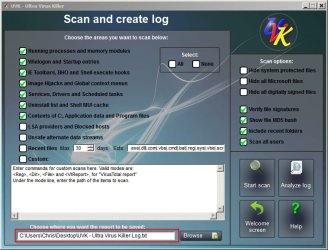
If the above doesn't produce any results you might want to consider running a scan with UVK and then zip and upload the results.

UVK Scan.jpg

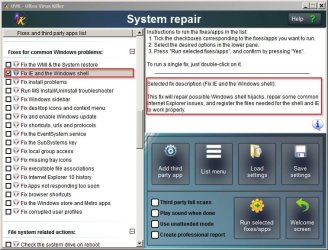
If you have a system image backup you might want to run the following fix although it's not guaranteed to solve the problem:

UVK Shell Fix.jpg

Note: Don't mess about with UVK just yet. Try the other steps first.
 

My Computer

Computer type
Laptop
Computer Manufacturer/Model Number
ASUS
OS
Microsoft Windows 7 Home Premium 64-bit 7601 Multiprocessor Free Service Pack 1
CPU
AMD C-60 APU with Radeon(tm) HD Graphics
Motherboard
ASUSTeK COMPUTER INC. X501U
Memory
4.00 GB
Graphics Card(s)
AMD Radeon HD 6290 Graphics
Sound Card
(1) AMD High Definition Audio Device (2) Realtek High Defi
Screen Resolution
1366 x 768 x 32 bits (4294967296 colors) @ 60 Hz
Hard Drives
Hitachi HTS545050A7E380 SATA Disk Device
Antivirus
Comodo CIS & FW, SecureAplus App Whitelisting, Threatfire
Browser
Cyberfox 64bit, Opera 64bit, Airfox
Other Info
Spy-The-Spy, HitmanPro.Alert, Norton Connect Safe, MJRegWatcher, BitDefender TrafficLight, Voodoo Shield, Zemana AntiMalware
Back
Top