Open File Location Does Nothing EXCEPT during explorer restart???

OK Have tried everything...removed, what I believe to be everything...no joy. Same behavior.

ODD!

Attached is the UVK log file.

Rick
 

Attachments

My Computer My Computer

Computer type
PC/Desktop
Computer Manufacturer/Model Number
eMachines T5216
OS
Microsoft Windows 7 Ultimate 32-bit 7601 Multiprocessor Free Service Pack 1
CPU
Intel(R) Pentium(R) D CPU 2.66GHz
Motherboard
Intel Corporation D102GGC2
Memory
2.00 GB
Graphics Card(s)
ATI RADEON XPRESS 200 Series
Sound Card
High Definition Audio Device
Screen Resolution
1440 x 900 x 32 bits (4294967296 colors) @ 59 Hz
Hard Drives
(1) WDC WD1600BB-22RDA0 ATA Device (2) Generic USB CF Reader USB Device (3) Generic USB MS Reader USB Device (4) Generic USB SD Reader USB Device (5) Generic USB SM Reader USB Device
Okay looking at your log there's nothing obvious that stands out.

I would suggest trying the following:

Magic ISO Maker - I know nothing about this software but research shows that there should be an option available to enable or disable Shell integration. I see that it is still enabled so try disabling from within the Magic ISO GUI. I cannot tell you where to find the setting but it must be there somewhere. Disable shell integration then reboot and test.

[EDIT] Take a look at the third screenshot in this thread. A reboot will be required after disabling shell integration.

http://www.sevenforums.com/customiz...so-context-menu-right-click-menu-win-7-a.html

You've also got a shortcut in your startup folder to run Magic ISO on boot. Perhaps you could try disabling it and run it on demand only.
 
Last edited:

My Computer My Computer

Computer type
Laptop
Computer Manufacturer/Model Number
ASUS
OS
Microsoft Windows 7 Home Premium 64-bit 7601 Multiprocessor Free Service Pack 1
CPU
AMD C-60 APU with Radeon(tm) HD Graphics
Motherboard
ASUSTeK COMPUTER INC. X501U
Memory
4.00 GB
Graphics Card(s)
AMD Radeon HD 6290 Graphics
Sound Card
(1) AMD High Definition Audio Device (2) Realtek High Defi
Screen Resolution
1366 x 768 x 32 bits (4294967296 colors) @ 60 Hz
Hard Drives
Hitachi HTS545050A7E380 SATA Disk Device
Antivirus
Comodo CIS & FW, SecureAplus App Whitelisting, Threatfire
Browser
Cyberfox 64bit, Opera 64bit, Airfox
Other Info
Spy-The-Spy, HitmanPro.Alert, Norton Connect Safe, MJRegWatcher, BitDefender TrafficLight, Voodoo Shield, Zemana AntiMalware
First, thanks for everything you are trying to assist me with!

Second, removed MagicISO entirely. I only use magicdisc to mount images. Used to use Daemon tools...but this is more win7 friendly.

Still not working!

Rick
 

My Computer My Computer

Computer type
PC/Desktop
Computer Manufacturer/Model Number
eMachines T5216
OS
Microsoft Windows 7 Ultimate 32-bit 7601 Multiprocessor Free Service Pack 1
CPU
Intel(R) Pentium(R) D CPU 2.66GHz
Motherboard
Intel Corporation D102GGC2
Memory
2.00 GB
Graphics Card(s)
ATI RADEON XPRESS 200 Series
Sound Card
High Definition Audio Device
Screen Resolution
1440 x 900 x 32 bits (4294967296 colors) @ 59 Hz
Hard Drives
(1) WDC WD1600BB-22RDA0 ATA Device (2) Generic USB CF Reader USB Device (3) Generic USB MS Reader USB Device (4) Generic USB SD Reader USB Device (5) Generic USB SM Reader USB Device
Damn. I really thought that Magic ISO could be the problem. I have some questions.

Do you know what these entries are? (from UVK log)

Code:
<ShellExecuteHooks> | {AEB6717E-7E19-11d0-97EE-00C04FD91972} | CLSID not found | No description | Hash error: File not found | No publiser

<FileContextMenu> | ShellExtension |  | No description | Hash error: File not found | Unsigned :  No publisher

<FileContextMenu> | BackupContextMenuExtension |  | No description | Hash error: File not found | Unsigned :  No publisher

<FolderContextMenu> | MSSE |  | No description | Hash error: File not found | Unsigned :  No publisher

If you like you can try deleting them. Here's a script to run via UVK that will create a restore point then remove those entries.

View attachment UVK Fix List.txt - save to desktop and rename to UVK Fix List.uvk

In other words change the file extension from .txt to .uvk

Contents of file:

Code:
<UVKCommandsScript>

<CreateRestorePoint>
<SDelete>

<ShellExecuteHooks> | {AEB6717E-7E19-11d0-97EE-00C04FD91972} | CLSID not found | No description | Hash error: File not found | No publiser

<FileContextMenu> | ShellExtension |  | No description | Hash error: File not found | Unsigned :  No publisher

<FileContextMenu> | BackupContextMenuExtension |  | No description | Hash error: File not found | Unsigned :  No publisher

<FolderContextMenu> | MSSE |  | No description | Hash error: File not found | Unsigned :  No publisher

############ End of fix list #################


Run UVK as administrator and from the welcome screen choose "Run Scripts" then "Import Commands From File"

Browse to "UVK Fix List.uvk" and open it. Then "Run/ Fix Listed"

Reboot.

Would you mind then running another UVK scan like you did before and uploading the results? I would like to check that all Magic ISO entries have been removed as I see that there was a running driver and sometimes programs like this don't get fully removed if you used Add/ Remove Programs to uninstall.

EDIT:

RE:

Code:
FolderContextMenu> | [B]MSSE[/B] |  | No description | Hash error: File not found | Unsigned :  No publisher

MSSE? I see that you use Avast. Did you ever have MSSE (Microsoft Security Essentials) installed? If so - it looks like it hasn't been fully removed.
 
Last edited:

My Computer My Computer

Computer type
Laptop
Computer Manufacturer/Model Number
ASUS
OS
Microsoft Windows 7 Home Premium 64-bit 7601 Multiprocessor Free Service Pack 1
CPU
AMD C-60 APU with Radeon(tm) HD Graphics
Motherboard
ASUSTeK COMPUTER INC. X501U
Memory
4.00 GB
Graphics Card(s)
AMD Radeon HD 6290 Graphics
Sound Card
(1) AMD High Definition Audio Device (2) Realtek High Defi
Screen Resolution
1366 x 768 x 32 bits (4294967296 colors) @ 60 Hz
Hard Drives
Hitachi HTS545050A7E380 SATA Disk Device
Antivirus
Comodo CIS & FW, SecureAplus App Whitelisting, Threatfire
Browser
Cyberfox 64bit, Opera 64bit, Airfox
Other Info
Spy-The-Spy, HitmanPro.Alert, Norton Connect Safe, MJRegWatcher, BitDefender TrafficLight, Voodoo Shield, Zemana AntiMalware
Went through the steps...no joy :(


Quite frustrating!

I'll look in MSSE...didn't install or it ever have it illed.


Rick
 

Attachments

My Computer My Computer

Computer type
PC/Desktop
Computer Manufacturer/Model Number
eMachines T5216
OS
Microsoft Windows 7 Ultimate 32-bit 7601 Multiprocessor Free Service Pack 1
CPU
Intel(R) Pentium(R) D CPU 2.66GHz
Motherboard
Intel Corporation D102GGC2
Memory
2.00 GB
Graphics Card(s)
ATI RADEON XPRESS 200 Series
Sound Card
High Definition Audio Device
Screen Resolution
1440 x 900 x 32 bits (4294967296 colors) @ 59 Hz
Hard Drives
(1) WDC WD1600BB-22RDA0 ATA Device (2) Generic USB CF Reader USB Device (3) Generic USB MS Reader USB Device (4) Generic USB SD Reader USB Device (5) Generic USB SM Reader USB Device
New Info.

Killing the Explorer task and then restarting it allows a single use of the OPEN FILE LOCATION menu item.

Rick
 

My Computer My Computer

Computer type
PC/Desktop
Computer Manufacturer/Model Number
eMachines T5216
OS
Microsoft Windows 7 Ultimate 32-bit 7601 Multiprocessor Free Service Pack 1
CPU
Intel(R) Pentium(R) D CPU 2.66GHz
Motherboard
Intel Corporation D102GGC2
Memory
2.00 GB
Graphics Card(s)
ATI RADEON XPRESS 200 Series
Sound Card
High Definition Audio Device
Screen Resolution
1440 x 900 x 32 bits (4294967296 colors) @ 59 Hz
Hard Drives
(1) WDC WD1600BB-22RDA0 ATA Device (2) Generic USB CF Reader USB Device (3) Generic USB MS Reader USB Device (4) Generic USB SD Reader USB Device (5) Generic USB SM Reader USB Device
Okay you've still got a Magic ISO process running.

Suggest: Reinstall Magic ISO to get a clean install of the program to work on - then reboot.

Use Task Manager to kill MagicDisc.exe or esle use UVK's process manager.

Delete the entry here:

Code:
<@Trillian\StartupFolder> | MagicDisc.lnk | C:\Program Files\MagicDisc\MagicDisc.exe | MagicISO Virtual CD/DVD Manager | A16852B04C0A5654B0B8DFD5E1A25718 | Unsigned :  MagicISO, Inc.

Startup Folder should be here:

%Userprofile%\AppData\Roaming\Microsoft\Windows\Start Menu\Programs\Startup

(copy and paste into explorer's address bar or Start> Run dialog box.

Use UVK's Service Manager to list services and drivers. Find mcdbus.sys in the list and right click it. Stop the driver.

Code:
<Drivers> | mcdbus | C:\Windows\system32\DRIVERS\mcdbus.sys | MagicISO SCSI Host Controller | Running - Manual | 8FD868E32459ECE2A1BB0169F513D31E | Unsigned :  MagicISO, Inc.

Your latest log does not include file and folder context menu entries so I cannot check those.

Download a copy of GeekUninstaller and run it. Find Magic Iso in the list and select for removal. Let the uninstaller run then allow a scan for leftovers. Note what is found. Select leftovers for removal. When finished reboot and recheck that the leftovers were deleted.

Will check this thread tomorrow.
 

My Computer My Computer

Computer type
Laptop
Computer Manufacturer/Model Number
ASUS
OS
Microsoft Windows 7 Home Premium 64-bit 7601 Multiprocessor Free Service Pack 1
CPU
AMD C-60 APU with Radeon(tm) HD Graphics
Motherboard
ASUSTeK COMPUTER INC. X501U
Memory
4.00 GB
Graphics Card(s)
AMD Radeon HD 6290 Graphics
Sound Card
(1) AMD High Definition Audio Device (2) Realtek High Defi
Screen Resolution
1366 x 768 x 32 bits (4294967296 colors) @ 60 Hz
Hard Drives
Hitachi HTS545050A7E380 SATA Disk Device
Antivirus
Comodo CIS & FW, SecureAplus App Whitelisting, Threatfire
Browser
Cyberfox 64bit, Opera 64bit, Airfox
Other Info
Spy-The-Spy, HitmanPro.Alert, Norton Connect Safe, MJRegWatcher, BitDefender TrafficLight, Voodoo Shield, Zemana AntiMalware
I do not believe Magic Disc nor Iso is the underlying problem.

I keep coming back to the fact that, when first started, explorer.exe works with OPEN FILE LOCATION without issues. When "something" loads subsequent to that...it fails.

The question, "What loads and from where after explorer.exe inits?"

On the other hand, this could also be a USER or PERMISSIONS glitch? (Maybe!)

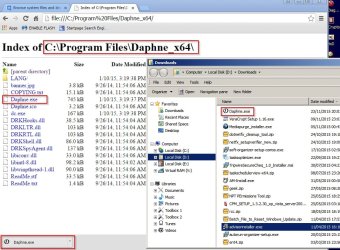
OPEN FOLDER from Chrome doesn't work either.

Attached is the latest Scan from UVK.

Rick
 

Attachments

My Computer My Computer

Computer type
PC/Desktop
Computer Manufacturer/Model Number
eMachines T5216
OS
Microsoft Windows 7 Ultimate 32-bit 7601 Multiprocessor Free Service Pack 1
CPU
Intel(R) Pentium(R) D CPU 2.66GHz
Motherboard
Intel Corporation D102GGC2
Memory
2.00 GB
Graphics Card(s)
ATI RADEON XPRESS 200 Series
Sound Card
High Definition Audio Device
Screen Resolution
1440 x 900 x 32 bits (4294967296 colors) @ 59 Hz
Hard Drives
(1) WDC WD1600BB-22RDA0 ATA Device (2) Generic USB CF Reader USB Device (3) Generic USB MS Reader USB Device (4) Generic USB SD Reader USB Device (5) Generic USB SM Reader USB Device
RE: Magic ISO

I'd say that anything that integrates with Explorer is suspect. Really since most of the rest of the shell extensions have been disabled I'd say that Magic ISO needs removing just to check that it is not the problem. I cannot say that it is the cause. Since Explorer++ works - it has to be a software related problem. Either an unpatched or buggy .dll (shell extension) or some other problem with software. I has a long standing issue with Explorer once that was related to "DiskSorter" software and I never managed to work out what the problem was but one day decided to fully remove "DiskSorter" and the mystery was solved.

Read Magic ISO info here:

   Note

Magic ISO is embedded with Windows Explorer.


MagicISO - Add file to ISO file


RE: Chrome and open folder location. I do not use Chrome but I do have SRWare Iron browser and Aviator browser installed (Chromium based browsers) and from what I can remember certain settings need to be enabled to allow file browsing within windows as it is usually seen as a security risk to have them enabled by default. I will see if I can find the info.

I will have a look at your latest log and offer my thoughts soon.
 

My Computer My Computer

Computer type
Laptop
Computer Manufacturer/Model Number
ASUS
OS
Microsoft Windows 7 Home Premium 64-bit 7601 Multiprocessor Free Service Pack 1
CPU
AMD C-60 APU with Radeon(tm) HD Graphics
Motherboard
ASUSTeK COMPUTER INC. X501U
Memory
4.00 GB
Graphics Card(s)
AMD Radeon HD 6290 Graphics
Sound Card
(1) AMD High Definition Audio Device (2) Realtek High Defi
Screen Resolution
1366 x 768 x 32 bits (4294967296 colors) @ 60 Hz
Hard Drives
Hitachi HTS545050A7E380 SATA Disk Device
Antivirus
Comodo CIS & FW, SecureAplus App Whitelisting, Threatfire
Browser
Cyberfox 64bit, Opera 64bit, Airfox
Other Info
Spy-The-Spy, HitmanPro.Alert, Norton Connect Safe, MJRegWatcher, BitDefender TrafficLight, Voodoo Shield, Zemana AntiMalware
Okay I see that you managed to remove MAGIC ISO and as the problem persists - it clearly was not the issue. It was worth chcking though.
 

My Computer My Computer

Computer type
Laptop
Computer Manufacturer/Model Number
ASUS
OS
Microsoft Windows 7 Home Premium 64-bit 7601 Multiprocessor Free Service Pack 1
CPU
AMD C-60 APU with Radeon(tm) HD Graphics
Motherboard
ASUSTeK COMPUTER INC. X501U
Memory
4.00 GB
Graphics Card(s)
AMD Radeon HD 6290 Graphics
Sound Card
(1) AMD High Definition Audio Device (2) Realtek High Defi
Screen Resolution
1366 x 768 x 32 bits (4294967296 colors) @ 60 Hz
Hard Drives
Hitachi HTS545050A7E380 SATA Disk Device
Antivirus
Comodo CIS & FW, SecureAplus App Whitelisting, Threatfire
Browser
Cyberfox 64bit, Opera 64bit, Airfox
Other Info
Spy-The-Spy, HitmanPro.Alert, Norton Connect Safe, MJRegWatcher, BitDefender TrafficLight, Voodoo Shield, Zemana AntiMalware
RE: Open folder from Chrome.

Any Chrome users care to comment?

I've looked at my other Chromuim based browsers but I'm sure that Chrome settings are different. In Aviator I must enable connection on certian ports to enable file browsing.

aviator://settings/NetworkPortConnection

In SRWareIron there's no option to open a folder or a file in Explorer and clicking on any file just places a copy in Downloads. "Show in folder" just opens Downloads.

SRWare Iron.jpg

Did you try ShellMenuView - download links near bottom of page - to see if anything else is listed as suggested in Post #20 ?

Also grab a copy of ShellMenuView from Nirsoft and run it. Sort by "Company" then look through the list at non microsoft entries where the "File Type" column shows:

Directory
Drive
Folder
*

Consider disabling those as a test.
 

My Computer My Computer

Computer type
Laptop
Computer Manufacturer/Model Number
ASUS
OS
Microsoft Windows 7 Home Premium 64-bit 7601 Multiprocessor Free Service Pack 1
CPU
AMD C-60 APU with Radeon(tm) HD Graphics
Motherboard
ASUSTeK COMPUTER INC. X501U
Memory
4.00 GB
Graphics Card(s)
AMD Radeon HD 6290 Graphics
Sound Card
(1) AMD High Definition Audio Device (2) Realtek High Defi
Screen Resolution
1366 x 768 x 32 bits (4294967296 colors) @ 60 Hz
Hard Drives
Hitachi HTS545050A7E380 SATA Disk Device
Antivirus
Comodo CIS & FW, SecureAplus App Whitelisting, Threatfire
Browser
Cyberfox 64bit, Opera 64bit, Airfox
Other Info
Spy-The-Spy, HitmanPro.Alert, Norton Connect Safe, MJRegWatcher, BitDefender TrafficLight, Voodoo Shield, Zemana AntiMalware
Callender,
Thanks for sticking with this.

I did download and try Shellmenuview. Nothing was listed at all.

Very weird.

Rick
 

My Computer My Computer

Computer type
PC/Desktop
Computer Manufacturer/Model Number
eMachines T5216
OS
Microsoft Windows 7 Ultimate 32-bit 7601 Multiprocessor Free Service Pack 1
CPU
Intel(R) Pentium(R) D CPU 2.66GHz
Motherboard
Intel Corporation D102GGC2
Memory
2.00 GB
Graphics Card(s)
ATI RADEON XPRESS 200 Series
Sound Card
High Definition Audio Device
Screen Resolution
1440 x 900 x 32 bits (4294967296 colors) @ 59 Hz
Hard Drives
(1) WDC WD1600BB-22RDA0 ATA Device (2) Generic USB CF Reader USB Device (3) Generic USB MS Reader USB Device (4) Generic USB SD Reader USB Device (5) Generic USB SM Reader USB Device
RE: ShellMenuView. That really is odd. There should have been some entries listed at least. Example:
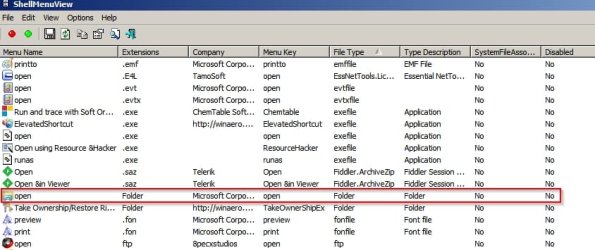
ShellMenuView 1.jpg

I have to ask a question. After doing some research I see that a few users have reported the same problem. One of those states that the problem occurs only when Explorer window is maximised. Perhaps you could try resizing the window to see if it makes any difference. I'm not sure that it will but who knows?

On another note how many user accounts are set up and do you have access to the built in administrator account?

Try this:

Start> Run then type

netplwiz

Press Enter.

What do you see listed? Or post a screenshot.

If other accounts are available try logging in as a different user or try logging into the built in administrator account and see if the same problem exists there.

See tutorial here:

Built-in Administrator Account - Enable or Disable

   Note
It is best to disable the built in administrator account and enable only on a when needed basis.


RE: Your question on permissions. That's not something I have much experience with but presumably you have not been changing permissions on anything right?

I have reset permissions on my own machine in the past.


[EDIT]

Another thought. How have you got folder view options set? Try setting them like this:
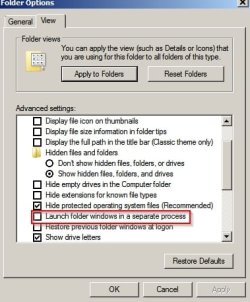
Folder Options.jpg

Also on the general tab set to "open in same window"

Computer > Organize> Folder Options> View.

 
Last edited:

My Computer My Computer

Computer type
Laptop
Computer Manufacturer/Model Number
ASUS
OS
Microsoft Windows 7 Home Premium 64-bit 7601 Multiprocessor Free Service Pack 1
CPU
AMD C-60 APU with Radeon(tm) HD Graphics
Motherboard
ASUSTeK COMPUTER INC. X501U
Memory
4.00 GB
Graphics Card(s)
AMD Radeon HD 6290 Graphics
Sound Card
(1) AMD High Definition Audio Device (2) Realtek High Defi
Screen Resolution
1366 x 768 x 32 bits (4294967296 colors) @ 60 Hz
Hard Drives
Hitachi HTS545050A7E380 SATA Disk Device
Antivirus
Comodo CIS & FW, SecureAplus App Whitelisting, Threatfire
Browser
Cyberfox 64bit, Opera 64bit, Airfox
Other Info
Spy-The-Spy, HitmanPro.Alert, Norton Connect Safe, MJRegWatcher, BitDefender TrafficLight, Voodoo Shield, Zemana AntiMalware
Already tried the built in admin account. has the same issue.

Oddly, when I run another instance of explorer or simply right-click from an opened file explorer window OPEN FILE LOCATION works.

If I copy desktop shortcuts into the file explorer window (e.g. into C:\) they work from file explorer.

Seems that it's a DESKTOP issue....

Hmmmm

Rich
 

My Computer My Computer

Computer type
PC/Desktop
Computer Manufacturer/Model Number
eMachines T5216
OS
Microsoft Windows 7 Ultimate 32-bit 7601 Multiprocessor Free Service Pack 1
CPU
Intel(R) Pentium(R) D CPU 2.66GHz
Motherboard
Intel Corporation D102GGC2
Memory
2.00 GB
Graphics Card(s)
ATI RADEON XPRESS 200 Series
Sound Card
High Definition Audio Device
Screen Resolution
1440 x 900 x 32 bits (4294967296 colors) @ 59 Hz
Hard Drives
(1) WDC WD1600BB-22RDA0 ATA Device (2) Generic USB CF Reader USB Device (3) Generic USB MS Reader USB Device (4) Generic USB SD Reader USB Device (5) Generic USB SM Reader USB Device
Shortcuts dragged and drop created onto the desktop Fail as well.

Rick
 

My Computer My Computer

Computer type
PC/Desktop
Computer Manufacturer/Model Number
eMachines T5216
OS
Microsoft Windows 7 Ultimate 32-bit 7601 Multiprocessor Free Service Pack 1
CPU
Intel(R) Pentium(R) D CPU 2.66GHz
Motherboard
Intel Corporation D102GGC2
Memory
2.00 GB
Graphics Card(s)
ATI RADEON XPRESS 200 Series
Sound Card
High Definition Audio Device
Screen Resolution
1440 x 900 x 32 bits (4294967296 colors) @ 59 Hz
Hard Drives
(1) WDC WD1600BB-22RDA0 ATA Device (2) Generic USB CF Reader USB Device (3) Generic USB MS Reader USB Device (4) Generic USB SD Reader USB Device (5) Generic USB SM Reader USB Device
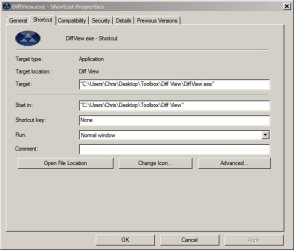
I suppose that you must have checked that the shortcut's "Target Location" is okay?

A couple of examples:

Shortcut Properties 1.jpg

Shortcut Properties 2.jpg

How about checking the registry entries for user shell folders?

Main User:
HKEY_CURRENT_USER\Software\Microsoft\Windows\CurrentVersion\Explorer\User Shell Folders

and

All Users:
HKEY_LOCAL_MACHINE\Software\Microsoft\Windows\CurrentVersion\Explorer\User Shell Folders
 

My Computer My Computer

Computer type
Laptop
Computer Manufacturer/Model Number
ASUS
OS
Microsoft Windows 7 Home Premium 64-bit 7601 Multiprocessor Free Service Pack 1
CPU
AMD C-60 APU with Radeon(tm) HD Graphics
Motherboard
ASUSTeK COMPUTER INC. X501U
Memory
4.00 GB
Graphics Card(s)
AMD Radeon HD 6290 Graphics
Sound Card
(1) AMD High Definition Audio Device (2) Realtek High Defi
Screen Resolution
1366 x 768 x 32 bits (4294967296 colors) @ 60 Hz
Hard Drives
Hitachi HTS545050A7E380 SATA Disk Device
Antivirus
Comodo CIS & FW, SecureAplus App Whitelisting, Threatfire
Browser
Cyberfox 64bit, Opera 64bit, Airfox
Other Info
Spy-The-Spy, HitmanPro.Alert, Norton Connect Safe, MJRegWatcher, BitDefender TrafficLight, Voodoo Shield, Zemana AntiMalware
Yup... shortcuts point in the right direction. All work to launch programs properly. I don;t see any anomalies with the reg keys.

Rick
 

My Computer My Computer

Computer type
PC/Desktop
Computer Manufacturer/Model Number
eMachines T5216
OS
Microsoft Windows 7 Ultimate 32-bit 7601 Multiprocessor Free Service Pack 1
CPU
Intel(R) Pentium(R) D CPU 2.66GHz
Motherboard
Intel Corporation D102GGC2
Memory
2.00 GB
Graphics Card(s)
ATI RADEON XPRESS 200 Series
Sound Card
High Definition Audio Device
Screen Resolution
1440 x 900 x 32 bits (4294967296 colors) @ 59 Hz
Hard Drives
(1) WDC WD1600BB-22RDA0 ATA Device (2) Generic USB CF Reader USB Device (3) Generic USB MS Reader USB Device (4) Generic USB SD Reader USB Device (5) Generic USB SM Reader USB Device
Currently I have only got a few suggestions left.

One is try a clean boot. See the tutorial here:

Troubleshoot Application Conflicts by Performing a Clean Startup

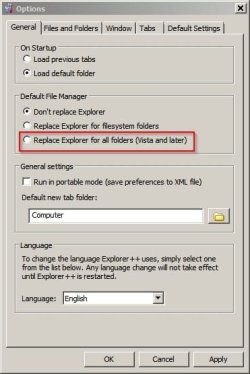
Another option is to replace Explorer with Explorer++ for the time being.

Options.jpg

Another option is to try a repair install:

How to Do a Repair Install to Fix Windows 7

Note: I do not know much about repair install as personally I make regular system image backups and rely on those if things are hard to fix.

[EDIT]

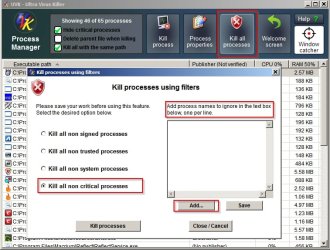
One other option to add. Consider using UVK's process manager to kill "All non ctitical processes" for test purposes but add the names of processes to exclude into the exclusion box. Examples would be any Microsoft signed processes and any security software processes. Basically stop any third party software processes.

Kill Processes.jpg
 
Last edited:

My Computer My Computer

Computer type
Laptop
Computer Manufacturer/Model Number
ASUS
OS
Microsoft Windows 7 Home Premium 64-bit 7601 Multiprocessor Free Service Pack 1
CPU
AMD C-60 APU with Radeon(tm) HD Graphics
Motherboard
ASUSTeK COMPUTER INC. X501U
Memory
4.00 GB
Graphics Card(s)
AMD Radeon HD 6290 Graphics
Sound Card
(1) AMD High Definition Audio Device (2) Realtek High Defi
Screen Resolution
1366 x 768 x 32 bits (4294967296 colors) @ 60 Hz
Hard Drives
Hitachi HTS545050A7E380 SATA Disk Device
Antivirus
Comodo CIS & FW, SecureAplus App Whitelisting, Threatfire
Browser
Cyberfox 64bit, Opera 64bit, Airfox
Other Info
Spy-The-Spy, HitmanPro.Alert, Norton Connect Safe, MJRegWatcher, BitDefender TrafficLight, Voodoo Shield, Zemana AntiMalware
Back
Top