Open File - Security Warning : Unblock File

How to Unblock a File to Stop "Open File - Security Warning" and "Windows 8 SmartScreen" Prompt

   Information
This will show you how to unblock a file that you have downloaded or copied from the internet or external source to no longer get the "Open File - Security Warning" or "Windows 8 SmartScreen" prompt when you open or run the file.

The Open File - Security Warning prompt is a security measure in Vista, Windows 7, and Windows 8 to ask for your permission (like UAC) before allowing a downloaded or copied file from the internet or another computer to be opened or run on your computer.

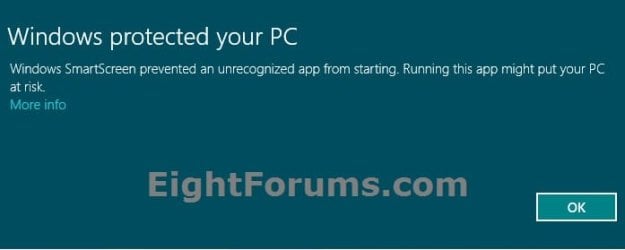
Windows SmartScreen, like the SmartScreen Filter in Internet Explorer, can help keep your whole computer safer by warning you before running unrecognized programs downloaded from the internet in Windows 8.

   Warning
You should only unblock files that you trust.


EXAMPLE: "Windows protected your PC" from Windows 8/8.1 SmartScreen
SmartSreen-1.jpg

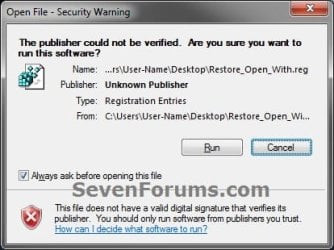
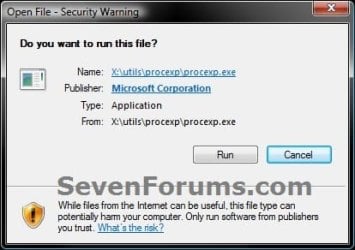
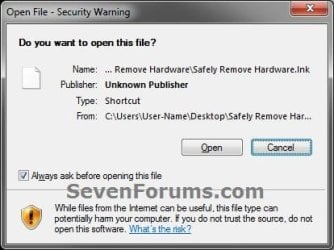
EXAMPLE: Open File - Security Warning
  • Do you want to open this File? Unknown Publisher
  • The Publisher could not be verified. Are you sure you want to run this software? Unknown Publisher
  • Do you want to run this file? Application
Example-1.jpgExample-2.jpg
warning-2.jpg


OPTION ONE

To Unblock the File Through Properties Page


NOTE: This option can only be done when the file or folder is still in one of your C:\Users\(user-name) folder locations. For example, your Desktop or Downloads folder. If it's not, then you will need to move the file to this location first, unblock it, then move it back.
1. While the file is on your desktop or in one of your user folders, right click or press and hold on the file, and click/tap on Properties.

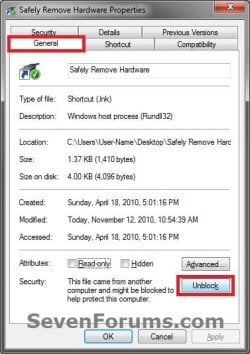
2. Under the General tab, click/tap on the Unblock button, and click/tap on OK. (see screenshot below)
NOTE: If you do not see an Unblock button, then the file has already been unblocked.
Step2.jpg
3. You will now no longer get a Open File - Security Warning prompt when you try to open or run this specific file.


OPTION TWO

Unblock File when you Open or Run it and get "Open File - Security Warning"


NOTE: This option will unblock the file no matter where it's located.
1. Open or Run the file to trigger the Open File - Security Warning prompt.

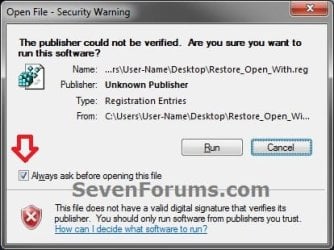
2. In the Open File - Security Warning prompt, uncheck the Always ask before opening this file box, then click/tap on either the Open or Run button. (see screenshots below)
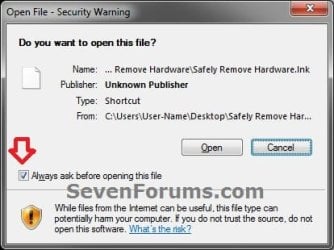
Step1.jpgStep1-B.jpg
3. If prompted by UAC, then click/tap on Yes (Windows 7/8) or Continue (Vista), or enter the administrator's password (standard user).
NOTE: You will only be prompted by UAC if the file is not in one of the C:\Users\(user-name) folder locations, and in a system folder (ex: C:\Windows) instead.

4. The file will now open or run, and you will now no longer get a Open File - Security Warning prompt when you try to open or run this specific file next time.


OPTION THREE

Unblock File when you Open or Run it and get "Windows 8/8.1 SmartScreen"


NOTE: This option only applies to Windows 8 or 8.1. Doing OPTION ONE or OPTION TWO above will also unblock the file to no longer get the "Windows protected your PC" prompt from Windows 8/8.1 SmartScreen.
1. Open or Run the file to trigger the Windows protected your PC prompt.
NOTE: If you do not get this prompt, then the file has already been unblocked, and there's nothing else that needs to be done.

2. Click/tap on the More info link. (see screenshot below)
SmartSreen-1.jpg
3. Click/tap on the Run anyway button. (see screenshot below)
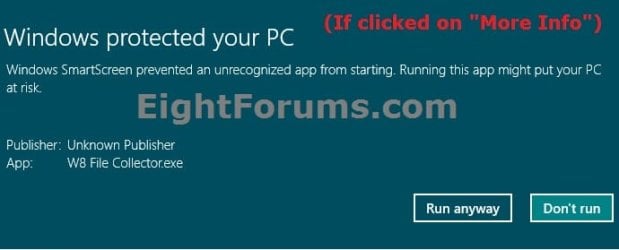
SmartSreen-2.jpg
4. The file will now open or run, and you will now no longer get a Windows protected your PC prompt when you try to open or run this specific file next time.
That's it,
Shawn


Last edited:
you could also just simply disable the UAC by just typin uac in start menu search thing simple as
 

My Computer

Computer Manufacturer/Model Number
Toshiba satellite L350-20G
OS
Microsoft Windows 7 Ultimate build 7600 32bit
CPU
Intel Core 2 Duo T5750 @2.0Mhz 1M 667FSB
Motherboard
Toshiba satellite l350
Memory
2GB DDR26400 800Mhz
Graphics Card(s)
Intel gma x4500MHD shared memory 890mb
Sound Card
Realtek Hd
Monitor(s) Displays
17'' WXGA trubrite
Screen Resolution
1440x900
Hard Drives
320 gig
Case
WTF!? i have a laptop
Cooling
build in fan
Keyboard
Ps/2
Mouse
Ps/2 synapsis
Internet Speed
Three tm mobile broadband
Hello Maciacia,

Yes, you could just turn off UAC, but this shows you how to stop this warning message for a file without disabling UAC protection for the entire computer. :)
 

My Computer

Computer type
PC/Desktop
Computer Manufacturer/Model Number
Self built custom
OS
64-bit Windows 11 Pro for Workstations
CPU
Intel i7-8700K OC'd to 5 GHz
Motherboard
ASUS ROG Maximus XI Formula Z390
Memory
64 GB (4x16GB) G.SKILL TridentZ RGB DDR4 3600 MHz
Graphics Card(s)
ASUS ROG-STRIX-GTX1080TI-O11G-GAMING
Sound Card
Integrated
Monitor(s) Displays
2 x Samsung Odyssey G7 27"
Screen Resolution
2560x1440
Hard Drives
1TB Samsung 990 PRO M.2,
4TB Samsung 990 PRO PRO M.2,
TerraMaster F8 SSD Plus NAS
PSU
Seasonic Prime Titanium 850W
Case
Thermaltake Core P3
Cooling
Corsair Hydro H115i
Keyboard
Logitech wireless K800
Mouse
Logitech MX Master 4
Internet Speed
2 Gb/s Download and 100 Mb/s Upload
Antivirus
Malwarebyte Anti-Malware Premium
Browser
Google Chrome
Other Info
Logitech Z625 speaker system,
Logitech BRIO 4K Pro webcam,
HP Color LaserJet Pro MFP M477fdn,
APC SMART-UPS RT 1000 XL - SURT1000XLI,
Galaxy S23 Plus phone
Same problem, but no tick box

Hello!

I've got the same problem, but my dialog do not have the tick-box saying "Always ask before opening this file", nor do I have the button saying "Unblock" in the file properties dialog. What can I do?
 

My Computer

Computer Manufacturer/Model Number
Selfbuild
OS
Windows 7 home premium 64 bit
CPU
Intel i7 - 920 2.66 GHz
Motherboard
Asus P6T Deluxe
Memory
Corsair 3 x 2GB DDR3
Graphics Card(s)
Gainward 9800GT PCI-E 512MB DDR3
Sound Card
Motherboard
Monitor(s) Displays
Eizo Flexscan S2231W
Hard Drives
Seagate Barracuda 7200.12 SATA
Western Digital WD20EARS
Western Digital WD1001FALS
PSU
Corsair TX 750W
Case
Cooler Master Centurion 590
Cooling
Fans
Internet Speed
12Mbit/700kBit
Hello Mikke, and welcome to Seven Forums. :)

Could you post a screenshot of what you are getting?

In addition, what file is this for, and what is it's location?
 

My Computer

Computer type
PC/Desktop
Computer Manufacturer/Model Number
Self built custom
OS
64-bit Windows 11 Pro for Workstations
CPU
Intel i7-8700K OC'd to 5 GHz
Motherboard
ASUS ROG Maximus XI Formula Z390
Memory
64 GB (4x16GB) G.SKILL TridentZ RGB DDR4 3600 MHz
Graphics Card(s)
ASUS ROG-STRIX-GTX1080TI-O11G-GAMING
Sound Card
Integrated
Monitor(s) Displays
2 x Samsung Odyssey G7 27"
Screen Resolution
2560x1440
Hard Drives
1TB Samsung 990 PRO M.2,
4TB Samsung 990 PRO PRO M.2,
TerraMaster F8 SSD Plus NAS
PSU
Seasonic Prime Titanium 850W
Case
Thermaltake Core P3
Cooling
Corsair Hydro H115i
Keyboard
Logitech wireless K800
Mouse
Logitech MX Master 4
Internet Speed
2 Gb/s Download and 100 Mb/s Upload
Antivirus
Malwarebyte Anti-Malware Premium
Browser
Google Chrome
Other Info
Logitech Z625 speaker system,
Logitech BRIO 4K Pro webcam,
HP Color LaserJet Pro MFP M477fdn,
APC SMART-UPS RT 1000 XL - SURT1000XLI,
Galaxy S23 Plus phone
Hello!

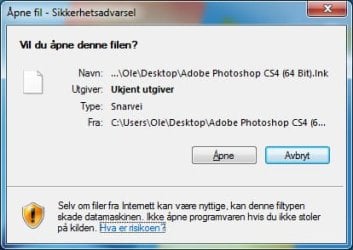
In this case it is shortcut on desktop for photoshop CS4.
 

Attachments

  • SikkerhetsadvarselPS4.jpg
    SikkerhetsadvarselPS4.jpg
    120.8 KB · Views: 291,142

My Computer

Computer Manufacturer/Model Number
Selfbuild
OS
Windows 7 home premium 64 bit
CPU
Intel i7 - 920 2.66 GHz
Motherboard
Asus P6T Deluxe
Memory
Corsair 3 x 2GB DDR3
Graphics Card(s)
Gainward 9800GT PCI-E 512MB DDR3
Sound Card
Motherboard
Monitor(s) Displays
Eizo Flexscan S2231W
Hard Drives
Seagate Barracuda 7200.12 SATA
Western Digital WD20EARS
Western Digital WD1001FALS
PSU
Corsair TX 750W
Case
Cooler Master Centurion 590
Cooling
Fans
Internet Speed
12Mbit/700kBit
Right click on the shortcut, and click on Properties, Shortcut tab, Open file Location button. Next, check that program's exe file to see if it's unblocked.

If the exe file is still unblocked after you unblocked it and checked again, then move the file to the desktop, unblock it at this location, and move it back.
 

My Computer

Computer type
PC/Desktop
Computer Manufacturer/Model Number
Self built custom
OS
64-bit Windows 11 Pro for Workstations
CPU
Intel i7-8700K OC'd to 5 GHz
Motherboard
ASUS ROG Maximus XI Formula Z390
Memory
64 GB (4x16GB) G.SKILL TridentZ RGB DDR4 3600 MHz
Graphics Card(s)
ASUS ROG-STRIX-GTX1080TI-O11G-GAMING
Sound Card
Integrated
Monitor(s) Displays
2 x Samsung Odyssey G7 27"
Screen Resolution
2560x1440
Hard Drives
1TB Samsung 990 PRO M.2,
4TB Samsung 990 PRO PRO M.2,
TerraMaster F8 SSD Plus NAS
PSU
Seasonic Prime Titanium 850W
Case
Thermaltake Core P3
Cooling
Corsair Hydro H115i
Keyboard
Logitech wireless K800
Mouse
Logitech MX Master 4
Internet Speed
2 Gb/s Download and 100 Mb/s Upload
Antivirus
Malwarebyte Anti-Malware Premium
Browser
Google Chrome
Other Info
Logitech Z625 speaker system,
Logitech BRIO 4K Pro webcam,
HP Color LaserJet Pro MFP M477fdn,
APC SMART-UPS RT 1000 XL - SURT1000XLI,
Galaxy S23 Plus phone
I've tried that now, but don't see the "Unblock"-button in either case,
:confused:
 

My Computer

Computer Manufacturer/Model Number
Selfbuild
OS
Windows 7 home premium 64 bit
CPU
Intel i7 - 920 2.66 GHz
Motherboard
Asus P6T Deluxe
Memory
Corsair 3 x 2GB DDR3
Graphics Card(s)
Gainward 9800GT PCI-E 512MB DDR3
Sound Card
Motherboard
Monitor(s) Displays
Eizo Flexscan S2231W
Hard Drives
Seagate Barracuda 7200.12 SATA
Western Digital WD20EARS
Western Digital WD1001FALS
PSU
Corsair TX 750W
Case
Cooler Master Centurion 590
Cooling
Fans
Internet Speed
12Mbit/700kBit
Um, ok. Give this a try to see if it may help. It will reset the Internet Security Zone settings back to default.
  • Open a elevated command prompt (right click - Run as administrator)
  • Copy and paste the comand below and press Enter.
Code:
reg delete "HKEY_CURRENT_USER\Software\Microsoft\Windows\CurrentVersion\Internet Settings\Zones" /f
  • Close the command prompt, and restart the computer to apply.
 

My Computer

Computer type
PC/Desktop
Computer Manufacturer/Model Number
Self built custom
OS
64-bit Windows 11 Pro for Workstations
CPU
Intel i7-8700K OC'd to 5 GHz
Motherboard
ASUS ROG Maximus XI Formula Z390
Memory
64 GB (4x16GB) G.SKILL TridentZ RGB DDR4 3600 MHz
Graphics Card(s)
ASUS ROG-STRIX-GTX1080TI-O11G-GAMING
Sound Card
Integrated
Monitor(s) Displays
2 x Samsung Odyssey G7 27"
Screen Resolution
2560x1440
Hard Drives
1TB Samsung 990 PRO M.2,
4TB Samsung 990 PRO PRO M.2,
TerraMaster F8 SSD Plus NAS
PSU
Seasonic Prime Titanium 850W
Case
Thermaltake Core P3
Cooling
Corsair Hydro H115i
Keyboard
Logitech wireless K800
Mouse
Logitech MX Master 4
Internet Speed
2 Gb/s Download and 100 Mb/s Upload
Antivirus
Malwarebyte Anti-Malware Premium
Browser
Google Chrome
Other Info
Logitech Z625 speaker system,
Logitech BRIO 4K Pro webcam,
HP Color LaserJet Pro MFP M477fdn,
APC SMART-UPS RT 1000 XL - SURT1000XLI,
Galaxy S23 Plus phone
Hello!

I've run the reg delete.
Sorry, no changes in either of the above methodes.
 

My Computer

Computer Manufacturer/Model Number
Selfbuild
OS
Windows 7 home premium 64 bit
CPU
Intel i7 - 920 2.66 GHz
Motherboard
Asus P6T Deluxe
Memory
Corsair 3 x 2GB DDR3
Graphics Card(s)
Gainward 9800GT PCI-E 512MB DDR3
Sound Card
Motherboard
Monitor(s) Displays
Eizo Flexscan S2231W
Hard Drives
Seagate Barracuda 7200.12 SATA
Western Digital WD20EARS
Western Digital WD1001FALS
PSU
Corsair TX 750W
Case
Cooler Master Centurion 590
Cooling
Fans
Internet Speed
12Mbit/700kBit
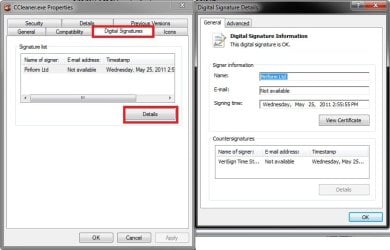
It would be hard to believe if they didn't digitally sign the exe file, but check the Properties page of the exe file again to see if has a Digital Signatures tab with one in it something like the one for CCleaner below. If not, then there's not much you can do to prevent getting this warning each time you run it without disabling it for everything. You wouldn't want to do that though since it lowers security on your system.

digital_signature.jpg
 

My Computer

Computer type
PC/Desktop
Computer Manufacturer/Model Number
Self built custom
OS
64-bit Windows 11 Pro for Workstations
CPU
Intel i7-8700K OC'd to 5 GHz
Motherboard
ASUS ROG Maximus XI Formula Z390
Memory
64 GB (4x16GB) G.SKILL TridentZ RGB DDR4 3600 MHz
Graphics Card(s)
ASUS ROG-STRIX-GTX1080TI-O11G-GAMING
Sound Card
Integrated
Monitor(s) Displays
2 x Samsung Odyssey G7 27"
Screen Resolution
2560x1440
Hard Drives
1TB Samsung 990 PRO M.2,
4TB Samsung 990 PRO PRO M.2,
TerraMaster F8 SSD Plus NAS
PSU
Seasonic Prime Titanium 850W
Case
Thermaltake Core P3
Cooling
Corsair Hydro H115i
Keyboard
Logitech wireless K800
Mouse
Logitech MX Master 4
Internet Speed
2 Gb/s Download and 100 Mb/s Upload
Antivirus
Malwarebyte Anti-Malware Premium
Browser
Google Chrome
Other Info
Logitech Z625 speaker system,
Logitech BRIO 4K Pro webcam,
HP Color LaserJet Pro MFP M477fdn,
APC SMART-UPS RT 1000 XL - SURT1000XLI,
Galaxy S23 Plus phone
I'm sorry but the file is signed.

Can it be that my version of windows 7 (home premium 64 bit) dont let me unblock files?
My wife have the same problem on hers Win7 home premium pc.
 

My Computer

Computer Manufacturer/Model Number
Selfbuild
OS
Windows 7 home premium 64 bit
CPU
Intel i7 - 920 2.66 GHz
Motherboard
Asus P6T Deluxe
Memory
Corsair 3 x 2GB DDR3
Graphics Card(s)
Gainward 9800GT PCI-E 512MB DDR3
Sound Card
Motherboard
Monitor(s) Displays
Eizo Flexscan S2231W
Hard Drives
Seagate Barracuda 7200.12 SATA
Western Digital WD20EARS
Western Digital WD1001FALS
PSU
Corsair TX 750W
Case
Cooler Master Centurion 590
Cooling
Fans
Internet Speed
12Mbit/700kBit

My Computer

Computer type
PC/Desktop
Computer Manufacturer/Model Number
Self built custom
OS
64-bit Windows 11 Pro for Workstations
CPU
Intel i7-8700K OC'd to 5 GHz
Motherboard
ASUS ROG Maximus XI Formula Z390
Memory
64 GB (4x16GB) G.SKILL TridentZ RGB DDR4 3600 MHz
Graphics Card(s)
ASUS ROG-STRIX-GTX1080TI-O11G-GAMING
Sound Card
Integrated
Monitor(s) Displays
2 x Samsung Odyssey G7 27"
Screen Resolution
2560x1440
Hard Drives
1TB Samsung 990 PRO M.2,
4TB Samsung 990 PRO PRO M.2,
TerraMaster F8 SSD Plus NAS
PSU
Seasonic Prime Titanium 850W
Case
Thermaltake Core P3
Cooling
Corsair Hydro H115i
Keyboard
Logitech wireless K800
Mouse
Logitech MX Master 4
Internet Speed
2 Gb/s Download and 100 Mb/s Upload
Antivirus
Malwarebyte Anti-Malware Premium
Browser
Google Chrome
Other Info
Logitech Z625 speaker system,
Logitech BRIO 4K Pro webcam,
HP Color LaserJet Pro MFP M477fdn,
APC SMART-UPS RT 1000 XL - SURT1000XLI,
Galaxy S23 Plus phone
Soory nothing helps! I suspect that since Windows 7 home premium do not support Local Group Policy Editor (see MStechnet here, read Additional considerations), it will not allowe me to mark spesific files unblocked. :cry:
 

My Computer

Computer Manufacturer/Model Number
Selfbuild
OS
Windows 7 home premium 64 bit
CPU
Intel i7 - 920 2.66 GHz
Motherboard
Asus P6T Deluxe
Memory
Corsair 3 x 2GB DDR3
Graphics Card(s)
Gainward 9800GT PCI-E 512MB DDR3
Sound Card
Motherboard
Monitor(s) Displays
Eizo Flexscan S2231W
Hard Drives
Seagate Barracuda 7200.12 SATA
Western Digital WD20EARS
Western Digital WD1001FALS
PSU
Corsair TX 750W
Case
Cooler Master Centurion 590
Cooling
Fans
Internet Speed
12Mbit/700kBit
I'll look into it tonight to see if there may a group policy option for this, and a manual way of doing it in the registry if so. I'll update the tutorial if so. :)
 

My Computer

Computer type
PC/Desktop
Computer Manufacturer/Model Number
Self built custom
OS
64-bit Windows 11 Pro for Workstations
CPU
Intel i7-8700K OC'd to 5 GHz
Motherboard
ASUS ROG Maximus XI Formula Z390
Memory
64 GB (4x16GB) G.SKILL TridentZ RGB DDR4 3600 MHz
Graphics Card(s)
ASUS ROG-STRIX-GTX1080TI-O11G-GAMING
Sound Card
Integrated
Monitor(s) Displays
2 x Samsung Odyssey G7 27"
Screen Resolution
2560x1440
Hard Drives
1TB Samsung 990 PRO M.2,
4TB Samsung 990 PRO PRO M.2,
TerraMaster F8 SSD Plus NAS
PSU
Seasonic Prime Titanium 850W
Case
Thermaltake Core P3
Cooling
Corsair Hydro H115i
Keyboard
Logitech wireless K800
Mouse
Logitech MX Master 4
Internet Speed
2 Gb/s Download and 100 Mb/s Upload
Antivirus
Malwarebyte Anti-Malware Premium
Browser
Google Chrome
Other Info
Logitech Z625 speaker system,
Logitech BRIO 4K Pro webcam,
HP Color LaserJet Pro MFP M477fdn,
APC SMART-UPS RT 1000 XL - SURT1000XLI,
Galaxy S23 Plus phone
There is a tool you can use to selectively unblock files. The tool is called Streams and can be downloaded here:

Streams

Lykke til!
 

My Computer

OS
Windows 7 Enterprise 64-bit
The file for that matter must only be executable, not a shortcut or something.
 

My Computer

OS
7ven ultimate
Typo:

Do you want tio run this file?

should be

Do you want to run this file?
 

My Computer

Computer type
Laptop
Computer Manufacturer/Model Number
Employer provided Dell Latitude
OS
W7 Pro SP1 64bit
CPU
i7
Memory
8GB
Graphics Card(s)
Intel HD Graphics
Hard Drives
crappy SSD
Antivirus
Employer mandated Symantec Endpoint Protection
Browser
Pale Moon 64bit, IE11 64bit & Chrome 64bit
Thank you sir. :)
 

My Computer

Computer type
PC/Desktop
Computer Manufacturer/Model Number
Self built custom
OS
64-bit Windows 11 Pro for Workstations
CPU
Intel i7-8700K OC'd to 5 GHz
Motherboard
ASUS ROG Maximus XI Formula Z390
Memory
64 GB (4x16GB) G.SKILL TridentZ RGB DDR4 3600 MHz
Graphics Card(s)
ASUS ROG-STRIX-GTX1080TI-O11G-GAMING
Sound Card
Integrated
Monitor(s) Displays
2 x Samsung Odyssey G7 27"
Screen Resolution
2560x1440
Hard Drives
1TB Samsung 990 PRO M.2,
4TB Samsung 990 PRO PRO M.2,
TerraMaster F8 SSD Plus NAS
PSU
Seasonic Prime Titanium 850W
Case
Thermaltake Core P3
Cooling
Corsair Hydro H115i
Keyboard
Logitech wireless K800
Mouse
Logitech MX Master 4
Internet Speed
2 Gb/s Download and 100 Mb/s Upload
Antivirus
Malwarebyte Anti-Malware Premium
Browser
Google Chrome
Other Info
Logitech Z625 speaker system,
Logitech BRIO 4K Pro webcam,
HP Color LaserJet Pro MFP M477fdn,
APC SMART-UPS RT 1000 XL - SURT1000XLI,
Galaxy S23 Plus phone

My Computer

Computer type
Laptop
Computer Manufacturer/Model Number
Employer provided Dell Latitude
OS
W7 Pro SP1 64bit
CPU
i7
Memory
8GB
Graphics Card(s)
Intel HD Graphics
Hard Drives
crappy SSD
Antivirus
Employer mandated Symantec Endpoint Protection
Browser
Pale Moon 64bit, IE11 64bit & Chrome 64bit
Back
Top