Open Folder Icon - Change

How to Change Open Folder Icon in Windows 7 and Windows 8


   Information
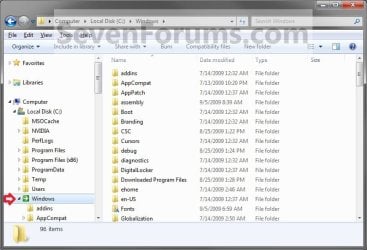
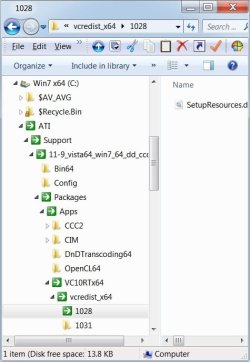
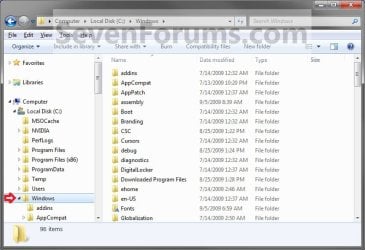
This will show you how to change the active icon used to indicate which folder is expanded or opened in the Windows Explorer Navigation Pane, Start Menu All Programs, and registry folder tree to any custom icon that you want instead in Windows 7 and Windows 8.

   Warning


  • You can only do this while logged in to a administrator account.
  • This will affect all user account's active open folder icons on the computer.
EXAMPLE: Active Open Folder
NOTE: This is the Windows Explorer navigation with the default open folder icon (left screenshot) and a custom open folder icon (right screenshot).
Default.jpg

After.jpg


OPTION ONE

To Change Default Open Folder Icon


1. Press the Windows + R keys to open the Run dialog, type regedit, and press click/tap on OK.

2. If prompted by UAC, then click/tap on Yes.

3. In regedit, navigate to the location below. (see screenshot below)
HKEY_LOCAL_MACHINE\SOFTWARE\Microsoft\Windows\CurrentVersion\Explorer
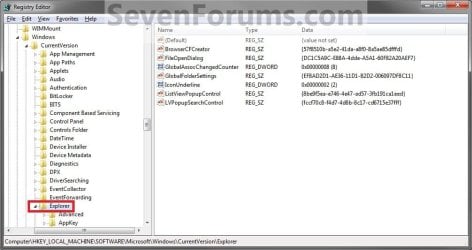
Reg1.jpg
4. In the left pane, right click on the Explorer key, and click on New and Key. (See screenshot above)

5. Type Shell Icons, and press Enter. (see screenshot below)
NOTE: If Shell Icons is already here, then you can skip steps 4 and 5.
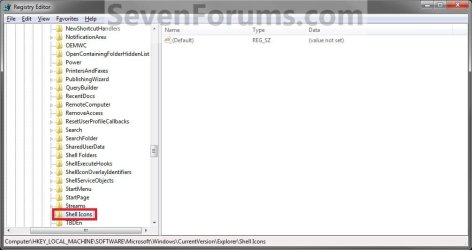
Reg2.jpg
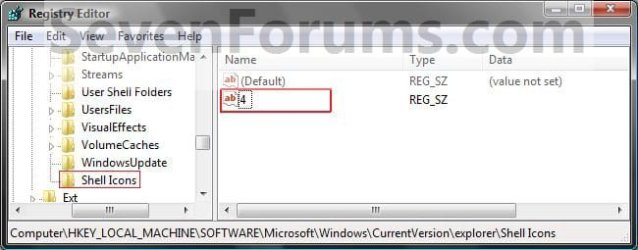
6. In the right pane of Shell Icons, right click on an empty space, and click on New and String Value. Type 4, and press Enter. (see screen shot below)
Reg3.jpg
7. Double click/tap on 4 to modify it. (see screenshot above)

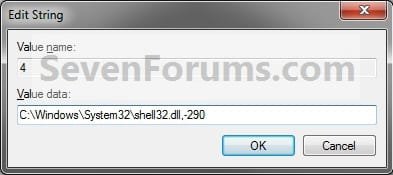
8. Type in the full path of the icon that you want to use as the new open folder icon. (See screenshot below)
NOTE: If you change the icon's location (path), then you must also change the location here in step 8 as well for the folder to still display that icon in Windows Explorer.


   Tip
These are some good icon paths to use:
  • 290.png C:\Windows\System32\shell32.dll,-290
  • 246.png C:\Windows\System32\shell32.dll,-246
Modify.jpg
9. The registry will now look similar to this with your icon path under the Data column in the right pane instead. (see screenshot below)
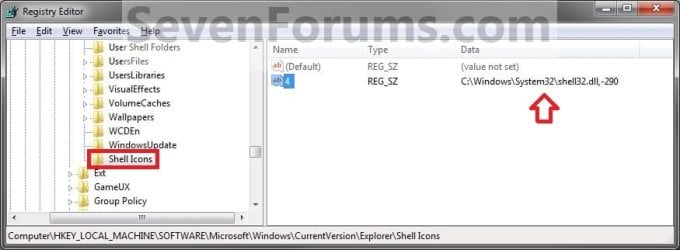
Reg4.jpg
10. Close Regedit.

11. Log off and Log on, or restart the computer to apply the new open folder icon.


OPTION TWO

To Restore Default Open Folder Icon


NOTE: This option assumes that you did OPTION ONE above to change the default folder icon.
1. Press the Windows + R keys to open the Run dialog, type regedit, and press click/tap on OK.

2. If prompted by UAC, then click/tap on Yes.

3. In regedit, navigate to the location below. (see screenshot below)
Code:
HKEY_LOCAL_MACHINE\SOFTWARE\Microsoft\Windows\CurrentVersion\Explorer\Shell Icons
4. In the right pane of Shell Icons, right click on 4, and click/tap on Delete. (See screenshot below)
Reg4.jpg
5. Click/tap on Yes. (See screenshot below)

Confirm.jpg
6. Close Regedit.

7. Log off and Log on, or restart the computer to restore the default yellow open folder icon.
That's it,
Shawn


Last edited:
Hello,

Nice trick. But is it possible to change only the icon of the folder currently in view, keeping the icons of the other folders in its path and the icons of other expanded folders?

Thanks.
 

My Computer

Computer type
PC/Desktop
Computer Manufacturer/Model Number
self-built
OS
Windows 7 Home Premium x64 SP2
CPU
AMD Phenom II X3 720 BE
Motherboard
GigaByte GA-890GPA-UD3H
Memory
A-Data DDR3 1333 Supreme SU3U1333B2G9-R 2G x4
Graphics Card(s)
ATI Raedon HD 4290 IGX on AMD SB850 chipset
Sound Card
on-board Realtek ALC892
Monitor(s) Displays
Samsung S22D300NY 21.5" wide screen
Screen Resolution
1280 x 720
Hard Drives
WD RE4 WD5003ABYX 500GB SATA2 x2 (RAID-0)
PSU
D.HIGH DHP-400GH-80P 400W
Case
no name
Cooling
Foxconn fan and heater for AMD CPU
Keyboard
Logitech standard keyboard Y-SM48
Mouse
Toshiba Pala Chan
Internet Speed
GPON 300M/100M
Antivirus
AVG AntiVirus Free
Browser
Vivaldi & Firefox
Hello,

Nice trick. But is it possible to change only the icon of the folder currently in view, keeping the icons of the other folders in its path and the icons of other expanded folders?

Thanks.

Hello, :-)

It only affects the open icon in the folder tree for the specific folder you have open.
 

My Computer

Computer type
PC/Desktop
Computer Manufacturer/Model Number
Self built custom
OS
64-bit Windows 11 Pro for Workstations
CPU
Intel i7-8700K OC'd to 5 GHz
Motherboard
ASUS ROG Maximus XI Formula Z390
Memory
64 GB (4x16GB) G.SKILL TridentZ RGB DDR4 3600 MHz
Graphics Card(s)
ASUS ROG-STRIX-GTX1080TI-O11G-GAMING
Sound Card
Integrated
Monitor(s) Displays
2 x Samsung Odyssey G7 27"
Screen Resolution
2560x1440
Hard Drives
1TB Samsung 990 PRO M.2,
4TB Samsung 990 PRO PRO M.2,
TerraMaster F8 SSD Plus NAS
PSU
Seasonic Prime Titanium 850W
Case
Thermaltake Core P3
Cooling
Corsair Hydro H115i
Keyboard
Logitech wireless K800
Mouse
Logitech MX Master 4
Internet Speed
2 Gb/s Download and 100 Mb/s Upload
Antivirus
Malwarebyte Anti-Malware Premium
Browser
Google Chrome
Other Info
Logitech Z625 speaker system,
Logitech BRIO 4K Pro webcam,
HP Color LaserJet Pro MFP M477fdn,
APC SMART-UPS RT 1000 XL - SURT1000XLI,
Galaxy S23 Plus phone
Hello, :-)

It only affects the open icon in the folder tree for the specific folder you have open.


But in the Windows Explorer on my Windows 7 PC, the icons of all the folders in the path to the open folder are replaced by the new icon, as the following screen capture image of Windows Explorer shows:
folder_icons_all_changed.jpg
 

My Computer

Computer type
PC/Desktop
Computer Manufacturer/Model Number
self-built
OS
Windows 7 Home Premium x64 SP2
CPU
AMD Phenom II X3 720 BE
Motherboard
GigaByte GA-890GPA-UD3H
Memory
A-Data DDR3 1333 Supreme SU3U1333B2G9-R 2G x4
Graphics Card(s)
ATI Raedon HD 4290 IGX on AMD SB850 chipset
Sound Card
on-board Realtek ALC892
Monitor(s) Displays
Samsung S22D300NY 21.5" wide screen
Screen Resolution
1280 x 720
Hard Drives
WD RE4 WD5003ABYX 500GB SATA2 x2 (RAID-0)
PSU
D.HIGH DHP-400GH-80P 400W
Case
no name
Cooling
Foxconn fan and heater for AMD CPU
Keyboard
Logitech standard keyboard Y-SM48
Mouse
Toshiba Pala Chan
Internet Speed
GPON 300M/100M
Antivirus
AVG AntiVirus Free
Browser
Vivaldi & Firefox
But in the Windows Explorer on my Windows 7 PC, the icons of all the folders in the path to the open folder are replaced by the new icon, as the following screen capture image of Windows Explorer shows:

This would be normal since each folder in your screenshot is an open folder in the folder tree. :(
 

My Computer

Computer type
PC/Desktop
Computer Manufacturer/Model Number
Self built custom
OS
64-bit Windows 11 Pro for Workstations
CPU
Intel i7-8700K OC'd to 5 GHz
Motherboard
ASUS ROG Maximus XI Formula Z390
Memory
64 GB (4x16GB) G.SKILL TridentZ RGB DDR4 3600 MHz
Graphics Card(s)
ASUS ROG-STRIX-GTX1080TI-O11G-GAMING
Sound Card
Integrated
Monitor(s) Displays
2 x Samsung Odyssey G7 27"
Screen Resolution
2560x1440
Hard Drives
1TB Samsung 990 PRO M.2,
4TB Samsung 990 PRO PRO M.2,
TerraMaster F8 SSD Plus NAS
PSU
Seasonic Prime Titanium 850W
Case
Thermaltake Core P3
Cooling
Corsair Hydro H115i
Keyboard
Logitech wireless K800
Mouse
Logitech MX Master 4
Internet Speed
2 Gb/s Download and 100 Mb/s Upload
Antivirus
Malwarebyte Anti-Malware Premium
Browser
Google Chrome
Other Info
Logitech Z625 speaker system,
Logitech BRIO 4K Pro webcam,
HP Color LaserJet Pro MFP M477fdn,
APC SMART-UPS RT 1000 XL - SURT1000XLI,
Galaxy S23 Plus phone
This would be normal since each folder in your screenshot is an open folder in the folder tree. :(

Oh! I suddenly realize that not only the folder the contents of which are currently in view is the open folder, but also any expanded folder is an open folder because its sub-folders are displayed. Some long held misconception clarified!

Thank you very much.

And, by the way, I recall that back in the old Windows 98 days, I downloaded, from your Win98 site, a small light green folder icon to represent only the currently viewed folder and I loved it very much. A late thank-you for that, too.
 

My Computer

Computer type
PC/Desktop
Computer Manufacturer/Model Number
self-built
OS
Windows 7 Home Premium x64 SP2
CPU
AMD Phenom II X3 720 BE
Motherboard
GigaByte GA-890GPA-UD3H
Memory
A-Data DDR3 1333 Supreme SU3U1333B2G9-R 2G x4
Graphics Card(s)
ATI Raedon HD 4290 IGX on AMD SB850 chipset
Sound Card
on-board Realtek ALC892
Monitor(s) Displays
Samsung S22D300NY 21.5" wide screen
Screen Resolution
1280 x 720
Hard Drives
WD RE4 WD5003ABYX 500GB SATA2 x2 (RAID-0)
PSU
D.HIGH DHP-400GH-80P 400W
Case
no name
Cooling
Foxconn fan and heater for AMD CPU
Keyboard
Logitech standard keyboard Y-SM48
Mouse
Toshiba Pala Chan
Internet Speed
GPON 300M/100M
Antivirus
AVG AntiVirus Free
Browser
Vivaldi & Firefox
:thumbsup:
 

My Computer

Computer type
PC/Desktop
Computer Manufacturer/Model Number
Self built custom
OS
64-bit Windows 11 Pro for Workstations
CPU
Intel i7-8700K OC'd to 5 GHz
Motherboard
ASUS ROG Maximus XI Formula Z390
Memory
64 GB (4x16GB) G.SKILL TridentZ RGB DDR4 3600 MHz
Graphics Card(s)
ASUS ROG-STRIX-GTX1080TI-O11G-GAMING
Sound Card
Integrated
Monitor(s) Displays
2 x Samsung Odyssey G7 27"
Screen Resolution
2560x1440
Hard Drives
1TB Samsung 990 PRO M.2,
4TB Samsung 990 PRO PRO M.2,
TerraMaster F8 SSD Plus NAS
PSU
Seasonic Prime Titanium 850W
Case
Thermaltake Core P3
Cooling
Corsair Hydro H115i
Keyboard
Logitech wireless K800
Mouse
Logitech MX Master 4
Internet Speed
2 Gb/s Download and 100 Mb/s Upload
Antivirus
Malwarebyte Anti-Malware Premium
Browser
Google Chrome
Other Info
Logitech Z625 speaker system,
Logitech BRIO 4K Pro webcam,
HP Color LaserJet Pro MFP M477fdn,
APC SMART-UPS RT 1000 XL - SURT1000XLI,
Galaxy S23 Plus phone
Back
Top