Open Folder Icon - Change

How to Change Open Folder Icon in Windows 7 and Windows 8


   Information
This will show you how to change the active icon used to indicate which folder is expanded or opened in the Windows Explorer Navigation Pane, Start Menu All Programs, and registry folder tree to any custom icon that you want instead in Windows 7 and Windows 8.

   Warning


  • You can only do this while logged in to a administrator account.
  • This will affect all user account's active open folder icons on the computer.
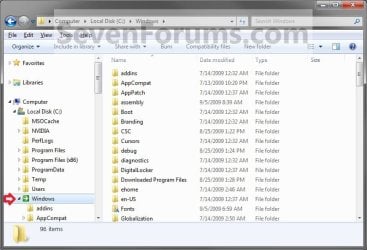
EXAMPLE: Active Open Folder
NOTE: This is the Windows Explorer navigation with the default open folder icon (left screenshot) and a custom open folder icon (right screenshot).
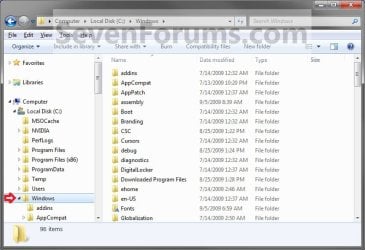
Default.jpg

After.jpg


OPTION ONE

To Change Default Open Folder Icon


1. Press the Windows + R keys to open the Run dialog, type regedit, and press click/tap on OK.

2. If prompted by UAC, then click/tap on Yes.

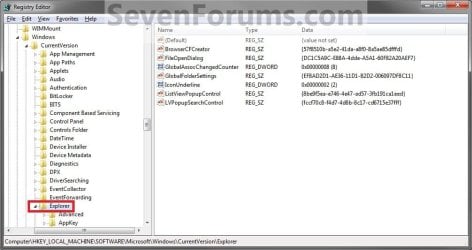
3. In regedit, navigate to the location below. (see screenshot below)
HKEY_LOCAL_MACHINE\SOFTWARE\Microsoft\Windows\CurrentVersion\Explorer
Reg1.jpg
4. In the left pane, right click on the Explorer key, and click on New and Key. (See screenshot above)

5. Type Shell Icons, and press Enter. (see screenshot below)
NOTE: If Shell Icons is already here, then you can skip steps 4 and 5.
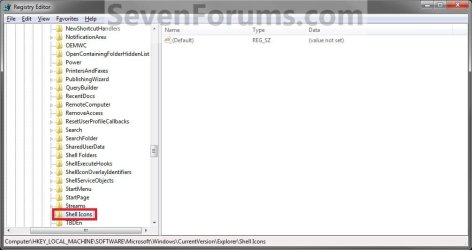
Reg2.jpg
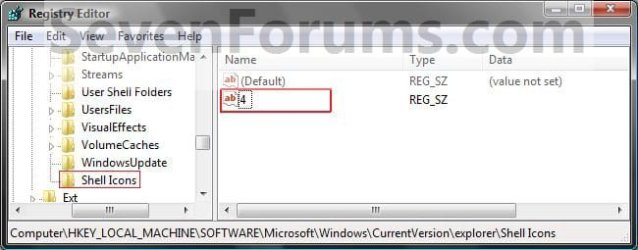
6. In the right pane of Shell Icons, right click on an empty space, and click on New and String Value. Type 4, and press Enter. (see screen shot below)
Reg3.jpg
7. Double click/tap on 4 to modify it. (see screenshot above)

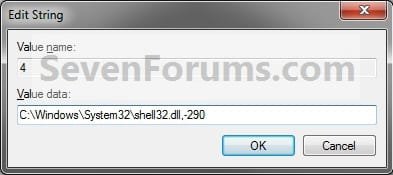
8. Type in the full path of the icon that you want to use as the new open folder icon. (See screenshot below)
NOTE: If you change the icon's location (path), then you must also change the location here in step 8 as well for the folder to still display that icon in Windows Explorer.


   Tip
These are some good icon paths to use:
  • 290.png C:\Windows\System32\shell32.dll,-290
  • 246.png C:\Windows\System32\shell32.dll,-246
Modify.jpg
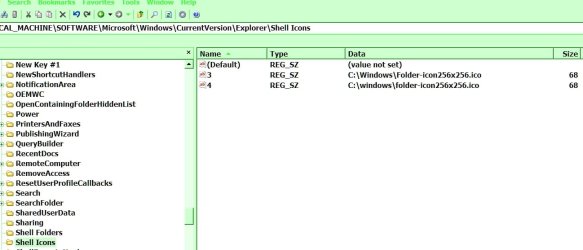
9. The registry will now look similar to this with your icon path under the Data column in the right pane instead. (see screenshot below)
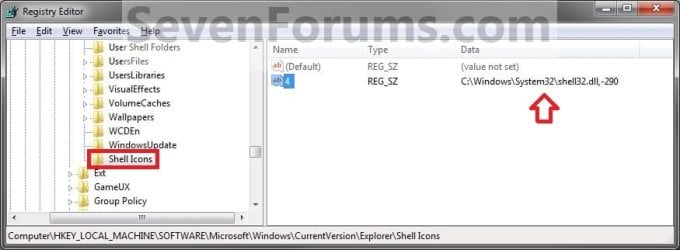
Reg4.jpg
10. Close Regedit.

11. Log off and Log on, or restart the computer to apply the new open folder icon.


OPTION TWO

To Restore Default Open Folder Icon


NOTE: This option assumes that you did OPTION ONE above to change the default folder icon.
1. Press the Windows + R keys to open the Run dialog, type regedit, and press click/tap on OK.

2. If prompted by UAC, then click/tap on Yes.

3. In regedit, navigate to the location below. (see screenshot below)
Code:
HKEY_LOCAL_MACHINE\SOFTWARE\Microsoft\Windows\CurrentVersion\Explorer\Shell Icons
4. In the right pane of Shell Icons, right click on 4, and click/tap on Delete. (See screenshot below)
Reg4.jpg
5. Click/tap on Yes. (See screenshot below)
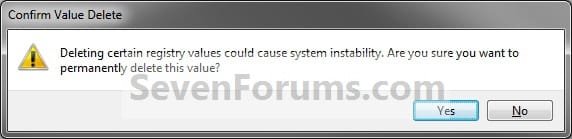
Confirm.jpg
6. Close Regedit.

7. Log off and Log on, or restart the computer to restore the default yellow open folder icon.
That's it,
Shawn


Last edited:
Hello Ron,

This doesn't affect the icons of open folders in the main window of Windows Explorer. This only affects them in a folder tree. For example, navigation pane.

Since your .ico file has space in it's name, see if having the path in quotes like below may work better.

"c:\Users\Ronald\Downloads\Documents\Folder Icons\Electric Grid\Folder Open.ico"

I noticed that you are using a custom skin/theme that could be interfering as well.
 

My Computer

Computer type
PC/Desktop
Computer Manufacturer/Model Number
Self built custom
OS
64-bit Windows 11 Pro for Workstations
CPU
Intel i7-8700K OC'd to 5 GHz
Motherboard
ASUS ROG Maximus XI Formula Z390
Memory
64 GB (4x16GB) G.SKILL TridentZ RGB DDR4 3600 MHz
Graphics Card(s)
ASUS ROG-STRIX-GTX1080TI-O11G-GAMING
Sound Card
Integrated
Monitor(s) Displays
2 x Samsung Odyssey G7 27"
Screen Resolution
2560x1440
Hard Drives
1TB Samsung 990 PRO M.2,
4TB Samsung 990 PRO PRO M.2,
TerraMaster F8 SSD Plus NAS
PSU
Seasonic Prime Titanium 850W
Case
Thermaltake Core P3
Cooling
Corsair Hydro H115i
Keyboard
Logitech wireless K800
Mouse
Logitech MX Master 4
Internet Speed
2 Gb/s Download and 100 Mb/s Upload
Antivirus
Malwarebyte Anti-Malware Premium
Browser
Google Chrome
Other Info
Logitech Z625 speaker system,
Logitech BRIO 4K Pro webcam,
HP Color LaserJet Pro MFP M477fdn,
APC SMART-UPS RT 1000 XL - SURT1000XLI,
Galaxy S23 Plus phone
Hello Ron,

This doesn't affect the icons of open folders in the main window of Windows Explorer. This only affects them in a folder tree. For example, navigation pane.

Since your .ico file has space in it's name, see if having the path in quotes like below may work better.

"c:\Users\Ronald\Downloads\Documents\Folder Icons\Electric Grid\Folder Open.ico"

I noticed that you are using a custom skin/theme that could be interfering as well.

Thanks, guess the first part is my answer.
I already tried the quotes option, before as I mentioned in my post.

Too bad, guess I will have to do the (most used/seen) folders manually then. At least that gives the option to even set different folders for each open folder. Just time consuming, but also fun. A job to do when bored, but entertaining, when then designing icons myself (well png to icon convert).

Thanks, Ron
 

My Computer

Computer type
PC/Desktop
Computer Manufacturer/Model Number
HP Envy 700-540d
OS
Windows 8.1 64bit
CPU
Core i7-4790 3.60MHz
Motherboard
Kaili2
Memory
8 GB DDR3
Graphics Card(s)
Nvidia GTX 745 - 4GB
Sound Card
Intergrated 7.1
Monitor(s) Displays
Samsung 24"
Screen Resolution
1920x1080
Hard Drives
Sata 2TB
Internet Speed
6Mbits - 1Mbits (Thailand is slow)
Antivirus
AVG 2015
Browser
FF
Other Info
Dutch guy, living in Thailand

http://support.hp.com/th-th/document/c04535723

My Computer

Computer type
PC/Desktop
Computer Manufacturer/Model Number
Self built custom
OS
64-bit Windows 11 Pro for Workstations
CPU
Intel i7-8700K OC'd to 5 GHz
Motherboard
ASUS ROG Maximus XI Formula Z390
Memory
64 GB (4x16GB) G.SKILL TridentZ RGB DDR4 3600 MHz
Graphics Card(s)
ASUS ROG-STRIX-GTX1080TI-O11G-GAMING
Sound Card
Integrated
Monitor(s) Displays
2 x Samsung Odyssey G7 27"
Screen Resolution
2560x1440
Hard Drives
1TB Samsung 990 PRO M.2,
4TB Samsung 990 PRO PRO M.2,
TerraMaster F8 SSD Plus NAS
PSU
Seasonic Prime Titanium 850W
Case
Thermaltake Core P3
Cooling
Corsair Hydro H115i
Keyboard
Logitech wireless K800
Mouse
Logitech MX Master 4
Internet Speed
2 Gb/s Download and 100 Mb/s Upload
Antivirus
Malwarebyte Anti-Malware Premium
Browser
Google Chrome
Other Info
Logitech Z625 speaker system,
Logitech BRIO 4K Pro webcam,
HP Color LaserJet Pro MFP M477fdn,
APC SMART-UPS RT 1000 XL - SURT1000XLI,
Galaxy S23 Plus phone
Thanks, I actually already have Resource Hacker and Take Ownership and used it yesterday to try it.
Well I did do shell32.dll, which was probably wrong as I see this tutorial edits imageres.dll

Yesterday when doing the restart, nope computer died on me. Only option was recovery and that cost me hours and hours of re-installing everything. Well at least I know the recover works.

Of course I had not yet made a full recovery backup (OS + Apps + Settings + Files) of the C-drive.
 

My Computer

Computer type
PC/Desktop
Computer Manufacturer/Model Number
HP Envy 700-540d
OS
Windows 8.1 64bit
CPU
Core i7-4790 3.60MHz
Motherboard
Kaili2
Memory
8 GB DDR3
Graphics Card(s)
Nvidia GTX 745 - 4GB
Sound Card
Intergrated 7.1
Monitor(s) Displays
Samsung 24"
Screen Resolution
1920x1080
Hard Drives
Sata 2TB
Internet Speed
6Mbits - 1Mbits (Thailand is slow)
Antivirus
AVG 2015
Browser
FF
Other Info
Dutch guy, living in Thailand

http://support.hp.com/th-th/document/c04535723
Well I took the leap and did the other option (Resource Hacker, ect.).
No joy with that also. just only again all the tree icons are changed, but in the main explorer area, I still just have the yellow icons.

After I did the imageres.dll (both 64bit), I emptied the thumbnails cache and rebuild it and restarted. NO Joy.

After that I also deleted the reg Shell Icons I did before and again emptied the cache and rebuild and restart, but again NO joy.

At least the Shell Icons options did change any empty folder, which the imageres.dll option not does.

I guess this means I am out of options, besides doing it all manually.

Well thanks again and at least I did not manage to screw up my computer this time, as I did yesterday.
 

My Computer

Computer type
PC/Desktop
Computer Manufacturer/Model Number
HP Envy 700-540d
OS
Windows 8.1 64bit
CPU
Core i7-4790 3.60MHz
Motherboard
Kaili2
Memory
8 GB DDR3
Graphics Card(s)
Nvidia GTX 745 - 4GB
Sound Card
Intergrated 7.1
Monitor(s) Displays
Samsung 24"
Screen Resolution
1920x1080
Hard Drives
Sata 2TB
Internet Speed
6Mbits - 1Mbits (Thailand is slow)
Antivirus
AVG 2015
Browser
FF
Other Info
Dutch guy, living in Thailand

http://support.hp.com/th-th/document/c04535723
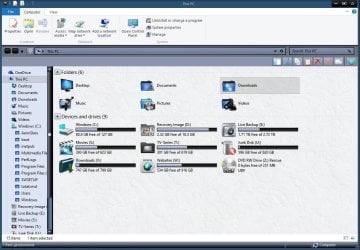
After a lot of tries and fiddling (manually deleting icon and thumbnail cache and more), I did finally manage to change all icons within W8.1, even the standard 6 folders in the "This PC", so no more ugly yellow icons for me.

Well 1 or 2 here and there, like in the ribbon, since unfortunately Ribbon Icons Customizer does not work for my 64bit and I have not found an alternative way (yet)
 

Attachments

  • this pc.JPG
    this pc.JPG
    116.5 KB · Views: 246

My Computer

Computer type
PC/Desktop
Computer Manufacturer/Model Number
HP Envy 700-540d
OS
Windows 8.1 64bit
CPU
Core i7-4790 3.60MHz
Motherboard
Kaili2
Memory
8 GB DDR3
Graphics Card(s)
Nvidia GTX 745 - 4GB
Sound Card
Intergrated 7.1
Monitor(s) Displays
Samsung 24"
Screen Resolution
1920x1080
Hard Drives
Sata 2TB
Internet Speed
6Mbits - 1Mbits (Thailand is slow)
Antivirus
AVG 2015
Browser
FF
Other Info
Dutch guy, living in Thailand

http://support.hp.com/th-th/document/c04535723
That's great news Ron. Looks good. :)
 

My Computer

Computer type
PC/Desktop
Computer Manufacturer/Model Number
Self built custom
OS
64-bit Windows 11 Pro for Workstations
CPU
Intel i7-8700K OC'd to 5 GHz
Motherboard
ASUS ROG Maximus XI Formula Z390
Memory
64 GB (4x16GB) G.SKILL TridentZ RGB DDR4 3600 MHz
Graphics Card(s)
ASUS ROG-STRIX-GTX1080TI-O11G-GAMING
Sound Card
Integrated
Monitor(s) Displays
2 x Samsung Odyssey G7 27"
Screen Resolution
2560x1440
Hard Drives
1TB Samsung 990 PRO M.2,
4TB Samsung 990 PRO PRO M.2,
TerraMaster F8 SSD Plus NAS
PSU
Seasonic Prime Titanium 850W
Case
Thermaltake Core P3
Cooling
Corsair Hydro H115i
Keyboard
Logitech wireless K800
Mouse
Logitech MX Master 4
Internet Speed
2 Gb/s Download and 100 Mb/s Upload
Antivirus
Malwarebyte Anti-Malware Premium
Browser
Google Chrome
Other Info
Logitech Z625 speaker system,
Logitech BRIO 4K Pro webcam,
HP Color LaserJet Pro MFP M477fdn,
APC SMART-UPS RT 1000 XL - SURT1000XLI,
Galaxy S23 Plus phone
Thank you,

Any alternative RIC. that works for W8.1 (after2012)?
Google says (RIC) NO, but maybe 8FORUM has a solution

Please let me know how to customize W8/8.1 ribbon, since RIC (2012) not works for W8/8.1-64bit

Maybe an update of RIC would be nice (COMES FROM REVIANT ART OR SOMETHING)
 

My Computer

Computer type
PC/Desktop
Computer Manufacturer/Model Number
HP Envy 700-540d
OS
Windows 8.1 64bit
CPU
Core i7-4790 3.60MHz
Motherboard
Kaili2
Memory
8 GB DDR3
Graphics Card(s)
Nvidia GTX 745 - 4GB
Sound Card
Intergrated 7.1
Monitor(s) Displays
Samsung 24"
Screen Resolution
1920x1080
Hard Drives
Sata 2TB
Internet Speed
6Mbits - 1Mbits (Thailand is slow)
Antivirus
AVG 2015
Browser
FF
Other Info
Dutch guy, living in Thailand

http://support.hp.com/th-th/document/c04535723
I'm not aware of one. :(
 

My Computer

Computer type
PC/Desktop
Computer Manufacturer/Model Number
Self built custom
OS
64-bit Windows 11 Pro for Workstations
CPU
Intel i7-8700K OC'd to 5 GHz
Motherboard
ASUS ROG Maximus XI Formula Z390
Memory
64 GB (4x16GB) G.SKILL TridentZ RGB DDR4 3600 MHz
Graphics Card(s)
ASUS ROG-STRIX-GTX1080TI-O11G-GAMING
Sound Card
Integrated
Monitor(s) Displays
2 x Samsung Odyssey G7 27"
Screen Resolution
2560x1440
Hard Drives
1TB Samsung 990 PRO M.2,
4TB Samsung 990 PRO PRO M.2,
TerraMaster F8 SSD Plus NAS
PSU
Seasonic Prime Titanium 850W
Case
Thermaltake Core P3
Cooling
Corsair Hydro H115i
Keyboard
Logitech wireless K800
Mouse
Logitech MX Master 4
Internet Speed
2 Gb/s Download and 100 Mb/s Upload
Antivirus
Malwarebyte Anti-Malware Premium
Browser
Google Chrome
Other Info
Logitech Z625 speaker system,
Logitech BRIO 4K Pro webcam,
HP Color LaserJet Pro MFP M477fdn,
APC SMART-UPS RT 1000 XL - SURT1000XLI,
Galaxy S23 Plus phone
This worked for my default folder, but not for the open folders.

In the registry, only Shell Icons and Shell Folders have spaces in their names. Is that correct?
 

My Computer

Computer type
PC/Desktop
Computer Manufacturer/Model Number
HP p6-2020t
OS
Win 7 Ult 64-bit
CPU
G620 2.6GHZ Pentium R
Memory
6 GB
Monitor(s) Displays
25" HPLV2311
Screen Resolution
1920 x 1200
Hard Drives
1 SATA, 1 exterior SATA
Case
HP
Cooling
PSU
Antivirus
Glasswire
Browser
Waterfox; Firefox; Chrome for work
Other Info
Firewall--Glasswire
Similar specs in Gateway DX4200
Verizon FIOS Wired network

1 other Win7 computer-- has SSD
Hello RoWin7, :-)

Please go ahead and post some screenshots showing what you're seeing instead.
 

My Computer

Computer type
PC/Desktop
Computer Manufacturer/Model Number
Self built custom
OS
64-bit Windows 11 Pro for Workstations
CPU
Intel i7-8700K OC'd to 5 GHz
Motherboard
ASUS ROG Maximus XI Formula Z390
Memory
64 GB (4x16GB) G.SKILL TridentZ RGB DDR4 3600 MHz
Graphics Card(s)
ASUS ROG-STRIX-GTX1080TI-O11G-GAMING
Sound Card
Integrated
Monitor(s) Displays
2 x Samsung Odyssey G7 27"
Screen Resolution
2560x1440
Hard Drives
1TB Samsung 990 PRO M.2,
4TB Samsung 990 PRO PRO M.2,
TerraMaster F8 SSD Plus NAS
PSU
Seasonic Prime Titanium 850W
Case
Thermaltake Core P3
Cooling
Corsair Hydro H115i
Keyboard
Logitech wireless K800
Mouse
Logitech MX Master 4
Internet Speed
2 Gb/s Download and 100 Mb/s Upload
Antivirus
Malwarebyte Anti-Malware Premium
Browser
Google Chrome
Other Info
Logitech Z625 speaker system,
Logitech BRIO 4K Pro webcam,
HP Color LaserJet Pro MFP M477fdn,
APC SMART-UPS RT 1000 XL - SURT1000XLI,
Galaxy S23 Plus phone
HcHYfbBY
I think I'm better off leaving it till I design an Open Folder, but tell me if i did something wrong.


2nd one is Win Explorer


HcHYfbBY
 

Attachments

  • open folder.jpg
    open folder.jpg
    9.1 KB · Views: 390
  • shell icons.jpg
    shell icons.jpg
    60 KB · Views: 30

My Computer

Computer type
PC/Desktop
Computer Manufacturer/Model Number
HP p6-2020t
OS
Win 7 Ult 64-bit
CPU
G620 2.6GHZ Pentium R
Memory
6 GB
Monitor(s) Displays
25" HPLV2311
Screen Resolution
1920 x 1200
Hard Drives
1 SATA, 1 exterior SATA
Case
HP
Cooling
PSU
Antivirus
Glasswire
Browser
Waterfox; Firefox; Chrome for work
Other Info
Firewall--Glasswire
Similar specs in Gateway DX4200
Verizon FIOS Wired network

1 other Win7 computer-- has SSD
I don't see anything wrong.

The only difference I see is the value for "4" is lower cased.
 

My Computer

Computer type
PC/Desktop
Computer Manufacturer/Model Number
Self built custom
OS
64-bit Windows 11 Pro for Workstations
CPU
Intel i7-8700K OC'd to 5 GHz
Motherboard
ASUS ROG Maximus XI Formula Z390
Memory
64 GB (4x16GB) G.SKILL TridentZ RGB DDR4 3600 MHz
Graphics Card(s)
ASUS ROG-STRIX-GTX1080TI-O11G-GAMING
Sound Card
Integrated
Monitor(s) Displays
2 x Samsung Odyssey G7 27"
Screen Resolution
2560x1440
Hard Drives
1TB Samsung 990 PRO M.2,
4TB Samsung 990 PRO PRO M.2,
TerraMaster F8 SSD Plus NAS
PSU
Seasonic Prime Titanium 850W
Case
Thermaltake Core P3
Cooling
Corsair Hydro H115i
Keyboard
Logitech wireless K800
Mouse
Logitech MX Master 4
Internet Speed
2 Gb/s Download and 100 Mb/s Upload
Antivirus
Malwarebyte Anti-Malware Premium
Browser
Google Chrome
Other Info
Logitech Z625 speaker system,
Logitech BRIO 4K Pro webcam,
HP Color LaserJet Pro MFP M477fdn,
APC SMART-UPS RT 1000 XL - SURT1000XLI,
Galaxy S23 Plus phone
I don't see anything wrong.

The only difference I see is the value for "4" is lower cased.

OK, just designed a FolderOpen icon, put it into the registry. Rebooted, and it works!! But it's using one I made about an hour before, not my final revision. I doublechecked the folder path and registry key.
 
Last edited:

My Computer

Computer type
PC/Desktop
Computer Manufacturer/Model Number
HP p6-2020t
OS
Win 7 Ult 64-bit
CPU
G620 2.6GHZ Pentium R
Memory
6 GB
Monitor(s) Displays
25" HPLV2311
Screen Resolution
1920 x 1200
Hard Drives
1 SATA, 1 exterior SATA
Case
HP
Cooling
PSU
Antivirus
Glasswire
Browser
Waterfox; Firefox; Chrome for work
Other Info
Firewall--Glasswire
Similar specs in Gateway DX4200
Verizon FIOS Wired network

1 other Win7 computer-- has SSD

My Computer

Computer type
PC/Desktop
Computer Manufacturer/Model Number
Self built custom
OS
64-bit Windows 11 Pro for Workstations
CPU
Intel i7-8700K OC'd to 5 GHz
Motherboard
ASUS ROG Maximus XI Formula Z390
Memory
64 GB (4x16GB) G.SKILL TridentZ RGB DDR4 3600 MHz
Graphics Card(s)
ASUS ROG-STRIX-GTX1080TI-O11G-GAMING
Sound Card
Integrated
Monitor(s) Displays
2 x Samsung Odyssey G7 27"
Screen Resolution
2560x1440
Hard Drives
1TB Samsung 990 PRO M.2,
4TB Samsung 990 PRO PRO M.2,
TerraMaster F8 SSD Plus NAS
PSU
Seasonic Prime Titanium 850W
Case
Thermaltake Core P3
Cooling
Corsair Hydro H115i
Keyboard
Logitech wireless K800
Mouse
Logitech MX Master 4
Internet Speed
2 Gb/s Download and 100 Mb/s Upload
Antivirus
Malwarebyte Anti-Malware Premium
Browser
Google Chrome
Other Info
Logitech Z625 speaker system,
Logitech BRIO 4K Pro webcam,
HP Color LaserJet Pro MFP M477fdn,
APC SMART-UPS RT 1000 XL - SURT1000XLI,
Galaxy S23 Plus phone
Can someone please tell me what I'm doing wrong. I followed the tutorial on how to change the main folder and then I wanted to change the open folder as well. And I'm having trouble with the open folder part.


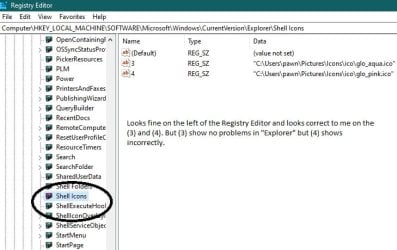
Registery Editor Shell Icons Correct.jpg This icon is the one I switched to for the open folders. Which shows correctly in the editor but not anywhere else.


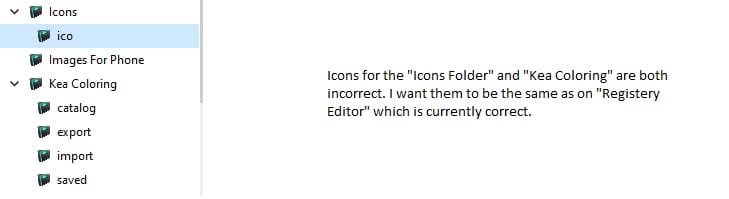
Wrong Icons.jpg In here the icons are incorrect am I doing something wrong. Please give me any advice you can thank you.
 

My Computer

Computer type
Laptop
Computer Manufacturer/Model Number
Lenovo
OS
windows 10 64 bit
Browser
Firefox
Hello Dawn121988, :-)

Just to verify, did you log out and in or restart the computer to apply?

What is the location in the second screenshot? Is this opened from a 3rd party program that may not use this registry setting?
 

My Computer

Computer type
PC/Desktop
Computer Manufacturer/Model Number
Self built custom
OS
64-bit Windows 11 Pro for Workstations
CPU
Intel i7-8700K OC'd to 5 GHz
Motherboard
ASUS ROG Maximus XI Formula Z390
Memory
64 GB (4x16GB) G.SKILL TridentZ RGB DDR4 3600 MHz
Graphics Card(s)
ASUS ROG-STRIX-GTX1080TI-O11G-GAMING
Sound Card
Integrated
Monitor(s) Displays
2 x Samsung Odyssey G7 27"
Screen Resolution
2560x1440
Hard Drives
1TB Samsung 990 PRO M.2,
4TB Samsung 990 PRO PRO M.2,
TerraMaster F8 SSD Plus NAS
PSU
Seasonic Prime Titanium 850W
Case
Thermaltake Core P3
Cooling
Corsair Hydro H115i
Keyboard
Logitech wireless K800
Mouse
Logitech MX Master 4
Internet Speed
2 Gb/s Download and 100 Mb/s Upload
Antivirus
Malwarebyte Anti-Malware Premium
Browser
Google Chrome
Other Info
Logitech Z625 speaker system,
Logitech BRIO 4K Pro webcam,
HP Color LaserJet Pro MFP M477fdn,
APC SMART-UPS RT 1000 XL - SURT1000XLI,
Galaxy S23 Plus phone
I tried both log out the log in. And even restart as well. The location of the second screen shot is just plain explore. I just cut a bunch of the other stuff off so there was less mess and distraction in the photo. The icons folder is located inside the pictures folder same place where the other icon is stored. I even tried "Rebuild Icon Cache". I think that is what kind of started placing the icons in the registry editor but not sure. But the icon is still messed up in the "File Explorer Area".
 

My Computer

Computer type
Laptop
Computer Manufacturer/Model Number
Lenovo
OS
windows 10 64 bit
Browser
Firefox
I tried both log out the log in. And even restart as well. The location of the second screen shot is just plain explore. I just cut a bunch of the other stuff off so there was less mess and distraction in the photo. The icons folder is located inside the pictures folder same place where the other icon is stored. I even tried "Rebuild Icon Cache". I think that is what kind of started placing the icons in the registry editor but not sure. But the icon is still messed up in the "File Explorer Area".

As a test, try an icon path provided in the tutorial for 4 to see if it works for you to rule out any possible issue with your icon.
 

My Computer

Computer type
PC/Desktop
Computer Manufacturer/Model Number
Self built custom
OS
64-bit Windows 11 Pro for Workstations
CPU
Intel i7-8700K OC'd to 5 GHz
Motherboard
ASUS ROG Maximus XI Formula Z390
Memory
64 GB (4x16GB) G.SKILL TridentZ RGB DDR4 3600 MHz
Graphics Card(s)
ASUS ROG-STRIX-GTX1080TI-O11G-GAMING
Sound Card
Integrated
Monitor(s) Displays
2 x Samsung Odyssey G7 27"
Screen Resolution
2560x1440
Hard Drives
1TB Samsung 990 PRO M.2,
4TB Samsung 990 PRO PRO M.2,
TerraMaster F8 SSD Plus NAS
PSU
Seasonic Prime Titanium 850W
Case
Thermaltake Core P3
Cooling
Corsair Hydro H115i
Keyboard
Logitech wireless K800
Mouse
Logitech MX Master 4
Internet Speed
2 Gb/s Download and 100 Mb/s Upload
Antivirus
Malwarebyte Anti-Malware Premium
Browser
Google Chrome
Other Info
Logitech Z625 speaker system,
Logitech BRIO 4K Pro webcam,
HP Color LaserJet Pro MFP M477fdn,
APC SMART-UPS RT 1000 XL - SURT1000XLI,
Galaxy S23 Plus phone
I tried a icon path from the tutorial and it still didn't change the folders in the explore but only in the registry editor. I put the "" and I signed out and then back in I even restarted the laptop and I even tried the rebuild icon cache. But the only place there is the icon is on the registry editor. Am I doing something wrong.
 

My Computer

Computer type
Laptop
Computer Manufacturer/Model Number
Lenovo
OS
windows 10 64 bit
Browser
Firefox
Back
Top