
Organizing games

Opi8

New member
Local time
5:05 PM
Messages
56
While I was away during the weekend, a family friend thankfully reformatted my computer and helped us install our version of Windows 7. So I just started using it now for the first time ever. So far everything's really smooth and looks nice, but I am still trying to familiarize myself. Currently, the only problem I am having is creating a good game folder on my desktop. Here's my problem:

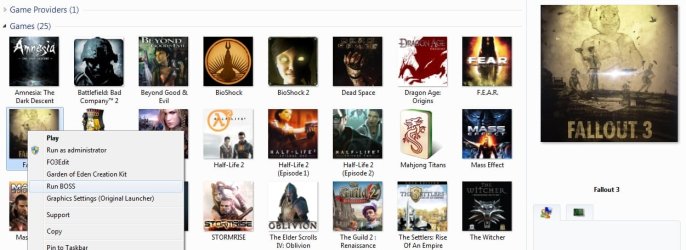
I want to have a folder on my desktop which will contain a shortcut to every game I have (by means of going to it's install directory and copying shortcut). However, I want this folder to look like the one found in Start Menu\All Programs\Games...the thing is, when I open the "Games" folder through the start menu, it shows me an undetailed folder, yet if I right click one of the games in the folder (while in the start menu), and select "Open File Location", only then does it give me a folder which shows only some of my games with full details. So is there any way to either show this folder on the desktop, or create one just like it. I tried making one and enabling preview panel, but whenever I put in the game shortcuts it says "No Preview Available".

Long story short (cause I know my question is all over the place and not worded well)...Is there any way of having a desktop game folder which gives previews for all the shortcuts I put into it???

Any help would be greatly appreciated!
 

My Computer

Computer Manufacturer/Model Number
MSI/MS-7309
OS
Windows 7 Ultimate x64
Graphics Card(s)
Radeon HD 4830
Other Info
Don't know enough about computers to fill in the rest, if any important info is missing, feel free to message me on where or how to find the details.
Plan and simple, Nope
 

My Computer

OS
Windows 7 Pro x64
CPU
Intel E6300 2.8Ghz
Motherboard
ASUS P5QPL-AM Intel G41
Memory
Corsair TWIN2X 2x2GB 5-5-5-18
Graphics Card(s)
ATI HD5770 GDDR5 1GB
Sound Card
5.1 Internal
Monitor(s) Displays
Samsung Series 5 32" Full HD
Hard Drives
Seagate Barracuda 500GB 7200 16MB SATAII
WD Elements 500GB 2.5" External
PSU
CoolerMaster 550W eXtreme Power Plust Silent 12CM
Case
Lian-Li Lancool PC-K56B
Cooling
Stock Fan, Water Cooling for HDD, GPU, CPU on the Way :D
Keyboard
Logitech G15
Mouse
CoolerMaster Sentinal (set at 5600dpi)
Internet Speed
Slingshot. 5Mbps, Currently getting 2Mbps
Hold on a sec, just before we leave this.

Do you mean to have a folder, like any other folder but contain only shortcuts to your games.

But as for preview, do you just mean its icon, the picture icon that comes with the game?

Lucky
 

My Computer

Computer Manufacturer/Model Number
The HAFmeister (Custom)
OS
Windows 7 Ultimate x64 RTM + SP1
CPU
Intel Core i7 950 3.06GHZ (OC'd to 3.99Ghz)
Motherboard
Asus Rampage III Extreme x58 SATA 6GB & USB 3.0
Memory
6GB OCZ Reaper HPC Edition PC3-16000 (set 1606Mhz 8-8-8-26)
Graphics Card(s)
EVGA Nvidia Geforce GTX 570
Sound Card
Creative SB X-Fi Titanium Fatal1ty Professional Series
Monitor(s) Displays
Samsung SM2433BW 24" Widescreen Monitor
Screen Resolution
1920x1200
Hard Drives
Western Digital Caviar Black 500GB 32Mb Buffer SATA II
Western Digital Caviar Black 750GB 32Mb Buffer SATA II
Western Digital Caviar Blue 500GB 16Mb Buffer SATA II
Western Digital My Book Essential Edition 750GB USB
Samsung Spinpoint 2TB SATA II
PSU
Thermaltake Toughpower 1200w (Modular)
Case
CoolerMaster HAF-932
Cooling
Zalman Reserator XT and ZM-WB5 Plus - GPU uses Stock coolers
Keyboard
Logitech G510
Mouse
Logitech G9 Gaming Mouse
Internet Speed
3MB Profile - 350-400kbs (Real-Speed)
Other Info
IcyBox Hot-Swap Bay,
Logitech G27 Steering Wheel,
Xbox 360 Wirless Elite Controller with Microsoft Reciever and
Play & Charge Kit,
Belkin USB Wireless Adaptor,
GAME Generic Controller (Playstation Looky-Likey),
Epson SX125 All-in-One.
Is there a particular reason you do not want to use the Game Exploere itself?

You can add all your Games to it and customize it however you see fit.


This tutorial:
http://www.sevenforums.com/tutorials/25787-games-explorer-folder-add-games.html?ltr=G

Will show you how to manually add your games.

You can make your own box art, add launch option to the context menu , and customize your game Explorer however you like.
I always like customizing it in this manner to suit my perferences, as seen in the snip here.
 

Attachments

  • Untitled.jpg
    Untitled.jpg
    87.2 KB · Views: 100

My Computer

Computer Manufacturer/Model Number
Custom (Self Build)
OS
Windows 7 Home Premium 64bit
CPU
Intel Core i7 2700k
Motherboard
eVGA P67 SLI
Memory
8GB Mushkin Redline Ridgebacks @1866
Graphics Card(s)
EVGA GTX570 SC
Sound Card
XiFi Titanium HD
Monitor(s) Displays
LG W2453V
Screen Resolution
1920x1080
Hard Drives
Intel 320 80GB -- Intel X25-V 40GB --WD Black 1TB x2 -- WD Blue 640GB
PSU
Seasonic x750
Case
Corsair 600T SE White
Cooling
eVGA Superclocked CPU Cooler
Keyboard
Saitek Cyborg
Antivirus
Kaspersky
Browser
IE
Other Info
LG BD/DVD
@wishmaster - yes, thank you for posting that image. I am really keen on having that folder on my desktop. I will try the link and if I still have troubles will ask more

edit: So I'm going through the tutorial and stuck trying to find a game with similar ESRB rating as Kane And Lynch 2 : Dog Days, which will also be LISTED in the notepad with list of all the old games. Does it have to have the same content, or does it only have to be "Mature"???
 
Last edited:

My Computer

Computer Manufacturer/Model Number
MSI/MS-7309
OS
Windows 7 Ultimate x64
Graphics Card(s)
Radeon HD 4830
Other Info
Don't know enough about computers to fill in the rest, if any important info is missing, feel free to message me on where or how to find the details.
Quite Honestly, the rating itself will not effect anything if it isnt exactly correct.

If you use something like: Half Life for example, youll get a Mature Rating (Animated Blood,Violence)

I just try to get the base rating as close as possible (Mature,Teen etc) and dont worry to much about the details in it.

I focus more on editing the other info to fit particular the game;
Title, Release Date, Publisher/Devoloper, (and links) Box art etc.
 

My Computer

Computer Manufacturer/Model Number
Custom (Self Build)
OS
Windows 7 Home Premium 64bit
CPU
Intel Core i7 2700k
Motherboard
eVGA P67 SLI
Memory
8GB Mushkin Redline Ridgebacks @1866
Graphics Card(s)
EVGA GTX570 SC
Sound Card
XiFi Titanium HD
Monitor(s) Displays
LG W2453V
Screen Resolution
1920x1080
Hard Drives
Intel 320 80GB -- Intel X25-V 40GB --WD Black 1TB x2 -- WD Blue 640GB
PSU
Seasonic x750
Case
Corsair 600T SE White
Cooling
eVGA Superclocked CPU Cooler
Keyboard
Saitek Cyborg
Antivirus
Kaspersky
Browser
IE
Other Info
LG BD/DVD
okay thanks wishmaster, I'll continue on with the tutorial just using a "mature" rating game and post if I encounter any problems or if everything works out.

edit: so, i continued to do what i was supposed to, but whenever I accidently entered a image file location that was incorrect (for the shortcut image to be an icon), it ended up deleting the whole registry, so I've had to start over 3 times now. So while I try doing it again, could you please let me know how your supposed to properly open the "Game" folder, because the only time I can get it to look like yours (game provider and all games I have), is when I right click one of the games and select "Open File Location". I don't think this is normal, I would really like to be able to access the folder from my desktop without the hassle everytime

edit x2: yeah, sorry for editing so much and having such unnecessarily long questions. I figured out how to make the Game folder appear as a link in the start menu, so now my only question is whether I can make it appear on desktop
 
Last edited:

My Computer

Computer Manufacturer/Model Number
MSI/MS-7309
OS
Windows 7 Ultimate x64
Graphics Card(s)
Radeon HD 4830
Other Info
Don't know enough about computers to fill in the rest, if any important info is missing, feel free to message me on where or how to find the details.
I got Kane & Lynch 2 to show up in the folder, with the proper boxart and everything. So before I consider this solved, I just wanna know if it's possible to have a link to the game folder on my desktop, and also if anybody knows of one, please post a link to a site that shows different things you can do to customize your GEF
 

My Computer

Computer Manufacturer/Model Number
MSI/MS-7309
OS
Windows 7 Ultimate x64
Graphics Card(s)
Radeon HD 4830
Other Info
Don't know enough about computers to fill in the rest, if any important info is missing, feel free to message me on where or how to find the details.
If you have the "Games" button in your Start menu, you can just drag it to desktop and it will create a shortcut on your desktop, that will lead to the Games Explorer.

If you don't have the link to Games Explorer in your Start menu, then right click on your Start button>properties>Start Menu tab>Customise> then find the "Games" part and click "Show as link" and click "Ok".
 

My Computer

Computer type
PC/Desktop
Computer Manufacturer/Model Number
Custom Built
OS
Windows 8.1 Pro x64
CPU
Intel Core i7 4790k
Motherboard
MSI Z97S Krait Edition
Memory
8GB Corsair Dominator 1600MHz
Graphics Card(s)
MSI TwinFrozr GeForce GTX770
Sound Card
ASUS Xonar DX/XD 7.1
Monitor(s) Displays
Dell 24" S2409W + Dell 20" E207WFP
Screen Resolution
1920x1080 + 1680x1050
Hard Drives
1x 120GB OCZ Agility 3, 1x 750GB Western Digital Caviar Black, 1x 1TB Western Digital Caviar Blue
PSU
Corsair HX850 modular
Case
Fractal Design Define R4
Cooling
Corsair H60 w/ twin Corsair SP120 fans
Keyboard
Logitech G510S Keyboard
Mouse
Logitech G500S Laser Mouse
Internet Speed
40Mbps
Antivirus
Microsoft Security Essentials
Browser
Google Chrome
Other Info
LG Blu-Ray player
alright, thanks a ton Everlong. thread solved :D
 

My Computer

Computer Manufacturer/Model Number
MSI/MS-7309
OS
Windows 7 Ultimate x64
Graphics Card(s)
Radeon HD 4830
Other Info
Don't know enough about computers to fill in the rest, if any important info is missing, feel free to message me on where or how to find the details.
Back
Top