
Solved OS Load problem

ICIT2LOL

Confusion Therapist
Guru
Gold Member
VIP
Local time
9:20 AM
Messages
20,778
Location
Central West NSW
Have just fitted a Samsung 830 SSD and diskparted it to have that essential 1024 partition as per WHS instruction s then did the install as per Shawns clean install after unhooking all other HDD's.

Now I boot > post > then a black screen with a message in white letters saying "Loading operating system...................(<white dots runs for 25 secs or more) > then flag starts to form and > UAC password. After that it flies but the load message has become a nightmare since I installed the first SSD an M4 some time ago.

The same happens using the old HDD's Is there anyone who can shed some light on this problem for me please as it is going to drive me crazy.

System is a Gigabyte H67UD3H-B3 board with a i5 2500 processsor and 8GB of DDR3 1333mhz RAM in it.

I have run memtests and scans and even come down to buying this Samsung to see if I can rid myself of what is a truly maddening problem.

I am even thinking perhaps there is somethingin the BIOS that has gone worng -have not done any updates on it as I am reluctant to touch that sort of stuff.
 

My Computer

Computer type
PC/Desktop
Computer Manufacturer/Model Number
Own build (new) Desk1 / Asus ROG Win 7 / Desk2 1st build
OS
Desk1 7 Home Prem / Desk2 10 Pro / Main lap Asus ROG 10 Pro 2 laptop Toshiba 7 Pro Asus P2520 7 & 10
CPU
Desk1 i5 3750K / Laptop i7 GTX 860M / Desk2 i5 2500
Motherboard
Desk1 Asus P877-V / Desk2 Gigabyte H67 UD3H / Laptop ?
Memory
Desk1 8GB (1866) / Desk2 16GB (1333) / Laptop 8Gb DDR3
Graphics Card(s)
Desk 1& 2NVidia GTX 650 & Laptops on board Intel
Sound Card
Desk 1 & 2 -XONAR DG Realtek High Def audio Laptop
Monitor(s) Displays
Desk 1 Benq HD 2450 / Desk2 Philips 24" / Laptop 17.5"
Screen Resolution
1920x1080 D1 & D2 & Laptop 1
Hard Drives
Desk1 Samsung 120GB 830 SSD
Asus ROG 256GB 850 Pro SSD
Desk2 Samsung 840 256 SSD
Toshiba 120GB EVO
PSU
Desk 1 Corsair HX 1050/ Laptop ? / Desk 2 Corsair HX 650
Case
Desk 1 Cooler HAF XM ? Toshiba laptop / Desk2 Coolermaster
Cooling
Fans on all Desk1 -2 Desk2 - all Coolermasters 5 Laptop ?
Keyboard
Desk 1 MS Sidewinder X6 Desk 2 MS Sidewinder X 4
Mouse
Desk 1&2 - Gigabyte MS 900 gamer - laptop - Logitec wireless
Internet Speed
ADSL2+
Other Info
One other Desktop (tester) and spare Toshba laptop both with SSD's
Running Kaspersky 2016 ISS on all machines config'd identically
Logitec audio stereo systems on each machine (x3)
Canon MG5250MFC
Router/modem TP-Link running WPA2SK
Disconnect all other drives.
Forget all of that SSD alignment stuff.
You are dealing with a Win 7 install.
Let me reassure you, Win 7 installer is very smart. Win 7 creates partitions correctly, aligned correctly, sets everything else correctly.

End result.
Disconnect all other drives.
Boot up from a win 7 DVD.
Follow the procedure I give to wipe that ssd clean (a simple format does not hack it).
Install Win 7.

[FONT=&quot]CLEAN A HARD DISK PRIOR TO WINDOWS 7 INSTALL USING YOUR WINDOWS 7 DVD[/FONT]

TURN OFF THE COMPUTER WITH THE DVD TRAY OPEN
Ø Turn on your computer.
Ø Open the DVD door.
Ø Turn off the computer with the DVD door open.

BOOT FROM YOUR WINDOWS 7 DVD AND GO TO A COMMAND PROMPT
Ø Insert the Windows 7 DVD and close the DVD door.
Ø Power on your computer.
Ø When that very first dialog appears where you would normally push the NEXT button, then use the SHIFT + F10 key combo to get to a command prompt.
Ø The command prompt will be X:>


USE THE DISKPART PROGRAM TO “CLEAN” THE HARD DISK
Type the commands shown, hitting the Enter key after each.

Do not proceed to the next command until the current command is finished.

· DISKPART (the command prompt will change to DISKPART>)
· LIST DISK (this will list the disks present)
· SELECT DISK 0 (assuming disk zero is the desired hard disk)
· DETAIL DISK (this will show you info regarding the disk you selected)
· CLEAN ALL (this is the command to write zeros to entire disk)
This can take half a day for a 2 Terabyte disk.
· EXIT(this will exit you from the DiskPart program)
· EXIT(this will exit you back to the Windows 7 install program)
 

My Computer

Computer Manufacturer/Model Number
Toshiba Satellite S875D-S7239 laptop
OS
MS Windows 7 Ultimate SP1 64-bit
CPU
AMD A10-4600M
Motherboard
AMD Pumori (Socket FT1)
Memory
6.00 GB Dual-Channel DDR3 @ 798MHz (11-11-12-28)
Graphics Card(s)
AMD Radeon HD 7660G
Sound Card
High Definition Audio Device
Monitor(s) Displays
Generic PnP Monitor (1600x900@60Hz)
Screen Resolution
1600x900@60Hz
Hard Drives
SSD 119GB Corsair CSSD-V128GB2 ATA Device
Keyboard
Standard PS/2 Keyboard
Mouse
HP Wireless Optical Mobile Mouse Model FHA-3410
Internet Speed
What the local pub, local coffee shop offers.
Other Info
Optical Drive:MATSHITA BD-CMB UJ160B ATA Device


Also have an Asus ha1002xp netbook with Win 7 Ultimate installed.
Disconnect all other drives.
Forget all of that SSD alignment stuff.
You are dealing with a Win 7 install.
Let me reassure you, Win 7 installer is very smart. Win 7 creates partitions correctly, aligned correctly, sets everything else correctly.

End result.
Disconnect all other drives.
Boot up from a win 7 DVD.
Follow the procedure I give to wipe that ssd clean (a simple format does not hack it).
Install Win 7.


[FONT=&quot]CLEAN A HARD DISK PRIOR TO WINDOWS 7 INSTALL USING YOUR WINDOWS 7 DVD[/FONT]


TURN OFF THE COMPUTER WITH THE DVD TRAY OPEN
Ø Turn on your computer.
Ø Open the DVD door.
Ø Turn off the computer with the DVD door open.

BOOT FROM YOUR WINDOWS 7 DVD AND GO TO A COMMAND PROMPT
Ø Insert the Windows 7 DVD and close the DVD door.
Ø Power on your computer.
Ø When that very first dialog appears where you would normally push the NEXT button, then use the SHIFT + F10 key combo to get to a command prompt.
Ø The command prompt will be X:>


USE THE DISKPART PROGRAM TO “CLEAN” THE HARD DISK
Type the commands shown, hitting the Enter key after each.

Do not proceed to the next command until the current command is finished.

· DISKPART (the command prompt will change to DISKPART>)
· LIST DISK (this will list the disks present)
· SELECT DISK 0 (assuming disk zero is the desired hard disk)
· DETAIL DISK (this will show you info regarding the disk you selected)
· CLEAN ALL (this is the command to write zeros to entire disk)
This can take half a day for a 2 Terabyte disk.
· EXIT(this will exit you from the DiskPart program)
· EXIT(this will exit you back to the Windows 7 install program)
Ok karl I'll give that a go as this drive is absolutely lightning fast so far and If I can get rid of that load problem it would be so pleasant to use my machine again in some form of orderly fashion.
 

My Computer

Computer type
PC/Desktop
Computer Manufacturer/Model Number
Own build (new) Desk1 / Asus ROG Win 7 / Desk2 1st build
OS
Desk1 7 Home Prem / Desk2 10 Pro / Main lap Asus ROG 10 Pro 2 laptop Toshiba 7 Pro Asus P2520 7 & 10
CPU
Desk1 i5 3750K / Laptop i7 GTX 860M / Desk2 i5 2500
Motherboard
Desk1 Asus P877-V / Desk2 Gigabyte H67 UD3H / Laptop ?
Memory
Desk1 8GB (1866) / Desk2 16GB (1333) / Laptop 8Gb DDR3
Graphics Card(s)
Desk 1& 2NVidia GTX 650 & Laptops on board Intel
Sound Card
Desk 1 & 2 -XONAR DG Realtek High Def audio Laptop
Monitor(s) Displays
Desk 1 Benq HD 2450 / Desk2 Philips 24" / Laptop 17.5"
Screen Resolution
1920x1080 D1 & D2 & Laptop 1
Hard Drives
Desk1 Samsung 120GB 830 SSD
Asus ROG 256GB 850 Pro SSD
Desk2 Samsung 840 256 SSD
Toshiba 120GB EVO
PSU
Desk 1 Corsair HX 1050/ Laptop ? / Desk 2 Corsair HX 650
Case
Desk 1 Cooler HAF XM ? Toshiba laptop / Desk2 Coolermaster
Cooling
Fans on all Desk1 -2 Desk2 - all Coolermasters 5 Laptop ?
Keyboard
Desk 1 MS Sidewinder X6 Desk 2 MS Sidewinder X 4
Mouse
Desk 1&2 - Gigabyte MS 900 gamer - laptop - Logitec wireless
Internet Speed
ADSL2+
Other Info
One other Desktop (tester) and spare Toshba laptop both with SSD's
Running Kaspersky 2016 ISS on all machines config'd identically
Logitec audio stereo systems on each machine (x3)
Canon MG5250MFC
Router/modem TP-Link running WPA2SK
Well I ma on the third try Karl and I get as far as point - Shift+F10 and nothing happens it just carries on installing.

The boot is just the same and if anything slower than the M4 now - it was like lightning the first install.

So I guess I am just going to have to put up with it as once the OS is up and running at least then it is really quick.

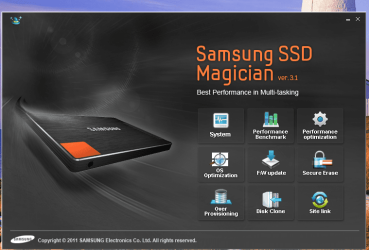
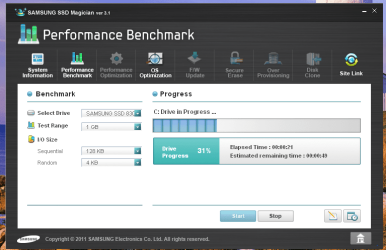
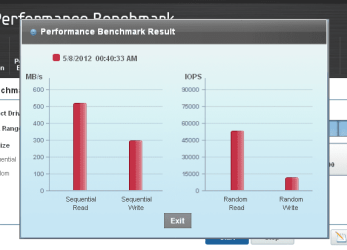
By the by the Samsung came with it's own software disk with a heap of tools on it and I optimised the drive and did a benchmark too and it also has it's own secure erase and cloning features. Which might prove to be handy and not only that but a Norton Ghost software disk that could be useful I suppose.

I am going to try the drive/s in my laptop tomorrow and see what happens if the boot is normal then something is quite wrong with my board.
 

Attachments

  • KARL1.PNG
    KARL1.PNG
    97.6 KB · Views: 4
  • KARL2.PNG
    KARL2.PNG
    61.9 KB · Views: 4
  • KARL4.PNG
    KARL4.PNG
    26.2 KB · Views: 4

My Computer

Computer type
PC/Desktop
Computer Manufacturer/Model Number
Own build (new) Desk1 / Asus ROG Win 7 / Desk2 1st build
OS
Desk1 7 Home Prem / Desk2 10 Pro / Main lap Asus ROG 10 Pro 2 laptop Toshiba 7 Pro Asus P2520 7 & 10
CPU
Desk1 i5 3750K / Laptop i7 GTX 860M / Desk2 i5 2500
Motherboard
Desk1 Asus P877-V / Desk2 Gigabyte H67 UD3H / Laptop ?
Memory
Desk1 8GB (1866) / Desk2 16GB (1333) / Laptop 8Gb DDR3
Graphics Card(s)
Desk 1& 2NVidia GTX 650 & Laptops on board Intel
Sound Card
Desk 1 & 2 -XONAR DG Realtek High Def audio Laptop
Monitor(s) Displays
Desk 1 Benq HD 2450 / Desk2 Philips 24" / Laptop 17.5"
Screen Resolution
1920x1080 D1 & D2 & Laptop 1
Hard Drives
Desk1 Samsung 120GB 830 SSD
Asus ROG 256GB 850 Pro SSD
Desk2 Samsung 840 256 SSD
Toshiba 120GB EVO
PSU
Desk 1 Corsair HX 1050/ Laptop ? / Desk 2 Corsair HX 650
Case
Desk 1 Cooler HAF XM ? Toshiba laptop / Desk2 Coolermaster
Cooling
Fans on all Desk1 -2 Desk2 - all Coolermasters 5 Laptop ?
Keyboard
Desk 1 MS Sidewinder X6 Desk 2 MS Sidewinder X 4
Mouse
Desk 1&2 - Gigabyte MS 900 gamer - laptop - Logitec wireless
Internet Speed
ADSL2+
Other Info
One other Desktop (tester) and spare Toshba laptop both with SSD's
Running Kaspersky 2016 ISS on all machines config'd identically
Logitec audio stereo systems on each machine (x3)
Canon MG5250MFC
Router/modem TP-Link running WPA2SK
You should have one year tech support with your warranty so I'd check with Samsung to see if this is a known issue.

I'd also research any newer BIOS update to see what it is for exactly (SSD load?). You needn't be afraid of updating to latest BIOS from an OS as I've never even heard of it failing.

Have you reset BIOS to defaults earlier? Clear CMOS - 3 Ways to Clear the CMOS - Reset BIOS
 
You should have one year tech support with your warranty so I'd check with Samsung to see if this is a known issue.

I'd also research any newer BIOS update to see what it is for exactly (SSD load?). You needn't be afraid of updating to latest BIOS from an OS as I've never even heard of it failing.

Have you reset BIOS to defaults earlier? Clear CMOS - 3 Ways to Clear the CMOS - Reset BIOS
Actually Greg this problem is happening with whatever drive I happen to use SSD or HDD.
It started when I first installed the Crucial M4 and chaning to the Samsung was just clutching at straws looking for a reason for this load problem.

The problem seems to me to be that there is some choke point in the sytem that slows the flow of data from the different components of the system on boot up and the OS being totally functinal.

It is almost as if the data can only trickle from the drive through the other board components to have the total OS up and running. Once in full swing the machine goes from app to app and accesses other data it needs for whatever one is doing at a very high speed.

Now given my limited knowledge of what goes on at boot I would hazard a guess at something is wrong with the north and south bridges as a memtest on the RAM came up with no errors, and that data is strangled at those points in the system.

I am going to try the original M4 in my laptop today which itself has an M4 in it and although the RAM is slightly slower the machine does operate at a 50% increase in speed to what it used to using an ordinary HDD - although the original drive did have a lot of Toshiba bloat on it to be fair to the manufacturer, and I use Shawns optimise 7 tutorial features on it.

The only other possibilty is a virus or some other malware I suppose that has not been picked up by the scans I have done.

But I will try your BIOS suggestions even if the drive does or does not function as it should in the laptop as because at the moment there is absolutely nothing to lose.
 

My Computer

Computer type
PC/Desktop
Computer Manufacturer/Model Number
Own build (new) Desk1 / Asus ROG Win 7 / Desk2 1st build
OS
Desk1 7 Home Prem / Desk2 10 Pro / Main lap Asus ROG 10 Pro 2 laptop Toshiba 7 Pro Asus P2520 7 & 10
CPU
Desk1 i5 3750K / Laptop i7 GTX 860M / Desk2 i5 2500
Motherboard
Desk1 Asus P877-V / Desk2 Gigabyte H67 UD3H / Laptop ?
Memory
Desk1 8GB (1866) / Desk2 16GB (1333) / Laptop 8Gb DDR3
Graphics Card(s)
Desk 1& 2NVidia GTX 650 & Laptops on board Intel
Sound Card
Desk 1 & 2 -XONAR DG Realtek High Def audio Laptop
Monitor(s) Displays
Desk 1 Benq HD 2450 / Desk2 Philips 24" / Laptop 17.5"
Screen Resolution
1920x1080 D1 & D2 & Laptop 1
Hard Drives
Desk1 Samsung 120GB 830 SSD
Asus ROG 256GB 850 Pro SSD
Desk2 Samsung 840 256 SSD
Toshiba 120GB EVO
PSU
Desk 1 Corsair HX 1050/ Laptop ? / Desk 2 Corsair HX 650
Case
Desk 1 Cooler HAF XM ? Toshiba laptop / Desk2 Coolermaster
Cooling
Fans on all Desk1 -2 Desk2 - all Coolermasters 5 Laptop ?
Keyboard
Desk 1 MS Sidewinder X6 Desk 2 MS Sidewinder X 4
Mouse
Desk 1&2 - Gigabyte MS 900 gamer - laptop - Logitec wireless
Internet Speed
ADSL2+
Other Info
One other Desktop (tester) and spare Toshba laptop both with SSD's
Running Kaspersky 2016 ISS on all machines config'd identically
Logitec audio stereo systems on each machine (x3)
Canon MG5250MFC
Router/modem TP-Link running WPA2SK
Here are additional steps to Clean Up Factory Bloatware. I would establish a Clean Boot to shrug off any freeloaders that might be creating issues.

Best of all of course in dealing with bloatware is to Clean Reinstall - Factory OEM Windows 7.

Have you had the hardware gone over with a fine tooth comb? Our Dave76 can help you work through that. Other clues may surface using these Troubleshooting Steps for Windows 7
Yeah Greg the machine is my own build and the OEM I used didnot have he SP1 on it which makes each reinstall that much harder.

Now I have dome most of the trouble shooting except for SFC and the etchnet team. The event viwer I have seen but I really don't know what I am looking at without Goolging every error and there are plenty.
I have checked evry single drivee for every device all up to date and the Samsung I have used it's own software for optimising and did abenchmark too although it syas no more than oe a day fo some read / write wrecking outcome.

I'll get onto Dave if the SFC and setting the BIOS to default doesn't work too and se if he can come up with anything.
 

My Computer

Computer type
PC/Desktop
Computer Manufacturer/Model Number
Own build (new) Desk1 / Asus ROG Win 7 / Desk2 1st build
OS
Desk1 7 Home Prem / Desk2 10 Pro / Main lap Asus ROG 10 Pro 2 laptop Toshiba 7 Pro Asus P2520 7 & 10
CPU
Desk1 i5 3750K / Laptop i7 GTX 860M / Desk2 i5 2500
Motherboard
Desk1 Asus P877-V / Desk2 Gigabyte H67 UD3H / Laptop ?
Memory
Desk1 8GB (1866) / Desk2 16GB (1333) / Laptop 8Gb DDR3
Graphics Card(s)
Desk 1& 2NVidia GTX 650 & Laptops on board Intel
Sound Card
Desk 1 & 2 -XONAR DG Realtek High Def audio Laptop
Monitor(s) Displays
Desk 1 Benq HD 2450 / Desk2 Philips 24" / Laptop 17.5"
Screen Resolution
1920x1080 D1 & D2 & Laptop 1
Hard Drives
Desk1 Samsung 120GB 830 SSD
Asus ROG 256GB 850 Pro SSD
Desk2 Samsung 840 256 SSD
Toshiba 120GB EVO
PSU
Desk 1 Corsair HX 1050/ Laptop ? / Desk 2 Corsair HX 650
Case
Desk 1 Cooler HAF XM ? Toshiba laptop / Desk2 Coolermaster
Cooling
Fans on all Desk1 -2 Desk2 - all Coolermasters 5 Laptop ?
Keyboard
Desk 1 MS Sidewinder X6 Desk 2 MS Sidewinder X 4
Mouse
Desk 1&2 - Gigabyte MS 900 gamer - laptop - Logitec wireless
Internet Speed
ADSL2+
Other Info
One other Desktop (tester) and spare Toshba laptop both with SSD's
Running Kaspersky 2016 ISS on all machines config'd identically
Logitec audio stereo systems on each machine (x3)
Canon MG5250MFC
Router/modem TP-Link running WPA2SK
The latest official installer ISO with SP1 along with tool to burn to DVD or write to flash is in Clean Reinstall - Factory OEM Windows 7.

I look for repeat errors at every boot or shutdown in Admin log, google them along with their identifiers to find out how others have solved them. There are other tips and tools to try in the Troubleshooting steps.
 
The latest official installer ISO with SP1 along with tool to burn to DVD or write to flash is in Clean Reinstall - Factory OEM Windows 7.

I look for repeat errors at every boot or shutdown in Admin log, google them along with their identifiers to find out how others have solved them. There are other tips and tools to try in the Troubleshooting steps.
Ok Greg and by the by I found this through a Google Loading Operating System... Delay - New-System-Build - Homebuilt-Systems at the bottom post it sounds sort of what maybe the answer. Now I don't have he Marvel ports this fellow is referring to but I might have a dig around in the BIOS again.

By the way that M4 fired up no problems in the laptop and took a little longer to UAC but it has more on it than the laptops own M4.
 

My Computer

Computer type
PC/Desktop
Computer Manufacturer/Model Number
Own build (new) Desk1 / Asus ROG Win 7 / Desk2 1st build
OS
Desk1 7 Home Prem / Desk2 10 Pro / Main lap Asus ROG 10 Pro 2 laptop Toshiba 7 Pro Asus P2520 7 & 10
CPU
Desk1 i5 3750K / Laptop i7 GTX 860M / Desk2 i5 2500
Motherboard
Desk1 Asus P877-V / Desk2 Gigabyte H67 UD3H / Laptop ?
Memory
Desk1 8GB (1866) / Desk2 16GB (1333) / Laptop 8Gb DDR3
Graphics Card(s)
Desk 1& 2NVidia GTX 650 & Laptops on board Intel
Sound Card
Desk 1 & 2 -XONAR DG Realtek High Def audio Laptop
Monitor(s) Displays
Desk 1 Benq HD 2450 / Desk2 Philips 24" / Laptop 17.5"
Screen Resolution
1920x1080 D1 & D2 & Laptop 1
Hard Drives
Desk1 Samsung 120GB 830 SSD
Asus ROG 256GB 850 Pro SSD
Desk2 Samsung 840 256 SSD
Toshiba 120GB EVO
PSU
Desk 1 Corsair HX 1050/ Laptop ? / Desk 2 Corsair HX 650
Case
Desk 1 Cooler HAF XM ? Toshiba laptop / Desk2 Coolermaster
Cooling
Fans on all Desk1 -2 Desk2 - all Coolermasters 5 Laptop ?
Keyboard
Desk 1 MS Sidewinder X6 Desk 2 MS Sidewinder X 4
Mouse
Desk 1&2 - Gigabyte MS 900 gamer - laptop - Logitec wireless
Internet Speed
ADSL2+
Other Info
One other Desktop (tester) and spare Toshba laptop both with SSD's
Running Kaspersky 2016 ISS on all machines config'd identically
Logitec audio stereo systems on each machine (x3)
Canon MG5250MFC
Router/modem TP-Link running WPA2SK
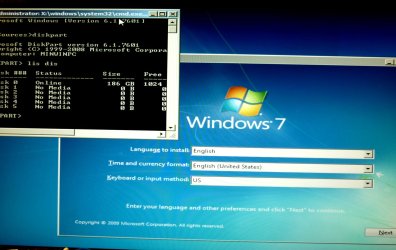
John, you did press Shift+F10 at this screen? Then go on and do your diskpart.
P1020553.JPG
 

My Computer

Computer type
PC/Desktop
Computer Manufacturer/Model Number
Home Built Desktop By DataTech
OS
Windows 7 Ultimate X64 SP1
CPU
Intel i5-2550K, Differing ~4.4-4.8GHz No built in GPU
Motherboard
ASUS P8Z68-V PRO/GEN3
Memory
16GB G.Skill Sniper 1866MHz @ 2133MHz 2x8GB
Graphics Card(s)
ASUS GTX650TIB-DC2OC-2GD5, (650TI Boost)
Sound Card
Onboard Realtek 5-1
Monitor(s) Displays
Samsung P2570HD
Screen Resolution
1920x1080
Hard Drives
Samsung 840 Pro 256GB SSD for OS, 500GB Seagate Constellation (Enterprise drive) for Data
PSU
Corsair HX650W
Case
Inwin Dragon Rider
Cooling
Hyper 212 EVO w/two Noctua fans, push-pull, @1300 RPM
Keyboard
E-Z Eyes, bright yellow keys with large characters
Mouse
steelseries SENSEI Laser Pro Gaming
Internet Speed
48-51Mbs Mbs down, 11 Mbs up Xfinity Cable
Antivirus
Norton Internet Security 2013
Browser
IE 10, Opera, Pale Moon if needed
Other Info
4 case fans, LG BluRay-RE, ASUS DVD-RW, Mr. Fusion power supply, 1.21 gigawatts.
Britton,
I'm like you. I don't understand how in the world such a simple procedure can be messed up. I know you didn't say those words. Those are my words.

All one has to do is to be able to follow instructions, precisely, just as written and all works perfectly.
 

My Computer

Computer Manufacturer/Model Number
Toshiba Satellite S875D-S7239 laptop
OS
MS Windows 7 Ultimate SP1 64-bit
CPU
AMD A10-4600M
Motherboard
AMD Pumori (Socket FT1)
Memory
6.00 GB Dual-Channel DDR3 @ 798MHz (11-11-12-28)
Graphics Card(s)
AMD Radeon HD 7660G
Sound Card
High Definition Audio Device
Monitor(s) Displays
Generic PnP Monitor (1600x900@60Hz)
Screen Resolution
1600x900@60Hz
Hard Drives
SSD 119GB Corsair CSSD-V128GB2 ATA Device
Keyboard
Standard PS/2 Keyboard
Mouse
HP Wireless Optical Mobile Mouse Model FHA-3410
Internet Speed
What the local pub, local coffee shop offers.
Other Info
Optical Drive:MATSHITA BD-CMB UJ160B ATA Device


Also have an Asus ha1002xp netbook with Win 7 Ultimate installed.
Now I don't want to sound cranky but I DID hit those keys Shift +F10 at that screen but nothing happened I am not dreaming this and I as I said I don't want to sound a bit miffed but it has happpend three times.

Now given that I might have missed it once - three times is just not on - sorry but I am just tired and well the whole damn thing is beginning to get to me.

I use a wired keyboard and mouse so it cannot be put down to some aberration in the control devices as in wireless ones.

I did try the original SSD - the M4 in the laptop and now it is in my tester and it worked perfectly in both so the problem has to be with my board and the transfer of data through the NB or SB or wherever it travels to get to the monitor.

I think I had better close this thread as I can see everyone is trying to help and must be getting very frustrated and annoyingly it is something that I will just have to put up with until I get another board.

Anyway I appreciate the time and patience you all have put in all the same:o
 

My Computer

Computer type
PC/Desktop
Computer Manufacturer/Model Number
Own build (new) Desk1 / Asus ROG Win 7 / Desk2 1st build
OS
Desk1 7 Home Prem / Desk2 10 Pro / Main lap Asus ROG 10 Pro 2 laptop Toshiba 7 Pro Asus P2520 7 & 10
CPU
Desk1 i5 3750K / Laptop i7 GTX 860M / Desk2 i5 2500
Motherboard
Desk1 Asus P877-V / Desk2 Gigabyte H67 UD3H / Laptop ?
Memory
Desk1 8GB (1866) / Desk2 16GB (1333) / Laptop 8Gb DDR3
Graphics Card(s)
Desk 1& 2NVidia GTX 650 & Laptops on board Intel
Sound Card
Desk 1 & 2 -XONAR DG Realtek High Def audio Laptop
Monitor(s) Displays
Desk 1 Benq HD 2450 / Desk2 Philips 24" / Laptop 17.5"
Screen Resolution
1920x1080 D1 & D2 & Laptop 1
Hard Drives
Desk1 Samsung 120GB 830 SSD
Asus ROG 256GB 850 Pro SSD
Desk2 Samsung 840 256 SSD
Toshiba 120GB EVO
PSU
Desk 1 Corsair HX 1050/ Laptop ? / Desk 2 Corsair HX 650
Case
Desk 1 Cooler HAF XM ? Toshiba laptop / Desk2 Coolermaster
Cooling
Fans on all Desk1 -2 Desk2 - all Coolermasters 5 Laptop ?
Keyboard
Desk 1 MS Sidewinder X6 Desk 2 MS Sidewinder X 4
Mouse
Desk 1&2 - Gigabyte MS 900 gamer - laptop - Logitec wireless
Internet Speed
ADSL2+
Other Info
One other Desktop (tester) and spare Toshba laptop both with SSD's
Running Kaspersky 2016 ISS on all machines config'd identically
Logitec audio stereo systems on each machine (x3)
Canon MG5250MFC
Router/modem TP-Link running WPA2SK
Let me help you here:
Shift + F10 is a key combo.

You PRESS and HOLD DOWN the SHIFT key.
do NOT release the SHIFT key.
Tap the F!0 key
Now you can release the SHIFT key.
 

My Computer

Computer Manufacturer/Model Number
Toshiba Satellite S875D-S7239 laptop
OS
MS Windows 7 Ultimate SP1 64-bit
CPU
AMD A10-4600M
Motherboard
AMD Pumori (Socket FT1)
Memory
6.00 GB Dual-Channel DDR3 @ 798MHz (11-11-12-28)
Graphics Card(s)
AMD Radeon HD 7660G
Sound Card
High Definition Audio Device
Monitor(s) Displays
Generic PnP Monitor (1600x900@60Hz)
Screen Resolution
1600x900@60Hz
Hard Drives
SSD 119GB Corsair CSSD-V128GB2 ATA Device
Keyboard
Standard PS/2 Keyboard
Mouse
HP Wireless Optical Mobile Mouse Model FHA-3410
Internet Speed
What the local pub, local coffee shop offers.
Other Info
Optical Drive:MATSHITA BD-CMB UJ160B ATA Device


Also have an Asus ha1002xp netbook with Win 7 Ultimate installed.
Let me help you here:
Shift + F10 is a key combo.

You PRESS and HOLD DOWN the SHIFT key.
do NOT release the SHIFT key.
Tap the F!0 key
Now you can release the SHIFT key.
Ok Karl I did that but not tapping F10 I just held them both down - shift first then quickly the F10. I'll do it again and see what happens perhaps fourth time lucky eh?

I am going to run some one off malware scans before trying again - sorry about the rant I'm not usually so touchy.:o
 

My Computer

Computer type
PC/Desktop
Computer Manufacturer/Model Number
Own build (new) Desk1 / Asus ROG Win 7 / Desk2 1st build
OS
Desk1 7 Home Prem / Desk2 10 Pro / Main lap Asus ROG 10 Pro 2 laptop Toshiba 7 Pro Asus P2520 7 & 10
CPU
Desk1 i5 3750K / Laptop i7 GTX 860M / Desk2 i5 2500
Motherboard
Desk1 Asus P877-V / Desk2 Gigabyte H67 UD3H / Laptop ?
Memory
Desk1 8GB (1866) / Desk2 16GB (1333) / Laptop 8Gb DDR3
Graphics Card(s)
Desk 1& 2NVidia GTX 650 & Laptops on board Intel
Sound Card
Desk 1 & 2 -XONAR DG Realtek High Def audio Laptop
Monitor(s) Displays
Desk 1 Benq HD 2450 / Desk2 Philips 24" / Laptop 17.5"
Screen Resolution
1920x1080 D1 & D2 & Laptop 1
Hard Drives
Desk1 Samsung 120GB 830 SSD
Asus ROG 256GB 850 Pro SSD
Desk2 Samsung 840 256 SSD
Toshiba 120GB EVO
PSU
Desk 1 Corsair HX 1050/ Laptop ? / Desk 2 Corsair HX 650
Case
Desk 1 Cooler HAF XM ? Toshiba laptop / Desk2 Coolermaster
Cooling
Fans on all Desk1 -2 Desk2 - all Coolermasters 5 Laptop ?
Keyboard
Desk 1 MS Sidewinder X6 Desk 2 MS Sidewinder X 4
Mouse
Desk 1&2 - Gigabyte MS 900 gamer - laptop - Logitec wireless
Internet Speed
ADSL2+
Other Info
One other Desktop (tester) and spare Toshba laptop both with SSD's
Running Kaspersky 2016 ISS on all machines config'd identically
Logitec audio stereo systems on each machine (x3)
Canon MG5250MFC
Router/modem TP-Link running WPA2SK
Good news I tried another keyboard - a very cheap one I keep for testing stuff and the shift+F10 - worked and am now waiting on clean all to finish.

My main (and expensive keyboard) would still not work the shift+F10 so no wonder I was getting nowhere.

Look I am so ashamed re my rant and must apologise to all.

Now it is cleaned and I am ready to move on:o
 

My Computer

Computer type
PC/Desktop
Computer Manufacturer/Model Number
Own build (new) Desk1 / Asus ROG Win 7 / Desk2 1st build
OS
Desk1 7 Home Prem / Desk2 10 Pro / Main lap Asus ROG 10 Pro 2 laptop Toshiba 7 Pro Asus P2520 7 & 10
CPU
Desk1 i5 3750K / Laptop i7 GTX 860M / Desk2 i5 2500
Motherboard
Desk1 Asus P877-V / Desk2 Gigabyte H67 UD3H / Laptop ?
Memory
Desk1 8GB (1866) / Desk2 16GB (1333) / Laptop 8Gb DDR3
Graphics Card(s)
Desk 1& 2NVidia GTX 650 & Laptops on board Intel
Sound Card
Desk 1 & 2 -XONAR DG Realtek High Def audio Laptop
Monitor(s) Displays
Desk 1 Benq HD 2450 / Desk2 Philips 24" / Laptop 17.5"
Screen Resolution
1920x1080 D1 & D2 & Laptop 1
Hard Drives
Desk1 Samsung 120GB 830 SSD
Asus ROG 256GB 850 Pro SSD
Desk2 Samsung 840 256 SSD
Toshiba 120GB EVO
PSU
Desk 1 Corsair HX 1050/ Laptop ? / Desk 2 Corsair HX 650
Case
Desk 1 Cooler HAF XM ? Toshiba laptop / Desk2 Coolermaster
Cooling
Fans on all Desk1 -2 Desk2 - all Coolermasters 5 Laptop ?
Keyboard
Desk 1 MS Sidewinder X6 Desk 2 MS Sidewinder X 4
Mouse
Desk 1&2 - Gigabyte MS 900 gamer - laptop - Logitec wireless
Internet Speed
ADSL2+
Other Info
One other Desktop (tester) and spare Toshba laptop both with SSD's
Running Kaspersky 2016 ISS on all machines config'd identically
Logitec audio stereo systems on each machine (x3)
Canon MG5250MFC
Router/modem TP-Link running WPA2SK
Now I boot > post > then a black screen with a message in white letters saying "Loading operating system...................(<white dots runs for 25 secs or more) > then flag starts to form and > UAC password. After that it flies but the load message has become a nightmare since I installed the first SSD an M4 some time ago.

The same happens using the old HDD's Is there anyone who can shed some light on this problem for me please as it is going to drive me crazy.

System is a Gigabyte H67UD3H-B3 board with a i5 2500 processsor and 8GB of DDR3 1333mhz RAM in it.

Are you still having the issue with the white dots for 25 seconds or more?

I had that too. On the very same motherboard you are using.

In my case, it turned out to because the BIOS was searching for a disk in the DVD drive to boot from while the dots were displayed.

With most motherboards, you can leave the DVD drive as the first boot device and the boot process will just fly by an empty DVD drive with no delay, and find the hard drive and boot. I've always left the DVD as first boot device because I sometimes want to boot from the DVD drive and didn't want to have to go into the BIOS repeatedly and set the DVD as first in the order.

But these Gigabytes search the DVD drive for around 25 seconds.

Solution: set your hard drive as the first boot device, not the DVD drive.

If you need to boot from the DVD drive, use the one-time boot menu to chose the DVD drive---or go into the BIOS and make the manual change from SSD first to DVD first every time.
 

My Computer

Computer type
PC/Desktop
Computer Manufacturer/Model Number
Ignatz Special; 4 speed manual gearbox; factory air conditioning; one of one
OS
Windows 7 Home Premium SP1, 64-bit
CPU
Intel Skylake i5-6600K, not overclocked
Motherboard
AsRock Z170M Extreme 4, micro ATX
Memory
8 GB HyperX DDR4-2666 (2 x 4 GB)
Graphics Card(s)
none; graphics are integrated on CPU
Sound Card
onboard: Realtek ALC1150; external: USB Behringer UF0-202
Monitor(s) Displays
Dell S2340M 23 inch IPS
Screen Resolution
1600 x 900
Hard Drives
System: Crucial MX100 series SSD, 128 GB;
Data: Samsung Spinpoint 103SJ, 1 TB;
Backup: WD Caviar Green WD30EZRX-00D8PB0, 3 TB
PSU
Rosewill SilentNight 500 watt fanless, semi-modular
Case
Antec Solo II
Cooling
Noctua NH-U12S; Noctua F12 intake, Noctua S12A exhaust
Keyboard
Microsoft 200 6JH-00001 USB
Mouse
Dell or Microsoft optical wired; USB
Antivirus
Microsoft Security Essentials and Malwarebytes Premium
Browser
Pale Moon
Other Info
All fans PWM; speeds at idle: CPU circa 500 rpm; intake circa 600 rpm; exhaust circa 600 rpm; CPU temps 27 idle and 47 C load in a warm room (27 C/81 F) when running Intel Extreme Tuning Utility stress test.
Now I boot > post > then a black screen with a message in white letters saying "Loading operating system...................(<white dots runs for 25 secs or more) > then flag starts to form and > UAC password. After that it flies but the load message has become a nightmare since I installed the first SSD an M4 some time ago.

The same happens using the old HDD's Is there anyone who can shed some light on this problem for me please as it is going to drive me crazy.

System is a Gigabyte H67UD3H-B3 board with a i5 2500 processsor and 8GB of DDR3 1333mhz RAM in it.

Are you still having the issue with the white dots for 25 seconds or more?

I had that too. On the very same motherboard you are using.

In my case, it turned out to because the BIOS was searching for a disk in the DVD drive to boot from while the dots were displayed.

With most motherboards, you can leave the DVD drive as the first boot device and the boot process will just fly by an empty DVD drive with no delay, and find the hard drive and boot. I've always left the DVD as first boot device because I sometimes want to boot from the DVD drive and didn't want to have to go into the BIOS repeatedly and set the DVD as first in the order.

But these Gigabytes search the DVD drive for around 25 seconds.

Solution: set your hard drive as the first boot device, not the DVD drive.

If you need to boot from the DVD drive, use the one-time boot menu to chose the DVD drive---or go into the BIOS and make the manual change from SSD first to DVD first every time.
Yep same old same old ignazatsonic white dots galore I'll have a go at that - time for some coffee right now lol!!

Nope couldn't wait to try it - it worked thanks so much I have been at this machine for the last four days and it was something as simple as that. Although I had changed the sequence before but perhaps cos I used Karl's set up and then your fix it is now working:D

One things for sure the keyboard is going to a good home - free!!
 

My Computer

Computer type
PC/Desktop
Computer Manufacturer/Model Number
Own build (new) Desk1 / Asus ROG Win 7 / Desk2 1st build
OS
Desk1 7 Home Prem / Desk2 10 Pro / Main lap Asus ROG 10 Pro 2 laptop Toshiba 7 Pro Asus P2520 7 & 10
CPU
Desk1 i5 3750K / Laptop i7 GTX 860M / Desk2 i5 2500
Motherboard
Desk1 Asus P877-V / Desk2 Gigabyte H67 UD3H / Laptop ?
Memory
Desk1 8GB (1866) / Desk2 16GB (1333) / Laptop 8Gb DDR3
Graphics Card(s)
Desk 1& 2NVidia GTX 650 & Laptops on board Intel
Sound Card
Desk 1 & 2 -XONAR DG Realtek High Def audio Laptop
Monitor(s) Displays
Desk 1 Benq HD 2450 / Desk2 Philips 24" / Laptop 17.5"
Screen Resolution
1920x1080 D1 & D2 & Laptop 1
Hard Drives
Desk1 Samsung 120GB 830 SSD
Asus ROG 256GB 850 Pro SSD
Desk2 Samsung 840 256 SSD
Toshiba 120GB EVO
PSU
Desk 1 Corsair HX 1050/ Laptop ? / Desk 2 Corsair HX 650
Case
Desk 1 Cooler HAF XM ? Toshiba laptop / Desk2 Coolermaster
Cooling
Fans on all Desk1 -2 Desk2 - all Coolermasters 5 Laptop ?
Keyboard
Desk 1 MS Sidewinder X6 Desk 2 MS Sidewinder X 4
Mouse
Desk 1&2 - Gigabyte MS 900 gamer - laptop - Logitec wireless
Internet Speed
ADSL2+
Other Info
One other Desktop (tester) and spare Toshba laptop both with SSD's
Running Kaspersky 2016 ISS on all machines config'd identically
Logitec audio stereo systems on each machine (x3)
Canon MG5250MFC
Router/modem TP-Link running WPA2SK
it worked thanks so much I have been at this machine for the last four days and it was something as simple as that. Although I had changed the sequence before but perhaps cos I used Karl's set up and then your fix it is now working:D

Aye aye, captain. You can use F12 to get at the one-time boot menu if and when you need to boot from the DVD drive.
 

My Computer

Computer type
PC/Desktop
Computer Manufacturer/Model Number
Ignatz Special; 4 speed manual gearbox; factory air conditioning; one of one
OS
Windows 7 Home Premium SP1, 64-bit
CPU
Intel Skylake i5-6600K, not overclocked
Motherboard
AsRock Z170M Extreme 4, micro ATX
Memory
8 GB HyperX DDR4-2666 (2 x 4 GB)
Graphics Card(s)
none; graphics are integrated on CPU
Sound Card
onboard: Realtek ALC1150; external: USB Behringer UF0-202
Monitor(s) Displays
Dell S2340M 23 inch IPS
Screen Resolution
1600 x 900
Hard Drives
System: Crucial MX100 series SSD, 128 GB;
Data: Samsung Spinpoint 103SJ, 1 TB;
Backup: WD Caviar Green WD30EZRX-00D8PB0, 3 TB
PSU
Rosewill SilentNight 500 watt fanless, semi-modular
Case
Antec Solo II
Cooling
Noctua NH-U12S; Noctua F12 intake, Noctua S12A exhaust
Keyboard
Microsoft 200 6JH-00001 USB
Mouse
Dell or Microsoft optical wired; USB
Antivirus
Microsoft Security Essentials and Malwarebytes Premium
Browser
Pale Moon
Other Info
All fans PWM; speeds at idle: CPU circa 500 rpm; intake circa 600 rpm; exhaust circa 600 rpm; CPU temps 27 idle and 47 C load in a warm room (27 C/81 F) when running Intel Extreme Tuning Utility stress test.
The F12 key trick doesn't work on all computers. Wish it did.
 

My Computer

Computer Manufacturer/Model Number
Toshiba Satellite S875D-S7239 laptop
OS
MS Windows 7 Ultimate SP1 64-bit
CPU
AMD A10-4600M
Motherboard
AMD Pumori (Socket FT1)
Memory
6.00 GB Dual-Channel DDR3 @ 798MHz (11-11-12-28)
Graphics Card(s)
AMD Radeon HD 7660G
Sound Card
High Definition Audio Device
Monitor(s) Displays
Generic PnP Monitor (1600x900@60Hz)
Screen Resolution
1600x900@60Hz
Hard Drives
SSD 119GB Corsair CSSD-V128GB2 ATA Device
Keyboard
Standard PS/2 Keyboard
Mouse
HP Wireless Optical Mobile Mouse Model FHA-3410
Internet Speed
What the local pub, local coffee shop offers.
Other Info
Optical Drive:MATSHITA BD-CMB UJ160B ATA Device


Also have an Asus ha1002xp netbook with Win 7 Ultimate installed.
Back
Top