Overclocking Q9550

beagrie07

New member
Member
VIP
Local time
2:28 AM
Messages
118
Location
UK
So I'm looking at a possible overclock for my Q9550 2.83GHz, I'm not looking at a max overclock however, I'm looking for 3.00GHz if possible :)

So, I've never overclocked a CPU before in BIOS and need some help, can i get some help overclocking it? I've tried other links elsewhere but its always going to vary what clocks you see.

Thanks
 

My Computer

Computer Manufacturer/Model Number
Custom
OS
Windows 7 Ultimate 64 Bit
CPU
Intel Core i7 2600k 3.8GHz
Motherboard
Asus P8Z68-V Pro
Memory
Corsair Vengeance 16GB DDR3 1600Mhz
Graphics Card(s)
Asus NVIDIA GeForce GTX 680 - 2GB GDDR5
Sound Card
On Board
Monitor(s) Displays
LG DM2780D
Screen Resolution
1920 x 1080
Hard Drives
OCZ Vertex 4 240GB SATA-III SSD
OCZ Agility 3 240GB SATA-III SSD
WD 500 GB SATA-II HDD
Hitachi 500 GB SATA-II HDD
Hitachi 1 TB SATA-II HDD
Seagate Barracuda 2 TB SATA-III HDD
250GB External HD
PSU
Corsair TX650M PSU
Case
NZXT Phantom Full Tower Case - Black
Cooling
1 x Sickleflow, 2 x AF120 Quiet, 1 x 200mm Top, Corsair H70
Keyboard
Logitech G110
Mouse
Logitech G500
Internet Speed
80 Down / 20 Up
i just got the Q9550 3 days ago and this thing R O C K S ...
out of the box i set it at 400 x 8.5 (3.4ghz) and voltage at 1.125 . ran the prime95 test for 12 hours no errors.
moved it up to (3.6ghz) same voltage 12 hours no errors . ( 3.7ghz) same voltage 12 hours no errors.
i'm testing it at (3.82 ghz) right now but i had to up the voltage to 1.18 and it's 4 hours and looking good.
take small steps and keep a eye on your temps and you should get a verygood overclock out of it....

View attachment 132280


scrooge
 
Last edited:

My Computer

Computer Manufacturer/Model Number
home build
OS
win 7 ( 64 bit)
CPU
Intel Core i7-870 Lynnfield 2.93GHz 8MB L3 Cache LGA 1156 95
Motherboard
ASUS P7P55 LX LGA 1156
Memory
G.SKILL Sniper Series 16GB (4 x 4GB) 240-Pin DDR3 SDRAM
Graphics Card(s)
ATI Radeon HD6800 Series
Sound Card
hdmi
Monitor(s) Displays
42" lg 3d tv
Screen Resolution
1920 x 1080
Hard Drives
1 ssd pci-e revodrive
4 seagate 1.5 tb
PSU
Rosewill BRONZE Series RBR1000-M 1000W Continuous@40°C, 80Pl
Case
CoolMaster 922
Cooling
CORSAIR CWCH60 Hydro Series H60 High Performance Liquid CPU
Keyboard
logtech
Mouse
logitect
Internet Speed
5 mbit
Cool, I'll probably have a look into it all tomorrow, I'll post back again if I have any problems, cheers
 

My Computer

Computer Manufacturer/Model Number
Custom
OS
Windows 7 Ultimate 64 Bit
CPU
Intel Core i7 2600k 3.8GHz
Motherboard
Asus P8Z68-V Pro
Memory
Corsair Vengeance 16GB DDR3 1600Mhz
Graphics Card(s)
Asus NVIDIA GeForce GTX 680 - 2GB GDDR5
Sound Card
On Board
Monitor(s) Displays
LG DM2780D
Screen Resolution
1920 x 1080
Hard Drives
OCZ Vertex 4 240GB SATA-III SSD
OCZ Agility 3 240GB SATA-III SSD
WD 500 GB SATA-II HDD
Hitachi 500 GB SATA-II HDD
Hitachi 1 TB SATA-II HDD
Seagate Barracuda 2 TB SATA-III HDD
250GB External HD
PSU
Corsair TX650M PSU
Case
NZXT Phantom Full Tower Case - Black
Cooling
1 x Sickleflow, 2 x AF120 Quiet, 1 x 200mm Top, Corsair H70
Keyboard
Logitech G110
Mouse
Logitech G500
Internet Speed
80 Down / 20 Up
i just got the Q9550 3 days ago and this thing R O C K S ...
out of the box i set it at 400 x 8.5 (3.4ghz) and voltage at 1.125 . ran the prime95 test for 12 hours no errors.
moved it up to (3.6ghz) same voltage 12 hours no errors . ( 3.7ghz) same voltage 12 hours no errors.
i'm testing it at (3.82 ghz) right now but i had to up the voltage to 1.18 and it's 4 hours and looking good.
take small steps and keep a eye on your temps and you should get a verygood overclock out of it....

View attachment 132280


scrooge

That's a nice CPU you have there then. I had to increase the voltage a bit more than what you have to get 3.6 running smoothly. Anything lower and I'd get lock ups every so often. Not tried for 3.8.

3GHz is easy to reach really. You can get that with virtually no effort. Just increase the FSB a bit and away you go.
 

My Computer

Computer type
PC/Desktop
Computer Manufacturer/Model Number
Custom Built
OS
Windows 8.1 Pro x64
CPU
Intel Core i7 4790k
Motherboard
MSI Z97S Krait Edition
Memory
8GB Corsair Dominator 1600MHz
Graphics Card(s)
MSI TwinFrozr GeForce GTX770
Sound Card
ASUS Xonar DX/XD 7.1
Monitor(s) Displays
Dell 24" S2409W + Dell 20" E207WFP
Screen Resolution
1920x1080 + 1680x1050
Hard Drives
1x 120GB OCZ Agility 3, 1x 750GB Western Digital Caviar Black, 1x 1TB Western Digital Caviar Blue
PSU
Corsair HX850 modular
Case
Fractal Design Define R4
Cooling
Corsair H60 w/ twin Corsair SP120 fans
Keyboard
Logitech G510S Keyboard
Mouse
Logitech G500S Laser Mouse
Internet Speed
40Mbps
Antivirus
Microsoft Security Essentials
Browser
Google Chrome
Other Info
LG Blu-Ray player
I'm running my Q9550 at 3.2Ghz by increasing the FSB from 333Mhz with an 8.5x multiplier to 400mhz with an 8.0x multiplier. Didn't have to touch the cpu voltages one bit. And with the stock intel cooler my temps only rose about 1 degree from this modest overclock. I never even bothered to try to take this CPU any higher, as it ran stable and cool at 3.2Ghz.

This also worked very well for my RAM, as I'm running DDR2-800 Crucial and it's at 800 exactly with a 400Mhz FSB...thus I have a 1:1 with the cpu and memory.
 

My Computer

Computer Manufacturer/Model Number
Self-Built in July 2009
OS
Windows 7 Ultimate x64
CPU
Intel Q9550 2.83Ghz OC'd to 3.40Ghz
Motherboard
Gigabyte GA-EP45-UD3R rev. 1.1, F12 BIOS
Memory
8GB G.Skill PI DDR2-800, 4-4-4-12 timings
Graphics Card(s)
EVGA 1280MB Nvidia GeForce GTX570
Sound Card
Realtek ALC899A 8 channel onboard audio
Monitor(s) Displays
23" Acer x233H
Screen Resolution
1920x1080
Hard Drives
Intel X25-M 80GB Gen 2 SSD
Western Digital 1TB Caviar Black, 32MB cache. WD1001FALS
PSU
Corsair 620HX modular
Case
Antec P182
Cooling
stock
Keyboard
ABS M1 Mechanical
Mouse
Logitech G9 Laser Mouse
Internet Speed
15/2 cable modem
Other Info
Windows and Linux enthusiast. Logitech G35 Headset.
3GHz is easy to reach really. You can get that with virtually no effort. Just increase the FSB a bit and away you go.

3Ghz is an absolute walk in the park.


3.2, as mentioned is fine on stock cooling.

3-4ghz - 3.6ghz is also pretty easy but voltage and RAM tweaking may be necessary. Aftermarket cooling can also become a concern.

After that it comes down to your cooling, mobo or chip.

My Q9550 could not get stable past 3.79ghz - at 3.8 - 4.2ghz it would POST/load windows but was completely unstable no matter what.

In my case I had a high VID chip (took a lot of volts) and a flaky motherboard.


BTW, You wouldn't notice any difference @ 3ghz
 

My Computer

Computer type
PC/Desktop
Computer Manufacturer/Model Number
Systems by SmartEyeball
OS
8 Pro x64
CPU
i7 3770K 4.6GHz
Motherboard
ASUS P8Z77 WS
Memory
16GB G.Skill Trident X 2666mhz
Graphics Card(s)
x2 EVGA 780 Ti Superclocked SLI
Sound Card
SB X-FI Surround 5.1 PRO USB / ATH-AD900 Headphones
Monitor(s) Displays
x3 Dell U2410 / 58" Samsung
Screen Resolution
5760*1200/ 1920*1200
Hard Drives
2x Intel 520 240GB (RAID 0) * 2x WD Caviar Blacks 2TB (RAID 0) * 2TB WD Caviar Black * Sony Optirac DVD
PSU
Silverstone Strider Evolution 1200W
Case
Thermaltake Level 10 GT Snow Edition
Cooling
Noctua NH-D14
Keyboard
Topre Realforce // Ducky Shine MX Black // Filco Ninja TKL
Mouse
Thermaltake Theron (Highly Recommended) + Razer Imperator
Antivirus
MSE
Browser
IE, FF, WaterFox
Other Info
GT Extreme V2 Sim Racing Cockpit + 40" LCD and K/B Mouse stand ▼
Fanatec CSR Elite Wheel + Clubsport V1 Pedals + CSR shifter/7G-H ▼Saitek X52 Pro ▼ TrackIR 5 Pro
Buttkicker v2 Seat Rumbler with Dedicated 5.1 and Sub Woofer attached to frame ▼
=
Bloody Big Grin
BTW, You wouldn't notice any difference @ 3ghz

Hmm, perhaps 3.4GHz is better fit then? Also I'm sure that my cooling is fine, its an Antec 900 so got a few fans going including the 200mm top fan. Moved some cables round the other day to to help air flow.
 
Last edited:

My Computer

Computer Manufacturer/Model Number
Custom
OS
Windows 7 Ultimate 64 Bit
CPU
Intel Core i7 2600k 3.8GHz
Motherboard
Asus P8Z68-V Pro
Memory
Corsair Vengeance 16GB DDR3 1600Mhz
Graphics Card(s)
Asus NVIDIA GeForce GTX 680 - 2GB GDDR5
Sound Card
On Board
Monitor(s) Displays
LG DM2780D
Screen Resolution
1920 x 1080
Hard Drives
OCZ Vertex 4 240GB SATA-III SSD
OCZ Agility 3 240GB SATA-III SSD
WD 500 GB SATA-II HDD
Hitachi 500 GB SATA-II HDD
Hitachi 1 TB SATA-II HDD
Seagate Barracuda 2 TB SATA-III HDD
250GB External HD
PSU
Corsair TX650M PSU
Case
NZXT Phantom Full Tower Case - Black
Cooling
1 x Sickleflow, 2 x AF120 Quiet, 1 x 200mm Top, Corsair H70
Keyboard
Logitech G110
Mouse
Logitech G500
Internet Speed
80 Down / 20 Up
Hey

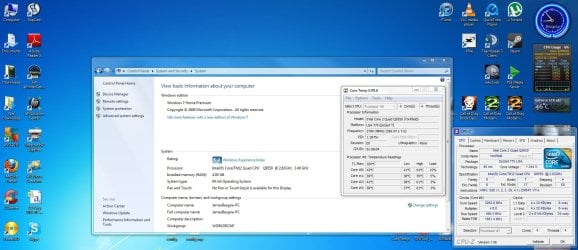
It seems i've overclocked my CPU to 3.40GHz, I'm not entirely sure on what the next step is? I suppose i'm testing for stability using Prime95?

Also heres a couple screens of what the comp says, do they seem ok? I've noticed the clock speed doesn't go all the way to 3.4GHz even though thats what wndows says its running at :/ Thanks in advance :)
 

Attachments

  • Untitled.jpg
    Untitled.jpg
    193 KB · Views: 278

My Computer

Computer Manufacturer/Model Number
Custom
OS
Windows 7 Ultimate 64 Bit
CPU
Intel Core i7 2600k 3.8GHz
Motherboard
Asus P8Z68-V Pro
Memory
Corsair Vengeance 16GB DDR3 1600Mhz
Graphics Card(s)
Asus NVIDIA GeForce GTX 680 - 2GB GDDR5
Sound Card
On Board
Monitor(s) Displays
LG DM2780D
Screen Resolution
1920 x 1080
Hard Drives
OCZ Vertex 4 240GB SATA-III SSD
OCZ Agility 3 240GB SATA-III SSD
WD 500 GB SATA-II HDD
Hitachi 500 GB SATA-II HDD
Hitachi 1 TB SATA-II HDD
Seagate Barracuda 2 TB SATA-III HDD
250GB External HD
PSU
Corsair TX650M PSU
Case
NZXT Phantom Full Tower Case - Black
Cooling
1 x Sickleflow, 2 x AF120 Quiet, 1 x 200mm Top, Corsair H70
Keyboard
Logitech G110
Mouse
Logitech G500
Internet Speed
80 Down / 20 Up
I've noticed the clock speed doesn't go all the way to 3.4GHz even though thats what wndows says its running at :/ Thanks in advance :)

I've sorted that, just disabled C1E Support. Windows says that its running at 3.40GHz but CPU-Z doesn't go over 3.2, which one should I trust here? lol

Thanks
 

My Computer

Computer Manufacturer/Model Number
Custom
OS
Windows 7 Ultimate 64 Bit
CPU
Intel Core i7 2600k 3.8GHz
Motherboard
Asus P8Z68-V Pro
Memory
Corsair Vengeance 16GB DDR3 1600Mhz
Graphics Card(s)
Asus NVIDIA GeForce GTX 680 - 2GB GDDR5
Sound Card
On Board
Monitor(s) Displays
LG DM2780D
Screen Resolution
1920 x 1080
Hard Drives
OCZ Vertex 4 240GB SATA-III SSD
OCZ Agility 3 240GB SATA-III SSD
WD 500 GB SATA-II HDD
Hitachi 500 GB SATA-II HDD
Hitachi 1 TB SATA-II HDD
Seagate Barracuda 2 TB SATA-III HDD
250GB External HD
PSU
Corsair TX650M PSU
Case
NZXT Phantom Full Tower Case - Black
Cooling
1 x Sickleflow, 2 x AF120 Quiet, 1 x 200mm Top, Corsair H70
Keyboard
Logitech G110
Mouse
Logitech G500
Internet Speed
80 Down / 20 Up
I've noticed the clock speed doesn't go all the way to 3.4GHz even though thats what wndows says its running at :/ Thanks in advance :)

I've sorted that, just disabled C1E Support. Windows says that its running at 3.40GHz but CPU-Z doesn't go over 3.2, which one should I trust here? lol

Thanks

Try disabling EIST (Intel SpeedStep) in BIOS as well.
 

My Computer

Computer type
PC/Desktop
Computer Manufacturer/Model Number
Custom Built
OS
Windows 8.1 Pro x64
CPU
Intel Core i7 4790k
Motherboard
MSI Z97S Krait Edition
Memory
8GB Corsair Dominator 1600MHz
Graphics Card(s)
MSI TwinFrozr GeForce GTX770
Sound Card
ASUS Xonar DX/XD 7.1
Monitor(s) Displays
Dell 24" S2409W + Dell 20" E207WFP
Screen Resolution
1920x1080 + 1680x1050
Hard Drives
1x 120GB OCZ Agility 3, 1x 750GB Western Digital Caviar Black, 1x 1TB Western Digital Caviar Blue
PSU
Corsair HX850 modular
Case
Fractal Design Define R4
Cooling
Corsair H60 w/ twin Corsair SP120 fans
Keyboard
Logitech G510S Keyboard
Mouse
Logitech G500S Laser Mouse
Internet Speed
40Mbps
Antivirus
Microsoft Security Essentials
Browser
Google Chrome
Other Info
LG Blu-Ray player
I've noticed the clock speed doesn't go all the way to 3.4GHz even though thats what wndows says its running at :/ Thanks in advance :)

I've sorted that, just disabled C1E Support. Windows says that its running at 3.40GHz but CPU-Z doesn't go over 3.2, which one should I trust here? lol

Thanks

Try disabling EIST (Intel SpeedStep) in BIOS as well.

It doesn't have the option for SpeedStep after I've overclocked it, it did before. I assume its disabled :)
 

My Computer

Computer Manufacturer/Model Number
Custom
OS
Windows 7 Ultimate 64 Bit
CPU
Intel Core i7 2600k 3.8GHz
Motherboard
Asus P8Z68-V Pro
Memory
Corsair Vengeance 16GB DDR3 1600Mhz
Graphics Card(s)
Asus NVIDIA GeForce GTX 680 - 2GB GDDR5
Sound Card
On Board
Monitor(s) Displays
LG DM2780D
Screen Resolution
1920 x 1080
Hard Drives
OCZ Vertex 4 240GB SATA-III SSD
OCZ Agility 3 240GB SATA-III SSD
WD 500 GB SATA-II HDD
Hitachi 500 GB SATA-II HDD
Hitachi 1 TB SATA-II HDD
Seagate Barracuda 2 TB SATA-III HDD
250GB External HD
PSU
Corsair TX650M PSU
Case
NZXT Phantom Full Tower Case - Black
Cooling
1 x Sickleflow, 2 x AF120 Quiet, 1 x 200mm Top, Corsair H70
Keyboard
Logitech G110
Mouse
Logitech G500
Internet Speed
80 Down / 20 Up
The temperatures when Windows starts are in the 49C to 60C area, is this normal? idle temperatures are around 33C - 40C.
 

My Computer

Computer Manufacturer/Model Number
Custom
OS
Windows 7 Ultimate 64 Bit
CPU
Intel Core i7 2600k 3.8GHz
Motherboard
Asus P8Z68-V Pro
Memory
Corsair Vengeance 16GB DDR3 1600Mhz
Graphics Card(s)
Asus NVIDIA GeForce GTX 680 - 2GB GDDR5
Sound Card
On Board
Monitor(s) Displays
LG DM2780D
Screen Resolution
1920 x 1080
Hard Drives
OCZ Vertex 4 240GB SATA-III SSD
OCZ Agility 3 240GB SATA-III SSD
WD 500 GB SATA-II HDD
Hitachi 500 GB SATA-II HDD
Hitachi 1 TB SATA-II HDD
Seagate Barracuda 2 TB SATA-III HDD
250GB External HD
PSU
Corsair TX650M PSU
Case
NZXT Phantom Full Tower Case - Black
Cooling
1 x Sickleflow, 2 x AF120 Quiet, 1 x 200mm Top, Corsair H70
Keyboard
Logitech G110
Mouse
Logitech G500
Internet Speed
80 Down / 20 Up
It doesn't have the option for SpeedStep after I've overclocked it, it did before. I assume its disabled :)

Some mobos will automatically do that.

The temperatures when Windows starts are in the 49C to 60C area, is this normal? idle temperatures are around 33C - 40C.


Idle temps are fine. So are the load temps, but I wouldn't like to go any higher for extended periods of time.


You can always attempt to lower your vcore (CPU voltage) to reduce heat. Re-test until stable.


Although I'd trust what CPU-Z says (when @ load) over what Windows reports for clock speeds.

What does your BIOS report the clock speed as when you first turn the PC on?
 

My Computer

Computer type
PC/Desktop
Computer Manufacturer/Model Number
Systems by SmartEyeball
OS
8 Pro x64
CPU
i7 3770K 4.6GHz
Motherboard
ASUS P8Z77 WS
Memory
16GB G.Skill Trident X 2666mhz
Graphics Card(s)
x2 EVGA 780 Ti Superclocked SLI
Sound Card
SB X-FI Surround 5.1 PRO USB / ATH-AD900 Headphones
Monitor(s) Displays
x3 Dell U2410 / 58" Samsung
Screen Resolution
5760*1200/ 1920*1200
Hard Drives
2x Intel 520 240GB (RAID 0) * 2x WD Caviar Blacks 2TB (RAID 0) * 2TB WD Caviar Black * Sony Optirac DVD
PSU
Silverstone Strider Evolution 1200W
Case
Thermaltake Level 10 GT Snow Edition
Cooling
Noctua NH-D14
Keyboard
Topre Realforce // Ducky Shine MX Black // Filco Ninja TKL
Mouse
Thermaltake Theron (Highly Recommended) + Razer Imperator
Antivirus
MSE
Browser
IE, FF, WaterFox
Other Info
GT Extreme V2 Sim Racing Cockpit + 40" LCD and K/B Mouse stand ▼
Fanatec CSR Elite Wheel + Clubsport V1 Pedals + CSR shifter/7G-H ▼Saitek X52 Pro ▼ TrackIR 5 Pro
Buttkicker v2 Seat Rumbler with Dedicated 5.1 and Sub Woofer attached to frame ▼
=
Bloody Big Grin
What does your BIOS report the clock speed as when you first turn the PC on?

BIOS says 3.21GHz, decided to lower the clock too. Something else, when I power on my computer, it powers up, powers down with a couple of second gap before it powers up again, is there a way to fix this or?

Cheers
 

My Computer

Computer Manufacturer/Model Number
Custom
OS
Windows 7 Ultimate 64 Bit
CPU
Intel Core i7 2600k 3.8GHz
Motherboard
Asus P8Z68-V Pro
Memory
Corsair Vengeance 16GB DDR3 1600Mhz
Graphics Card(s)
Asus NVIDIA GeForce GTX 680 - 2GB GDDR5
Sound Card
On Board
Monitor(s) Displays
LG DM2780D
Screen Resolution
1920 x 1080
Hard Drives
OCZ Vertex 4 240GB SATA-III SSD
OCZ Agility 3 240GB SATA-III SSD
WD 500 GB SATA-II HDD
Hitachi 500 GB SATA-II HDD
Hitachi 1 TB SATA-II HDD
Seagate Barracuda 2 TB SATA-III HDD
250GB External HD
PSU
Corsair TX650M PSU
Case
NZXT Phantom Full Tower Case - Black
Cooling
1 x Sickleflow, 2 x AF120 Quiet, 1 x 200mm Top, Corsair H70
Keyboard
Logitech G110
Mouse
Logitech G500
Internet Speed
80 Down / 20 Up
What does your BIOS report the clock speed as when you first turn the PC on?

BIOS says 3.21GHz, decided to lower the clock too. Something else, when I power on my computer, it powers up, powers down with a couple of second gap before it powers up again, is there a way to fix this or?

Cheers

Gigabyte boards will do that when you make a significant enough change in the BIOS. In addition, they will do that and resort to the second BIOS if there is something configured bad enough that the machine won't run.

If you are changing settings and experience this on the first boot after the change...don't worry about it. It has to cut power to the CPU and such to actually make the change. If it happens on each and every boot and you haven't been making changing in the BIOS, then you might have an issue.
 

My Computer

Computer Manufacturer/Model Number
Self-Built in July 2009
OS
Windows 7 Ultimate x64
CPU
Intel Q9550 2.83Ghz OC'd to 3.40Ghz
Motherboard
Gigabyte GA-EP45-UD3R rev. 1.1, F12 BIOS
Memory
8GB G.Skill PI DDR2-800, 4-4-4-12 timings
Graphics Card(s)
EVGA 1280MB Nvidia GeForce GTX570
Sound Card
Realtek ALC899A 8 channel onboard audio
Monitor(s) Displays
23" Acer x233H
Screen Resolution
1920x1080
Hard Drives
Intel X25-M 80GB Gen 2 SSD
Western Digital 1TB Caviar Black, 32MB cache. WD1001FALS
PSU
Corsair 620HX modular
Case
Antec P182
Cooling
stock
Keyboard
ABS M1 Mechanical
Mouse
Logitech G9 Laser Mouse
Internet Speed
15/2 cable modem
Other Info
Windows and Linux enthusiast. Logitech G35 Headset.
I only changed a couple of options in BIOS, I didn't tweak any voltages. I think I just changed the FSB frequency and the ratio, plus turned off C1E support and SpeedStep (Which disabled anyway)
 

My Computer

Computer Manufacturer/Model Number
Custom
OS
Windows 7 Ultimate 64 Bit
CPU
Intel Core i7 2600k 3.8GHz
Motherboard
Asus P8Z68-V Pro
Memory
Corsair Vengeance 16GB DDR3 1600Mhz
Graphics Card(s)
Asus NVIDIA GeForce GTX 680 - 2GB GDDR5
Sound Card
On Board
Monitor(s) Displays
LG DM2780D
Screen Resolution
1920 x 1080
Hard Drives
OCZ Vertex 4 240GB SATA-III SSD
OCZ Agility 3 240GB SATA-III SSD
WD 500 GB SATA-II HDD
Hitachi 500 GB SATA-II HDD
Hitachi 1 TB SATA-II HDD
Seagate Barracuda 2 TB SATA-III HDD
250GB External HD
PSU
Corsair TX650M PSU
Case
NZXT Phantom Full Tower Case - Black
Cooling
1 x Sickleflow, 2 x AF120 Quiet, 1 x 200mm Top, Corsair H70
Keyboard
Logitech G110
Mouse
Logitech G500
Internet Speed
80 Down / 20 Up
I've started to play around with my Q9550 a little bit more. I was running it at 3.2ghz, up from 2.83, by using a 400FSB with 8.0 multiplier. I ran with idle temps of 31,27,32,34 across 4 cores (with RealTemp 3.6 and CoreTemp64), and max temps with Prime95 running of 68,62,67 and 67. Mind you, this is with the stock Intel cooler, an Antec P182 case with 3 x 120mm fans all set at their LOWEST setting.

One thing that I hadn't done much with was change my vcore to my CPU. It was set to AUTO which on my Gigabyte GA-EP45-UD3R turns out to be 1.2500V volts.

So, I started to experiment with actually lowering the vcore just a bit to drop my temps. Since my temps dropped and I stayed stable by dropping my vcore down to 1.125V..I decided to see what would happen if I increased by multiplier from 8.0 to 8.5...thus bringing my CPU from 3.2Ghz to 3.4Ghz. At 1.125v, I couldn't run Prime95 stable.....but it seems that I can at 1.175V or 1.200V.

At 1.175 running at 3.4Ghz, I'm idling at 30,28,31,34 with max temps of 65,59,64,64.

I'm currently testing 1.150V at 3.4Ghz to see if I can run stable. My ambient temps in my basement are about 19C.

I've always been quite happy with this Q9550 chip and Intel Stock cooler.
 

My Computer

Computer Manufacturer/Model Number
Self-Built in July 2009
OS
Windows 7 Ultimate x64
CPU
Intel Q9550 2.83Ghz OC'd to 3.40Ghz
Motherboard
Gigabyte GA-EP45-UD3R rev. 1.1, F12 BIOS
Memory
8GB G.Skill PI DDR2-800, 4-4-4-12 timings
Graphics Card(s)
EVGA 1280MB Nvidia GeForce GTX570
Sound Card
Realtek ALC899A 8 channel onboard audio
Monitor(s) Displays
23" Acer x233H
Screen Resolution
1920x1080
Hard Drives
Intel X25-M 80GB Gen 2 SSD
Western Digital 1TB Caviar Black, 32MB cache. WD1001FALS
PSU
Corsair 620HX modular
Case
Antec P182
Cooling
stock
Keyboard
ABS M1 Mechanical
Mouse
Logitech G9 Laser Mouse
Internet Speed
15/2 cable modem
Other Info
Windows and Linux enthusiast. Logitech G35 Headset.
Pretty low voltages and decent temps for a stock HS.


Is that 1.15 at load? If so, you have quite a bit of room to work with. :)

1.175 is good anyway for 400FSB.

Looks like only thing really holding back from much higher FSB speeds is the cooler itself. It seems to be doing a good job ATM though.

9550/9650s are great chips IMHO.
 

My Computer

Computer Manufacturer/Model Number
Custom (Self Build)
OS
Windows 7 Home Premium 64bit
CPU
Intel Core i7 2700k
Motherboard
eVGA P67 SLI
Memory
8GB Mushkin Redline Ridgebacks @1866
Graphics Card(s)
EVGA GTX570 SC
Sound Card
XiFi Titanium HD
Monitor(s) Displays
LG W2453V
Screen Resolution
1920x1080
Hard Drives
Intel 320 80GB -- Intel X25-V 40GB --WD Black 1TB x2 -- WD Blue 640GB
PSU
Seasonic x750
Case
Corsair 600T SE White
Cooling
eVGA Superclocked CPU Cooler
Keyboard
Saitek Cyborg
Antivirus
Kaspersky
Browser
IE
Other Info
LG BD/DVD
Is that 1.15 at load? If so, you have quite a bit of room to work with. :)
At 1.15, my 4th worker threw a rounding error....so I'm not going to run there.

1.175 is good anyway for 400FSB.
This seems to be my sweet spot and where I plan to keep things. It's running just fine at 3.4Ghz here, at 1.175V and is cooler now then it used to be when i was running 3.2Ghz at 1.250V.

Looks like only thing really holding back from much higher FSB speeds is the cooler itself. It seems to be doing a good job ATM though.
My RAM is likely holding me back too, as I'm running Corsair DDR2 800 RAM in this box. With a 400FSB, I'm sitting at a 1:1 cpu:mem ratio.

While I have considering numerous times of replacing my stock cooler with a CM 212+, I spent so much time wiring my case, and I don't have a back access panel to put on a new cooler, so I would have to pull the mobo to change the cooler. And since my temps aren't an issue, I cannot be bothered to have to redo my wiring for a few degree drop in temp.

9550/9650s are great chips IMHO.
Yep, no need to replace it yet. It handles everything I throw at it with ease. And considering it's 2 years old now, that makes me quite happy. And the chip was only $219 when I bought it.
 

My Computer

Computer Manufacturer/Model Number
Self-Built in July 2009
OS
Windows 7 Ultimate x64
CPU
Intel Q9550 2.83Ghz OC'd to 3.40Ghz
Motherboard
Gigabyte GA-EP45-UD3R rev. 1.1, F12 BIOS
Memory
8GB G.Skill PI DDR2-800, 4-4-4-12 timings
Graphics Card(s)
EVGA 1280MB Nvidia GeForce GTX570
Sound Card
Realtek ALC899A 8 channel onboard audio
Monitor(s) Displays
23" Acer x233H
Screen Resolution
1920x1080
Hard Drives
Intel X25-M 80GB Gen 2 SSD
Western Digital 1TB Caviar Black, 32MB cache. WD1001FALS
PSU
Corsair 620HX modular
Case
Antec P182
Cooling
stock
Keyboard
ABS M1 Mechanical
Mouse
Logitech G9 Laser Mouse
Internet Speed
15/2 cable modem
Other Info
Windows and Linux enthusiast. Logitech G35 Headset.
Back
Top