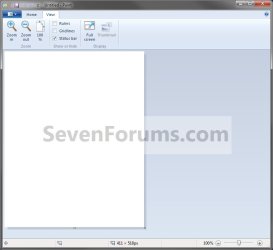
Paint - Open

How to Open Paint in Windows 7

   Information
Paint has been updated and given a new facelift in Windows 7. It is a feature to create drawings or edit digital pictures, and to save picture files using different file formats.

For more detailed information on how to use Paint, click on the Help.png icon at the upper right corner in Paint.
   Note
The Paint exe file is located at C:\Windows\system32\mspaint.exe.

EXAMPLE: Paint
NOTE: As you can see, it looks completely different now than it did in Vista.
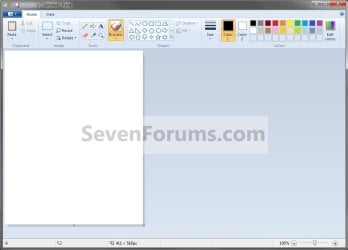
Paint3.jpg

Paint4.jpg


Here's How:
1. Open the Start Menu, and click on All Programs, double click on Accessories, and double click on Paint. (See screenshot below)
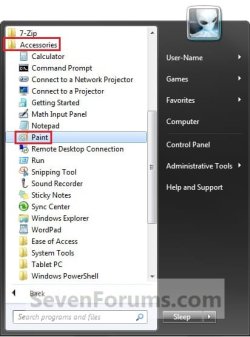
Paint1.jpg
OR

2. Open the Start Menu, and type mspaint.exe in the search line and press enter. (See screenshot below)
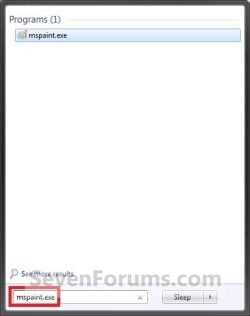
Paint2.jpg
That's it,
Shawn


Last edited:
In vista and xp there's a tool in paint that allows me to cut out the picture around a face and just leave the head of who ever is in the picture. I can't find it in windows 7. Please help. I use that feature a dozen times a day. I think it's free cut.

it's down on the bottom of the tool bar with the circle tool and square tool.

ok it's the shape making tool that looks like a ski boot. It's between the triangle and the round cornered rectangle in the first row in the windows 7 paint. In xp and vista you can choose to cut out or fill in solid with white the shape that you make. The shape I would make is the negative space around heads of people. How can I still do that in windows 7?


oh wait. no I figured it out. let me see if i can do it again. no I can't get it to happen again. What was happening when it did work was that it was making the shape or filling in the shape so it would automatically fill in a triangle even if I had only drawn two lines. but I don't know how I got it to do that. oh and i'm trying to use the program in chinese so I can't read anything.

ok I got it. wow. this forum really helps! thanks!
 
Last edited by a moderator:

My Computer

Computer Manufacturer/Model Number
dell inspiron one
OS
windows 7
CPU
pentium
Memory
4 gb
Hard Drives
500gb
I lost mspaint

I cannot find it under C:\Windows\system32\

How do I put it back?
 

My Computer

OS
Windows 2000
Hello Pogi,

Does Paint open when you try in the Start Menu as in the tutorial?

If you do not have known file extensions set to show, then the Paint EXE file would show as C:\Windows\system32\mspaint instead withouth the .exe file extension on it.

Hope this helps,
Shawn
 

My Computer

Computer type
PC/Desktop
Computer Manufacturer/Model Number
Self built custom
OS
64-bit Windows 11 Pro for Workstations
CPU
Intel i7-8700K OC'd to 5 GHz
Motherboard
ASUS ROG Maximus XI Formula Z390
Memory
64 GB (4x16GB) G.SKILL TridentZ RGB DDR4 3600 MHz
Graphics Card(s)
ASUS ROG-STRIX-GTX1080TI-O11G-GAMING
Sound Card
Integrated
Monitor(s) Displays
2 x Samsung Odyssey G7 27"
Screen Resolution
2560x1440
Hard Drives
1TB Samsung 990 PRO M.2,
4TB Samsung 990 PRO PRO M.2,
TerraMaster F8 SSD Plus NAS
PSU
Seasonic Prime Titanium 850W
Case
Thermaltake Core P3
Cooling
Corsair Hydro H115i
Keyboard
Logitech wireless K800
Mouse
Logitech MX Master 4
Internet Speed
2 Gb/s Download and 100 Mb/s Upload
Antivirus
Malwarebyte Anti-Malware Premium
Browser
Google Chrome
Other Info
Logitech Z625 speaker system,
Logitech BRIO 4K Pro webcam,
HP Color LaserJet Pro MFP M477fdn,
APC SMART-UPS RT 1000 XL - SURT1000XLI,
Galaxy S23 Plus phone
Back
Top