Partition Find and Mount

Orbital Shark

New member
Guru
Gold Member
VIP
Local time
11:42 PM
Messages
6,298
Location
Milton Keynes, United Kingdom
Recently a friend asked me to look into why his PC was shorting out - turns out his power supply wasn't powerfull enough but that's another story :p

It turns out that one time when it cut out, his external 320GB hard disk crapped out too and was showing 2.5GB of available data and a 295GB unallocated partition.....Oh dear, there was sooo much data on that disk.

I started searching for partition recovery software and came accross a little (1.6MB) app call Partition Find and Mount so thought I'd give it a try. OMG!! It scans the affected drive then allows you to Mount the deleted partition to a new drive letter. This allows you to access the deleted partition so you can copy anything you may need over to a new drive. You can then unmount, close the software and delete the partitions and reformat the drive, good as new :D

Painless Partition Recovery

Partition Find & Mount implements a new concept of deleted or lost partition recovery. It works in the most convenient way possible — by locating and mounting partitions into the system, thus making those lost partitions available to you like any generic disk volume. Partition Find & Mount will also work in case any Boot Record (including the Master Boot Record) is missing, damaged or overwritten.


Partition Find & Mount is:
  • Easy to use. You do not need special knowledge to use the software.
  • Safe to your data. There is no possible way you could get things worse.
  • Free for personal use. Use it as much as you like.
Lost important data? Give it a try. Partition Find & Mount is free for personal use!

Source Here

And....It works on Windows 7 too :p
 

My Computer

Computer Manufacturer/Model Number
Compaq Desktop
OS
Windows 7 Ultimate x64
CPU
AMD Sempron Dual Core
Memory
3GB
Graphics Card(s)
NVIDIA GeForce 6150SE nForce 430
Screen Resolution
1024x768
Hard Drives
150GB Sata
Good post OS...

Thanks!

(When I saw "Source Here", I thought it was the 'source-code' for the freebie!) :doh:


Wonder whatever happened to that " FUJITSU MPF3102AT hard drive" that he was going to demo ? :party:

(In a good mood tonight...)
 

My Computer

Computer Manufacturer/Model Number
Gateway GT5056
OS
XP_Pro, W7_7201, W7RC.vhd, SciLinux5.3, Fedora12, Fedora9_2x, OpenSolaris_09-06
CPU
AMD 64x2
Motherboard
Yes
Memory
1 gig
Graphics Card(s)
Dunno
Sound Card
Realtek something
Monitor(s) Displays
Samsung SyncMaster 940MW w/TV
Screen Resolution
1280x1024
Hard Drives
250 GB WD, USB Seagate Freedesk 1.5 T
Internet Speed
Cable modem
Other Info
1 + 1 = 10b,
7 + 7 = 16o,
a + b = 15h.
Was looking a tool to retrieve mysteriously disappeared system recovery partition from an old HP Pavilion laptop which I want to restore to factory settings. Found it using the tool of this tip. Thanks, mate. Now looking for some quality posts around here to be able to rep you, currently your rep button tells "You must spread some Reputation around before giving it to Orbital Shark again."

Kari
 

My Computer

Computer type
Laptop
Computer Manufacturer/Model Number
HP ENVY 17-1150eg
OS
Windows 10 Pro x64 EN-GB
CPU
1.6 GHz Intel Core i7-720QM Processor
Memory
6 GB
Graphics Card(s)
ATI Mobility Radeon HD 5850 Graphics
Sound Card
Beats sound system with integrated subwoofer
Monitor(s) Displays
17" laptop display, 22" LED and 32" Full HD TV through HDMI
Screen Resolution
1600*900 (1), 1920*1080 (2&3)
Hard Drives
Internal: 2 x 500 GB SATA Hard Disk Drive 7200 rpm
External: 2TB for backups, 3TB USB3 network drive for media
Cooling
As Envy runs a bit warm, I have it on a Cooler Master pad
Keyboard
Logitech diNovo Media Desktop Laser (bluetooth)
Mouse
Logitech Performance Mouse MX
Internet Speed
50/10 Mbps VDSL
Antivirus
Windows Defender 4.3.9431.0
Browser
Maxthon 3.5.2., IE11
Was looking a tool to retrieve mysteriously disappeared system recovery partition from an old HP Pavilion laptop which I want to restore to factory settings. Found it using the tool of this tip. Thanks, mate. Now looking for some quality posts around here to be able to rep you, currently your rep button tells "You must spread some Reputation around before giving it to Orbital Shark again."

Kari

That's not problem mate, glad it worked for you too :p

Nice post...
Thanks.:)
+rep

You're welcome & thanks :D
 

My Computer

Computer Manufacturer/Model Number
Compaq Desktop
OS
Windows 7 Ultimate x64
CPU
AMD Sempron Dual Core
Memory
3GB
Graphics Card(s)
NVIDIA GeForce 6150SE nForce 430
Screen Resolution
1024x768
Hard Drives
150GB Sata
This won't work for me, it says that it uses a driver that is not digitally signed, is this because I'm using 7 x64? How can I solve this problem? I lost a 250GB data partition. All the data is still there but I can't get to it, and other software I've seen that can access it costs $100+
 

My Computer

Computer Manufacturer/Model Number
Me
OS
Windows 7 x64
CPU
AMD Athalon 64x2 6000+
Memory
6GB Dual-Channel DDR2 1066
Hi Sir Glen welcome to the forums.

I don't use 64bit but if you boot up using the F8 key (just after the POST screen) 1 of the options is regarding Disabling Driver Signing. Try that option then install the software.

Hope it helps :)


OS
 

My Computer

Computer Manufacturer/Model Number
Compaq Desktop
OS
Windows 7 Ultimate x64
CPU
AMD Sempron Dual Core
Memory
3GB
Graphics Card(s)
NVIDIA GeForce 6150SE nForce 430
Screen Resolution
1024x768
Hard Drives
150GB Sata
Thank you very much OS, that worked. :) I wasn't aware of the F8 option previously, it's nice to know it's there.
 

My Computer

Computer Manufacturer/Model Number
Me
OS
Windows 7 x64
CPU
AMD Athalon 64x2 6000+
Memory
6GB Dual-Channel DDR2 1066
You're welcome :)
 

My Computer

Computer Manufacturer/Model Number
Compaq Desktop
OS
Windows 7 Ultimate x64
CPU
AMD Sempron Dual Core
Memory
3GB
Graphics Card(s)
NVIDIA GeForce 6150SE nForce 430
Screen Resolution
1024x768
Hard Drives
150GB Sata
Hello, and sorry for necroposting. If that bothers you, I'll make a new thread upon request. But it is specific to this particular piece of software. Apparently, I am the only one, that this thing happened to, or it happened to so little people that I can't find any useful informations regarding this issue.

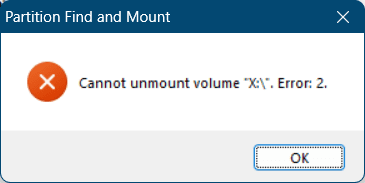
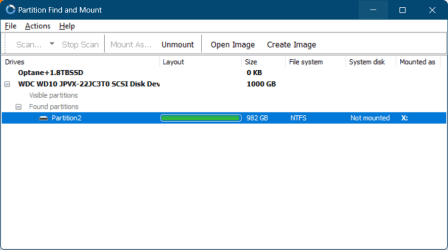
I tried this software out yesterday. At first, I tried thorough scan, which was quite long (it is a 1TB external drive), but in the end it found a deleted partition I needed. Tried to mount, program crashed (not responding). I thought that was it, mounting was unsuccessful and it's a useless piece of crap. So I uninstalled it, and started doing something else. I didn't realise. I didn't notice, until it was time to shut down the PC and go to sleep, that there was a new volume mounted to the system. It had files in it, and it was labeled with the drive letter I assigned to the deleted partition that has been found. Turns out it did actually work. I quickly looked through it, everything worked as it should, I could navigate around, even open files, didn't try copying files tho, which is what I wanted to try today. So I installed the program back quickly, shut down the PC and disconnected the drive. Big mistake. Apparently, when I shut down the PC before unplugging the disk (or maybe it didn't have an effect on that), system still thinks the partition is connected, yet even after reconnecting the disk, I cannot navigate the file system, I cannot open files. System thinks the partition is mounted, even the program thinks it's mounted, but system tells me the file system is corrupted, and program cannout unmount the partition, it shows me this error:
image.png

This is what the program tells me:
image.png

How can I unmount a ghost volume? I figured out I need to unmount it, find it again, and then mount newly found partition before I could proceed.

- - - Updated - - -

Hello, and sorry for necroposting. If that bothers you, I'll make a new thread upon request. But it is specific to this particular piece of software. Apparently, I am the only one, that this thing happened to, or it happened to so little people that I can't find any useful informations regarding this issue...
So, here's the thing. I investigated registry to search for "Partition Find and Mount", that exact string didn't yield anything, but "Find and Mount" did, several registry keys. One of them was labeled with "slicedisk", and pointed out to a file "slicedisk_x64.sys", which resides in PFM install directory. I figured out that file wouldn't be too wise to delete, but I tried to delete the registry key that pointer was in, and rebooted Windows. That helped actually, phantom drive was no more. So I tried to find and mount that deleted partition again with PFM and voilà, it did work again. This time, I let the PC take its time to open the Explorer with the partition for me, and it didn't crash. Perfect. Now did it really work?So first I tried to navigate around. Check. Next time, I tried to open various files. Check. Tried to copy a small file from it. Check. Then I copied all contents from a single folder. Check. Then I tried to mount a virtual CD image from the partition, plays without any issue. Check. Then, the moment of truth. Does the copied file work? Does the virtual CD mount from my copied files? Yes, it does. So that's another, and final check. So did it really work? I think so. This is what I'm going to stick with, and this is what I'm going to use to copy the entire contents of the deleted partition to another external disk.

Thanks anyway, even I actually figured this out myself. Let's keep this in for further readers who might come across similar issue.
 
Last edited:

My Computers

System One System Two

  • Computer type
    Laptop
    Computer Manufacturer/Model Number
    Acer
    OS
    Windows 11 Insider Preview (dev channel)
    CPU
    Intel Core i5+ 8th gen
    Memory
    16 GB
    Graphics Card(s)
    nVidia GeForce GTX 1050
    Screen Resolution
    1920x1080
    Hard Drives
    Samsung SSD (2TB)
    Internet Speed
    Various (I travel)
    Antivirus
    builtin
    Browser
    Google Chrome
  • Computer type
    PC/Desktop
    System Manufacturer/Model Number
    Asus
    OS
    Windows 10 Home
    CPU
    AMD Ryzen
Back
Top