- Local time
- 12:45 AM
- Messages
- 16,784
It is the yellow folder Boot - just rt click and copy and paste directly onto the C drive.
You will get a message saying bcd is in use - just skip it - the other files in that folder will copy across.
You also need to do the same with bootmgr.
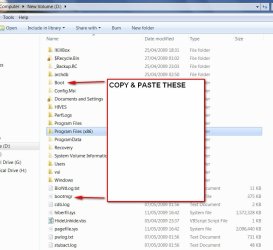
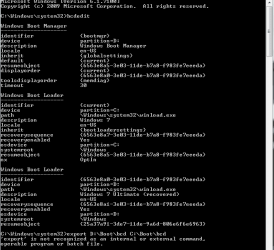
Then use the export command to get bcd into the C:\Boot folder.
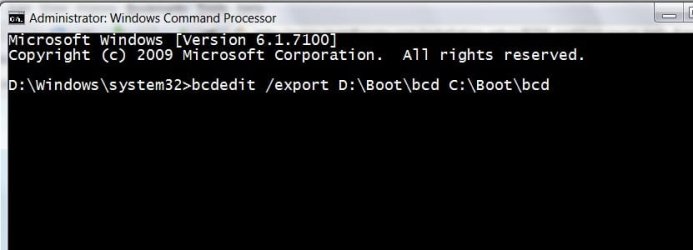
Press enter at the end of the command.
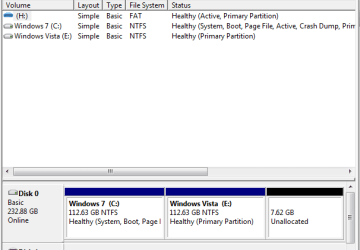
Then mark C as Active in Disk Management.
Shutdown - boot the 7 dvd - run Startup repair.
You will get a message saying bcd is in use - just skip it - the other files in that folder will copy across.
You also need to do the same with bootmgr.
Then use the export command to get bcd into the C:\Boot folder.
Press enter at the end of the command.
Then mark C as Active in Disk Management.
Shutdown - boot the 7 dvd - run Startup repair.
My Computers
System One System Two
-
- Computer type
- PC/Desktop
- OS
- 7 X64
- CPU
- i5 8400
- Motherboard
- gigabyte b365m ds3h
- Memory
- 2x8gb 3200mhz
- Hard Drives
- various
- PSU
- pure power 11 400w cm
- Case
- Coolermaster
- Cooling
- cryorig m9i
-
- Computer type
- PC/Desktop
- OS
- 7x64
- CPU
- g5400
- Motherboard
- ga b365m ds3h
- Memory
- 8gb ddr4 2400
- PSU
- xfx pro 450w