Partition - Mark as Inactive

How to Mark a Partition as Inactive in Windows 7 and Vista


   Information
Marking a partition as active on a basic disk means that the computer will use the loader (an operating system tool) on that partition to start the operating system. Marking a partition as active if it doesn't contain the loader for an operating system may cause your computer to become unbootable.

This tutorial will show you how to mark a partition as inactive in Windows 7 and Vista in case you marked it as active by mistake.

   Tip
If you mark the wrong active partition as inactive by mistake and can no longer boot from it, then you can do a startup repair to fix it.


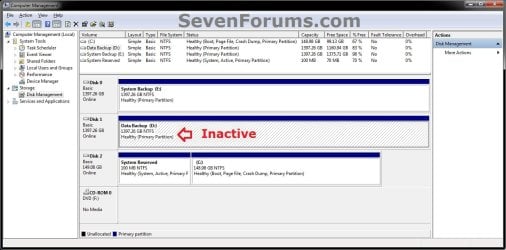
EXAMPLE: Partition Marked as Active and Inactive
NOTE: This is an example of my D: data partition shown as active by mistake in Disk Management (diskmgmt.msc). I used the steps in this tutorial to mark it as inactive since my System Reserved partition is my true active partition instead.
Active.jpg

Inactive.jpg


Here's How:
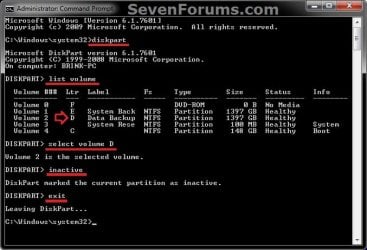
1. Open a elevated command prompt, or a command prompt at boot.

2. In the command prompt, type diskpart and press Enter. (see screenshot below step 6)

3. In the command prompt, type list volume and press Enter. (see screenshot below step 6)
NOTE: Make note of the volume number or letter that you wanted to mark as inactive. At boot, the drive letters may not be the same as they are in Windows.

4. In the command prompt, type select volume # or select volume letter and press Enter. (see screenshot below step 6)
NOTE: You would substitute # for the volume number listed, or letter for the volume/partition letter. For example, I want to mark my D: partition as inactive, so I would type either select volume 2 or select volume D and press Enter.

5. In the command prompt, type inactive and press Enter. (see screenshot below step 6)

6. In the command prompt, type exit and press Enter. (see screenshot below)
CMD.jpg
7. Close the elevated command prompt in Windows, or restart the computer if at boot.

That's it,
Shawn


Last edited:
Excellent tutorial Brink !
 

My Computer

Computer type
PC/Desktop
Computer Manufacturer/Model Number
Custom Build
OS
Windows 10 Pro x64
CPU
Intel Core i5 4440 @Stock
Motherboard
Gigabyte Z97 D3H
Memory
4 x 4GB HyperX Fury DDR3
Graphics Card(s)
Gigabyte GTX 1050Ti O4G
Sound Card
Integrated
Monitor(s) Displays
Dell P2417H
Screen Resolution
1920 x 1080
Hard Drives
Samsung EVO 850 120GB / Toshiba DT01ACA050 1TB 7200prm 32MB
PSU
Riotoro Onyx 750W
Case
NZXT H500 Black-Red
Cooling
Stock CPU + NZXT 120mm + 2x120mm red fans
Keyboard
Modecom Volcano Lanparty
Mouse
Asus ROG Gladius / DeepCool E-Pad Plus
Internet Speed
DOCSIS 50/3 Mbit
Browser
Google Chrome
Other Info
Asus K55VJ(i5 3210M, GT635M / 2GB, 8GB DDR3, 500GB HDD)
Thank you guys. :)
 

My Computer

Computer type
PC/Desktop
Computer Manufacturer/Model Number
Self built custom
OS
64-bit Windows 11 Pro for Workstations
CPU
Intel i7-8700K OC'd to 5 GHz
Motherboard
ASUS ROG Maximus XI Formula Z390
Memory
64 GB (4x16GB) G.SKILL TridentZ RGB DDR4 3600 MHz
Graphics Card(s)
ASUS ROG-STRIX-GTX1080TI-O11G-GAMING
Sound Card
Integrated
Monitor(s) Displays
2 x Samsung Odyssey G7 27"
Screen Resolution
2560x1440
Hard Drives
1TB Samsung 990 PRO M.2,
4TB Samsung 990 PRO PRO M.2,
TerraMaster F8 SSD Plus NAS
PSU
Seasonic Prime Titanium 850W
Case
Thermaltake Core P3
Cooling
Corsair Hydro H115i
Keyboard
Logitech wireless K800
Mouse
Logitech MX Master 4
Internet Speed
2 Gb/s Download and 100 Mb/s Upload
Antivirus
Malwarebyte Anti-Malware Premium
Browser
Google Chrome
Other Info
Logitech Z625 speaker system,
Logitech BRIO 4K Pro webcam,
HP Color LaserJet Pro MFP M477fdn,
APC SMART-UPS RT 1000 XL - SURT1000XLI,
Galaxy S23 Plus phone
I can't seem to figure this out like you guys.
08efaadc.jpg


I'm trying to mark O as inactive. This is my removable usb hard drive.
 
Last edited:

My Computer

OS
California
Hello Lopy, and welcome to Seven Forums.

See if using the command below at step 4 may work instead. :)

select volume 7

Hope this helps,
Shawn
 

My Computer

Computer type
PC/Desktop
Computer Manufacturer/Model Number
Self built custom
OS
64-bit Windows 11 Pro for Workstations
CPU
Intel i7-8700K OC'd to 5 GHz
Motherboard
ASUS ROG Maximus XI Formula Z390
Memory
64 GB (4x16GB) G.SKILL TridentZ RGB DDR4 3600 MHz
Graphics Card(s)
ASUS ROG-STRIX-GTX1080TI-O11G-GAMING
Sound Card
Integrated
Monitor(s) Displays
2 x Samsung Odyssey G7 27"
Screen Resolution
2560x1440
Hard Drives
1TB Samsung 990 PRO M.2,
4TB Samsung 990 PRO PRO M.2,
TerraMaster F8 SSD Plus NAS
PSU
Seasonic Prime Titanium 850W
Case
Thermaltake Core P3
Cooling
Corsair Hydro H115i
Keyboard
Logitech wireless K800
Mouse
Logitech MX Master 4
Internet Speed
2 Gb/s Download and 100 Mb/s Upload
Antivirus
Malwarebyte Anti-Malware Premium
Browser
Google Chrome
Other Info
Logitech Z625 speaker system,
Logitech BRIO 4K Pro webcam,
HP Color LaserJet Pro MFP M477fdn,
APC SMART-UPS RT 1000 XL - SURT1000XLI,
Galaxy S23 Plus phone
Thanks.
This is the result I get. It doesnt seem to work

DISKPART> list volume

Volume ### Ltr Label Fs Type Size Status Info
---------- --- ----------- ----- ---------- ------- --------- --------
Volume 0 E DVD-ROM 0 B No Media
Volume 1 C HP NTFS Partition 583 GB Healthy System
Volume 2 D FACTORY_IMA NTFS Partition 13 GB Healthy
Volume 3 G Removable 0 B No Media
Volume 4 H Removable 0 B No Media
Volume 5 I Removable 0 B No Media
Volume 6 J Removable 0 B No Media
Volume 7 O FAT32 Partition 466 GB Healthy

DISKPART> select volume 7

Volume 7 is the selected volume.

DISKPART> inactive

There is no partition selected.
Please select a partition and try again.

DISKPART>
 

My Computer

OS
California
Could you post back with a screenshot of your Disk Management (diskmgmt.msc) showing all of your HDDs' full layout?

Do you have anything on the HDD that you need to keep? If so, do you have space on another HDD to move it to temporarily?
 

My Computer

Computer type
PC/Desktop
Computer Manufacturer/Model Number
Self built custom
OS
64-bit Windows 11 Pro for Workstations
CPU
Intel i7-8700K OC'd to 5 GHz
Motherboard
ASUS ROG Maximus XI Formula Z390
Memory
64 GB (4x16GB) G.SKILL TridentZ RGB DDR4 3600 MHz
Graphics Card(s)
ASUS ROG-STRIX-GTX1080TI-O11G-GAMING
Sound Card
Integrated
Monitor(s) Displays
2 x Samsung Odyssey G7 27"
Screen Resolution
2560x1440
Hard Drives
1TB Samsung 990 PRO M.2,
4TB Samsung 990 PRO PRO M.2,
TerraMaster F8 SSD Plus NAS
PSU
Seasonic Prime Titanium 850W
Case
Thermaltake Core P3
Cooling
Corsair Hydro H115i
Keyboard
Logitech wireless K800
Mouse
Logitech MX Master 4
Internet Speed
2 Gb/s Download and 100 Mb/s Upload
Antivirus
Malwarebyte Anti-Malware Premium
Browser
Google Chrome
Other Info
Logitech Z625 speaker system,
Logitech BRIO 4K Pro webcam,
HP Color LaserJet Pro MFP M477fdn,
APC SMART-UPS RT 1000 XL - SURT1000XLI,
Galaxy S23 Plus phone
Yes, I can back it up to my main hdd.

28f46e01.jpg
 
Last edited by a moderator:

My Computer

OS
California

My Computer

Computer type
PC/Desktop
Computer Manufacturer/Model Number
Self built custom
OS
64-bit Windows 11 Pro for Workstations
CPU
Intel i7-8700K OC'd to 5 GHz
Motherboard
ASUS ROG Maximus XI Formula Z390
Memory
64 GB (4x16GB) G.SKILL TridentZ RGB DDR4 3600 MHz
Graphics Card(s)
ASUS ROG-STRIX-GTX1080TI-O11G-GAMING
Sound Card
Integrated
Monitor(s) Displays
2 x Samsung Odyssey G7 27"
Screen Resolution
2560x1440
Hard Drives
1TB Samsung 990 PRO M.2,
4TB Samsung 990 PRO PRO M.2,
TerraMaster F8 SSD Plus NAS
PSU
Seasonic Prime Titanium 850W
Case
Thermaltake Core P3
Cooling
Corsair Hydro H115i
Keyboard
Logitech wireless K800
Mouse
Logitech MX Master 4
Internet Speed
2 Gb/s Download and 100 Mb/s Upload
Antivirus
Malwarebyte Anti-Malware Premium
Browser
Google Chrome
Other Info
Logitech Z625 speaker system,
Logitech BRIO 4K Pro webcam,
HP Color LaserJet Pro MFP M477fdn,
APC SMART-UPS RT 1000 XL - SURT1000XLI,
Galaxy S23 Plus phone
You're most welcome. :)
 

My Computer

Computer type
PC/Desktop
Computer Manufacturer/Model Number
Self built custom
OS
64-bit Windows 11 Pro for Workstations
CPU
Intel i7-8700K OC'd to 5 GHz
Motherboard
ASUS ROG Maximus XI Formula Z390
Memory
64 GB (4x16GB) G.SKILL TridentZ RGB DDR4 3600 MHz
Graphics Card(s)
ASUS ROG-STRIX-GTX1080TI-O11G-GAMING
Sound Card
Integrated
Monitor(s) Displays
2 x Samsung Odyssey G7 27"
Screen Resolution
2560x1440
Hard Drives
1TB Samsung 990 PRO M.2,
4TB Samsung 990 PRO PRO M.2,
TerraMaster F8 SSD Plus NAS
PSU
Seasonic Prime Titanium 850W
Case
Thermaltake Core P3
Cooling
Corsair Hydro H115i
Keyboard
Logitech wireless K800
Mouse
Logitech MX Master 4
Internet Speed
2 Gb/s Download and 100 Mb/s Upload
Antivirus
Malwarebyte Anti-Malware Premium
Browser
Google Chrome
Other Info
Logitech Z625 speaker system,
Logitech BRIO 4K Pro webcam,
HP Color LaserJet Pro MFP M477fdn,
APC SMART-UPS RT 1000 XL - SURT1000XLI,
Galaxy S23 Plus phone
Awesome

Thank you Brink for yet another helpful tutorial. Though my other internal drives were marked as active it never caused any boot problems. This was another one of those irritating issues in windows for me. Within 2 minutes I had marked the 3 other drives as inactive thanks to your guide. Never would have figured that out with out it.

I learned something new today! How do you remember all this shit!?
 

My Computer

Computer type
PC/Desktop
OS
Windows 10 Pro
CPU
AMD FX-4100 4Ghz
Motherboard
Gigabyte GA-970A-DS3
Memory
8GB Corsair PC3-10700H Dual Channel @1600mhz
Graphics Card(s)
NVIDIA GeForce GTX 660 2GB GDDR5
Sound Card
Realtek HD Audio (On Board Audio Controller)
Monitor(s) Displays
Dell 19" 1400x900 and HP x20LED 1600x900 plus mounted TV
Hard Drives
C: - 640GB Western Digital
D: - 1000GB Western Digital
E: - 3000GB Toshiba (3TB)
PSU
OCZ ModXstream-Pro 730W
Case
Rosewill Nautilus
Cooling
Traditional Air/Fan Cooling
Keyboard
Ivation Illuminated Keyboard (Blue LED)
Mouse
E-3lue Cobra
Internet Speed
DSL @ 740kb/s download
Antivirus
Microsoft Security Essentials
Browser
Firefox
You're welcome Britton. Glad it could help. :)
 

My Computer

Computer type
PC/Desktop
Computer Manufacturer/Model Number
Self built custom
OS
64-bit Windows 11 Pro for Workstations
CPU
Intel i7-8700K OC'd to 5 GHz
Motherboard
ASUS ROG Maximus XI Formula Z390
Memory
64 GB (4x16GB) G.SKILL TridentZ RGB DDR4 3600 MHz
Graphics Card(s)
ASUS ROG-STRIX-GTX1080TI-O11G-GAMING
Sound Card
Integrated
Monitor(s) Displays
2 x Samsung Odyssey G7 27"
Screen Resolution
2560x1440
Hard Drives
1TB Samsung 990 PRO M.2,
4TB Samsung 990 PRO PRO M.2,
TerraMaster F8 SSD Plus NAS
PSU
Seasonic Prime Titanium 850W
Case
Thermaltake Core P3
Cooling
Corsair Hydro H115i
Keyboard
Logitech wireless K800
Mouse
Logitech MX Master 4
Internet Speed
2 Gb/s Download and 100 Mb/s Upload
Antivirus
Malwarebyte Anti-Malware Premium
Browser
Google Chrome
Other Info
Logitech Z625 speaker system,
Logitech BRIO 4K Pro webcam,
HP Color LaserJet Pro MFP M477fdn,
APC SMART-UPS RT 1000 XL - SURT1000XLI,
Galaxy S23 Plus phone
Thanks, and additional.

I was just going to add my thanks for a clear and well-illustrated and explained tut, but I'll pick your brains further, if I may.
I'm here because Create System Image includes my D: drive which contains XP - I dual boot, and it will not be unchecked. Is this process in any way destructive? Can I execute this procedure to exclude D: temporarily, and after Creating the Image, restore its status to Active using Mark as Active without any damage to the boot information - MBR whatever?

Thanks again.

PS. I posted a link to this tut on another forum for someone who was "at my wit's end" over this. That's OK isn't it?
 

My Computer

Computer type
PC/Desktop
Computer Manufacturer/Model Number
Self Build
OS
Windows 7 Professional 64 bit (and Linux Mint)
CPU
AMD FX 8320 8-core
Motherboard
MSI 990FXA-GD65
Memory
16 Gig DDR3
Graphics Card(s)
Sapphire Radeon Dual-X R9 280X 3GB
Sound Card
Onboard sound
Monitor(s) Displays
ProLiteE2483HS
Screen Resolution
1920 x 1080 (60Hz)
Hard Drives
SanDisk 250GB SSD SATAIII
Seagate 500GB as Program Install drive, inc redirected System Folders
USB 500GB (Seagate) Backup, everything
Toshiba 80GB 2.5 inch w/ Linux Mint
PSU
Integrator 700 Watt
Case
Xcase
Cooling
Thermalright Truespirit-90M. Tower. Superb
Keyboard
Old Dell (very)
Mouse
Trust wireless. Rusted contact w/added aluminium foil clump
Internet Speed
Not bad
Antivirus
Kaspersky 2016
Browser
Opera
Other Info
Age 65, me, not the machine.
Don't like modern jazz, sport, marzipan, noisy pillows, being cold, most TV programmes, Windows 10, unfair division of wealth, toothache, gristle, bears and sharks, and anything that doesn't work.
Hello Bob,

A system image will include all of your system drives by default, and cannot be unchecked as you discovered. That's perfectly fine and what you would want since that is what you would at least want to be included in the image anyways.

If your D: drive is marked as a "system" drive, then it wouldn't matter if it was "active" or not, it would still be included in the image.

Sure, it's perfectly fine and welcomed to link our tutorials anywhere you like. I created them so that they may help folks no matter where. :)
 

My Computer

Computer type
PC/Desktop
Computer Manufacturer/Model Number
Self built custom
OS
64-bit Windows 11 Pro for Workstations
CPU
Intel i7-8700K OC'd to 5 GHz
Motherboard
ASUS ROG Maximus XI Formula Z390
Memory
64 GB (4x16GB) G.SKILL TridentZ RGB DDR4 3600 MHz
Graphics Card(s)
ASUS ROG-STRIX-GTX1080TI-O11G-GAMING
Sound Card
Integrated
Monitor(s) Displays
2 x Samsung Odyssey G7 27"
Screen Resolution
2560x1440
Hard Drives
1TB Samsung 990 PRO M.2,
4TB Samsung 990 PRO PRO M.2,
TerraMaster F8 SSD Plus NAS
PSU
Seasonic Prime Titanium 850W
Case
Thermaltake Core P3
Cooling
Corsair Hydro H115i
Keyboard
Logitech wireless K800
Mouse
Logitech MX Master 4
Internet Speed
2 Gb/s Download and 100 Mb/s Upload
Antivirus
Malwarebyte Anti-Malware Premium
Browser
Google Chrome
Other Info
Logitech Z625 speaker system,
Logitech BRIO 4K Pro webcam,
HP Color LaserJet Pro MFP M477fdn,
APC SMART-UPS RT 1000 XL - SURT1000XLI,
Galaxy S23 Plus phone
Hi Brink, and thanks for your reply. Obviously I did some research about this drives-included-in-the-Image-list thing, and I was given to believe that the key to inclusion was the term "Active". I checked this - Computer/(right click)/Manage/Storage/Disk Management, and, indeed, both my C: and D: drives bear that term in their listing therein. No others do, and no others are included in the "Create System Image" list, so that seems to fit. Curiously, my C: drive does not contain the term, "System", while my D: drive does. My D: (XP) drive is not the important drive, and I truly do not want to Image it. I'm bothered only about having to reinstall Windows 7, and, all over again, the gigabytes of Updates that would subsequently follow - without a 2nd Service Pack, that is. I know that I will follow your tutorial sooner or later, regardless - I'm a fiddler, believing, "If it aint broke, mess about with it anyway."; I won't be able to ignore it now that I've read it.
I used the term "destructive" in the computer sense, meaning that the procedure rewrites or deletes or otherwise changes more than the contents of the single location that indicates "Active" or not active.
I'll let you know what happens.
Cheers.
 

My Computer

Computer type
PC/Desktop
Computer Manufacturer/Model Number
Self Build
OS
Windows 7 Professional 64 bit (and Linux Mint)
CPU
AMD FX 8320 8-core
Motherboard
MSI 990FXA-GD65
Memory
16 Gig DDR3
Graphics Card(s)
Sapphire Radeon Dual-X R9 280X 3GB
Sound Card
Onboard sound
Monitor(s) Displays
ProLiteE2483HS
Screen Resolution
1920 x 1080 (60Hz)
Hard Drives
SanDisk 250GB SSD SATAIII
Seagate 500GB as Program Install drive, inc redirected System Folders
USB 500GB (Seagate) Backup, everything
Toshiba 80GB 2.5 inch w/ Linux Mint
PSU
Integrator 700 Watt
Case
Xcase
Cooling
Thermalright Truespirit-90M. Tower. Superb
Keyboard
Old Dell (very)
Mouse
Trust wireless. Rusted contact w/added aluminium foil clump
Internet Speed
Not bad
Antivirus
Kaspersky 2016
Browser
Opera
Other Info
Age 65, me, not the machine.
Don't like modern jazz, sport, marzipan, noisy pillows, being cold, most TV programmes, Windows 10, unfair division of wealth, toothache, gristle, bears and sharks, and anything that doesn't work.
Go ahead and post a screenshot of Disk Management showing the layout of your drives to see what we may be able to do. :)
 

My Computer

Computer type
PC/Desktop
Computer Manufacturer/Model Number
Self built custom
OS
64-bit Windows 11 Pro for Workstations
CPU
Intel i7-8700K OC'd to 5 GHz
Motherboard
ASUS ROG Maximus XI Formula Z390
Memory
64 GB (4x16GB) G.SKILL TridentZ RGB DDR4 3600 MHz
Graphics Card(s)
ASUS ROG-STRIX-GTX1080TI-O11G-GAMING
Sound Card
Integrated
Monitor(s) Displays
2 x Samsung Odyssey G7 27"
Screen Resolution
2560x1440
Hard Drives
1TB Samsung 990 PRO M.2,
4TB Samsung 990 PRO PRO M.2,
TerraMaster F8 SSD Plus NAS
PSU
Seasonic Prime Titanium 850W
Case
Thermaltake Core P3
Cooling
Corsair Hydro H115i
Keyboard
Logitech wireless K800
Mouse
Logitech MX Master 4
Internet Speed
2 Gb/s Download and 100 Mb/s Upload
Antivirus
Malwarebyte Anti-Malware Premium
Browser
Google Chrome
Other Info
Logitech Z625 speaker system,
Logitech BRIO 4K Pro webcam,
HP Color LaserJet Pro MFP M477fdn,
APC SMART-UPS RT 1000 XL - SURT1000XLI,
Galaxy S23 Plus phone
Hidy. It only bloody worked :shock:! After marking D: as Inactive it cleared the foul and wicked fixed tick in Create System Image. Good call. (Yes, I could've just disconnected the drive inside the case, and reconnected after doing the Image, but this is way more fun, ...and I thank you - sung to the tune of I thank you, Sam & Dave, decades ago. Youtube it.)
Just out of curiosity, I'm going to reboot without resetting the D: drive back to Active, and see what happens when I choose XP at startup - can't help it, I'm a fiddler. Later, though, got some fairly urgent stuff to do over the next coupla days. But I'll let you know.
Off Topic. Was thinking recently about the best innovations in computers in general. For me that's USB - just four cable connections and hot switchable, no more having to shutdown, connect, restart, and, with 7, one never seems to need a driver CD. Using the Command Prompt here reminded me that one of the best Windows innovations is the scrollable DOS window. Beats only having F1 to display the previous command - character by character.
No smiley of a happy bunny, sadly. But that's me now.
Took screenshots, but Insert Image wants a URL. There is no Browse (local disk) :confused:. Nturrh. Don't do cloud, cepn fer email.
 

My Computer

Computer type
PC/Desktop
Computer Manufacturer/Model Number
Self Build
OS
Windows 7 Professional 64 bit (and Linux Mint)
CPU
AMD FX 8320 8-core
Motherboard
MSI 990FXA-GD65
Memory
16 Gig DDR3
Graphics Card(s)
Sapphire Radeon Dual-X R9 280X 3GB
Sound Card
Onboard sound
Monitor(s) Displays
ProLiteE2483HS
Screen Resolution
1920 x 1080 (60Hz)
Hard Drives
SanDisk 250GB SSD SATAIII
Seagate 500GB as Program Install drive, inc redirected System Folders
USB 500GB (Seagate) Backup, everything
Toshiba 80GB 2.5 inch w/ Linux Mint
PSU
Integrator 700 Watt
Case
Xcase
Cooling
Thermalright Truespirit-90M. Tower. Superb
Keyboard
Old Dell (very)
Mouse
Trust wireless. Rusted contact w/added aluminium foil clump
Internet Speed
Not bad
Antivirus
Kaspersky 2016
Browser
Opera
Other Info
Age 65, me, not the machine.
Don't like modern jazz, sport, marzipan, noisy pillows, being cold, most TV programmes, Windows 10, unfair division of wealth, toothache, gristle, bears and sharks, and anything that doesn't work.
I'm happy to hear that all is well so far Bob. :)
 

My Computer

Computer type
PC/Desktop
Computer Manufacturer/Model Number
Self built custom
OS
64-bit Windows 11 Pro for Workstations
CPU
Intel i7-8700K OC'd to 5 GHz
Motherboard
ASUS ROG Maximus XI Formula Z390
Memory
64 GB (4x16GB) G.SKILL TridentZ RGB DDR4 3600 MHz
Graphics Card(s)
ASUS ROG-STRIX-GTX1080TI-O11G-GAMING
Sound Card
Integrated
Monitor(s) Displays
2 x Samsung Odyssey G7 27"
Screen Resolution
2560x1440
Hard Drives
1TB Samsung 990 PRO M.2,
4TB Samsung 990 PRO PRO M.2,
TerraMaster F8 SSD Plus NAS
PSU
Seasonic Prime Titanium 850W
Case
Thermaltake Core P3
Cooling
Corsair Hydro H115i
Keyboard
Logitech wireless K800
Mouse
Logitech MX Master 4
Internet Speed
2 Gb/s Download and 100 Mb/s Upload
Antivirus
Malwarebyte Anti-Malware Premium
Browser
Google Chrome
Other Info
Logitech Z625 speaker system,
Logitech BRIO 4K Pro webcam,
HP Color LaserJet Pro MFP M477fdn,
APC SMART-UPS RT 1000 XL - SURT1000XLI,
Galaxy S23 Plus phone
Back
Top