
Partition not showing up after crash.

MajorHarrison72

New member
Local time
10:28 PM
Messages
8
About two weeks ago I was having problems with my hard drive so I decided to create a new partition to install Windows on (I was having problems installing it from the disk for some reason). When I was creating that partition something caused my computer to crash and it took the amount I created for the partition with it (~350gb if Im not mistaken).

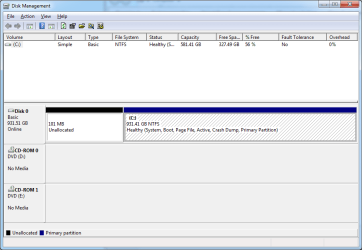
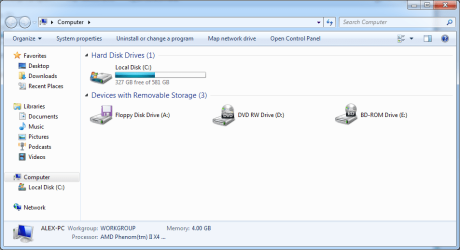
Well now I am coming here for help. I have no clue what to do. It shows my hdd as only having 581gb in My Computer but in Disk Management it knows it has 931gb. It does not, however, show the other partition. I have attached pictures in case you all are curious. I would really appreciate the help.
1.png 2.png
 

My Computer My Computer

At a glance

Windows 7 Ultimate x64AMD Phenom II Black Edition @ 3.4GHz4GB DDR3 (2x2GB) Patriot Memory @ 1333MHzAMD Radeon HD 6850
OS
Windows 7 Ultimate x64
CPU
AMD Phenom II Black Edition @ 3.4GHz
Motherboard
Gigabyte 790XTA-UD4
Memory
4GB DDR3 (2x2GB) Patriot Memory @ 1333MHz
Graphics Card(s)
AMD Radeon HD 6850
Monitor(s) Displays
AOC 23" LCD
Hard Drives
Samsung Spinpoint F3 1 TB with 32MB Cache
PSU
XPower 1000w
Case
NZXT M59
Hello MajorHarrison72

Check your HDD for errors. By doing these steps:
Open computer right click on your drive, select properties, click the Tools tab, and then, under Error-checking, click Check Now.
 

My Computer My Computer

At a glance

Windows 7 Ultimate SP1 x64Intel Core I5-3570K16GB Corsair Vengeance DDR3 1600 MHzEvga Geforce GTX 660
Computer type
PC/Desktop
Computer Manufacturer/Model Number
Custom
OS
Windows 7 Ultimate SP1 x64
CPU
Intel Core I5-3570K
Motherboard
Gigabyte Z77-D3H
Memory
16GB Corsair Vengeance DDR3 1600 MHz
Graphics Card(s)
Evga Geforce GTX 660
Sound Card
Integrated
Monitor(s) Displays
HP 2009m
Screen Resolution
1600x900
Hard Drives
2 Internal 500 GB
1 External 3TB
1 120GB SSD (OS)
PSU
750 Watt
Case
Thermaltake VM600M1W2Z Dokker Tower Case
Keyboard
Razer Deathstalker Ultimate
Mouse
Roccat Kova+
Antivirus
Kaspersky Antivirus 2013
Browser
Mozilla Firefox
As windows uses the binary multiples, 1TB Disks report the capacity of 931 GB, its normal. But The 931 GB in disk management is showing as 581 GB in explorer that's odd.

If the steps suggested by N0b0dy cannot recover the disk, you may try for a fresh formatting .
 

My Computer My Computer

At a glance

Microsoft Windows 10 Pro Insider Preview 64-bitIntel(R) Core(TM) i3-4130 CPU @ 3.40GHzCorsair Vengence 4GB x2 (8.00GB Dual-Channel ...2047MB GeForce GTS 450 (ZOTAC International)
Computer type
PC/Desktop
Computer Manufacturer/Model Number
Self Assembled
OS
Microsoft Windows 10 Pro Insider Preview 64-bit
CPU
Intel(R) Core(TM) i3-4130 CPU @ 3.40GHz
Motherboard
Gigabyte Technology Co., Ltd. B85M-D3H
Memory
Corsair Vengence 4GB x2 (8.00GB Dual-Channel DDR3 @ 798MHz)
Graphics Card(s)
2047MB GeForce GTS 450 (ZOTAC International)
Sound Card
Onboard (Realtek High Definition Audio)
Monitor(s) Displays
LG Flatron E2040T
Screen Resolution
1600x900
Hard Drives
Western Digital 1 TB
Seagate 500 GB
PSU
Corsair VS550
Case
Cooler Master K380
Cooling
Cooler Master Seidon 120V Plus
Keyboard
Logitech MK260r
Mouse
Logitech MK260r
Internet Speed
PMPL Broadband
Antivirus
Windows Defender + MBAM
Browser
Firefox
Other Info
Dell Studio 15" Laptop
Should I check "Scan for and attempt recovery of bad sectors" too? It was unchecked when I ran it and I was unsure if it should be.
 

My Computer My Computer

At a glance

Windows 7 Ultimate x64AMD Phenom II Black Edition @ 3.4GHz4GB DDR3 (2x2GB) Patriot Memory @ 1333MHzAMD Radeon HD 6850
OS
Windows 7 Ultimate x64
CPU
AMD Phenom II Black Edition @ 3.4GHz
Motherboard
Gigabyte 790XTA-UD4
Memory
4GB DDR3 (2x2GB) Patriot Memory @ 1333MHz
Graphics Card(s)
AMD Radeon HD 6850
Monitor(s) Displays
AOC 23" LCD
Hard Drives
Samsung Spinpoint F3 1 TB with 32MB Cache
PSU
XPower 1000w
Case
NZXT M59
Should I check "Scan for and attempt recovery of bad sectors" too? It was unchecked when I ran it and I was unsure if it should be.

I can't tell you if you should, but I do. But, if you have already run a scan for errors and it found none, there is no reason.
 

My Computers My Computers

  • At a glance

    Windows 11 ProRyzen 9 5900X32GB G Skill DDR4-3600EVGA RTX 3080 FTW 3 Ultra
    Computer type
    PC/Desktop
    Computer Manufacturer/Model Number
    ALWAYS UNDER CONSTRUCTION
    OS
    Windows 11 Pro
    CPU
    Ryzen 9 5900X
    Motherboard
    Asus X570 Crosshair Viii Hero
    Memory
    32GB G Skill DDR4-3600
    Graphics Card(s)
    EVGA RTX 3080 FTW 3 Ultra
    Sound Card
    On Board/Sennheiser PC37X Headset
    Monitor(s) Displays
    3 X Asus 27"
    Screen Resolution
    2560x1440
    Hard Drives
    2 X 1 TB NVME drives
    PSU
    EVGA 850
    Case
    Phanteks Eclipse P400A
    Cooling
    EVGA 280 AIO
    Keyboard
    Logitech G510s/ Logitech G13
    Mouse
    Logitech G502
    Internet Speed
    24/1
    Antivirus
    ESET/MBAM Pro/SAS Pro
    Browser
    Chrome/ Firefox/ Edge
  • At a glance

    Windows 11 ProIntel Ultra 9 288V32 GB LPDDR5X 8533
    Computer type
    Laptop
    System Manufacturer/Model Number
    Dell 16 Plus
    OS
    Windows 11 Pro
    CPU
    Intel Ultra 9 288V
    Memory
    32 GB LPDDR5X 8533
    Monitor(s) Displays
    16" Mini-LED HDR600 Touch 90 Hz
    Screen Resolution
    2560X1600
    Hard Drives
    1 TB NVME
Back
Top