

You are using an out of date browser. It may not display this or other websites correctly.
You should upgrade or use an alternative browser.
You should upgrade or use an alternative browser.
Partition Wizard : New Tutorial
- Thread starter Bare Foot Kid
- Start date

Many a slip twixtthe cup and the lip, the finger and the keyboard! :roflmao:
:roflmao::roflmao:
Oopps, hate it when that happens

My Computer
- Computer type
- PC/Desktop
- Computer Manufacturer/Model Number
- 76~2.0
- OS
- Windows 7 Ult x64 - SP1/ Windows 8 Pro x64
- CPU
- Intel Core i5-3570K 4.6GHz
- Motherboard
- Gigabyte GA-Z77X UD3H, f18
- Memory
- 8GB (2X4GB) DDR3 1600 Corsair Vengeance CL8 1.5v
- Graphics Card(s)
- Sapphire HD 7770 Vapor-X OC 1GB DDR5
- Sound Card
- Onboard VIA VT2021
- Monitor(s) Displays
- 22" LCD Dell
- Screen Resolution
- 1680x1050
- Hard Drives
- Samsung 840Pro 128GB SSD,
Seagate Barracuda 500GB SATA2 7200rpm 32MB cache, Seagate Barracuda 1TB SATA2 7200rpm 32MB cache,
- PSU
- Corsair HX650W
- Case
- Cooler Master Storm Scout
- Cooling
- Corsair H80 2x12cm Noctua NF P12 , 2x14cm case fans
- Keyboard
- Logitech Wave
- Mouse
- CM Sentinel
- Internet Speed
- Dismal
- Antivirus
- Avast
- Browser
- Opera Next
- Other Info
- Haswell laptop: HP Envy 17t-j, i7-4700MQ, GeForce 740M 2GB DDR3, 17.3" Full HD 1920x1080, 16GB RAM, Samsung 840 Pro 128GB, 1TB Hitachi 7200 HDD,
Desktop: eSATA ports,
External eSATA Seagate 500GB SATA2 7200rpm,
External WD USB 500GB

Here's a new one that was a lot of work, I hope it's a help to many.
Partition Wizard : Use the Bootable CD
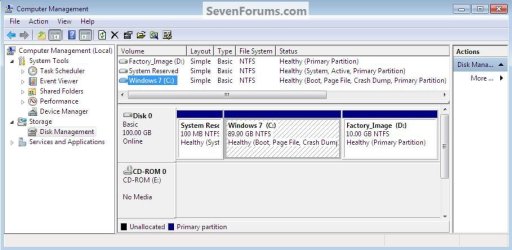
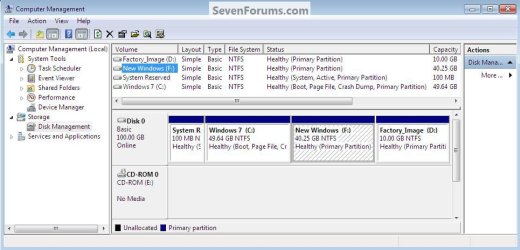
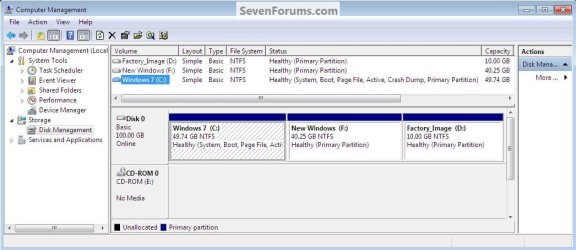
With the questions that came about in this thread here and then here it caused me to consider the usefulness of this tutorial in its present form, so I have decided to totally re-work it from the ground up to include instructions on creating a fourth Windows primary partition, I'm going to do away with the section on "Wipe" and replace about 90% of the current snips with new ones, I have all the needed snips already created and I will make the changes this weekend; the new additions will show how to go from the state in this first snip to the third, though I doubt these snips will be included in the tutorial.
My Computer
- Computer Manufacturer/Model Number
- * BFK Customs *
- OS
- W 7 64-bit Ultimate
- CPU
- Intel Q9550 Yorkfield
- Motherboard
- ASUS P5Q Pro
- Memory
- 8GB Dominator 8500C5D
- Graphics Card(s)
- ATI : XFX 5870
- Sound Card
- Realtek HD Audio 7-1
- Monitor(s) Displays
- 1x 47" LCD HDMI & 3x 26" LCD HDMI
- Screen Resolution
- 1920x1080P & 1920x1200
- Hard Drives
- 1x 80GB Intel X25-M G2 SSD : 1x 500GB & 1x 640GB WD Caviar Black(s)
- PSU
- Corsair 620HX
- Case
- Cooler Master RC-690
- Cooling
- Tuniq Tower 120, 2x 140mm and 3x 120mm case fans
- Keyboard
- Microsoft 500
- Mouse
- Razer Diamondback 3G
- Internet Speed
- 14 Mb/s
- Other Info
- 1x Koutech 3Gb/s SATA HDD Hot Swap Rack

BFK, it looks like you are doing a lot of work. Did you ever consider a video in lieu of the static pictures. I found videos very practical for showing transitions from one page to the next.
My Computer
- Computer Manufacturer/Model Number
- HP, Dell, Gateway, Toshiba - 4 laptops and 2 desktops
- OS
- Vista, Windows7, Mint Mate, Zorin, Windows 8
- CPU
- from 1.6GHz Duo to i7
- Monitor(s) Displays
- 2x HP w2207
- Hard Drives
- 5x HDD, 7x SSD, 12x Externals
- Keyboard
- with trackball - no mices
- Mouse
- Trackball mice
- Internet Speed
- DSL 6000
BFK, it looks like you are doing a lot of work. Did you ever consider a video in lieu of the static pictures. I found videos very practical for showing transitions from one page to the next.
Hello Wolfgang.
That is something to consider though I have no video equipment to do it with and I'm sure I don't have as pleasing a voice as some; besides all the work is done, I just have to put it together now.
Thank you for the suggestion though.
My Computer
- Computer Manufacturer/Model Number
- * BFK Customs *
- OS
- W 7 64-bit Ultimate
- CPU
- Intel Q9550 Yorkfield
- Motherboard
- ASUS P5Q Pro
- Memory
- 8GB Dominator 8500C5D
- Graphics Card(s)
- ATI : XFX 5870
- Sound Card
- Realtek HD Audio 7-1
- Monitor(s) Displays
- 1x 47" LCD HDMI & 3x 26" LCD HDMI
- Screen Resolution
- 1920x1080P & 1920x1200
- Hard Drives
- 1x 80GB Intel X25-M G2 SSD : 1x 500GB & 1x 640GB WD Caviar Black(s)
- PSU
- Corsair 620HX
- Case
- Cooler Master RC-690
- Cooling
- Tuniq Tower 120, 2x 140mm and 3x 120mm case fans
- Keyboard
- Microsoft 500
- Mouse
- Razer Diamondback 3G
- Internet Speed
- 14 Mb/s
- Other Info
- 1x Koutech 3Gb/s SATA HDD Hot Swap Rack
You do not need any equipment - just a little video capture program and maybe a lossless editing program. If you ever want to venture into it, send me a PM and I will tell you how I do it. Here is a little example of a class tutorial which I teach at my computer club. Chapter3 RAM and CPU on VimeoBFK, it looks like you are doing a lot of work. Did you ever consider a video in lieu of the static pictures. I found videos very practical for showing transitions from one page to the next.
Hello Wolfgang.
That is something to consider though I have no video equipment to do it with and I'm sure I don't have as pleasing a voice as some; besides all the work is done, I just have to put it together now.
Thank you for the suggestion though.
My Computer
- Computer Manufacturer/Model Number
- HP, Dell, Gateway, Toshiba - 4 laptops and 2 desktops
- OS
- Vista, Windows7, Mint Mate, Zorin, Windows 8
- CPU
- from 1.6GHz Duo to i7
- Monitor(s) Displays
- 2x HP w2207
- Hard Drives
- 5x HDD, 7x SSD, 12x Externals
- Keyboard
- with trackball - no mices
- Mouse
- Trackball mice
- Internet Speed
- DSL 6000
You do not need any equipment - just a little video capture program and maybe a lossless editing program. If you ever want to venture into it, send me a PM and I will tell you how I do it. Here is a little example of a class tutorial which I teach at my computer club. Chapter3 RAM and CPU on VimeoBFK, it looks like you are doing a lot of work. Did you ever consider a video in lieu of the static pictures. I found videos very practical for showing transitions from one page to the next.
Hello Wolfgang.
That is something to consider though I have no video equipment to do it with and I'm sure I don't have as pleasing a voice as some; besides all the work is done, I just have to put it together now.
Thank you for the suggestion though.
Thanks mate, I just may take you up on that before too long.
My Computer
- Computer Manufacturer/Model Number
- * BFK Customs *
- OS
- W 7 64-bit Ultimate
- CPU
- Intel Q9550 Yorkfield
- Motherboard
- ASUS P5Q Pro
- Memory
- 8GB Dominator 8500C5D
- Graphics Card(s)
- ATI : XFX 5870
- Sound Card
- Realtek HD Audio 7-1
- Monitor(s) Displays
- 1x 47" LCD HDMI & 3x 26" LCD HDMI
- Screen Resolution
- 1920x1080P & 1920x1200
- Hard Drives
- 1x 80GB Intel X25-M G2 SSD : 1x 500GB & 1x 640GB WD Caviar Black(s)
- PSU
- Corsair 620HX
- Case
- Cooler Master RC-690
- Cooling
- Tuniq Tower 120, 2x 140mm and 3x 120mm case fans
- Keyboard
- Microsoft 500
- Mouse
- Razer Diamondback 3G
- Internet Speed
- 14 Mb/s
- Other Info
- 1x Koutech 3Gb/s SATA HDD Hot Swap Rack
Any time - just holler.Thanks mate, I just may take you up on that before too long.
My Computer
- Computer Manufacturer/Model Number
- HP, Dell, Gateway, Toshiba - 4 laptops and 2 desktops
- OS
- Vista, Windows7, Mint Mate, Zorin, Windows 8
- CPU
- from 1.6GHz Duo to i7
- Monitor(s) Displays
- 2x HP w2207
- Hard Drives
- 5x HDD, 7x SSD, 12x Externals
- Keyboard
- with trackball - no mices
- Mouse
- Trackball mice
- Internet Speed
- DSL 6000
Here it is I sure wish everyone would have a look and let me know if there are any obvious boo-boos or typos.
Thank you!
Partition Wizard : Use the Bootable CD_v2.0
.
Thank you!
Partition Wizard : Use the Bootable CD_v2.0
.
Last edited:
My Computer
- Computer Manufacturer/Model Number
- * BFK Customs *
- OS
- W 7 64-bit Ultimate
- CPU
- Intel Q9550 Yorkfield
- Motherboard
- ASUS P5Q Pro
- Memory
- 8GB Dominator 8500C5D
- Graphics Card(s)
- ATI : XFX 5870
- Sound Card
- Realtek HD Audio 7-1
- Monitor(s) Displays
- 1x 47" LCD HDMI & 3x 26" LCD HDMI
- Screen Resolution
- 1920x1080P & 1920x1200
- Hard Drives
- 1x 80GB Intel X25-M G2 SSD : 1x 500GB & 1x 640GB WD Caviar Black(s)
- PSU
- Corsair 620HX
- Case
- Cooler Master RC-690
- Cooling
- Tuniq Tower 120, 2x 140mm and 3x 120mm case fans
- Keyboard
- Microsoft 500
- Mouse
- Razer Diamondback 3G
- Internet Speed
- 14 Mb/s
- Other Info
- 1x Koutech 3Gb/s SATA HDD Hot Swap Rack
Here it is I sure wish everyone would have a look and let me know if there are any obvious boo-boos or typos.
Thank you!
Partition Wizard : Use the Bootable CD_v2.0
.
Just though to bring this around one last time for those that may not have seen it yet.
My Computer
- Computer Manufacturer/Model Number
- * BFK Customs *
- OS
- W 7 64-bit Ultimate
- CPU
- Intel Q9550 Yorkfield
- Motherboard
- ASUS P5Q Pro
- Memory
- 8GB Dominator 8500C5D
- Graphics Card(s)
- ATI : XFX 5870
- Sound Card
- Realtek HD Audio 7-1
- Monitor(s) Displays
- 1x 47" LCD HDMI & 3x 26" LCD HDMI
- Screen Resolution
- 1920x1080P & 1920x1200
- Hard Drives
- 1x 80GB Intel X25-M G2 SSD : 1x 500GB & 1x 640GB WD Caviar Black(s)
- PSU
- Corsair 620HX
- Case
- Cooler Master RC-690
- Cooling
- Tuniq Tower 120, 2x 140mm and 3x 120mm case fans
- Keyboard
- Microsoft 500
- Mouse
- Razer Diamondback 3G
- Internet Speed
- 14 Mb/s
- Other Info
- 1x Koutech 3Gb/s SATA HDD Hot Swap Rack
Hello everyone.
It came to my attention over the week-end that the font color was incorrect in some of my tutorials and that made them un-viewable in the black skins, I believe they all have been corrected now, but if anyone notices any issues viewing (or not being able to view) any of my tutorials please PM me with a link of the tut in question and I will correct it.
Thank you all very much!
It came to my attention over the week-end that the font color was incorrect in some of my tutorials and that made them un-viewable in the black skins, I believe they all have been corrected now, but if anyone notices any issues viewing (or not being able to view) any of my tutorials please PM me with a link of the tut in question and I will correct it.
Thank you all very much!
My Computer
- Computer Manufacturer/Model Number
- * BFK Customs *
- OS
- W 7 64-bit Ultimate
- CPU
- Intel Q9550 Yorkfield
- Motherboard
- ASUS P5Q Pro
- Memory
- 8GB Dominator 8500C5D
- Graphics Card(s)
- ATI : XFX 5870
- Sound Card
- Realtek HD Audio 7-1
- Monitor(s) Displays
- 1x 47" LCD HDMI & 3x 26" LCD HDMI
- Screen Resolution
- 1920x1080P & 1920x1200
- Hard Drives
- 1x 80GB Intel X25-M G2 SSD : 1x 500GB & 1x 640GB WD Caviar Black(s)
- PSU
- Corsair 620HX
- Case
- Cooler Master RC-690
- Cooling
- Tuniq Tower 120, 2x 140mm and 3x 120mm case fans
- Keyboard
- Microsoft 500
- Mouse
- Razer Diamondback 3G
- Internet Speed
- 14 Mb/s
- Other Info
- 1x Koutech 3Gb/s SATA HDD Hot Swap Rack
excellent tut as usual BFK , would it be feasible to add that to a usb stick ?
You can have a look at a couple of methods to do this on the RAM - Test with Memtest86+ Tutorial.
Post #12 which is here.
There are a couple of apps that can easily do this, I used the Grub method to add several apps to my USB memory stick, including Partition Wizard.
Just add the bootable, CD/DVD or USB memory stick, ISO file to the root of the USB memory stick and do a easy edit to the menu file and it will come up as an option when the USB stick is booted.
You can add as many apps (must be in stand alone ISO format) to the memory stick as you have space for.
Let us know if you have any questions.
BFK, no problems viewing for me.
My Computer
- Computer type
- PC/Desktop
- Computer Manufacturer/Model Number
- 76~2.0
- OS
- Windows 7 Ult x64 - SP1/ Windows 8 Pro x64
- CPU
- Intel Core i5-3570K 4.6GHz
- Motherboard
- Gigabyte GA-Z77X UD3H, f18
- Memory
- 8GB (2X4GB) DDR3 1600 Corsair Vengeance CL8 1.5v
- Graphics Card(s)
- Sapphire HD 7770 Vapor-X OC 1GB DDR5
- Sound Card
- Onboard VIA VT2021
- Monitor(s) Displays
- 22" LCD Dell
- Screen Resolution
- 1680x1050
- Hard Drives
- Samsung 840Pro 128GB SSD,
Seagate Barracuda 500GB SATA2 7200rpm 32MB cache, Seagate Barracuda 1TB SATA2 7200rpm 32MB cache,
- PSU
- Corsair HX650W
- Case
- Cooler Master Storm Scout
- Cooling
- Corsair H80 2x12cm Noctua NF P12 , 2x14cm case fans
- Keyboard
- Logitech Wave
- Mouse
- CM Sentinel
- Internet Speed
- Dismal
- Antivirus
- Avast
- Browser
- Opera Next
- Other Info
- Haswell laptop: HP Envy 17t-j, i7-4700MQ, GeForce 740M 2GB DDR3, 17.3" Full HD 1920x1080, 16GB RAM, Samsung 840 Pro 128GB, 1TB Hitachi 7200 HDD,
Desktop: eSATA ports,
External eSATA Seagate 500GB SATA2 7200rpm,
External WD USB 500GB
Thanks Dave!
My Computer
- Computer Manufacturer/Model Number
- * BFK Customs *
- OS
- W 7 64-bit Ultimate
- CPU
- Intel Q9550 Yorkfield
- Motherboard
- ASUS P5Q Pro
- Memory
- 8GB Dominator 8500C5D
- Graphics Card(s)
- ATI : XFX 5870
- Sound Card
- Realtek HD Audio 7-1
- Monitor(s) Displays
- 1x 47" LCD HDMI & 3x 26" LCD HDMI
- Screen Resolution
- 1920x1080P & 1920x1200
- Hard Drives
- 1x 80GB Intel X25-M G2 SSD : 1x 500GB & 1x 640GB WD Caviar Black(s)
- PSU
- Corsair 620HX
- Case
- Cooler Master RC-690
- Cooling
- Tuniq Tower 120, 2x 140mm and 3x 120mm case fans
- Keyboard
- Microsoft 500
- Mouse
- Razer Diamondback 3G
- Internet Speed
- 14 Mb/s
- Other Info
- 1x Koutech 3Gb/s SATA HDD Hot Swap Rack
As always, your welcome Ted
My Computer
- Computer type
- PC/Desktop
- Computer Manufacturer/Model Number
- 76~2.0
- OS
- Windows 7 Ult x64 - SP1/ Windows 8 Pro x64
- CPU
- Intel Core i5-3570K 4.6GHz
- Motherboard
- Gigabyte GA-Z77X UD3H, f18
- Memory
- 8GB (2X4GB) DDR3 1600 Corsair Vengeance CL8 1.5v
- Graphics Card(s)
- Sapphire HD 7770 Vapor-X OC 1GB DDR5
- Sound Card
- Onboard VIA VT2021
- Monitor(s) Displays
- 22" LCD Dell
- Screen Resolution
- 1680x1050
- Hard Drives
- Samsung 840Pro 128GB SSD,
Seagate Barracuda 500GB SATA2 7200rpm 32MB cache, Seagate Barracuda 1TB SATA2 7200rpm 32MB cache,
- PSU
- Corsair HX650W
- Case
- Cooler Master Storm Scout
- Cooling
- Corsair H80 2x12cm Noctua NF P12 , 2x14cm case fans
- Keyboard
- Logitech Wave
- Mouse
- CM Sentinel
- Internet Speed
- Dismal
- Antivirus
- Avast
- Browser
- Opera Next
- Other Info
- Haswell laptop: HP Envy 17t-j, i7-4700MQ, GeForce 740M 2GB DDR3, 17.3" Full HD 1920x1080, 16GB RAM, Samsung 840 Pro 128GB, 1TB Hitachi 7200 HDD,
Desktop: eSATA ports,
External eSATA Seagate 500GB SATA2 7200rpm,
External WD USB 500GB

Looks good Ted Excellent Tutorial as usual
*shameless plug* seems like this would be a good thing to use with my tutorial here: http://www.sevenforums.com/tutorials/70559-boot-iso-without-burning-disk.html
Excellent Tutorial as usual *shameless plug* seems like this would be a good thing to use with my tutorial here: http://www.sevenforums.com/tutorials/70559-boot-iso-without-burning-disk.html
My Computer
- Computer type
- PC/Desktop
- Computer Manufacturer/Model Number
- Medion Erazer (note to self: insert model number) - with custom additions
- OS
- Windows 10 Pro x64
- CPU
- Intel Core i5 7400 @ 3.00GHz
- Motherboard
- OEM supllied with PC
- Memory
- 8GB 2133Mhz DDR4 (OEM supplied)
- Graphics Card(s)
- Gygabyte Windforce GTX 1050Ti (Factory Overclocked)
- Sound Card
- Realtek
- Monitor(s) Displays
- Acer Al1980 + HKC
- Screen Resolution
- 1360*768(HKC) / 1280*1024(Acer)
- Hard Drives
- 1TB Toshiba
1TB WD Caviar Green
120GB Samsung Evo 840
- PSU
- OEM supplied (no power rating on case)
- Case
- OEM Supplied
- Cooling
- Stock
- Keyboard
- Logitech Wireless
- Mouse
- Logitect Wireless
- Internet Speed
- 40Mb/s Down 10Mb/s Up
- Antivirus
- Defender
- Browser
- Firefox
As I got tired of explaining it to people, I've added back the info on doing a wipe to a single partition as Option Three.
Partition Wizard : Use the Bootable CD_V2.1
Partition Wizard : Use the Bootable CD_V2.1
My Computer
- Computer Manufacturer/Model Number
- * BFK Customs *
- OS
- W 7 64-bit Ultimate
- CPU
- Intel Q9550 Yorkfield
- Motherboard
- ASUS P5Q Pro
- Memory
- 8GB Dominator 8500C5D
- Graphics Card(s)
- ATI : XFX 5870
- Sound Card
- Realtek HD Audio 7-1
- Monitor(s) Displays
- 1x 47" LCD HDMI & 3x 26" LCD HDMI
- Screen Resolution
- 1920x1080P & 1920x1200
- Hard Drives
- 1x 80GB Intel X25-M G2 SSD : 1x 500GB & 1x 640GB WD Caviar Black(s)
- PSU
- Corsair 620HX
- Case
- Cooler Master RC-690
- Cooling
- Tuniq Tower 120, 2x 140mm and 3x 120mm case fans
- Keyboard
- Microsoft 500
- Mouse
- Razer Diamondback 3G
- Internet Speed
- 14 Mb/s
- Other Info
- 1x Koutech 3Gb/s SATA HDD Hot Swap Rack

Hi BFK. I just read this thread and I'm now looking at your tutorial and I find it clear and understandable. You put a lot of work into this and it shows.
Thanks very much, John
Thanks very much, John
My Computer
- Computer Manufacturer/Model Number
- The Monolith. 3.1
- OS
- Windows 7 Home Premium 64 bit
- CPU
- i7 [email protected]
- Motherboard
- Gigabyte Z77-D3H
- Memory
- 2x4GB Corsair Vegeance DDR3
- Graphics Card(s)
- XFX GTX 260 Black Edition
- Sound Card
- none-through large stereo hi fi
- Monitor(s) Displays
- Croosover 27MDP LED IPS Dell 2408 WFP
- Screen Resolution
- 2560x1440 1920x1200
- Hard Drives
- 1x Samsung 840Pro 128GB SSD
1x Samsung Spinpoint F1 1TB
- PSU
- Corsair AX 850 Watt
- Case
- Cooler Master ACTS 840
- Cooling
- Be Quiet! Dark Rock Pro
- Keyboard
- Enermax Aurora
- Mouse
- Logitech Ballmouse
- Internet Speed
- 20MBPS
Hello John, thank you for the support, it's appreciated.
My Computer
- Computer Manufacturer/Model Number
- * BFK Customs *
- OS
- W 7 64-bit Ultimate
- CPU
- Intel Q9550 Yorkfield
- Motherboard
- ASUS P5Q Pro
- Memory
- 8GB Dominator 8500C5D
- Graphics Card(s)
- ATI : XFX 5870
- Sound Card
- Realtek HD Audio 7-1
- Monitor(s) Displays
- 1x 47" LCD HDMI & 3x 26" LCD HDMI
- Screen Resolution
- 1920x1080P & 1920x1200
- Hard Drives
- 1x 80GB Intel X25-M G2 SSD : 1x 500GB & 1x 640GB WD Caviar Black(s)
- PSU
- Corsair 620HX
- Case
- Cooler Master RC-690
- Cooling
- Tuniq Tower 120, 2x 140mm and 3x 120mm case fans
- Keyboard
- Microsoft 500
- Mouse
- Razer Diamondback 3G
- Internet Speed
- 14 Mb/s
- Other Info
- 1x Koutech 3Gb/s SATA HDD Hot Swap Rack
Similar threads
- Replies
- 1
- Views
- 676
- Replies
- 9
- Views
- 3K


- Replies
- 3
- Views
- 3K