Partitioning Error: Basic disk will be converted to dynamic disks

Thank you so much...for all the help...

I partitioned 253 gb because all my data was in C: drive and if anything happens or i need to format the disk then all my data would have lost...so I thought lets have the data in separate partition and windows in separate....
 

My Computer My Computer

OS
Windows 7 Home Basic 64 bit OS
Post a shot of disk management so we can see your results.
 

My Computer My Computer

Computer type
PC/Desktop
Computer Manufacturer/Model Number
Skylake Special #666
OS
Windows 10 Pro x64
CPU
Intel Core i7 6700K
Motherboard
Asus Sabertooth Z170 Mark 1
Memory
GSkill TridentZ RGB 16GB 3600 16-16-16-36
Graphics Card(s)
EVGA GTX 980 Ti SC x2
Sound Card
Realtek High Definition
Monitor(s) Displays
AOC G2460PG
Screen Resolution
1920 x 1080 144Hz
Hard Drives
Samsung 860 Pro 256GB, Seagate Barracuda 4TB x2
PSU
EVGA 1000 P2, EVGA White Custom Braided Cables
Case
Corsair Vengeance C70 Gunmetal Black
Cooling
Corsair H100i v2, Corsair ML120 x2, Thermal Grizzly Kryonaut
Keyboard
Logitech G910 Orion Spectrum
Mouse
Logitech G700s
Internet Speed
Verizon Fios Quantum Gateway 75/75
Antivirus
Windows Defender, Malwarebytes Free 3.8.3
Browser
Chrome
Other Info
Corsair SP120 x4, LG Blu-ray Drive, Durabrand HT-395 100 Watt Dolby Digital Amp, Corsair H2100 Wireless 7.1 Headset
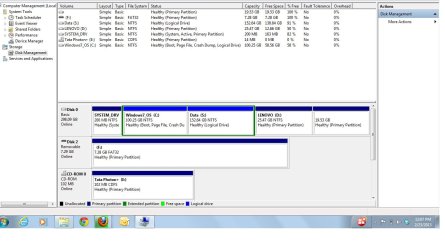
My final disk management attached...

Disk Management.jpg
 

My Computer My Computer

OS
Windows 7 Home Basic 64 bit OS
Good Job :D
 

My Computer My Computer

Computer type
PC/Desktop
Computer Manufacturer/Model Number
Skylake Special #666
OS
Windows 10 Pro x64
CPU
Intel Core i7 6700K
Motherboard
Asus Sabertooth Z170 Mark 1
Memory
GSkill TridentZ RGB 16GB 3600 16-16-16-36
Graphics Card(s)
EVGA GTX 980 Ti SC x2
Sound Card
Realtek High Definition
Monitor(s) Displays
AOC G2460PG
Screen Resolution
1920 x 1080 144Hz
Hard Drives
Samsung 860 Pro 256GB, Seagate Barracuda 4TB x2
PSU
EVGA 1000 P2, EVGA White Custom Braided Cables
Case
Corsair Vengeance C70 Gunmetal Black
Cooling
Corsair H100i v2, Corsair ML120 x2, Thermal Grizzly Kryonaut
Keyboard
Logitech G910 Orion Spectrum
Mouse
Logitech G700s
Internet Speed
Verizon Fios Quantum Gateway 75/75
Antivirus
Windows Defender, Malwarebytes Free 3.8.3
Browser
Chrome
Other Info
Corsair SP120 x4, LG Blu-ray Drive, Durabrand HT-395 100 Watt Dolby Digital Amp, Corsair H2100 Wireless 7.1 Headset
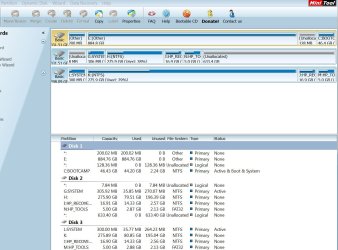
In Partition Wizard, rightclick to explore the 19.58gb partition. If it shows no content, then go to Control Panel>Folder Options to unhide System and Hidden files, try again. Post back a screenshot of content.
 
If you try to, again, it will turn your disk to dynamic, you now have to leave them as logical.
why is that, why can't you covert back to primary?

No, why would you do that? You just converted them to Logical.

explain why you would *not* want to covert back to what they were originally, why not convert back to primary? (link to discussion of primary vs logical if too OT, tia).

Now I just created a clone to an external drive I'm going to try to use to recovery some deleted files from my laptop drive (currently in a external drive caddy), but I also wanted to have 2 copies...just in case the recovery software screws up on the cloned drive copy....so I want to copy a drive image into the unallocated space left over from the cloning (or suppose could create another clone? using different software than current clone, just to have another copy around and place it into the unallocated space/volume>>>how would I do that? as cloning software seems to want to erase/format the entire physical drive in to one volume).

Getting that same MBR message when trying to create a partition/name a volume for that unallocated drive space :(


advantages/disadvantages to having a drive partition logical vs primary???
 

Attachments

  • Partition primary-logical convert.JPG
    Partition primary-logical convert.JPG
    161.7 KB · Views: 0
Last edited:

My Computer My Computer

Computer type
PC/Desktop
Computer Manufacturer/Model Number
Apple iMac late 2009
OS
home premium 64bit
CPU
i7 quad 2.8Ghz
Memory
12 GB
Graphics Card(s)
?
Browser
FireFox
General rule of thumb for safety's sake is Logical for Data and Primary for OS's. This avoids data partitions getting marked Active to steal the System boot files from the OS when repairs or reinstall is run.

You can have four Primary or three Primary and one Logical extended which can house as many adjacent Logical partitions as you want. Any attempt to force another Primary will trigger Dynamic which is not meant to be used except to span a partition across multiple HD's.

I'd use Partition Wizard to manage Logicals since it is more flexible.
 
Why ? You`d have to ask Bill gates to answer that. As Greg stated, You CAN HAVE 4 primary partitions on a hard drive with windows 7, an attempt to create more will turn the the disk to Dynamic.

Google it.
 

My Computer My Computer

Computer type
PC/Desktop
Computer Manufacturer/Model Number
Skylake Special #666
OS
Windows 10 Pro x64
CPU
Intel Core i7 6700K
Motherboard
Asus Sabertooth Z170 Mark 1
Memory
GSkill TridentZ RGB 16GB 3600 16-16-16-36
Graphics Card(s)
EVGA GTX 980 Ti SC x2
Sound Card
Realtek High Definition
Monitor(s) Displays
AOC G2460PG
Screen Resolution
1920 x 1080 144Hz
Hard Drives
Samsung 860 Pro 256GB, Seagate Barracuda 4TB x2
PSU
EVGA 1000 P2, EVGA White Custom Braided Cables
Case
Corsair Vengeance C70 Gunmetal Black
Cooling
Corsair H100i v2, Corsair ML120 x2, Thermal Grizzly Kryonaut
Keyboard
Logitech G910 Orion Spectrum
Mouse
Logitech G700s
Internet Speed
Verizon Fios Quantum Gateway 75/75
Antivirus
Windows Defender, Malwarebytes Free 3.8.3
Browser
Chrome
Other Info
Corsair SP120 x4, LG Blu-ray Drive, Durabrand HT-395 100 Watt Dolby Digital Amp, Corsair H2100 Wireless 7.1 Headset
Back
Top