This is essentially the identical request as
the other thread in this forum which coincidentally has the identical subject name as this one!
The goal is to make a new partition out of the currently unallocated space between the C-primary partition and the D-primary Recovery partition. I don't know if the C-primary partition was "shrunk" from its original size thus producing this unallocated space, but likely it was.
Anyway, as has been pointed out the problem is simply that a maximum of FOUR primary partitions is allowed on a basic hard drive. Given the existing structure shown, all four primary partitions are thus already allocated. So a fifth primary partition is not possible.
However as has been explained, it is possible to solve the request by converting one of the existing "primary" partitions into "logical", which really means creating a new "extended partition" around it and imbedding the partition being converted inside of it. It now is called "logical" (nothing really changed about it, only its technical title given its location inside of the surrounding "extended partition"). The newly created "extended partition" is now that fourth primary partition on the drive, and ANY NUMBER OF LOGICAL PARTITIONS CAN BE SUB-DEFINED INSIDE OF IT.
Furthermore, the "extended partition" can be enlarged (by Partition Wizard) to also include the currently unallocated space between C and D, thus incorporating that currently unallocated space as instead being unallocated space inside of the "extended partition". Thus, a new "logical" partition can then be created in this unallocated space which has now been "annexed" into the "extended" partition. Again, ANY NUMBER OF LOGICAL PARTITIONS can be sub-defined inside of a single "extended partition" (which itself is one of the four allowed primary partitions on the drive).
So you'll end up with:
Primary partition P1: 199MB "system reserved" (no drive letter, but Win7 boot manager files here)
Primary partition P2: 142GB - drive letter C (Win7 bootable system)
Primary partition P3: 155GB "extended partition":
new 139GB logical partition L1 (probably drive letter F, unless you change it)
16GB logical partition L2 - drive letter D (no change from current, other than now "logical")
Primary partition P4: 103MB (no drive letter, but HP tools here)
I believe that you can accomplish what you want to accomplish in two easy steps using Partition Wizard.
Here's all you need to do (once you
download Partition Wizard and install it under Win7, and also
download the ISO for standalone boot CD and burn it).
Run Partition Wizard, preferably from standalone CD for this "surgery". But since the C partition is not being affected by what you're doing I believe you can probably just run it from under Win7. No difference in functionality, but the version under Win7 will show you Windows drive letters and the standalone boot CD will not.
Don't forget... if you have some crucial data you are always advised to have an adequate backup of your system, in case something doesn't go quite as planned.
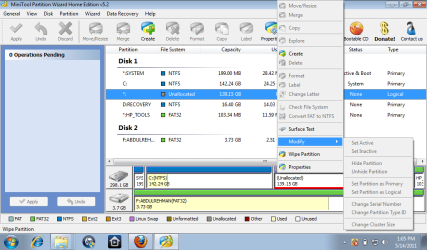
Step #1: right-click on D and convert D from "primary" to "logical".
This is accomplished by creating an "extended partition" around D, including only sufficient room for the DE partition at the moment .
The conversion to "logical" will either (a) take about 8MB away from D to be used as the "prefix" area in front of an "extended partition" and keep the unallocated space to its left exactly the same size, or (b) take 8MB away from the high-end of the unallocated space for the "prefix" of the new "extended partition which will include the converted D exactly the same size in "logical" as it was when "primary".
One way or the other, the conversion of D from "primary" to "logical" will create an "extended partition" just large enough to hold the now "logical" D.
Step #2: right-click on unallocated space and "create partition, type logical".
Partition Wizard will almost certainly recognize that immediately to the right of this space is already an "extended partition", and will surely automatically increase the size of the "extended partition" to the left, to include the unallocated space to its left.
The 8MB "prefix" for the "extended partition" which previously was immediately in front of the "logical" D partition will now be moved by Partition Wizard, to the extreme left of what is at the moment the unallocated space and which has just been "annexed" into the newly enlarged 155GB "extended partition". The remaining unallocated space will thus be added to the total combined new size of the enlarged "extended partition", and from this unallocated space now inside the newly enlarged "extended partition" the newly requested "logical" partition will be created and assigned a drive letter of F.
You can change the assigned letter later to something else (maybe calling it E and calling your CD drive F, or whatever you want to do), if you want.
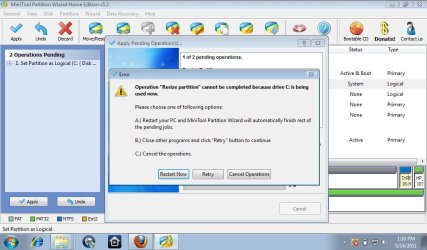
Note that the above 2-step procedure will be queued as "pending operations" (shown in the lower-left corner of the Partition Wizard window). When you are satisfied you've got it set correctly you push the APPLY button to actually make it all really happen.
If you make a mistake in entering something, you can UNDO that operation which will remove it from the "pending operations" list.
As you enter your operations (that get queued), Partition Wizard will re-draw the drive pictures so that they reflect what WILL happen once you push the APPLY button. So although you haven't actually permanently changed anything until you push APPLY, the pictures will appear as if you have already done so. This is very user-friendly and helpful.
Note that Partition Wizard can be used to do all kinds of things (everything that Win7's Diskmgmt can do as well as lots more), including resize partition, move/copy partitions, convert from primary to logical or vice versa (if allowed), etc.



 )
)


