PC randomly doesn't boot after sleep + no POST (no BSOD)

Banderi

New member
Local time
12:25 AM
Messages
18
Note: edited, because I just need help with the POST/sleep issue, not the BSOD.

I'm having a series of problems I'm just losing my head over.

1) First off, I never had a single stability problem while the PC is running, in fact it's quite new and I've been using it without any issues. However, as soon as I put it to sleep there will be a chance that it will simply not wake up next time, regardless of sleep duration, forcing me to turn it off and on again.

2) When this happens, it will take some random attempt at rebooting it because sometimes the POST will just not happen, and I've tried every combination of button press/USB unplugging/power cut. I don't know why power cycling/manually erasing the residual charge doesn't do the trick, but I might be doing it wrong.

After that, once it boots I get everything working as usual as if nothing has ever happened; the PSU voltages seem to be fine, the motherboard/GPU/CPU seem to work correctly, I can play games, watch videos, develop apps, fill 16 gb of RAM no problem...

What is this? A software issue? A hardware issue? The BIOS? A faulty Windows installation? I'm simply losing my head!

My specs are as following:

- Windows 7 Professional SP1 (I have some updates due)
- Corsair CX500M 500 Watt PSU
- Gigabyte 990FXA-UD3
- Zotac GeForce GTX 970
- AMD FX-8350 4.00 GHz
- Corsair Vengeance 16-GB kit RAM
- Cooler Master Hyper 212 EVO
- An old 300 GB Seagate ST1000DM003-1SB10C
- A newer 7200 RPM 1TB Seagate Barracuda ST3320418AS
- An old VGA Acer AL1512 15"
- A newer DVI Samsung S24B420BW 24"
- Various USB devices
 

My Computer My Computer

Computer type
PC/Desktop
OS
Windows 7 x64
Hello Banderi now you mention you tested the PSU rail volts just how did you do that please - software or a hands on multimeter? I have a little method via software that I find rather good but will wait ofr reply.

The other thing is mate have you run some basic tests such as
http://www.sevenforums.com/tutorials/1538-sfc-scannow-command-system-file-checker.html
http://www.sevenforums.com/tutorials/433-disk-check.html < if necessary include the /f and /r in the command line as per Option2 in safe mode
(the /r swich can be omitted if you like but I usually run it.

Do that first up if you haven't already and post back.
 

My Computer My Computer

Computer type
PC/Desktop
Computer Manufacturer/Model Number
Own build (new) Desk1 / Asus ROG Win 7 / Desk2 1st build
OS
Desk1 7 Home Prem / Desk2 10 Pro / Main lap Asus ROG 10 Pro 2 laptop Toshiba 7 Pro Asus P2520 7 & 10
CPU
Desk1 i5 3750K / Laptop i7 GTX 860M / Desk2 i5 2500
Motherboard
Desk1 Asus P877-V / Desk2 Gigabyte H67 UD3H / Laptop ?
Memory
Desk1 8GB (1866) / Desk2 16GB (1333) / Laptop 8Gb DDR3
Graphics Card(s)
Desk 1& 2NVidia GTX 650 & Laptops on board Intel
Sound Card
Desk 1 & 2 -XONAR DG Realtek High Def audio Laptop
Monitor(s) Displays
Desk 1 Benq HD 2450 / Desk2 Philips 24" / Laptop 17.5"
Screen Resolution
1920x1080 D1 & D2 & Laptop 1
Hard Drives
Desk1 Samsung 120GB 830 SSD
Asus ROG 256GB 850 Pro SSD
Desk2 Samsung 840 256 SSD
Toshiba 120GB EVO
PSU
Desk 1 Corsair HX 1050/ Laptop ? / Desk 2 Corsair HX 650
Case
Desk 1 Cooler HAF XM ? Toshiba laptop / Desk2 Coolermaster
Cooling
Fans on all Desk1 -2 Desk2 - all Coolermasters 5 Laptop ?
Keyboard
Desk 1 MS Sidewinder X6 Desk 2 MS Sidewinder X 4
Mouse
Desk 1&2 - Gigabyte MS 900 gamer - laptop - Logitec wireless
Internet Speed
ADSL2+
Other Info
One other Desktop (tester) and spare Toshba laptop both with SSD's
Running Kaspersky 2016 ISS on all machines config'd identically
Logitec audio stereo systems on each machine (x3)
Canon MG5250MFC
Router/modem TP-Link running WPA2SK
Hi, thanks for the response! I have only looked at the voltages shown by HWMonitor, since I do not have a multimeter or other similar instruments at home, though I could get one in case of necessity. Do you know any other method?

Regarding SFC and CHKDSK:
SFC did found some corrupted files and successfully restored them, I browsed through the log but heck if I can understand if it was of any meaning to the issue I'm facing, but could it? I attached the CBS log.
I will run CHKDSK as scheduled once rebooting.
 

My Computer My Computer

Computer type
PC/Desktop
OS
Windows 7 x64
Ok well try this little ditty of mine to see the PSU and any other component info/details \

Using HW Info
PART A:
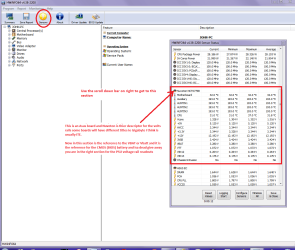
You can test the volts on the PSU with HW Info HWiNFO, HWiNFO32/64 - Download < download the right bit version and close the right hand window select Sensors and scroll down to the power section where you will see what the volts are doing see my pic. In my pic the section (Nuvoton) with VBATT is a dead give away you are in the section for the rail voltages. There are other section titles and one that pops up often is ITE
Now the voltage on the different rails have to be within 5% =+/- of what is required or the machine will not work properly if at all.
Limits +/-
12v = 11.4 – 12.6v
5v = 4.74 – 5.25v
3.3v = 3.135 – 3.465v
The Power good signal voltage at pin 8 on the 24 pin plug (grey cable) should be the same as the 5v rail reading/s
See this for the rail voltage info
Power Supply 101: A Reference Of Specifications - Power Supplies (Section 2.)
The original right hand window shows the machine running and is handy for that but for looking at the components in some detail close it and use the main left hand side panel
FOR OTHER COMPONENTS
PART B:
Open each small square with + in it on the section the components are in and then click on the individual component/s (it will highlight in blue) - in the right hand side will appear all sorts of details including brands speeds and other essential info that particular device. See pic for example.

Ye those CBS files are a bit of a mystery to me too to be honest so I cannot help you much there.

That chkdsk is the next logical step
 

Attachments

  • HW INFO DESKTOP PSU.PNG
    HW INFO DESKTOP PSU.PNG
    52.6 KB · Views: 1

My Computer My Computer

Computer type
PC/Desktop
Computer Manufacturer/Model Number
Own build (new) Desk1 / Asus ROG Win 7 / Desk2 1st build
OS
Desk1 7 Home Prem / Desk2 10 Pro / Main lap Asus ROG 10 Pro 2 laptop Toshiba 7 Pro Asus P2520 7 & 10
CPU
Desk1 i5 3750K / Laptop i7 GTX 860M / Desk2 i5 2500
Motherboard
Desk1 Asus P877-V / Desk2 Gigabyte H67 UD3H / Laptop ?
Memory
Desk1 8GB (1866) / Desk2 16GB (1333) / Laptop 8Gb DDR3
Graphics Card(s)
Desk 1& 2NVidia GTX 650 & Laptops on board Intel
Sound Card
Desk 1 & 2 -XONAR DG Realtek High Def audio Laptop
Monitor(s) Displays
Desk 1 Benq HD 2450 / Desk2 Philips 24" / Laptop 17.5"
Screen Resolution
1920x1080 D1 & D2 & Laptop 1
Hard Drives
Desk1 Samsung 120GB 830 SSD
Asus ROG 256GB 850 Pro SSD
Desk2 Samsung 840 256 SSD
Toshiba 120GB EVO
PSU
Desk 1 Corsair HX 1050/ Laptop ? / Desk 2 Corsair HX 650
Case
Desk 1 Cooler HAF XM ? Toshiba laptop / Desk2 Coolermaster
Cooling
Fans on all Desk1 -2 Desk2 - all Coolermasters 5 Laptop ?
Keyboard
Desk 1 MS Sidewinder X6 Desk 2 MS Sidewinder X 4
Mouse
Desk 1&2 - Gigabyte MS 900 gamer - laptop - Logitec wireless
Internet Speed
ADSL2+
Other Info
One other Desktop (tester) and spare Toshba laptop both with SSD's
Running Kaspersky 2016 ISS on all machines config'd identically
Logitec audio stereo systems on each machine (x3)
Canon MG5250MFC
Router/modem TP-Link running WPA2SK
Oh, I do have HWiNFO!
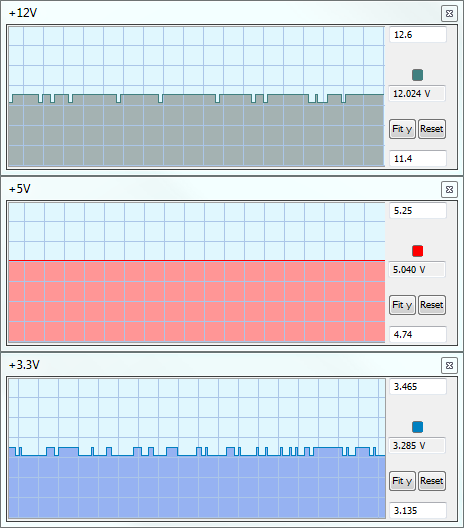
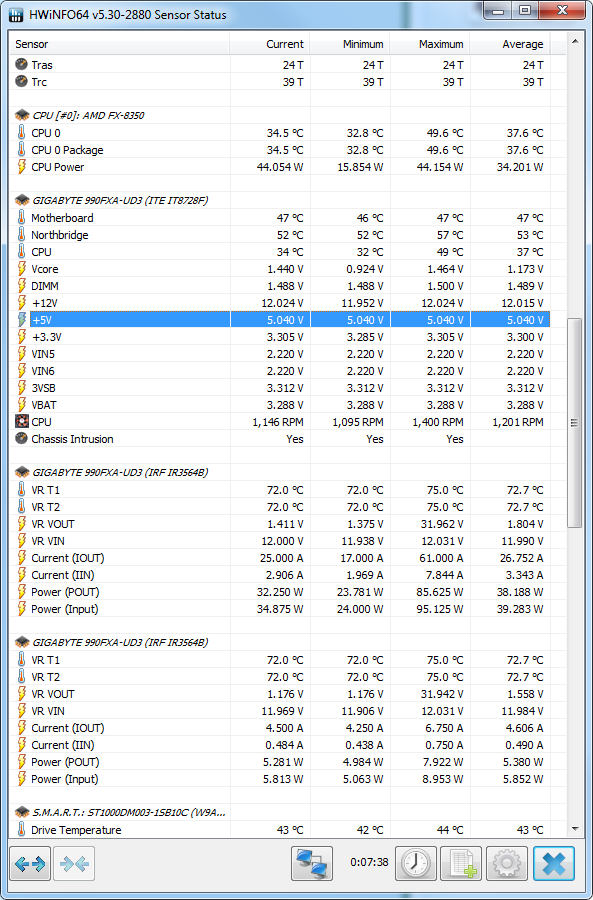
Took a look at it, they seem to be pretty stable:

uuPZSTq.png

uVL7rvg.png


And here's my chkdsk result:

Code:
Checking file system on C:
The type of the file system is NTFS.
Volume label is Sirius.

A disk check has been scheduled.
Windows will now check the disk.

CHKDSK is verifying files (stage 1 of 5)...
  781568 file records processed.
File verification completed.
  2640 large file records processed.
0 bad file records processed.
2 EA records processed.
84 reparse records processed.
CHKDSK is verifying indexes (stage 2 of 5)...
  1015156 index entries processed.
Index verification completed.
  0 unindexed files scanned.
0 unindexed files recovered.
CHKDSK is verifying security descriptors (stage 3 of 5)...
The security data stream entry at offset 0x3d38550 with length 0xf31e188d
crosses the page boundary.
The security data stream entry at offset 0x3d38550 with length 0x416f6747
crosses the page boundary.
Repairing the security file record segment.
Deleting an index entry with Id 22787 from index $SII of file 9.
Deleting an index entry with Id 22788 from index $SII of file 9.
Deleting an index entry with Id 22789 from index $SII of file 9.
Deleting an index entry with Id 22790 from index $SII of file 9.
Deleting an index entry with Id 22791 from index $SII of file 9.
Deleting an index entry with Id 22792 from index $SII of file 9.
Deleting an index entry with Id 22793 from index $SII of file 9.
Deleting an index entry with Id 22794 from index $SII of file 9.
Deleting an index entry with Id 22795 from index $SII of file 9.
Deleting an index entry with Id 22794 from index $SDH of file 9.
Deleting an index entry with Id 22792 from index $SDH of file 9.
Deleting an index entry with Id 22789 from index $SDH of file 9.
Deleting an index entry with Id 22787 from index $SDH of file 9.
Deleting an index entry with Id 22790 from index $SDH of file 9.
Deleting an index entry with Id 22793 from index $SDH of file 9.
Deleting an index entry with Id 22795 from index $SDH of file 9.
Deleting an index entry with Id 22791 from index $SDH of file 9.
Deleting an index entry with Id 22788 from index $SDH of file 9.
Replacing invalid security id with default security id for file 5420.
Replacing invalid security id with default security id for file 8555.
Replacing invalid security id with default security id for file 502243.
Replacing invalid security id with default security id for file 595327.
Replacing invalid security id with default security id for file 777644.
Replacing invalid security id with default security id for file 777647.
  781568 file SDs/SIDs processed.
CHKDSK is compacting the security descriptor stream
Cleaning up 2860 unused security descriptors.
  116795 data files processed.
CHKDSK is verifying Usn Journal...
  36729168 USN bytes processed.
Usn Journal verification completed.
CHKDSK is verifying file data (stage 4 of 5)...
  781552 files processed.
File data verification completed.
CHKDSK is verifying free space (stage 5 of 5)...
  25564066 free clusters processed.
Free space verification is complete.
CHKDSK discovered free space marked as allocated in the
master file table (MFT) bitmap.
Correcting errors in the Volume Bitmap.
Windows has made corrections to the file system.

 312568640 KB total disk space.
 209082660 KB in 661957 files.
    334732 KB in 116798 indexes.
         0 KB in bad sectors.
    894980 KB in use by the system.
     65536 KB occupied by the log file.
 102256268 KB available on disk.

      4096 bytes in each allocation unit.
  78142160 total allocation units on disk.
  25564067 allocation units available on disk.

Internal Info:
00 ed 0b 00 80 e1 0b 00 94 17 15 00 00 00 00 00  ................
56 07 00 00 54 00 00 00 00 00 00 00 00 00 00 00  V...T...........
00 00 00 00 00 00 00 00 00 00 00 00 00 00 00 00  ................

Windows has finished checking your disk.
Please wait while your computer restarts.

I skimmed through the other components, at first sight it seems to be all within the ranges but I'm not 100% sure. I've also updated my BIOS to the latest version (ver. F3 28/05/2015), I'll wait and see if one of them did the trick, I'll post back in case it didn't.
In case the problem persists, do you have anything else in mind that could be worth a try? I also had a PNP bsod on startup and cleaned my USB drivers up, though I can't yet confirmed that it's gone, nor that it wasn't one of the causes.
 

My Computer My Computer

Computer type
PC/Desktop
OS
Windows 7 x64
Yes the rails are spot on so no worries there and the temps look good - the chkdsk readout does seem to have a few fixes in it more than I have ever had running it on my machines and I have to be honest I don't understand them thoroughly.

Now if the problem persists I would be thinking about running a few add on malware scans just in case and if they don't come up with a fix then a running a rescue disk - that is one that boots to the machine in a non Windows environment - it will check all parts of the system form go to whoa. But these are something to be done if things go wrong again and would still just be a part of an elimination process.

Anyway will wait to see what comes back.
 

My Computer My Computer

Computer type
PC/Desktop
Computer Manufacturer/Model Number
Own build (new) Desk1 / Asus ROG Win 7 / Desk2 1st build
OS
Desk1 7 Home Prem / Desk2 10 Pro / Main lap Asus ROG 10 Pro 2 laptop Toshiba 7 Pro Asus P2520 7 & 10
CPU
Desk1 i5 3750K / Laptop i7 GTX 860M / Desk2 i5 2500
Motherboard
Desk1 Asus P877-V / Desk2 Gigabyte H67 UD3H / Laptop ?
Memory
Desk1 8GB (1866) / Desk2 16GB (1333) / Laptop 8Gb DDR3
Graphics Card(s)
Desk 1& 2NVidia GTX 650 & Laptops on board Intel
Sound Card
Desk 1 & 2 -XONAR DG Realtek High Def audio Laptop
Monitor(s) Displays
Desk 1 Benq HD 2450 / Desk2 Philips 24" / Laptop 17.5"
Screen Resolution
1920x1080 D1 & D2 & Laptop 1
Hard Drives
Desk1 Samsung 120GB 830 SSD
Asus ROG 256GB 850 Pro SSD
Desk2 Samsung 840 256 SSD
Toshiba 120GB EVO
PSU
Desk 1 Corsair HX 1050/ Laptop ? / Desk 2 Corsair HX 650
Case
Desk 1 Cooler HAF XM ? Toshiba laptop / Desk2 Coolermaster
Cooling
Fans on all Desk1 -2 Desk2 - all Coolermasters 5 Laptop ?
Keyboard
Desk 1 MS Sidewinder X6 Desk 2 MS Sidewinder X 4
Mouse
Desk 1&2 - Gigabyte MS 900 gamer - laptop - Logitec wireless
Internet Speed
ADSL2+
Other Info
One other Desktop (tester) and spare Toshba laptop both with SSD's
Running Kaspersky 2016 ISS on all machines config'd identically
Logitec audio stereo systems on each machine (x3)
Canon MG5250MFC
Router/modem TP-Link running WPA2SK
Unfortunately, if the system won't POST there is no way for me to access a rescue disk, even - this really seems to be an issue on a lower level than the OS, that's the problem; I just can't connect the dots!
 

My Computer My Computer

Computer type
PC/Desktop
OS
Windows 7 x64
Hmm now if you ran the HW Info it must have run through post - I don't quite understand what you mean by post now.

By the y do you get any beeps on power up?? ie one beep for the RAM being ok or not ?? see this https://en.wikipedia.org/wiki/Power-on_self-test as you can see there are cards that can test the post.
 

My Computer My Computer

Computer type
PC/Desktop
Computer Manufacturer/Model Number
Own build (new) Desk1 / Asus ROG Win 7 / Desk2 1st build
OS
Desk1 7 Home Prem / Desk2 10 Pro / Main lap Asus ROG 10 Pro 2 laptop Toshiba 7 Pro Asus P2520 7 & 10
CPU
Desk1 i5 3750K / Laptop i7 GTX 860M / Desk2 i5 2500
Motherboard
Desk1 Asus P877-V / Desk2 Gigabyte H67 UD3H / Laptop ?
Memory
Desk1 8GB (1866) / Desk2 16GB (1333) / Laptop 8Gb DDR3
Graphics Card(s)
Desk 1& 2NVidia GTX 650 & Laptops on board Intel
Sound Card
Desk 1 & 2 -XONAR DG Realtek High Def audio Laptop
Monitor(s) Displays
Desk 1 Benq HD 2450 / Desk2 Philips 24" / Laptop 17.5"
Screen Resolution
1920x1080 D1 & D2 & Laptop 1
Hard Drives
Desk1 Samsung 120GB 830 SSD
Asus ROG 256GB 850 Pro SSD
Desk2 Samsung 840 256 SSD
Toshiba 120GB EVO
PSU
Desk 1 Corsair HX 1050/ Laptop ? / Desk 2 Corsair HX 650
Case
Desk 1 Cooler HAF XM ? Toshiba laptop / Desk2 Coolermaster
Cooling
Fans on all Desk1 -2 Desk2 - all Coolermasters 5 Laptop ?
Keyboard
Desk 1 MS Sidewinder X6 Desk 2 MS Sidewinder X 4
Mouse
Desk 1&2 - Gigabyte MS 900 gamer - laptop - Logitec wireless
Internet Speed
ADSL2+
Other Info
One other Desktop (tester) and spare Toshba laptop both with SSD's
Running Kaspersky 2016 ISS on all machines config'd identically
Logitec audio stereo systems on each machine (x3)
Canon MG5250MFC
Router/modem TP-Link running WPA2SK
If you read the first post again, I said:

I never had a single stability problem while the PC is running, in fact it's quite new and I've been using it without any issues. However, as soon as I put it to sleep there will be a chance that it will simply not wake up next time, regardless of sleep duration, forcing me to turn it off and on again.

When this happens, it will take some random attempt at rebooting it because sometimes the POST will just not happen, and I've tried every combination of button press/USB unplugging/power cut. I don't know why power cycling/manually erasing the residual charge doesn't do the trick, but I might be doing it wrong.

So sometimes, it won't POST, and I don't know why. That's the issue I've been having all along.
When it does boot up, the POST is just the usual single beep, never ever had any error signal.
 

My Computer My Computer

Computer type
PC/Desktop
OS
Windows 7 x64
When it does boot up, the POST is just the usual single beep, never ever had any error signal.
Yes well that is all I was asking really - as to why it doesn't post leads me to think there is something in some firmware that isn't quite right or that the graphics are just not kicking in.

Otherwise why it should be an intermittent non post has got me foxed - have you checked around the board for any signs of bad caps, dry joints, on what you can see - especially around the BIOS chips, any board scorching, loose cable joints?

I assume by power cycling you mean unplugging the mains source and holding down to power button for around a minute - that should be long enough for any residual power to dissipate, and then try again.
 

My Computer My Computer

Computer type
PC/Desktop
Computer Manufacturer/Model Number
Own build (new) Desk1 / Asus ROG Win 7 / Desk2 1st build
OS
Desk1 7 Home Prem / Desk2 10 Pro / Main lap Asus ROG 10 Pro 2 laptop Toshiba 7 Pro Asus P2520 7 & 10
CPU
Desk1 i5 3750K / Laptop i7 GTX 860M / Desk2 i5 2500
Motherboard
Desk1 Asus P877-V / Desk2 Gigabyte H67 UD3H / Laptop ?
Memory
Desk1 8GB (1866) / Desk2 16GB (1333) / Laptop 8Gb DDR3
Graphics Card(s)
Desk 1& 2NVidia GTX 650 & Laptops on board Intel
Sound Card
Desk 1 & 2 -XONAR DG Realtek High Def audio Laptop
Monitor(s) Displays
Desk 1 Benq HD 2450 / Desk2 Philips 24" / Laptop 17.5"
Screen Resolution
1920x1080 D1 & D2 & Laptop 1
Hard Drives
Desk1 Samsung 120GB 830 SSD
Asus ROG 256GB 850 Pro SSD
Desk2 Samsung 840 256 SSD
Toshiba 120GB EVO
PSU
Desk 1 Corsair HX 1050/ Laptop ? / Desk 2 Corsair HX 650
Case
Desk 1 Cooler HAF XM ? Toshiba laptop / Desk2 Coolermaster
Cooling
Fans on all Desk1 -2 Desk2 - all Coolermasters 5 Laptop ?
Keyboard
Desk 1 MS Sidewinder X6 Desk 2 MS Sidewinder X 4
Mouse
Desk 1&2 - Gigabyte MS 900 gamer - laptop - Logitec wireless
Internet Speed
ADSL2+
Other Info
One other Desktop (tester) and spare Toshba laptop both with SSD's
Running Kaspersky 2016 ISS on all machines config'd identically
Logitec audio stereo systems on each machine (x3)
Canon MG5250MFC
Router/modem TP-Link running WPA2SK
Hmm, I'll definitely check the internals. And yeah, I tried pressing a couple of times and also holding the power button with the cable unplugged, maybe I didn't press it for long enough, I thought it kinda all drained almost instantly; I'll be sure to try that as well if it happens again.
 

My Computer My Computer

Computer type
PC/Desktop
OS
Windows 7 x64
Yes well in normal circumstances the PSU CAPS should discharge really quickly but form a few shocks I have had and from dealing with cleaning PSU's these components can stay charged for up to two weeks. So in essence the larger the cap the longer it takes.
While you are doing that just watch for any LED visible to see how long they take to die away, but you still need to be careful because there other caps besides those inside the PSU that can still hold a charge but not as dangerous as the voltage inverter circuit uses. In simple terms the mains voltage is raised to a higher frequency at a low current and then converted back to low voltages at a higher current hence the incoming mains at say 2.4 amps is converted to 12 volts at 24 amps. That is a very simplistic way of describing it.

So I always hold the power switch longer than probably is necessary but at least I can be reasonably sure the PSU is drained. This will give you an idea of what I have said https://en.wikipedia.org/wiki/Power_supply_unit_(computer) and a good reference for the future.
 

My Computer My Computer

Computer type
PC/Desktop
Computer Manufacturer/Model Number
Own build (new) Desk1 / Asus ROG Win 7 / Desk2 1st build
OS
Desk1 7 Home Prem / Desk2 10 Pro / Main lap Asus ROG 10 Pro 2 laptop Toshiba 7 Pro Asus P2520 7 & 10
CPU
Desk1 i5 3750K / Laptop i7 GTX 860M / Desk2 i5 2500
Motherboard
Desk1 Asus P877-V / Desk2 Gigabyte H67 UD3H / Laptop ?
Memory
Desk1 8GB (1866) / Desk2 16GB (1333) / Laptop 8Gb DDR3
Graphics Card(s)
Desk 1& 2NVidia GTX 650 & Laptops on board Intel
Sound Card
Desk 1 & 2 -XONAR DG Realtek High Def audio Laptop
Monitor(s) Displays
Desk 1 Benq HD 2450 / Desk2 Philips 24" / Laptop 17.5"
Screen Resolution
1920x1080 D1 & D2 & Laptop 1
Hard Drives
Desk1 Samsung 120GB 830 SSD
Asus ROG 256GB 850 Pro SSD
Desk2 Samsung 840 256 SSD
Toshiba 120GB EVO
PSU
Desk 1 Corsair HX 1050/ Laptop ? / Desk 2 Corsair HX 650
Case
Desk 1 Cooler HAF XM ? Toshiba laptop / Desk2 Coolermaster
Cooling
Fans on all Desk1 -2 Desk2 - all Coolermasters 5 Laptop ?
Keyboard
Desk 1 MS Sidewinder X6 Desk 2 MS Sidewinder X 4
Mouse
Desk 1&2 - Gigabyte MS 900 gamer - laptop - Logitec wireless
Internet Speed
ADSL2+
Other Info
One other Desktop (tester) and spare Toshba laptop both with SSD's
Running Kaspersky 2016 ISS on all machines config'd identically
Logitec audio stereo systems on each machine (x3)
Canon MG5250MFC
Router/modem TP-Link running WPA2SK
I see; I'll definitely try to hold down the power button for longer as well, just in case!

Oh, and I just remembered something, thought this might sound a bit stupid of me. The motherboard and the case both have front USB support, and I tried to plug them but it never worked, so I probably got the wiring wrong; however, I completely forgot about it until this moment and never unplugged it, could it be possible it caused some issues?
 

My Computer My Computer

Computer type
PC/Desktop
OS
Windows 7 x64
Ok no worries we all do things absent minded at time mate ;)

Now by USB on the board and front I am assuming you mean you have front USB ports with cables so on the board there should be a header for them usually they are easily connected up as from what I have done in the past it is just a matter of getting them installed the right way round and again I think you can only connect them one way round anyway.
 

Attachments

  • HEADER.PNG
    HEADER.PNG
    67.3 KB · Views: 22

My Computer My Computer

Computer type
PC/Desktop
Computer Manufacturer/Model Number
Own build (new) Desk1 / Asus ROG Win 7 / Desk2 1st build
OS
Desk1 7 Home Prem / Desk2 10 Pro / Main lap Asus ROG 10 Pro 2 laptop Toshiba 7 Pro Asus P2520 7 & 10
CPU
Desk1 i5 3750K / Laptop i7 GTX 860M / Desk2 i5 2500
Motherboard
Desk1 Asus P877-V / Desk2 Gigabyte H67 UD3H / Laptop ?
Memory
Desk1 8GB (1866) / Desk2 16GB (1333) / Laptop 8Gb DDR3
Graphics Card(s)
Desk 1& 2NVidia GTX 650 & Laptops on board Intel
Sound Card
Desk 1 & 2 -XONAR DG Realtek High Def audio Laptop
Monitor(s) Displays
Desk 1 Benq HD 2450 / Desk2 Philips 24" / Laptop 17.5"
Screen Resolution
1920x1080 D1 & D2 & Laptop 1
Hard Drives
Desk1 Samsung 120GB 830 SSD
Asus ROG 256GB 850 Pro SSD
Desk2 Samsung 840 256 SSD
Toshiba 120GB EVO
PSU
Desk 1 Corsair HX 1050/ Laptop ? / Desk 2 Corsair HX 650
Case
Desk 1 Cooler HAF XM ? Toshiba laptop / Desk2 Coolermaster
Cooling
Fans on all Desk1 -2 Desk2 - all Coolermasters 5 Laptop ?
Keyboard
Desk 1 MS Sidewinder X6 Desk 2 MS Sidewinder X 4
Mouse
Desk 1&2 - Gigabyte MS 900 gamer - laptop - Logitec wireless
Internet Speed
ADSL2+
Other Info
One other Desktop (tester) and spare Toshba laptop both with SSD's
Running Kaspersky 2016 ISS on all machines config'd identically
Logitec audio stereo systems on each machine (x3)
Canon MG5250MFC
Router/modem TP-Link running WPA2SK
I wish I was that easy, heheh. The USB header is no single header, it's a bundle of cable, and I couldn't find a schematic for them. It's two black grounds, two red +5v, blue 1+D, green 2+D, white 1-D, yellow 2-D (I was able to find a guide just now, though I'll try another time). Now that I checked however, I did unplug them all afterall, so no issue there. It just did its thing again, so I took the chance to look inside.
There doesn't seem to be anything wrong that I can see of, no scratches or bent stuff, though I cleaned the dust and moved the cables around a bit just to be sure, but nothing worked. Also tried holding down power for ~60s, no dice. I still have to power it off and on a hundred times. Maybe the GPU got damaged (I did have some firmware issues) and now it can't flush the charge when going to sleep? If that's possible and that's the case my only choice would be to have it repaired or get a new one.
 

My Computer My Computer

Computer type
PC/Desktop
OS
Windows 7 x64
Yep I know when I built my first desky I was thrown a bit but you can get those cable holders to fit up first - in the correct order of course then just plug it in. Same goes for all those cables that are used for the power ,reset, and LED lights for the front panel.

Basically there are only power and data connections for USB and this is quite a good guide https://en.wikipedia.org/wiki/USB for how to line them up.

Now just as a by the by if you intend ever to put in one of those USB cards on the board for extra USB on the back panel make sure it is a good brand and it is fitted well and has the drivers properly installed because my experience with them is nightmarish but that could have justbeen me.
 

My Computer My Computer

Computer type
PC/Desktop
Computer Manufacturer/Model Number
Own build (new) Desk1 / Asus ROG Win 7 / Desk2 1st build
OS
Desk1 7 Home Prem / Desk2 10 Pro / Main lap Asus ROG 10 Pro 2 laptop Toshiba 7 Pro Asus P2520 7 & 10
CPU
Desk1 i5 3750K / Laptop i7 GTX 860M / Desk2 i5 2500
Motherboard
Desk1 Asus P877-V / Desk2 Gigabyte H67 UD3H / Laptop ?
Memory
Desk1 8GB (1866) / Desk2 16GB (1333) / Laptop 8Gb DDR3
Graphics Card(s)
Desk 1& 2NVidia GTX 650 & Laptops on board Intel
Sound Card
Desk 1 & 2 -XONAR DG Realtek High Def audio Laptop
Monitor(s) Displays
Desk 1 Benq HD 2450 / Desk2 Philips 24" / Laptop 17.5"
Screen Resolution
1920x1080 D1 & D2 & Laptop 1
Hard Drives
Desk1 Samsung 120GB 830 SSD
Asus ROG 256GB 850 Pro SSD
Desk2 Samsung 840 256 SSD
Toshiba 120GB EVO
PSU
Desk 1 Corsair HX 1050/ Laptop ? / Desk 2 Corsair HX 650
Case
Desk 1 Cooler HAF XM ? Toshiba laptop / Desk2 Coolermaster
Cooling
Fans on all Desk1 -2 Desk2 - all Coolermasters 5 Laptop ?
Keyboard
Desk 1 MS Sidewinder X6 Desk 2 MS Sidewinder X 4
Mouse
Desk 1&2 - Gigabyte MS 900 gamer - laptop - Logitec wireless
Internet Speed
ADSL2+
Other Info
One other Desktop (tester) and spare Toshba laptop both with SSD's
Running Kaspersky 2016 ISS on all machines config'd identically
Logitec audio stereo systems on each machine (x3)
Canon MG5250MFC
Router/modem TP-Link running WPA2SK
Gotcha, I'll be wary of that. I'll definitely try to plug them in again in the future and see if I can get them working properly.

In the meanwhile, I've noticed that the NVIDIA utilities weren't working properly so I reinstalled them, along with updating the drivers, and finally uninstalled the last trace of the old AMD card's drivers. Fingers crossed!
 

My Computer My Computer

Computer type
PC/Desktop
OS
Windows 7 x64
Ok well if you want to check in the registry HKEY's LOCAL_MACHINE & CURRENT_USER > Software scroll down each list to see if there are any refs to AMD in there. If you find some then right click them and delete - you will need to be the admin to do that and I always do this before I change reg entries so that if a I mess up I can merge the old reg back in http://www.sevenforums.com/tutorials/4230-registry-backup-restore.html personally I find exporting the whole registry is so simple and easy and quick.
 

My Computer My Computer

Computer type
PC/Desktop
Computer Manufacturer/Model Number
Own build (new) Desk1 / Asus ROG Win 7 / Desk2 1st build
OS
Desk1 7 Home Prem / Desk2 10 Pro / Main lap Asus ROG 10 Pro 2 laptop Toshiba 7 Pro Asus P2520 7 & 10
CPU
Desk1 i5 3750K / Laptop i7 GTX 860M / Desk2 i5 2500
Motherboard
Desk1 Asus P877-V / Desk2 Gigabyte H67 UD3H / Laptop ?
Memory
Desk1 8GB (1866) / Desk2 16GB (1333) / Laptop 8Gb DDR3
Graphics Card(s)
Desk 1& 2NVidia GTX 650 & Laptops on board Intel
Sound Card
Desk 1 & 2 -XONAR DG Realtek High Def audio Laptop
Monitor(s) Displays
Desk 1 Benq HD 2450 / Desk2 Philips 24" / Laptop 17.5"
Screen Resolution
1920x1080 D1 & D2 & Laptop 1
Hard Drives
Desk1 Samsung 120GB 830 SSD
Asus ROG 256GB 850 Pro SSD
Desk2 Samsung 840 256 SSD
Toshiba 120GB EVO
PSU
Desk 1 Corsair HX 1050/ Laptop ? / Desk 2 Corsair HX 650
Case
Desk 1 Cooler HAF XM ? Toshiba laptop / Desk2 Coolermaster
Cooling
Fans on all Desk1 -2 Desk2 - all Coolermasters 5 Laptop ?
Keyboard
Desk 1 MS Sidewinder X6 Desk 2 MS Sidewinder X 4
Mouse
Desk 1&2 - Gigabyte MS 900 gamer - laptop - Logitec wireless
Internet Speed
ADSL2+
Other Info
One other Desktop (tester) and spare Toshba laptop both with SSD's
Running Kaspersky 2016 ISS on all machines config'd identically
Logitec audio stereo systems on each machine (x3)
Canon MG5250MFC
Router/modem TP-Link running WPA2SK
Done; let's hope I don't have to replace the GPU or something else..
 

My Computer My Computer

Computer type
PC/Desktop
OS
Windows 7 x64
Sorry late reply mate well if push comes to shove then that is what it may need but as you say lets see.
 

My Computer My Computer

Computer type
PC/Desktop
Computer Manufacturer/Model Number
Own build (new) Desk1 / Asus ROG Win 7 / Desk2 1st build
OS
Desk1 7 Home Prem / Desk2 10 Pro / Main lap Asus ROG 10 Pro 2 laptop Toshiba 7 Pro Asus P2520 7 & 10
CPU
Desk1 i5 3750K / Laptop i7 GTX 860M / Desk2 i5 2500
Motherboard
Desk1 Asus P877-V / Desk2 Gigabyte H67 UD3H / Laptop ?
Memory
Desk1 8GB (1866) / Desk2 16GB (1333) / Laptop 8Gb DDR3
Graphics Card(s)
Desk 1& 2NVidia GTX 650 & Laptops on board Intel
Sound Card
Desk 1 & 2 -XONAR DG Realtek High Def audio Laptop
Monitor(s) Displays
Desk 1 Benq HD 2450 / Desk2 Philips 24" / Laptop 17.5"
Screen Resolution
1920x1080 D1 & D2 & Laptop 1
Hard Drives
Desk1 Samsung 120GB 830 SSD
Asus ROG 256GB 850 Pro SSD
Desk2 Samsung 840 256 SSD
Toshiba 120GB EVO
PSU
Desk 1 Corsair HX 1050/ Laptop ? / Desk 2 Corsair HX 650
Case
Desk 1 Cooler HAF XM ? Toshiba laptop / Desk2 Coolermaster
Cooling
Fans on all Desk1 -2 Desk2 - all Coolermasters 5 Laptop ?
Keyboard
Desk 1 MS Sidewinder X6 Desk 2 MS Sidewinder X 4
Mouse
Desk 1&2 - Gigabyte MS 900 gamer - laptop - Logitec wireless
Internet Speed
ADSL2+
Other Info
One other Desktop (tester) and spare Toshba laptop both with SSD's
Running Kaspersky 2016 ISS on all machines config'd identically
Logitec audio stereo systems on each machine (x3)
Canon MG5250MFC
Router/modem TP-Link running WPA2SK
Back
Top