Solved .PDF reader

I have both portable files on my usb stick, both open ok.
Number 1 has NoOCR

Okay maybe we are getting somewhere. I'm not sure if it's possible to set a default program for opening files if the program is on USB. Copy one of those folders to your Windows partition (typically C: drive) and launch the program. Then exit the program.

Then go through the same process as before - setting it as the default program for PDF's using the executable that you copied to your windows partition.

If anyone knows how to set a portable program stored on USB as default please post.
 

My Computer My Computer

Computer type
Laptop
Computer Manufacturer/Model Number
ASUS
OS
Microsoft Windows 7 Home Premium 64-bit 7601 Multiprocessor Free Service Pack 1
CPU
AMD C-60 APU with Radeon(tm) HD Graphics
Motherboard
ASUSTeK COMPUTER INC. X501U
Memory
4.00 GB
Graphics Card(s)
AMD Radeon HD 6290 Graphics
Sound Card
(1) AMD High Definition Audio Device (2) Realtek High Defi
Screen Resolution
1366 x 768 x 32 bits (4294967296 colors) @ 60 Hz
Hard Drives
Hitachi HTS545050A7E380 SATA Disk Device
Antivirus
Comodo CIS & FW, SecureAplus App Whitelisting, Threatfire
Browser
Cyberfox 64bit, Opera 64bit, Airfox
Other Info
Spy-The-Spy, HitmanPro.Alert, Norton Connect Safe, MJRegWatcher, BitDefender TrafficLight, Voodoo Shield, Zemana AntiMalware
Because you've downloaded a file and stored it in USB even if you move it elsewhere you might need to "Unblock" the file before you can set it as default program via the method that you are trying to use.

Open File - Security Warning : Unblock File

(See Option One)
 

My Computer My Computer

Computer type
Laptop
Computer Manufacturer/Model Number
ASUS
OS
Microsoft Windows 7 Home Premium 64-bit 7601 Multiprocessor Free Service Pack 1
CPU
AMD C-60 APU with Radeon(tm) HD Graphics
Motherboard
ASUSTeK COMPUTER INC. X501U
Memory
4.00 GB
Graphics Card(s)
AMD Radeon HD 6290 Graphics
Sound Card
(1) AMD High Definition Audio Device (2) Realtek High Defi
Screen Resolution
1366 x 768 x 32 bits (4294967296 colors) @ 60 Hz
Hard Drives
Hitachi HTS545050A7E380 SATA Disk Device
Antivirus
Comodo CIS & FW, SecureAplus App Whitelisting, Threatfire
Browser
Cyberfox 64bit, Opera 64bit, Airfox
Other Info
Spy-The-Spy, HitmanPro.Alert, Norton Connect Safe, MJRegWatcher, BitDefender TrafficLight, Voodoo Shield, Zemana AntiMalware
Okay maybe we are getting somewhere. I'm not sure if it's possible to set a default program for opening files if the program is on USB. Copy one of those folders to your Windows partition (typically C: drive) and launch the program. Then exit the program.

When I download anything it gets saved to desktop. I then copy the files to my USB, knowing I can play with them without worrying as I have the untouched originals on my USB.
The only portable programs on C: Drive are AudacityPortable & PDF Reader. I have ThunderbirdPortable, FireFoxPortable, DVDStylerPortable, HDD ScannerPortable, EverythingPortable, GeekUninstallerPortable, MoodConnectionWatchPortable, ProcessMonitorPortable, RevoUninstallerPortable & Speccy Portable on D: Drive. They all work perfectly on both my computers.
 

My Computer My Computer

Computer Manufacturer/Model Number
Look in my Signature.
OS
Win7 H.Prem. 32bit+SP1

My Computer My Computer

Computer Manufacturer/Model Number
Look in my Signature.
OS
Win7 H.Prem. 32bit+SP1
When I download anything it gets saved to desktop. I then copy the files to my USB, knowing I can play with them without worrying as I have the untouched originals on my USB.
The only portable programs on C: Drive are AudacityPortable & PDF Reader. I have ThunderbirdPortable, FireFoxPortable, DVDStylerPortable, HDD ScannerPortable, EverythingPortable, GeekUninstallerPortable, MoodConnectionWatchPortable, ProcessMonitorPortable, RevoUninstallerPortable & Speccy Portable on D: Drive. They all work perfectly on both my computers.

Well all I can suggest is to copy the folder containing PDFXE (portable) onto your C drive then launch it. Onxe it has launched exit the program then try setting it as the default program for PDFs.

Maybe it will work or maybe it won't!

Those other programs you mentioned:

ThunderbirdPortable, FireFoxPortable, DVDStylerPortable, HDD ScannerPortable, EverythingPortable, GeekUninstallerPortable, MoodConnectionWatchPortable, ProcessMonitorPortable, RevoUninstallerPortable & Speccy Portable on D: Drive. They all work perfectly on both my computers.

As far as I can see they would work fine without being set as the default program for opening any file types.

Also could you export this registry key and upload it?

HKEY_CURRENT_USER\Software\Microsoft\Windows\CurrentVersion\Explorer\FileExts\.pdf

Open registry editor then navigate to the .pdf key in the left pane and right click it. Choose "Export" then Save As PDF.reg

Then attach the file so I/ we can look at it. Thanks.
 

My Computer My Computer

Computer type
Laptop
Computer Manufacturer/Model Number
ASUS
OS
Microsoft Windows 7 Home Premium 64-bit 7601 Multiprocessor Free Service Pack 1
CPU
AMD C-60 APU with Radeon(tm) HD Graphics
Motherboard
ASUSTeK COMPUTER INC. X501U
Memory
4.00 GB
Graphics Card(s)
AMD Radeon HD 6290 Graphics
Sound Card
(1) AMD High Definition Audio Device (2) Realtek High Defi
Screen Resolution
1366 x 768 x 32 bits (4294967296 colors) @ 60 Hz
Hard Drives
Hitachi HTS545050A7E380 SATA Disk Device
Antivirus
Comodo CIS & FW, SecureAplus App Whitelisting, Threatfire
Browser
Cyberfox 64bit, Opera 64bit, Airfox
Other Info
Spy-The-Spy, HitmanPro.Alert, Norton Connect Safe, MJRegWatcher, BitDefender TrafficLight, Voodoo Shield, Zemana AntiMalware
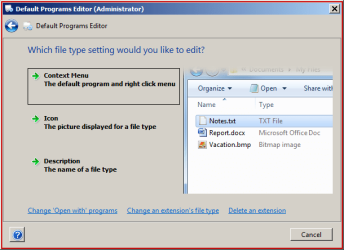
I tried this and it worked for me. I cannot say for sure if it will work for you but here's the details.

Download Default Programs Editor (Portable Free)

Right click the executable and "Run as administrator"

In the window that opens click "File Type Settings"

In the search/ filter box type .pdf

Double click "PDF Document" when it appears.

The Open menu may show a different program but double click and on the screen that opens type text like this:

Default Programs Editor (Administrator).jpg

So the Command should read &Open

Program Path should read:

"C:\Portable Apps\PDFXEdit_Portable_NoOCR\PDFXEdit.exe" "%1"

Replace C:\Portable Apps\PDFXEdit_Portable_NoOCR\PDFXEdit.exe in the line above with the full path to the executable. Include the quotes and add a space then "%1" at the end.

Choose Icon if you want to.

Click "Save Context Menu"

Hopefully it works!

On my machine this pops up when the entry is saved. You can see the registry location.

MJ REGWATCHER.jpg
 

My Computer My Computer

Computer type
Laptop
Computer Manufacturer/Model Number
ASUS
OS
Microsoft Windows 7 Home Premium 64-bit 7601 Multiprocessor Free Service Pack 1
CPU
AMD C-60 APU with Radeon(tm) HD Graphics
Motherboard
ASUSTeK COMPUTER INC. X501U
Memory
4.00 GB
Graphics Card(s)
AMD Radeon HD 6290 Graphics
Sound Card
(1) AMD High Definition Audio Device (2) Realtek High Defi
Screen Resolution
1366 x 768 x 32 bits (4294967296 colors) @ 60 Hz
Hard Drives
Hitachi HTS545050A7E380 SATA Disk Device
Antivirus
Comodo CIS & FW, SecureAplus App Whitelisting, Threatfire
Browser
Cyberfox 64bit, Opera 64bit, Airfox
Other Info
Spy-The-Spy, HitmanPro.Alert, Norton Connect Safe, MJRegWatcher, BitDefender TrafficLight, Voodoo Shield, Zemana AntiMalware

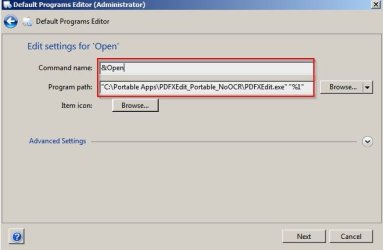
Okay that's not right. Try adding PDFXedit.exe as the default program as in Post #26

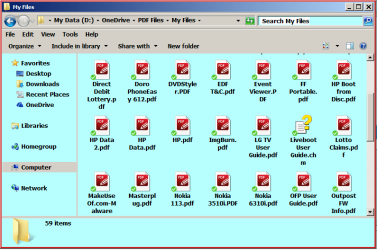
Also if you have place the folder containing PDFXedit.exe on your windows partition. launched it and opened a PDF from the GUI it should show up in the screenshot in this post. It doesn't.

Confirm please that you managed to use it to open a PDF and that you have the folder on your windows partition.

If that's the case then I'm stuck so if anyone else wants to help feel free.
 

My Computer My Computer

Computer type
Laptop
Computer Manufacturer/Model Number
ASUS
OS
Microsoft Windows 7 Home Premium 64-bit 7601 Multiprocessor Free Service Pack 1
CPU
AMD C-60 APU with Radeon(tm) HD Graphics
Motherboard
ASUSTeK COMPUTER INC. X501U
Memory
4.00 GB
Graphics Card(s)
AMD Radeon HD 6290 Graphics
Sound Card
(1) AMD High Definition Audio Device (2) Realtek High Defi
Screen Resolution
1366 x 768 x 32 bits (4294967296 colors) @ 60 Hz
Hard Drives
Hitachi HTS545050A7E380 SATA Disk Device
Antivirus
Comodo CIS & FW, SecureAplus App Whitelisting, Threatfire
Browser
Cyberfox 64bit, Opera 64bit, Airfox
Other Info
Spy-The-Spy, HitmanPro.Alert, Norton Connect Safe, MJRegWatcher, BitDefender TrafficLight, Voodoo Shield, Zemana AntiMalware
Re Post#26,
this is as far as I got.

GC.png

I also tried this with my original pdf reader removed.

GC1.png
 

My Computer My Computer

Computer Manufacturer/Model Number
Look in my Signature.
OS
Win7 H.Prem. 32bit+SP1
Hi Callender,
Thanks to 'Default Programs Editor' I now get :-

pdf.png
Success

Now for my other computer.
 
Last edited:

My Computer My Computer

Computer Manufacturer/Model Number
Look in my Signature.
OS
Win7 H.Prem. 32bit+SP1
Great! :)
 

My Computer My Computer

Computer type
Laptop
Computer Manufacturer/Model Number
ASUS
OS
Microsoft Windows 7 Home Premium 64-bit 7601 Multiprocessor Free Service Pack 1
CPU
AMD C-60 APU with Radeon(tm) HD Graphics
Motherboard
ASUSTeK COMPUTER INC. X501U
Memory
4.00 GB
Graphics Card(s)
AMD Radeon HD 6290 Graphics
Sound Card
(1) AMD High Definition Audio Device (2) Realtek High Defi
Screen Resolution
1366 x 768 x 32 bits (4294967296 colors) @ 60 Hz
Hard Drives
Hitachi HTS545050A7E380 SATA Disk Device
Antivirus
Comodo CIS & FW, SecureAplus App Whitelisting, Threatfire
Browser
Cyberfox 64bit, Opera 64bit, Airfox
Other Info
Spy-The-Spy, HitmanPro.Alert, Norton Connect Safe, MJRegWatcher, BitDefender TrafficLight, Voodoo Shield, Zemana AntiMalware
Back
Top